
Usage Guide
This section provides guidance on using the KFRE library.
The kfre library offers a flexible and user-friendly interface to estimate the
risk of kidney failure for individual patients using the KFRE model developed by
Tangri et al. With kfre, you can calculate the risk using the classic
4-variable model, the detailed 8-variable model, and, uniquely, a 6-variable
model that is not commonly found in online calculators.
Input Requirements and Common Pitfalls
Important
Read this before running any risk calculation. The conditions below either raise an error, emit a runtime warning, or silently return values that look plausible but are wrong.
Values that break the risk equations
Warning
uACR must be strictly greater than 0. The KFRE risk equations take the
natural logarithm of uACR, which is undefined at 0 and for negative
values. A 0 propagates as -inf through the linear predictor and
drives the returned risk to 0, which is indistinguishable from a
genuinely low-risk patient. Screen for non-positive uACR before calling
kfre_person or add_kfre_risk_col, and either drop those rows or
substitute the assay’s lower limit of detection.
The same constraint applies to uPCR when converting through
upcr_uacr, since a non-positive uPCR yields a non-positive uACR.
eGFR must be strictly greater than 0 for the same reason.
Unit mismatches that fail silently
Warning
These produce no error and no warning. The output is simply wrong.
create_years_col=Truewith aduration_colalready expressed in years divides by 365.25 and collapses the time window, so effectively no patient reaches the horizon. Usecreate_years_col=Falsefor years-valued columns.uACRmust be in mg/g. Passing mg/mmol understates risk by roughly an order of magnitude. Convert withperform_conversionsfirst.albuminin g/dL,phosphorousandcalciumin mg/dL,bicarbonatein mEq/L for the 8-variable model.Mixing North American and non-North American patients in a single
add_kfre_risk_colcall applies one coefficient set to all rows.
Approximations
Warning
The uPCR-to-uACR conversion is an estimate, not a measurement. See
upcr_uacr() for the full caveat. upcr_uacr() emits a runtime
warning whenever it produces estimated values.
class_esrd_outcome with censor_incomplete=False labels censored
patients as 0. See the warning under that function.
Conditions that raise ValueError
yearsis anything other than2or5.is_north_americanisNone.dmorhtnis not in{0, 1, False, True}.Required columns for the requested
num_varsare missing, for exampledm_col/htn_colfor the 6-variable model, or any ofalbumin_col,phosphorous_col,bicarbonate_col,calcium_colfor the 8-variable model.sex_colvalues do not resolve tomaleorfemale.save_plots=Trueinplot_kfre_metricswithoutimage_path_pngorimage_path_svg.An unsupported
metricname is passed tobootstrap_metric_ci.
Single Patient Risk Calculation
The kfre_person function allows for detailed, personalized risk assessments
based on a range of clinical parameters. Depending on the completeness of the
data provided, the function can apply a basic 4-variable model or more
comprehensive models incorporating additional risk factors like diabetes,
hypertension, and various biochemical markers.
The function is designed for ease of use in clinical settings or research, providing immediate risk estimations that are crucial for patient management or further analysis.
- kfre_person(age, is_male, eGFR, uACR, is_north_american, years=2, dm=None, htn=None, albumin=None, phosphorous=None, bicarbonate=None, calcium=None, precision=None)
- Parameters:
age – Age of the patient.
is_male (bool) –
Trueif the patient is male,Falseif female.eGFR (float) – Estimated Glomerular Filtration Rate.
uACR (float) – Urinary Albumin to Creatinine Ratio.
is_north_american (bool) –
Trueif the patient is from North America,Falseotherwise.years (int) – Time horizon for the risk prediction (
2or5, default is2).dm (float) – (
optional) Diabetes mellitus indicator.(1=yes; 0=no).htn (float) – (
optional) Hypertension indicator.(1=yes; 0=no).albumin (float) – (
optional) Serum albumin level.phosphorous (float) – (
optional) Serum phosphorous level.bicarbonate (float) – (
optional) Serum bicarbonate level.calcium (float) – (
optional) Serum calcium level.precision (int) – (
optional) Decimal places to round the result. IfNone, no rounding is applied.
- Returns:
float: The risk of kidney failure within the specified timeframe, as a decimal. Multiply by 100 to convert to a percentage.- Raises:
ValueError – If required parameters are missing, if
yearsis not2or5, ifis_north_americanisNone, or ifdm/htnare not in{0, 1, False, True}.
Example Usage
from kfre import kfre_person
risk_percentage = kfre_person(
    age=57.28,
    is_male=False,
    eGFR=15.0,
    uACR=1762.001840,
    is_north_american=False,
    years=2,
    dm=None,
    htn=None,
    albumin=None,
    phosphorous=None,
    bicarbonate=None,
    calcium=None
) * 100  # Convert to percentage

message = f"The 2-year risk of kidney failure for this patient is"
print(f"{message} {risk_percentage:.2f}%.")
The 2-year risk of kidney failure for this patient is 44.66%.
Example Calculation for 2-year and 5-year Risk
Here’s how to estimate the 2-year and 5-year kidney failure risk for a hypothetical 57.28-year-old female who is not from North America and has specific clinical characteristics.
Ensure to:
Uncomment
dmandhtnif you are using the 6-variable KFRE model.For the 8-variable KFRE, keep
dmandhtncommented out and instead, uncomment thealbumin,phosphorous,bicarbonate, andcalciumvariables.
for years in [2, 5]:
    risk_percentage = (
        kfre_person(
            age=57.28,
            is_male=False,  # is the patient male?
            eGFR=15.0,  # ml/min/1.73 m^2
            uACR=1762.001840,  # mg/g
            is_north_american=False,  # is the patient from North America?
            years=years,
            ################################################################
            # Uncomment "dm" and "htn" for the 6-variable model:
            ################################################################
            # dm=0,
            # htn=1,
            ################################################################
            # Comment out "dm" and "htn"; uncomment the following lines for
            # the 8-variable model:
            ################################################################
            # albumin=3.0, # g/dL
            # phosphorous=3.162, # mg/dL
            # bicarbonate=21.3, # mEq/L
            # calcium=9.72, # mg/dL
        )
        * 100  # multiply by 100 to convert to percentage
    )

    message = f"The {years}-year risk of kidney failure for this patient is"
    print(f"{message} {risk_percentage:.2f}%.")
The 2-year risk of kidney failure for this patient is 44.66%.
The 5-year risk of kidney failure for this patient is 89.89%.
Conversion of Clinical Parameters
The kfre library includes a utility function perform_conversions
designed to convert clinical measurement units. This function is especially
useful when preparing data for analyses that require specific units. It can
handle conversions for multiple parameters, such as urinary protein-creatinine
ratio (uPCR), calcium, phosphate, and albumin levels.
Key Features
Flexible Conversion: The function supports both standard and reverse conversions, allowing users to switch between units as needed.
Batch Processing: It can process entire columns of data, making it suitable for datasets with multiple patients.
Custom Column Names: Users can specify which columns to convert, providing flexibility in handling datasets with varied naming conventions.
uPCR to uACR
Warning
The uPCR-to-uACR conversion is an approximation, not a measurement. The
albumin fraction of total urinary protein varies between individuals and by
the underlying cause of proteinuria, no single conversion has reached
consensus, and estimated values therefore carry inherent measurement error.
A directly measured uACR should be preferred when available, and this
limitation should be reported wherever converted values are used.
upcr_uacr() emits a runtime warning whenever it produces estimated
values.
The conversion of uPCR from mg/mmol to mg/g involves understanding that both mg/mmol and mg/g are ratios that can be related through their units.
mg/mmol is a ratio of mass (in milligrams) to molar concentration (in millimoles), while
mg/g is a ratio of mass (in milligrams) to mass (in grams).
To convert mg/mmol to mg/g, we need to know the molar mass of creatinine, because uPCR is the ratio of the mass of protein to the mass of creatinine. The molar mass of creatinine is approximately 113.12 g/mol. Therefore, 1 mmol of creatinine is 113.12 mg.
Here’s the conversion:
1 mg/mmol means that you have 1 mg of protein for every 1 mmol of creatinine. Since 1 mmol of creatinine is 113.12 mg:
Calcium
Calcium is often measured in millimoles per liter (mmol/L) and needs to be converted to milligrams per deciliter (mg/dL) for certain clinical applications or study comparisons. - Molecular weight of Calcium (Ca): Calcium’s atomic weight is approximately 40.08 g/mol. - Conversion factor: To convert mmol/L to mg/dL for calcium, you multiply by 4. This is derived as follows:
Phosphate
Phosphate concentrations are similarly reported in mmol/L but often need to be expressed in mg/dL.
Molecular weight of Phosphate (PO₄³⁻): The molar mass of phosphate as an ion (considering phosphorus and oxygen) is approximately 94.97 g/mol.
Conversion factor: To convert mmol/L to mg/dL for phosphate:
Albumin
Albumin measurements are often made in grams per liter (g/L) and converted to grams per deciliter (g/dL) for standard reporting in many clinical contexts.
Conversion factor: Converting g/L to g/dL is straightforward as it involves shifting the decimal point:
These conversions help ensure consistency in reporting and interpreting lab values across different systems and studies, facilitating better comparison and understanding of patient data.
Conversion Functions
- perform_conversions(df, reverse, upcr_col, calcium_col, albumin_col, convert_all)
- Parameters:
df (DataFrame) – The DataFrame containing the data that needs unit conversion. This DataFrame should include columns that contain measurements in either original units or units that need conversion according to specified clinical or scientific standards.
reverse (bool) – (optional) Determines the direction of the conversion. If set to
True, the function will convert units from a converted state back to the original state (e.g., from mmol/L back to mg/dL). IfFalse, the function performs the standard conversion from original to new units (e.g., from mg/dL to mmol/L). Default isFalse.convert_all (bool) – (optional) If set to
True, the function attempts to automatically identify and convert all recognized columns based on standard medical or chemical units present in the DataFrame. IfFalse, the function will only convert the columns explicitly specified by the other parameters (e.g., upcr_col, calcium_col). Default isFalse.upcr_col (str) – (optional) Specifies the column name for urine protein-creatinine ratio (uPCR) in the DataFrame, which often needs conversion between mg/g and mmol/L for clinical assessments. If provided, this column will be converted according to the specified
reverseflag.calcium_col (str) – (optional) Specifies the column name for calcium measurements in the DataFrame. This parameter allows the conversion between common units of calcium concentration, enhancing comparability across different data sets or aligning with specific analysis requirements.
phosphate_col (str) – (optional) Specifies the column name for phosphate measurements in the DataFrame. Similar to
calcium_col, this parameter enables unit conversion for phosphate levels, important for biochemical and clinical assessments.albumin_col (str) – (optional) Specifies the column name for albumin measurements. Albumin, often measured in different units across various medical tests, can be converted using this parameter to standardize the data for analysis or reporting purposes.
These parameters provide the flexibility to tailor the unit conversion process to specific data needs, enabling precise and appropriate conversions crucial for accurate data analysis and interpretation in clinical or scientific research.
Example Usage
The following is an example to illustrate the usage of the perform_conversions function. This example shows how to convert values from mmol to mg for various clinical parameters within a DataFrame.
First 5 Rows of Biochemical Data (Adapted from Ali et al., 2021, BMC Nephrol) [1].
uPCR |
Calcium (mmol/L) |
Albumin (g/l) |
Phosphate (mmol/L) |
|---|---|---|---|
33.0 |
2.78 |
37.0 |
0.88 |
395.0 |
2.43 |
30.0 |
1.02 |
163.0 |
2.33 |
36.0 |
1.24 |
250.0 |
2.29 |
39.0 |
1.80 |
217.0 |
2.45 |
43.0 |
1.39 |
from kfre import perform_conversions
# Perform conversions using the wrapper function, specifying all parameters
# and specify new column names
converted_df = perform_conversions(
    df=df,
    reverse=False,
    convert_all=True,
)

# Print the DataFrame to see the changes
converted_df
Converted 'uPCR' to new column 'uPCR_mg_g' with factor 8.84016973125884
Converted 'Calcium (mmol/L)' to new column 'Calcium_mg_dl' with factor 4
Converted 'Phosphate (mmol/L)' to new column 'Phosphate_mg_dl' with factor 3.1
Converted 'Albumin (g/l)' to new column 'Albumin_g_dl' with factor 0.1
First 5 Rows of Biochemical Data with Conversions (Adapted from Ali et al., 2021, BMC Nephrol) [1].
uPCR |
Calcium (mmol/L) |
Albumin (g/l) |
Phosphate (mmol/L) |
uPCR_mg_g |
Calcium_mg_dl |
Phosphate_mg_dl |
Albumin_g_dl |
|---|---|---|---|---|---|---|---|
33.0 |
2.78 |
37.0 |
0.88 |
291.725601 |
11.12 |
2.728 |
3.7 |
395.0 |
2.43 |
30.0 |
1.02 |
3491.867044 |
9.72 |
3.162 |
3.0 |
163.0 |
2.33 |
36.0 |
1.24 |
1440.947666 |
9.32 |
3.844 |
3.6 |
250.0 |
2.29 |
39.0 |
1.80 |
2210.042433 |
9.16 |
5.580 |
3.9 |
217.0 |
2.45 |
43.0 |
1.39 |
1918.316832 |
9.80 |
4.309 |
4.3 |
- upcr_uacr(df, sex_col, diabetes_col, hypertension_col, upcr_col, female_str)
- Parameters:
df (DataFrame) – This parameter should be a pandas DataFrame containing the patient data. The DataFrame needs to include specific columns that will be referenced by the other parameters in the function for the conversion process.
sex_col (str) – The name of the column in the DataFrame that identifies the patient’s sex. This is used to apply gender-specific adjustments in the conversion formula, as biological sex can influence the levels of urinary protein and albumin.
diabetes_col (str) – The name of the column that indicates whether the patient has diabetes, typically marked as
1foryesand0forno. Diabetes status is used to adjust the conversion because diabetes can impact kidney function and alter protein and albumin excretion rates.hypertension_col (str) – The name of the column that shows whether the patient has hypertension, also typically marked as
1foryesand0forno. Hypertension can affect kidney function, making it a necessary factor in the conversion calculations.upcr_col (str) – The name of the column containing the urinary protein-creatinine ratio (uPCR) values that need to be converted to urinary albumin-creatinine ratio (uACR). This is the primary input for the conversion process.
female_str (str) – The string used in the dataset to identify female patients. This string is crucial for applying the correct conversion factors, as the function adjusts differently based on the patient being male or female, reflecting the biological differences in albumin excretion.
- Returns:
pd.Series: The function returns a pandas Series containing the computed urinary albumin-creatinine ratio (uACR) for each patient in the DataFrame. This Series is indexed in the same way as the original DataFrame (df.index), ensuring that the uACR values align correctly with the corresponding patient data.
The upcr_uacr function is typically used in clinical data processing where accurate assessment of kidney function is critical. By converting uPCR to uACR, clinicians can get a more precise evaluation of albuminuria, which is important for diagnosing and monitoring kidney diseases. This function allows for a standardized approach to handling variations in patient characteristics that might affect urinary albumin levels.
from kfre import upcr_uacr
df["uACR"] = upcr_uacr(
    df=df,
    sex_col="SEX",
    diabetes_col="Diabetes (1=yes; 0=no)",
    hypertension_col="Hypertension (1=yes; 0=no)",
    upcr_col="uPCR_mg_g",
    female_str="Female",
)
print(df["uACR"])
0       102.438624
1      1762.039423
2       659.136129
3      1145.245058
4       980.939665
        ...
740    3462.801185
741    5977.278911
742    3787.896473
743            NaN
744            NaN
Name: uACR, Length: 745, dtype: float64
- class_esrd_outcome(df, col, years, duration_col, prefix=None, create_years_col=True, censor_incomplete=False)
- Parameters:
df (DataFrame) – The DataFrame to perform calculations on. This DataFrame should include columns relevant for labeling kidney-failure outcomes.
col (str) – Column name of a binary indicator of the kidney-failure event as the KFRE defines it, i.e. initiation of maintenance dialysis or kidney transplantation (kidney replacement therapy / ESKD). This indicator is supplied by the user; the function does not infer the event from eGFR or any other laboratory value.
years (int) – The number of years to use in the condition (the time horizon).
duration_col (str) – The name of the column containing the follow-up duration (time to event or censoring).
prefix (str) – (optional) Custom prefix for the new column name. If
None, no prefix is added.create_years_col (bool) – (optional) If
True, treatsduration_colas days and converts it to years (dividing by 365.25) into a new columnESRD_duration_years. IfFalse, usesduration_coldirectly and assumes it is already expressed in years. Default isTrue.censor_incomplete (bool) – (optional) If
True, patients with no event whose follow-up is shorter thanyearsare labeledNaN(censored) rather than0, so they can be excluded from fixed-horizon evaluation. Default isFalse, which preserves the naive labeling (all non-events become0).
- Returns:
pd.DataFrame: The modified DataFrame with the new binary outcome column added.
This function applies a time window to a user-supplied kidney-failure event indicator, populating a new column with 1 when the event occurred within the specified number of years and 0 otherwise. It does not derive the event itself. The new column is named using the specified prefix and number of years, or just the number of years if no prefix is provided.
Note
Match create_years_col to the units of your duration_col. Use
create_years_col=True when the column is in days, and
create_years_col=False when it is already in years. Passing a
years-valued column with create_years_col=True divides it by 365.25,
which makes every value fall below the horizon and silently collapses the
time window.
Warning
This is a naive fixed-horizon labeling. With the default
censor_incomplete=False, a value of 0 means “no event observed
within years years” and therefore also includes patients who were
censored before the horizon (for example, death without kidney failure, or
loss to follow-up). It does not account for the competing risk of death or
for right-censoring, and is not a substitute for time-to-event survival
analysis. In cohorts with substantial early mortality, treating all
non-events as event-free can bias performance estimates. Setting
censor_incomplete=True provides a basic guard by excluding (NaN)
non-event patients whose observed follow-up does not reach the horizon.
Example Usage
from kfre import class_esrd_outcome
# 2-year outcome
df = class_esrd_outcome(
    df=df,
    col="ESRD",
    years=2,
    duration_col="Follow-up YEARS",
    prefix=None,
    create_years_col=False,
)

# 5-year outcome
df = class_esrd_outcome(
    df=df,
    col="ESRD",
    years=5,
    duration_col="Follow-up YEARS",
    prefix=None,
    create_years_col=False,
)
First 5 Rows of Outcome Data (Adapted from Ali et al., 2021, BMC Nephrol) [1].
Index |
2_year_outcome |
5_year_outcome |
|---|---|---|
0 |
0 |
0 |
1 |
1 |
1 |
2 |
0 |
0 |
3 |
1 |
1 |
4 |
0 |
0 |
The kfre library provides the functionality to perform batch processing of
patient data, allowing for the computation of kidney failure risk predictions
across multiple patients in a single operation. This capability is especially
valuable for researchers and clinicians needing to assess risks for large cohorts
or patient groups.
Key Features
When using the add_kfre_risk_col function, the library will append new columns
for each specified variable model (4-variable, 6-variable, 8-variable) and each
time frame (2 years, 5 years) directly to the original DataFrame. This facilitates
a seamless integration of risk predictions into existing patient datasets without
the need for additional data manipulation steps.
Important
The kfre library is designed to facilitate risk prediction using Tangri’s KFRE
model based on a given set of patient data. It is crucial to ensure that all
patient data within a batch calculation are consistent in terms of regional
categorization—that is, either all North American or all non-North American. To
this end, it is crucial to ensure that all patient data within a batch calculation
are consistent in terms of regional categorization. Mixing patient data from
different regions within a single batch is not supported, as the function is set
to apply one regional coefficient set at a time. This approach ensures the accuracy
and reliability of the risk predictions.
- add_kfre_risk_col(df, age_col=None, sex_col=None, eGFR_col=None, uACR_col=None, dm_col=None, htn_col=None, albumin_col=None, phosphorous_col=None, bicarbonate_col=None, calcium_col=None, num_vars=8, years=(2, 5), is_north_american=False, copy=True, precision=None)
- Parameters:
df (DataFrame) – The DataFrame containing the patient data.
age_col (str) – The column name in
dffor patient age. Required for4-,6-, and8-variable models.sex_col (str) – The column name in
dffor patient sex. Expected values map to male or female. Required for4-,6-, and8-variable models.eGFR_col (str) – The column name for estimated glomerular filtration rate (eGFR). Required for all models.
uACR_col (str) – The column name for urinary albumin-creatinine ratio (uACR). Required for all models.
dm_col (str) – (
optional) Column for diabetes mellitus indicator (1=yes; 0=no). Required for the6-variable model.htn_col (str) – (
optional) Column for hypertension indicator (1=yes; 0=no). Required for the6-variable model.albumin_col (str) – (
optional) Column for serum albumin. Required for the8-variable model.phosphorous_col (str) – (
optional) Column for serum phosphorous. Required for the8-variable model.bicarbonate_col (str) – (
optional) Column for serum bicarbonate. Required for the8-variable model.calcium_col (str) – (
optional) Column for serum calcium. Required for the8-variable model.num_vars (int or list) – Specifies which model sizes to compute, accepts
4,6,8, a list like[4, 6, 8], or"all". Default8.years (int or tuple or list or str) – Time horizons to compute, accepts
2,5, a tuple or list like(2, 5), or"all". Default(2, 5).is_north_american (bool) – Use North American coefficients if
True. DefaultFalse.copy (bool) – If
True, operate on a copy ofdf. IfFalse, modify in place. DefaultTrue.precision (int) – (
optional) Decimal places to round added risk columns. IfNone, no rounding. DefaultNone.
- Returns:
pd.DataFramewith added columns namedkfre_{model_var}var_{year}year(for example,kfre_4var_2year).- Raises:
ValueError – If required columns for a requested model size are not provided (for example, missing
dm_colorhtn_colfor the6-variable model, or missing any ofalbumin_col,phosphorous_col,bicarbonate_col,calcium_colfor the8-variable model).
This function is designed to compute the risk of chronic kidney disease (CKD) over specified or all possible models and time frames, directly appending the results as new columns to the provided DataFrame. It organizes the results by model (4-variable, 6-variable, 8-variable) first, followed by the time frame (2 years, 5 years) for each model type.
Important
The sex_col must contain strings (case-insensitive) indicating either female or male.
Example Usage
from kfre import add_kfre_risk_col
df = add_kfre_risk_col(
    df=df,
    age_col="Age",
    sex_col="SEX",
    eGFR_col="eGFR-EPI",
    uACR_col="uACR",
    dm_col="Diabetes (1=yes; 0=no)",
    htn_col="Hypertension (1=yes; 0=no)",
    albumin_col="Albumin_g_dl",
    phosphorous_col="Phosphate_mg_dl",
    bicarbonate_col="Bicarbonate (mmol/L)",
    calcium_col="Calcium_mg_dl",
    num_vars=8,
    years=(2, 5),
    is_north_american=False,
    copy=False  # Modify the original DataFrame directly
)
# The resulting DataFrame 'df' now includes new columns with risk
# predictions for each model and time frame
First 5 Rows of Kidney Failure Risk Data (Adapted from Ali et al., 2021, BMC Nephrol) [1].
Age |
SEX |
Diabetes (1=yes; 0=no) |
Hypertension (1=yes; 0=no) |
eGFR-EPI |
uACR |
2_year_outcome |
5_year_outcome |
kfre_4var_2year |
kfre_4var_5year |
kfre_6var_2year |
kfre_6var_5year |
kfre_8var_2year |
kfre_8var_5year |
|---|---|---|---|---|---|---|---|---|---|---|---|---|---|
87.24 |
Male |
1 |
1 |
19.0 |
5.744563 |
0 |
0 |
0.018785 |
0.070800 |
0.017622 |
0.065247 |
0.011139 |
0.049138 |
56.88 |
Female |
0 |
1 |
15.0 |
140.661958 |
1 |
1 |
0.173785 |
0.522508 |
0.189202 |
0.548860 |
0.209930 |
0.641537 |
66.53 |
Female |
0 |
1 |
17.0 |
35.224504 |
0 |
0 |
0.226029 |
0.064027 |
0.069593 |
0.239481 |
0.061889 |
0.249777 |
69.92 |
Male |
0 |
0 |
12.0 |
74.299919 |
1 |
1 |
0.524577 |
0.174712 |
0.190458 |
0.551506 |
0.305670 |
0.806220 |
81.14 |
Female |
1 |
1 |
15.0 |
59.683881 |
0 |
0 |
0.255029 |
0.073213 |
0.068968 |
0.237542 |
0.060353 |
0.244235 |
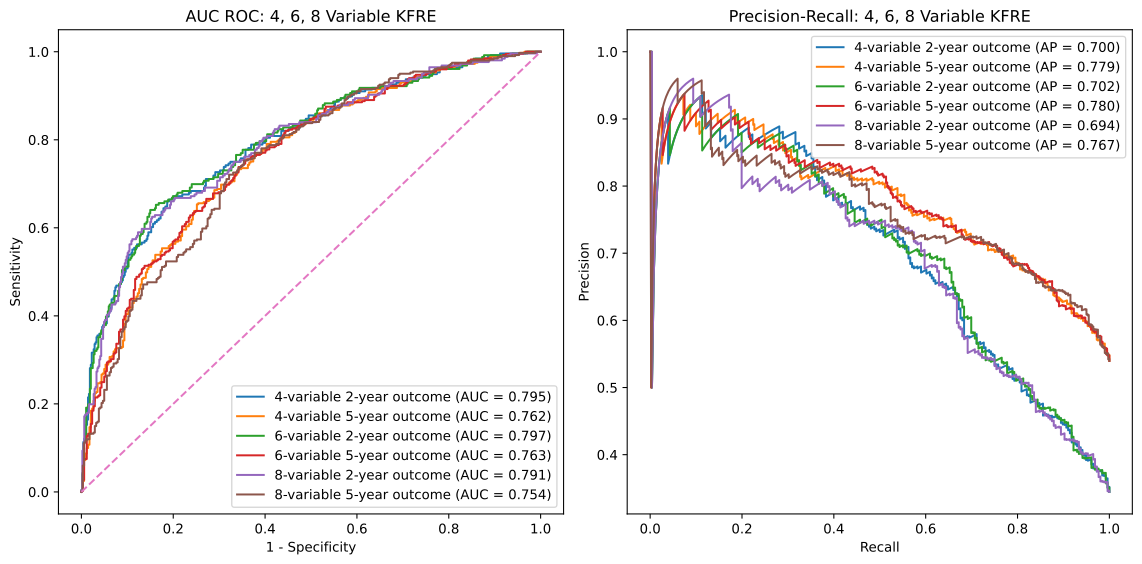
AUC ROC & Precision-Recall Curves
- plot_kfre_metrics(df, num_vars, fig_size=(12, 6), mode='both', image_path_png=None, image_path_svg=None, image_prefix=None, bbox_inches='tight', plot_type='all_plots', save_plots=False, show_years=[2, 5], plot_combinations=False, show_subplots=False, decimal_places=2)
- Parameters:
df (DataFrame) – The input DataFrame containing the necessary columns for truth and predictions.
num_vars (int or list of int or tuple of int) – Number of variables (e.g.,
4) or a list/tuple of numbers of variables (e.g.,[4, 6, 8]) to generate predictions for.fig_size (tuple) – (optional) Size of the figure for the ROC plot, default is
(12, 6).mode (str) – (optional) Operation mode, can be
'prep','plot', or'both'. Default is'both'.'prep'only prepares the metrics,'plot'only plots the metrics (requires pre-prepped metrics),'both'prepares and plots the metrics.image_path_png (str) – (optional) Path to save the PNG images. Default is
None.image_path_svg (str) – (optional) Path to save the SVG images. Default is
None.image_prefix (str) – (optional) Prefix to use for saved images. Default is
None.bbox_inches (str) – (optional) Bounding box in inches for the saved images. Default is
'tight'.plot_type (str) – (optional) Type of plot to generate, can be
'auc_roc','precision_recall', or'all_plots'. Default is'all_plots'.save_plots (bool) – (optional) Whether to save plots. Default is
False.show_years (int or list of int or tuple of int) – (optional) Year outcomes to show in the plots. Default is
[2, 5].plot_combinations (bool) – (optional) Whether to plot all combinations of variables in a single plot. Default is
False.show_subplots (bool) – (optional) Whether to show subplots of all combinations. Default is
False.decimal_places (int) – (optional) Number of decimal places for AUC and AP scores in the plot legends. Default is
2.
- Returns:
tuple(optional): Only returned if mode is ‘prep’ or ‘both’: - y_true (list of pd.Series): True labels for specified year outcomes. - preds (dict of list of pd.Series): Predicted probabilities for each number of variables and each outcome. - outcomes (list of str): List of outcome labels.- Raises:
If
save_plotsisTruewithout specifyingimage_path_pngorimage_path_svg.If
bbox_inchesis not a string orNone.If
show_yearscontains invalid year values.If required KFRE probability columns are missing in the DataFrame.
If
plot_typeis not one of'auc_roc','precision_recall', or'all_plots'.
This function generates the true labels and predicted probabilities for 2-year and 5-year outcomes, and optionally plots and saves ROC and Precision-Recall curves for specified variable models. It can also save the plots as PNG or SVG files.
Example usage
from kfre import plot_kfre_metrics
plot_kfre_metrics(
    df=df,                       # DataFrame to produce plots for
    num_vars=[4, 6, 8],          # 4,6,8 KFRE variables
    fig_size=[6, 6],             # Custom figure size
    mode="plot",                 # Can be 'prep', 'plot', or 'both'
    image_prefix="performance",  # Optional prefix for saved images
    bbox_inches="tight",         # Bounding box in inches for the saved images
    plot_type="all_plots",       # Can be 'auc_roc', 'precision_recall', or 'all_plots'
    show_years=[2, 5],           # Year outcomes to show in the plots
    plot_combinations=True,      # Plot combinations of all variables in one plot
    show_subplots=True,          # Place all plots on one subplot; False does individual
    decimal_places=3,            # Number of decimal places in legend
)
Performance Metrics
This section explains the various performance metrics calculated by the eval_kfre_metrics function.
Precision (Positive Predictive Value)
Precision, also known as Positive Predictive Value (PPV), is the ratio of correctly predicted positive observations to the total predicted positives. It is calculated as:
- Where:
\(TP\) is the number of true positives.
\(FP\) is the number of false positives.
Average Precision
Average precision summarizes a precision-recall curve as the weighted mean of precisions achieved at each threshold, with the increase in recall from the previous threshold used as the weight. It is calculated as:
- Where:
\(R_n\) and \(R_{n-1}\) are the recall values at thresholds \(n\) and \(n-1\).
\(P_n\) is the precision at threshold \(n\).
Sensitivity (Recall)
Sensitivity, also known as Recall, is the ratio of correctly predicted positive observations to all observations in the actual class. It is calculated as:
- Where:
\(TP\) is the number of true positives.
\(FN\) is the number of false negatives.
Specificity
Specificity measures the proportion of actual negatives that are correctly identified as such. It is calculated as:
- Where:
\(TN\) is the number of true negatives.
\(FP\) is the number of false positives.
AUC ROC (Area Under the Receiver Operating Characteristic Curve)
AUC ROC is a performance measurement for classification problems at various threshold settings. ROC is a probability curve and AUC represents the degree or measure of separability. It is calculated as:
- Where:
\(TPR\) is the true positive rate (sensitivity).
\(FPR\) is the false positive rate (1 - specificity).
Brier Score
Brier score measures the mean squared difference between the predicted probabilities and the actual binary outcomes. It is calculated as:
- Where:
\(N\) is the number of total observations.
\(f_i\) is the predicted probability for the \(i\)-th observation.
\(o_i\) is the actual outcome for the \(i\)-th observation (0 or 1).
- eval_kfre_metrics(df, n_var_list, outcome_years=[2, 5], decimal_places=6)
- Parameters:
df (DataFrame) – The input DataFrame containing the necessary columns for truth and predictions. Rows with NaN values will be dropped.
n_var_list (list of int) – List of variable numbers to consider, e.g.,
[4, 6, 8].outcome_years (list, tuple, or int) – (optional) List, tuple, or single year to consider for outcomes. Default is
[2, 5].decimal_places (int) – (optional) Number of decimal places for the calculated metrics. Default is
6.
- Returns:
pd.DataFrame: A DataFrame containing the calculated metrics for each outcome.- Raises:
If required outcome columns are missing in the DataFrame.
If an invalid variable number is provided in
n_var_list.
This function computes a set of performance metrics for multiple binary classification models given the true labels and the predicted probabilities for each outcome. The metrics calculated include precision (positive predictive value), average precision, sensitivity (recall), specificity, AUC ROC, and Brier score.
- Notes:
Precision is calculated with a threshold of 0.5 for the predicted probabilities.
Sensitivity is also known as recall.
Specificity is calculated as the recall for the negative class.
AUC ROC is calculated using the receiver operating characteristic curve.
Brier score measures the mean squared difference between predicted probabilities and the true binary outcomes.
Example Usage
from kfre import eval_kfre_metrics
metrics_df_n_var = eval_kfre_metrics(
    df=df,                 # Metrics-ready DataFrame as the first argument
    n_var_list=[4, 6, 8],  # Specify the list of variable numbers to consider
    outcome_years=[2, 5],  # Specify the list of outcome years to consider
)
Outcome Metrics |
2_year_4_var_kfre |
5_year_4_var_kfre |
2_year_6_var_kfre |
5_year_6_var_kfre |
2_year_8_var_kfre |
5_year_8_var_kfre |
|---|---|---|---|---|---|---|
Precision/PPV |
0.781955 |
0.675676 |
0.788321 |
0.683992 |
0.792308 |
0.677083 |
Average Precision |
0.700455 |
0.779076 |
0.701722 |
0.779973 |
0.694139 |
0.767282 |
Sensitivity |
0.406250 |
0.810474 |
0.421875 |
0.820449 |
0.402344 |
0.810474 |
Specificity |
0.940452 |
0.543860 |
0.940452 |
0.555556 |
0.944559 |
0.546784 |
AUC ROC |
0.794605 |
0.761955 |
0.797268 |
0.763070 |
0.790627 |
0.754411 |
Brier Score |
0.170219 |
0.206805 |
0.168640 |
0.207114 |
0.172653 |
0.210370 |
Bootstrap Confidence Intervals
- bootstrap_metric_ci(y_true, y_score, metric='auc_roc', n_boot=1000, ci=95, threshold=0.5, seed=None, progress=True)
- Parameters:
y_true (array-like) – Binary ground-truth labels (
0/1).NaNvalues are dropped pairwise withy_scorebefore resampling, so censored outcomes can be passed directly.y_score (array-like) – Predicted risk scores (probabilities in
[0, 1]).metric (str) – One of
"precision","average_precision","sensitivity","specificity","auc_roc", or"brier". Threshold-based metrics usethresholdto binarizey_score.n_boot (int) – (optional) Number of bootstrap resamples. Default is
1000.ci (float) – (optional) Confidence level as a percentage. Default is
95.threshold (float) – (optional) Cutoff for threshold-based metrics. Default is
0.5.seed (int) – (optional) Seed for reproducible resampling.
progress (bool) – (optional) Display a progress bar over the resamples. Default is
True.
- Returns:
dict:{"metric", "point", "lower", "upper", "ci", "n_boot_valid"}, wherepointis the metric computed on the full sample andlower/upperare the confidence-interval bounds.- Raises:
ValueError – If an unsupported
metricname is supplied.
This function resamples patients with replacement n_boot times, recomputes the requested metric on each resample, and reports the point estimate together with the percentile bounds of the requested confidence level. Resamples in which the metric is undefined (for example, only one outcome class present, which makes AUC ROC and average precision undefined) are skipped and reported through n_boot_valid. Reporting interval estimates alongside point estimates conveys the precision of each metric given the cohort size and the prevalence of kidney-failure events.
Example Usage
from kfre import bootstrap_metric_ci
result = bootstrap_metric_ci(
    y_true=df["2_year_outcome"],     # observed binary outcome
    y_score=df["kfre_4var_2year"],   # KFRE risk score
    metric="auc_roc",
    n_boot=1000,
    ci=95,
    seed=42,
)

print(
    f"AUROC {result['point']:.3f} "
    f"(95% CI {result['lower']:.3f}-{result['upper']:.3f})"
)
AUROC 0.795 (95% CI 0.760-0.829)