
Partial Dependence Plots
Partial Dependence Plots (PDPs) are a powerful tool in machine learning interpretability, providing insights into how features influence the predicted outcome of a model. PDPs can be generated in both 2D and 3D, depending on whether you want to analyze the effect of one feature or the interaction between two features on the model’s predictions.
2D Partial Dependence Plots
The plot_2d_pdp function generates 2D partial dependence plots (PDPs) for specified features or pairs of features. These plots help analyze the marginal effect of individual or paired features on the predicted outcome.
Key Features:
Flexible Plot Layouts: Generate all 2D PDPs in a grid layout, as separate individual plots, or both for maximum versatility.
Customization Options: Adjust figure size, font sizes for labels and ticks, and wrap long titles to ensure clear and visually appealing plots.
Save Plots: Save generated plots in PNG or SVG formats with options to save all plots, only individual plots, or just the grid plot.
- plot_2d_pdp(model, X_train, feature_names, features, title='Partial dependence plot', grid_resolution=50, plot_type='grid', grid_figsize=(12, 8), individual_figsize=(6, 4), label_fontsize=12, tick_fontsize=10, text_wrap=50, image_path_png=None, image_path_svg=None, save_plots=None, file_prefix='partial_dependence')
Generate and save 2D partial dependence plots for specified features using a trained machine learning model. The function supports grid and individual layouts and provides options for customization and saving plots in various formats.
- Parameters:
model (estimator object) – The trained machine learning model used to generate partial dependence plots.
X_train (pandas.DataFrame or numpy.ndarray) – The training data used to compute partial dependence. Should correspond to the features used to train the model.
feature_names (list of str) – A list of feature names corresponding to the columns in
X_train.features (list of int or tuple of int) – A list of feature indices or tuples of feature indices for which to generate partial dependence plots.
title (str, optional) – The title for the entire plot. Default is
"Partial dependence plot".grid_resolution (int, optional) – The resolution of the grid used to compute the partial dependence. Higher values provide smoother curves but may increase computation time. Default is
50.plot_type (str, optional) – The type of plot to generate. Choose
"grid"for a grid layout,"individual"for separate plots, or"both"to generate both layouts. Default is"grid".grid_figsize (tuple, optional) – Tuple specifying the width and height of the figure for the grid layout. Default is
(12, 8).individual_figsize (tuple, optional) – Tuple specifying the width and height of the figure for individual plots. Default is
(6, 4).label_fontsize (int, optional) – Font size for the axis labels and titles. Default is
12.tick_fontsize (int, optional) – Font size for the axis tick labels. Default is
10.text_wrap (int, optional) – The maximum width of the title text before wrapping. Useful for managing long titles. Default is
50.image_path_png (str, optional) – The directory path where PNG images of the plots will be saved, if saving is enabled.
image_path_svg (str, optional) – The directory path where SVG images of the plots will be saved, if saving is enabled.
save_plots (str, optional) – Controls whether to save the plots. Options include
"all","individual","grid", orNone(default). If saving is enabled, ensureimage_path_pngorimage_path_svgare provided.file_prefix (str, optional) – Prefix for the filenames of the saved grid plots. Default is
"partial_dependence".
- Raises:
If
plot_typeis not one of"grid","individual", or"both".If
save_plotsis enabled but neitherimage_path_pngnorimage_path_svgis provided.
- Returns:
NoneThis function generates partial dependence plots and displays them. It does not return any values.
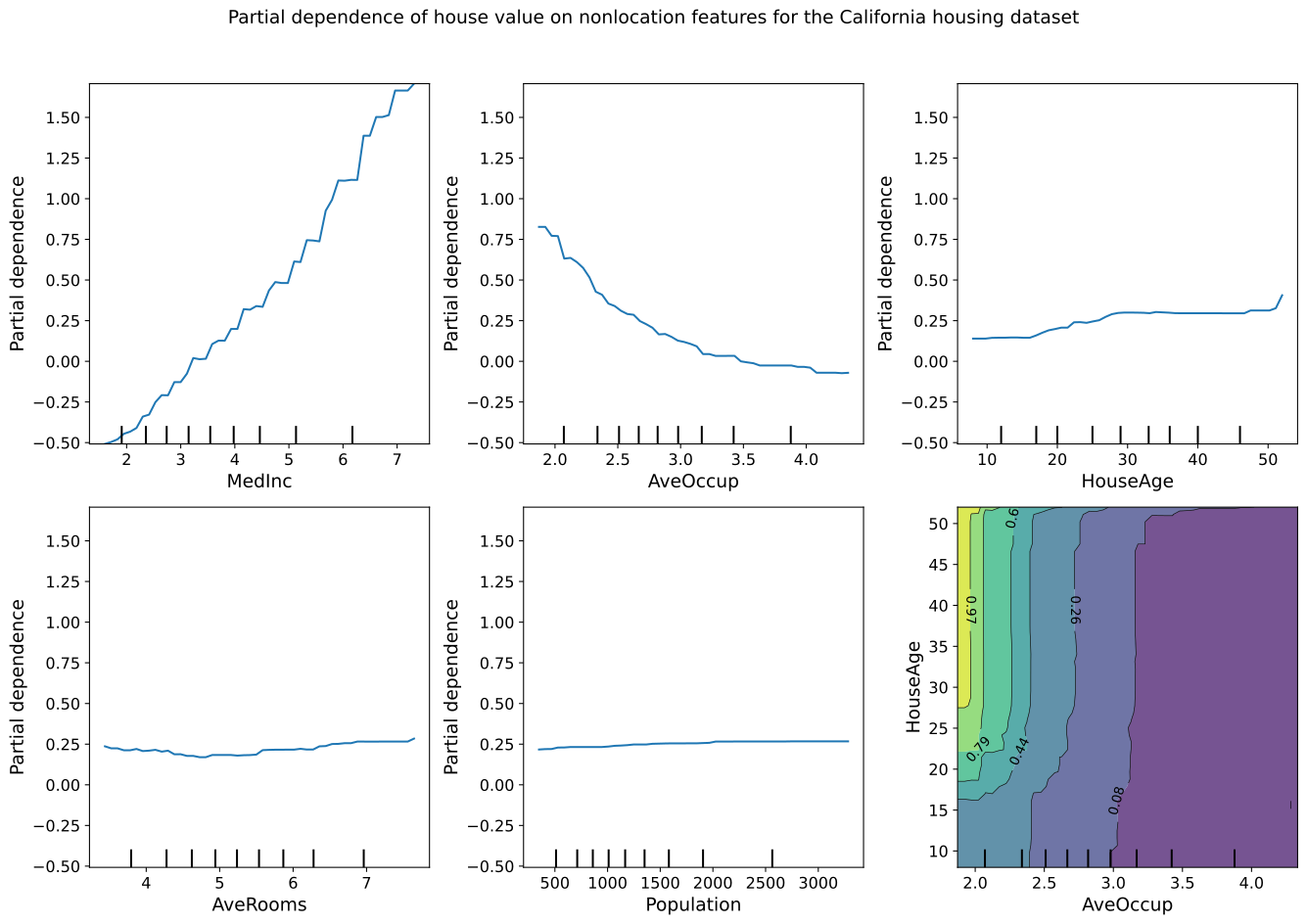
2D Plots - CA Housing Example
Consider a scenario where you have a machine learning model predicting median
house values in California. [1] Suppose you want to understand how non-location
features like the average number of occupants per household (AveOccup) and the
age of the house (HouseAge) jointly influence house values. A 2D partial
dependence plot allows you to visualize this relationship in two ways: either as
individual plots for each feature or as a combined plot showing the interaction
between two features.
For instance, the 2D partial dependence plot can help you analyze how the age of the house impacts house values while holding the number of occupants constant, or vice versa. This is particularly useful for identifying the most influential features and understanding how changes in these features might affect the predicted house value.
If you extend this to two interacting features, such as AveOccup and HouseAge,
you can explore their combined effect on house prices. The plot can reveal how
different combinations of occupancy levels and house age influence the value,
potentially uncovering non-linear relationships or interactions that might not be
immediately obvious from a simple 1D analysis.
Here’s how you can generate and visualize these 2D partial dependence plots using the California housing dataset:
Fetch The CA Housing Dataset and Prepare The DataFrame
from sklearn.datasets import fetch_california_housing
from sklearn.model_selection import train_test_split
from sklearn.ensemble import GradientBoostingRegressor
import pandas as pd

# Load the dataset
data = fetch_california_housing()
df = pd.DataFrame(data.data, columns=data.feature_names)
Split The Data Into Training and Testing Sets
X_train, X_test, y_train, y_test = train_test_split(
    df, data.target, test_size=0.2, random_state=42
)
Train a GradientBoostingRegressor Model
model = GradientBoostingRegressor(
    n_estimators=100,
    max_depth=4,
    learning_rate=0.1,
    loss="huber",
    random_state=42,
)
model.fit(X_train, y_train)
Create 2D Partial Dependence Plot Grid
from model_metrics import plot_2d_pdp

# Feature names
names = data.feature_names

# Generate 2D partial dependence plots
plot_2d_pdp(
    model=model,
    X_train=X_train,
    feature_names=names,
    features=[
        "MedInc",
        "AveOccup",
        "HouseAge",
        "AveRooms",
        "Population",
        ("AveOccup", "HouseAge"),
    ],
    title="PDP of house value on CA non-location features",
    grid_figsize=(14, 10),
    individual_figsize=(12, 4),
    label_fontsize=14,
    tick_fontsize=12,
    text_wrap=120,
    plot_type="grid",
    image_path_png="path/to/save/png",
    save_plots="all",
)
3D Partial Dependence Plots
The plot_3d_pdp function extends the concept of partial dependence to three dimensions, allowing you to visualize the interaction between two features and their combined effect on the model’s predictions.
Interactive and Static 3D Plots: Generate static 3D plots using Matplotlib or interactive 3D plots using Plotly. The function also allows for generating both types simultaneously.
Colormap and Layout Customization: Customize the colormaps for both Matplotlib and Plotly plots. Adjust figure size, camera angles, and zoom levels to create plots that fit perfectly within your presentation or report.
Axis and Title Configuration: Customize axis labels for both Matplotlib and Plotly plots. Adjust font sizes and control the wrapping of long titles to maintain readability.
Categorical Axis Support: Map raw or encoded axis values to human-readable tick labels using
x_label_mapandy_label_map.
- plot_3d_pdp(model, dataframe, feature_names, x_label=None, y_label=None, z_label=None, x_label_map=None, y_label_map=None, title=None, save_plots=None, html_file_path=None, html_file_name=None, plot_type='both', matplotlib_colormap=None, plotly_colormap='Viridis', zoom_out_factor=None, wireframe_color=None, view_angle=(22, 70), figsize=(7, 4.5), text_wrap=50, horizontal=-1.25, depth=1.25, vertical=1.25, cbar_x=1.05, cbar_thickness=25, title_x=0.5, title_y=0.95, top_margin=100, image_path_png=None, image_path_svg=None, show_cbar=True, grid_resolution=20, left_margin=20, right_margin=65, label_fontsize=8, tick_fontsize=6, enable_zoom=True, show_modebar=True, modebar_image_format='png')
Generate 3D partial dependence plots for two features of a machine learning model.
This function supports both static (Matplotlib) and interactive (Plotly) visualizations, allowing for flexible and comprehensive analysis of the relationship between two features and the target variable in a model.
- Parameters:
model (estimator object) – The trained machine learning model used to generate partial dependence plots.
dataframe (pandas.DataFrame or numpy.ndarray) – The dataset on which the model was trained or a representative sample. If a DataFrame is provided,
feature_namesshould correspond to the column names. If a NumPy array is provided,feature_namesshould correspond to the indices of the columns.feature_names (list of str) – A list of two feature names or indices corresponding to the features for which partial dependence plots are generated.
x_label (str, optional) – Label for the x-axis in the plots. Defaults to the first feature in
feature_names. Default isNone.y_label (str, optional) – Label for the y-axis in the plots. Defaults to the second feature in
feature_names. Default isNone.z_label (str, optional) – Label for the z-axis in the plots. Defaults to
"Partial Dependence". Default isNone.x_label_map (dict, optional) – A dictionary mapping raw x-axis values to display labels. Useful for converting numeric or encoded category values to human-readable strings. For example,
{0: "No", 1: "Yes"}. If not provided, raw values are used as tick labels. Default isNone.y_label_map (dict, optional) – A dictionary mapping raw y-axis values to display labels. Useful for converting numeric or encoded category values to human-readable strings. For example,
{0: "Low", 1: "Medium", 2: "High"}. If not provided, raw values are used as tick labels. Default isNone.title (str, optional) – The title for the plots. If not provided, no title is displayed. Default is
None.save_plots (str or None, optional) – Specifies whether and how to save the generated plots. Options are: -
"static": Saves only the Matplotlib (PNG/SVG) plot. -"html": Saves only the Plotly interactive plot as an HTML file. -"both": Saves both static (PNG/SVG) and interactive (HTML) plots. -None: Does not save any plots. Default isNone.html_file_path (str, optional) – Directory path to save the interactive Plotly HTML file. Required if
save_plotsis"html"or"both", or ifplot_typeis"interactive"or"both". Default isNone.html_file_name (str, optional) – Name of the HTML file to save the interactive Plotly plot. Required if
plot_typeis"interactive"or"both", or ifsave_plotsis"html"or"both". Default isNone.plot_type (str, optional) –
The type of plots to generate. Options are: -
"static": Generate only static Matplotlib plots. -"interactive": Generate only interactive Plotly plots. -"both": Generate both static and interactive plots. Default is"both".Note
If
plot_type="static", an interactive plot is not created, and attempting to save an HTML file will raise an error.matplotlib_colormap (matplotlib.colors.Colormap, optional) – Custom colormap for the Matplotlib plot. If not provided, a default colormap is used.
plotly_colormap (str, optional) – Colormap for the Plotly plot. Default is
"Viridis".zoom_out_factor (float, optional) – Factor to adjust the zoom level of the Plotly plot. Default is
None.wireframe_color (str, optional) – Color for the wireframe in the Matplotlib plot. If
None, no wireframe is plotted. Default isNone.view_angle (tuple, optional) – Elevation and azimuthal angles for the Matplotlib plot view. Default is
(22, 70).figsize (tuple, optional) – Figure size for the Matplotlib plot. Default is
(7, 4.5).text_wrap (int, optional) – Maximum width of the title text before wrapping. Useful for managing long titles. Default is
50.horizontal (float, optional) – Horizontal camera position for the Plotly plot. Default is
-1.25.depth (float, optional) – Depth camera position for the Plotly plot. Default is
1.25.vertical (float, optional) – Vertical camera position for the Plotly plot. Default is
1.25.cbar_x (float, optional) – Position of the color bar along the x-axis in the Plotly plot. Default is
1.05.cbar_thickness (int, optional) – Thickness of the color bar in the Plotly plot. Default is
25.title_x (float, optional) – Horizontal position of the title in the Plotly plot. Default is
0.5.title_y (float, optional) – Vertical position of the title in the Plotly plot. Default is
0.95.top_margin (int, optional) – Top margin for the Plotly plot layout. Default is
100.image_path_png (str, optional) – Directory path to save the PNG file of the Matplotlib plot. Default is
None.image_path_svg (str, optional) – Directory path to save the SVG file of the Matplotlib plot. Default is
None.show_cbar (bool, optional) – Whether to display the color bar in the Matplotlib plot. Default is
True.grid_resolution (int, optional) – The resolution of the grid for computing partial dependence. Default is
20.left_margin (int, optional) – Left margin for the Plotly plot layout. Default is
20.right_margin (int, optional) – Right margin for the Plotly plot layout. Default is
65.label_fontsize (int, optional) – Font size for axis labels in the Matplotlib plot. Default is
8.tick_fontsize (int, optional) – Font size for tick labels in the Matplotlib plot. Default is
6.enable_zoom (bool, optional) – Whether to enable zooming in the Plotly plot. Default is
True.show_modebar (bool, optional) – Whether to display the mode bar in the Plotly plot. Default is
True.modebar_image_format (str, optional) – Image format for the modebar download button in the Plotly plot. Accepted values are
"png","svg","jpeg", and"webp". Only one format can be active at a time. Default is"png".
- Raises:
If
save_plotsis not one of"html","static","both", orNone.If
save_plotsis"static"or"both"and neitherimage_path_pngnorimage_path_svgis provided.If
save_plotsis"html"or"both"andhtml_file_pathis not provided.If
plot_typeis not one of"static","interactive", or"both".If
plot_typeis"interactive"or"both"and eitherhtml_file_pathorhtml_file_nameis not provided.If
modebar_image_formatis not one of"png","svg","jpeg", or"webp".
- Returns:
NoneThis function generates 3D partial dependence plots and displays or saves them. It does not return any values.
Note
This function handles warnings related to scikit-learn’s
partial_dependencefunction, specifically aFutureWarningrelated to non-tuple sequences for multidimensional indexing. This warning is suppressed as it stems from the internal workings of scikit-learn in Python versions like 3.7.4.To maintain compatibility with different versions of scikit-learn, the function attempts to use
"values"for grid extraction in newer versions and falls back to"grid_values"for older versions.The interactive Plotly plot always renders in Jupyter notebooks regardless of the
save_plotssetting. Setsave_plots="html"or"both"only if you wish to write the plot to disk.
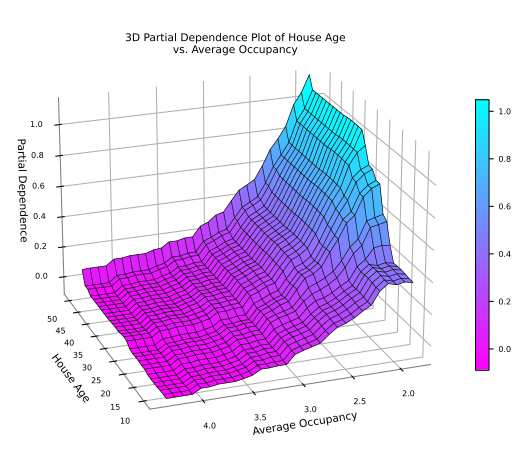
3D Plots - CA Housing Example
Consider a scenario where you have a machine learning model predicting median
house values in California.[1]_ Suppose you want to understand how non-location
features like the average number of occupants per household (AveOccup) and the
age of the house (HouseAge) jointly influence house values. A 3D partial
dependence plot allows you to visualize this relationship in a more comprehensive
manner, providing a detailed view of how these two features interact to affect
the predicted house value.
For instance, the 3D partial dependence plot can help you explore how different combinations of house age and occupancy levels influence house values. By visualizing the interaction between AveOccup and HouseAge in a 3D space, you can uncover complex, non-linear relationships that might not be immediately apparent in 2D plots.
This type of plot is particularly useful when you need to understand the joint effect of two features on the target variable, as it provides a more intuitive and detailed view of how changes in both features impact predictions simultaneously.
Here’s how you can generate and visualize these 3D partial dependence plots using the California housing dataset:
Static Plot
Fetch The CA Housing Dataset and Prepare The DataFrame
from sklearn.ensemble import GradientBoostingRegressor
from sklearn.datasets import fetch_california_housing
from sklearn.model_selection import train_test_split
import pandas as pd

# Load the dataset
data = fetch_california_housing()
df = pd.DataFrame(data.data, columns=data.feature_names)
Split The Data Into Training and Testing Sets
X_train, X_test, y_train, y_test = train_test_split(
    df, data.target, test_size=0.2, random_state=42
)
Train a GradientBoostingRegressor Model
model = GradientBoostingRegressor(
    n_estimators=100,
    max_depth=4,
    learning_rate=0.1,
    loss="huber",
    random_state=1,
)
model.fit(X_train, y_train)
Create Static 3D Partial Dependence Plot
from model_metrics import plot_3d_pdp

plot_3d_pdp(
    model=model,
    dataframe=X_test,
    feature_names=["HouseAge", "AveOccup"],
    x_label="House Age",
    y_label="Average Occupancy",
    z_label="Partial Dependence",
    title="3D Partial Dependence Plot of House Age vs. Average Occupancy",
    image_filename="3d_pdp",
    plot_type="static",
    figsize=[8, 5],
    text_wrap=40,
    wireframe_color="black",
    image_path_png=image_path_png,
    grid_resolution=30,
)
Interactive Plot
from model_metrics import plot_3d_pdp

plot_3d_pdp(
    model=model,
    dataframe=X_test,
    feature_names=["HouseAge", "AveOccup"],
    x_label="House Age",
    y_label="Average Occupancy",
    z_label="Partial Dependence",
    title="3D Partial Dependence Plot of House Age vs. Average Occupancy",
    html_file_path=image_path_png,
    html_file_name="3d_pdp.html",
    plot_type="interactive",
    text_wrap=80,
    zoom_out_factor=1.2,
    image_path_png=image_path_png,
    image_path_svg=image_path_svg,
    grid_resolution=30,
    label_fontsize=8,
    tick_fontsize=6,
    title_x=0.38,
    top_margin=10,
    right_margin=50,
    left_margin=50,
    cbar_x=0.9,
    cbar_thickness=25,
    show_modebar=False,
    enable_zoom=True,
)
Warning
Scrolling Notice:
While interacting with the interactive Plotly plot below, scrolling down the page using the mouse wheel may be blocked when the mouse pointer is hovering over the plot. To continue scrolling, either move the mouse pointer outside the plot area or use the keyboard arrow keys to navigate down the page.
This interactive plot was generated using Plotly, which allows for rich, interactive visualizations directly in the browser. The plot above is an example of an interactive 3D Partial Dependence Plot. Here’s how it differs from generating a static plot using Matplotlib.
Key Differences
Plot Type:
The
plot_typeis set to"interactive"for the Plotly plot and"static"for the Matplotlib plot.
Interactive-Specific Parameters:
HTML File Path and Name: The
html_file_pathandhtml_file_nameparameters are required to save the interactive Plotly plot as an HTML file. These parameters are not needed for static plots.Zoom and Positioning: The interactive plot includes parameters like
zoom_out_factor,title_x,cbar_x, andcbar_thicknessto control the zoom level, title position, and color bar position in the Plotly plot. These parameters do not affect the static plot.Mode Bar and Zoom: The
show_modebarandenable_zoomparameters are specific to the interactive Plotly plot, allowing you to toggle the visibility of the mode bar and enable or disable zoom functionality.
Static-Specific Parameters:
Figure Size and Wireframe Color: The static plot uses parameters like
figsizeto control the size of the Matplotlib plot andwireframe_colorto define the color of the wireframe in the plot. These parameters are not applicable to the interactive Plotly plot.
By adjusting these parameters, you can customize the behavior and appearance of your 3D Partial Dependence Plots according to your needs, whether for static or interactive visualization.