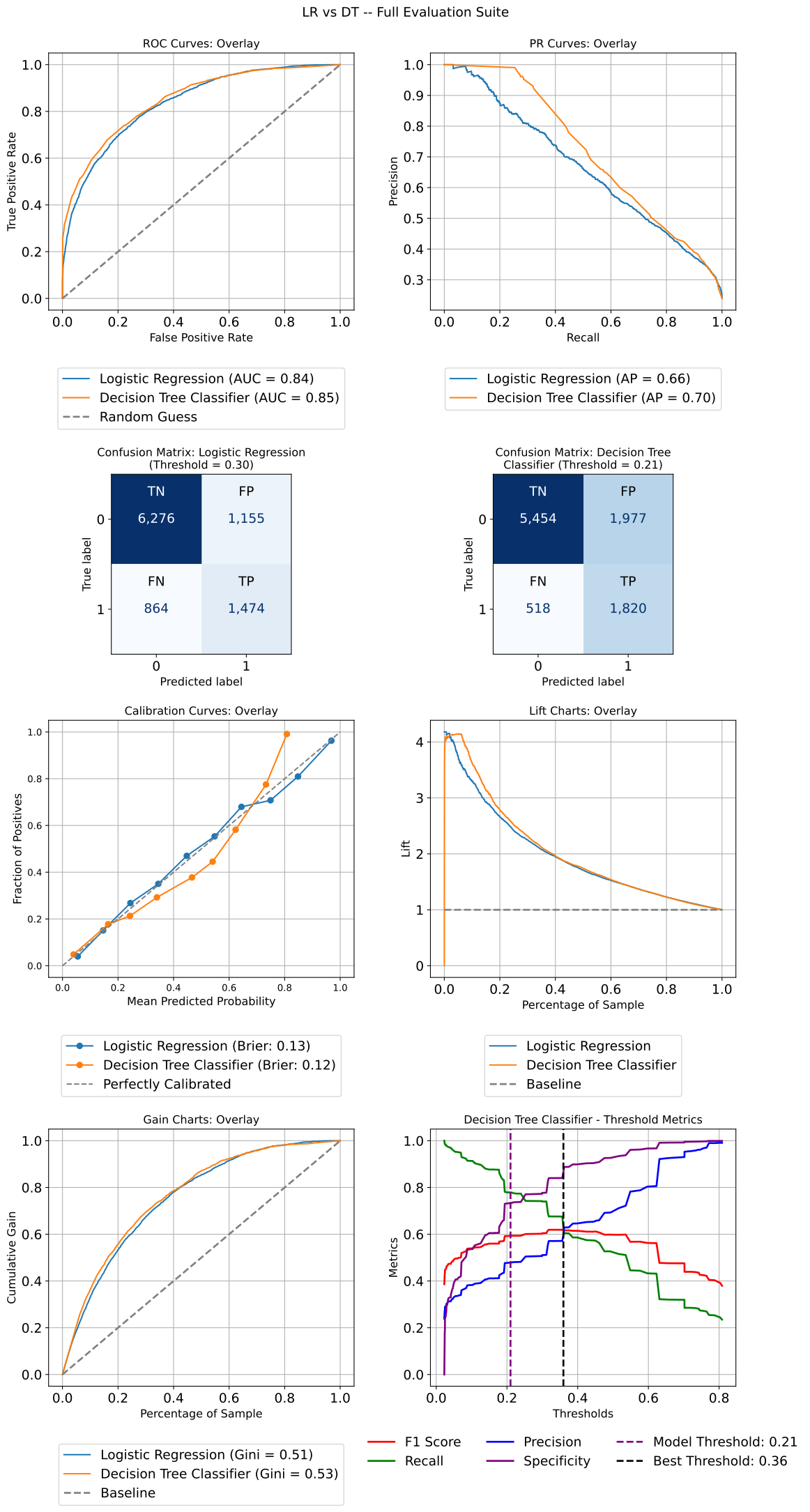
Model Performance Summaries
Per-Model Ground Truth
Most evaluation calls score every model against one shared y. External
validation breaks that assumption: each set of predictions comes from a
different cohort, so the targets differ in both content and length. Passing a
list of y_prob arrays with a single y cannot express that, and a shared
y of the wrong length surfaces later as an opaque scikit-learn error.
Every function that accepts precomputed predictions now also accepts a per-model list for the target:
from model_metrics import show_roc_curve

show_roc_curve(
    y_prob=[p_internal, p_external],   # 9,769 and 195,663 rows
    y=[y_internal, y_external],        # one target per cohort
    model_title=["Adult 1994 (internal)", "ACS CA 2018 (external)"],
    overlay=True,
)
A list is treated as per-model ground truth only when all four conditions
hold: the value is a list or tuple, more than one model is being evaluated, its
length equals the model count, and every element is itself array-like. Anything
else falls through to the shared-y behavior, so a plain Python list of
scalar labels for a single model keeps working exactly as before.
Supported by summarize_model_performance, show_confusion_matrix,
show_roc_curve, show_pr_curve, show_lift_chart,
show_gain_chart, show_calibration_curve, plot_threshold_metrics,
and show_residual_diagnostics.
Important
Applies to the precomputed-prediction path only. When
modelandXare supplied, predictions are generated from one feature matrix, so there is a single cohort by construction.The resolved target is length-checked against its prediction array. A mismatch raises immediately and names the model, rather than propagating into a curve that renders but means nothing.
overlay=Truerequires more than one model; a single-cohort call still passesyas a plain array.
Notes
- Reading a Cross-Cohort Overlay:
AUC ROC transfers cleanly across cohorts, since it is invariant to the positive rate.
Average Precision and Brier score both move with prevalence, so a lower external value does not by itself indicate a worse model.
A precision-recall curve’s chance level is the positive rate, which differs per cohort. Read the external PR panel against its own baseline rather than against the internal curve.
Summarizes model performance metrics for classification and regression models.
- summarize_model_performance(model=None, X=None, y_prob=None, y_pred=None, y=None, model_type='classification', model_threshold=None, model_title=None, custom_threshold=None, score=None, return_df=False, overall_only=False, decimal_places=3, group_category=None, include_adjusted_r2=False, average='macro', per_class=False, split_by_model=False, class_labels=None)
- Parameters:
model (estimator, list, or
None) – Trained model or list of trained models. IfNone,y_probory_predmust be provided.X (array-like or
None) – Feature matrix used for evaluation. Required ifmodelis provided without precomputed predictions.y_prob (array-like, list, or
None) – Predicted probabilities for classification models. Can be provided instead ofmodelandX. For binary models, the positive-class probability. For multiclass models, the full(n_samples, n_classes)matrix frompredict_proba, with columns in sorted class order.y_pred (array-like, list, or
None) – Predicted labels (classification) or continuous predictions (regression). Can be provided instead ofmodelandX.y (array-like or list of array-like) – True target values. When
y_probory_predis a list of arrays,ymay be a matching list of targets, one per model, so models scored on different cohorts can be summarized side by side. See Per-Model Ground Truth.model_type (str, optional) – Specifies whether the model is for classification or regression. Must be either
"classification"or"regression".model_threshold (float, dict, or
None, optional) – Classification decision thresholds. Can be a float or dict keyed by model name. Ignored ifcustom_thresholdis provided. Binary classification only.custom_threshold (float or
None, optional) – Overrides all model thresholds with a fixed value. If set, excludes the “Model Threshold” row. Binary classification only.model_title (str, list, or
None, optional) – Custom model names to display in output. Defaults to inferred names likeModel 1,Model 2, etc.score (str or
None, optional) – Optional custom scoring metric for threshold resolution.return_df (bool, optional) – If
True, returns results as apandas.DataFrameinstead of printing.overall_only (bool, optional) – For regression models, if
True, returns only overall metrics (without coefficients or feature importances).decimal_places (int, optional) – Number of decimal places for rounding metric values. Defaults to 3.
group_category (str, array-like, or
None, optional) – Optional grouping variable for classification metrics. Can be a column name inXor an array matching the length ofy. When multiple models are provided alongsidegroup_category, only the first model’s results are returned and aUserWarningis emitted.include_adjusted_r2 (bool, optional) – For regression models, if
True, computes and includes adjusted R-squared. Requires bothmodelandXto be provided.average (str, optional) – For multiclass models, how per-class metrics are combined:
"macro"(each class weighted equally),"weighted"(weighted by class support), or"micro"(counts pooled across classes). Defaults to"macro".per_class (bool, optional) – For multiclass models, if
True, reports one-vs-rest metrics for each class plus aSupportrow (true cases per class), in place of averaged metrics.averageis not used. Cannot be combined withgroup_category.split_by_model (bool, optional) – Requires
per_class=True. IfTrue, returns a dictionary of DataFrames keyed by model title, one per model with classes as columns, in place of a single table.class_labels (list[str], optional) – For multiclass models, names for the model’s classes in
classes_order (position i names encoded class i).ymay hold these names or the encoded labels. Output uses the names. See Multiclass Classification Models.
- Returns:
If
return_df=True:Classification (no groups): metrics as rows, models as columns.
Classification (grouped): metrics as rows, groups as columns.
Multiclass (per_class): metrics as rows, classes as columns. With several models, columns are a (model, class)
MultiIndex.Multiclass (per_class, split_by_model): a dictionary of DataFrames keyed by model title, each with metrics as rows and classes as columns.
Regression: rows for metrics, coefficients, and/or feature importances.
If
return_df=False, prints a formatted performance summary using manual layout logic.
- Return type:
pandas.DataFrame or
None- Raises:
If
model_typeis invalid.If
overall_only=Trueis used for classification models.If neither (
modelandX) nor (y_probory_pred) are provided.If
averageis not"macro","weighted", or"micro".If a threshold is passed for a multiclass model.
If
per_class=Trueis used with a binary model or withgroup_category.If
split_by_model=Trueis used withoutper_class=True.If
class_labelsdoes not have one entry per class.
Important
You can supply either
modelwithXor precomputedy_prob/y_preddirectly.When using precomputed predictions, the function bypasses model inference.
When no estimator is supplied, the number of models is taken from the number of prediction arrays passed, so a list of probability arrays produces one column per array.
A bare list of scalar probabilities is treated as one model’s predictions, not as a list of models.
Group-level metrics are only available for classification tasks using
group_category.If
custom_thresholdis specified, it overrides all model thresholds.
Notes
- Classification Models:
Computes precision, recall, specificity, F1-score, AUC ROC, Brier score, and average precision.
Supports per-group metric computation when
group_categoryis provided.Grouped outputs automatically use group names as table headers and maintain metric order (with “Model Threshold” appearing last).
When
group_categoryis used with multiple models, only the first model’s results are returned and aUserWarningis emitted.Works with multiple models, custom thresholds, or precomputed probabilities.
- Multiclass Classification Models:
Detected automatically: a 2D
y_probwith more than two columns, or a model with more than two classes.Predictions are the class with the highest probability, so thresholds do not apply.
Precision, recall, F1-score, and specificity are computed one-vs-rest per class and combined with
average. AUC ROC and Average Precision use one-vs-rest on the binarized labels.Brier Score is the multiclass form: the mean over samples of the summed squared error across classes, ranging from 0 to 2.
Under
average="macro", Sensitivity/Recall equals balanced accuracy. Underaverage="weighted", it equals overall accuracy.With
per_class=True, each class is scored as its own binary problem, so its Brier Score is the one-vs-rest score for that class (0 to 1).
- Regression Models:
Computes MAE, MAPE, MSE, RMSE, Explained Variance, R², and optionally Adj. R² (if
include_adjusted_r2=True).Extracts coefficients, intercepts, and feature importances (if available).
- Preserves original manual formatting block:
Maintains right-aligned column layout and visual separators for readability.
Ensures coefficients and intercepts are displayed consistently across models.
Provides clear model breaks and retains console formatting identical to previous releases.
overall_only=Truelimits output to a single summary row per model.
Output Behavior:
return_df=False: prints a fully formatted summary preserving manual alignment.return_df=True: returns a structured DataFrame suitable for further analysis or visualization.Metrics are rounded to the specified
decimal_placesfor clarity.
The summarize_model_performance function provides a structured evaluation of classification and regression models, generating key performance metrics. For classification models, it computes precision, recall, specificity, F1-score, and AUC ROC. For regression models, it extracts coefficients and evaluates error metrics like MSE, RMSE, and R². The function allows specifying custom thresholds, metric rounding, and formatted display options.
Below are two examples demonstrating how to evaluate multiple models using summarize_model_performance. The function calculates and presents metrics for classification and regression models.
Binary Classification Models
This section introduces binary classification using two widely used machine learning models: Logistic Regression and Random Forest Classifier.
These examples demonstrate how model_metrics prepares and trains models on a
synthetic dataset, setting the stage for evaluating their performance in subsequent sections.
Both models use a default classification threshold of 0.5, where predictions are
classified as positive (1) if the predicted probability exceeds 0.5, and negative (0)
otherwise.
from sklearn.datasets import make_classification
from sklearn.linear_model import LogisticRegression
from sklearn.ensemble import RandomForestClassifier
from sklearn.model_selection import train_test_split

# Generate a synthetic dataset
X, y = make_classification(
    n_samples=1000,
    n_features=10,
    random_state=42,
)

# Split into training and testing sets
X_train, X_test, y_train, y_test = train_test_split(
    X,
    y,
    test_size=0.2,
    random_state=42,
)

# Train models
model1 = LogisticRegression(random_state=42).fit(X_train, y_train)
model2 = RandomForestClassifier(random_state=42).fit(X_train, y_train)

model_title = ["Logistic Regression", "Random Forest"]
Binary Classification Example 1: Default Threshold
from model_metrics import summarize_model_performance

model_performance = summarize_model_performance(
    model=[model1, model2],
    model_title=model_titles,
    X=X_test,
    y=y_test,
    model_type="classification",
    return_df=True,
)

model_performance
Output
| Metrics | Logistic Regression | Random Forest |
|---|---|---|
| Precision/PPV | 0.867 | 0.914 |
| Average Precision | 0.937 | 0.968 |
| Sensitivity/Recall | 0.820 | 0.865 |
| Specificity | 0.843 | 0.899 |
| F1-Score | 0.843 | 0.889 |
| AUC ROC | 0.913 | 0.952 |
| Brier Score | 0.118 | 0.083 |
| Model Threshold | 0.500 | 0.500 |
Binary Classification Example 2: Custom Threshold
In this example, we revisit binary classification with the same two models: Logistic
Regression and Random Forest, but adjust the classification threshold
(custom_threshold input in this case) from the default 0.5 to 0.2. This
change allows us to explore how lowering the threshold impacts model performance,
potentially increasing sensitivity (recall) by classifying more instances as
positive (1) at the expense of precision.
from model_metrics import summarize_model_performance

model_performance = summarize_model_performance(
    model=[model1, model2],
    model_title=model_titles,
    X=X_test,
    y=y_test,
    model_type="classification",
    return_df=True,
    custom_threshold=0.2,
)

model_performance
Output
| Metrics | Logistic Regression | Random Forest |
|---|---|---|
| Precision/PPV | 0.803 | 0.814 |
| Average Precision | 0.937 | 0.968 |
| Sensitivity/Recall | 0.919 | 0.946 |
| Specificity | 0.719 | 0.730 |
| F1-Score | 0.857 | 0.875 |
| AUC ROC | 0.913 | 0.952 |
| Brier Score | 0.118 | 0.083 |
| Model Threshold | 0.200 | 0.200 |
Binary Classification Example 3: Adult Income Data
In this third ROC AUC evaluation example, we utilize the well-known Adult Income dataset [2], a widely used benchmark for binary classification tasks. Its rich combination of categorical and numerical features makes it particularly suitable for evaluating subgroup fairness and model performance across demographic segments.
In this example, we extend binary classification evaluation by introducing the
group_category parameter to assess how model performance varies across
different subpopulations. Specifically, we employ a Random Forest classifier
and incorporate the race column from the test set to form a combined dataset
that includes both predictive features and demographic information.
By passing this categorical variable to group_category, the function
computes and displays subgroup-level metrics side-by-side, including AUC,
precision, recall, and F1-score. This enables clear identification of potential
performance disparities across demographic groups (e.g., by race, gender, or
age category), offering valuable insights into fairness, equity, and subgroup
behavior within the model’s predictions.
X_test_analysis = X_test.join(X["race"])
from model_metrics import summarize_model_performance

model_summary = summarize_model_performance(
    y_prob=y_prob[2],
    y=y_test,
    model_title=model_titles,
    model_threshold=model_thresholds,
    return_df=True,
    decimal_places=3,
    group_category=X_test_analysis["race"],
)

model_summary
Output
| Metrics | Amer-Indian-Eskimo | Asian-Pac-Islander | Black | Other | White |
|---|---|---|---|---|---|
| AUC ROC | 0.625 | 0.840 | 0.869 | 0.940 | 0.865 |
| Average Precision | 0.238 | 0.718 | 0.619 | 0.767 | 0.747 |
| Brier Score | 0.100 | 0.127 | 0.071 | 0.051 | 0.119 |
| F1-Score | 0.167 | 0.587 | 0.502 | 0.700 | 0.641 |
| Model Threshold | 0.300 | 0.300 | 0.300 | 0.300 | 0.300 |
| Precision/PPV | 0.125 | 0.533 | 0.475 | 0.700 | 0.646 |
| Sensitivity/Recall | 0.250 | 0.653 | 0.532 | 0.700 | 0.636 |
| Specificity | 0.831 | 0.808 | 0.923 | 0.962 | 0.880 |
Multiclass Classification Models
summarize_model_performance and the plotting functions in this page handle
models with more than two classes. Multiclass input is detected automatically:
a 2D y_prob with more than two columns, or a model whose classes_ hold
more than two labels. Each class is evaluated one-vs-rest (that class against
all others), and predictions are the class with the highest probability.
The examples below use a synthetic five-class dataset with string labels and
imbalanced class sizes. Logistic Regression and Random Forest are trained on the
string labels. XGBoost requires encoded targets (0 to K-1), so it is trained on
LabelEncoder codes, and class_labels maps those codes back to the class
names. The same three models are used in the multiclass examples of the
confusion matrix, ROC AUC, Precision-Recall,
and calibration sections.
import numpy as np
import pandas as pd
from sklearn.datasets import make_classification
from sklearn.ensemble import RandomForestClassifier
from sklearn.linear_model import LogisticRegression
from sklearn.model_selection import train_test_split
from sklearn.pipeline import make_pipeline
from sklearn.preprocessing import LabelEncoder, StandardScaler
from xgboost import XGBClassifier

class_names = np.array(["Alpha", "Bravo", "Charlie", "Delta", "Echo"])

X, y_idx = make_classification(
    n_samples=3000,
    n_features=12,
    n_informative=8,
    n_redundant=2,
    n_classes=5,
    n_clusters_per_class=1,
    weights=[0.40, 0.25, 0.15, 0.12, 0.08],
    class_sep=1.0,
    random_state=222,
)
X = pd.DataFrame(X, columns=[f"feat_{i}" for i in range(X.shape[1])])
y = pd.Series(class_names[y_idx], name="label")

X_train, X_test, y_train, y_test = train_test_split(
    X, y, test_size=0.3, stratify=y, random_state=222
)

# XGBoost needs encoded targets; lab_names[i] is the name of code i
encoder = LabelEncoder().fit(y_train)
lab_names = list(encoder.classes_)

lr = make_pipeline(StandardScaler(), LogisticRegression(max_iter=2000)).fit(
    X_train, y_train
)
rf = RandomForestClassifier(n_estimators=300, max_depth=8, random_state=222).fit(
    X_train, y_train
)
xgb = XGBClassifier(
    n_estimators=300, max_depth=4, learning_rate=0.1, random_state=222
).fit(X_train, encoder.transform(y_train))

models = [lr, rf, xgb]
model_titles = ["Logistic Regression", "Random Forest", "XGBoost"]
The test set holds 357 Alpha, 224 Bravo, 137 Charlie, 109 Delta, and 73 Echo cases.
Important
Pass
class_labelswhen a model was trained on encoded targets. Without it, the function cannot tell which code belongs to which name, falls back to the sorted labels iny, and issues aUserWarning. That fallback is correct forLabelEncoder, which also sorts, and wrong for any other encoding order.model_thresholdandcustom_thresholdapply to binary models only.
Multiclass Example 1: Macro-Averaged Metrics
With the default average="macro", each metric is computed one-vs-rest for
every class and averaged with equal weight per class. Small classes count as
much as large ones, so a model that neglects a rare class is penalized. This is
the usual headline view for imbalanced outcomes.
from model_metrics import summarize_model_performance

model_performance = summarize_model_performance(
    model=models,
    model_title=model_titles,
    X=X_test,
    y=y_test,
    class_labels=lab_names,
    average="macro",
    return_df=True,
)

model_performance
Output
| Metrics | Logistic Regression | Random Forest | XGBoost |
|---|---|---|---|
| Precision/PPV | 0.802 | 0.867 | 0.884 |
| Average Precision | 0.834 | 0.924 | 0.940 |
| Sensitivity/Recall | 0.779 | 0.827 | 0.868 |
| Specificity | 0.957 | 0.969 | 0.975 |
| F1-Score | 0.789 | 0.844 | 0.875 |
| AUC ROC | 0.955 | 0.982 | 0.985 |
| Brier Score | 0.247 | 0.205 | 0.144 |
Macro Sensitivity/Recall equals balanced accuracy: 0.779, 0.827, and 0.868
match sklearn.metrics.balanced_accuracy_score for the three models, and the
AUC ROC row matches roc_auc_score(..., multi_class="ovr"). Brier Score is
the multiclass form, on a 0 to 2 scale.
Multiclass Example 2: Weighted Average
average="weighted" weights each class by its number of true cases, so the
summary is dominated by the largest classes. Weighted Sensitivity/Recall equals
overall accuracy.
from model_metrics import summarize_model_performance

model_performance = summarize_model_performance(
    model=models,
    model_title=model_titles,
    X=X_test,
    y=y_test,
    class_labels=lab_names,
    average="weighted",
    return_df=True,
)

model_performance
Output
| Metrics | Logistic Regression | Random Forest | XGBoost |
|---|---|---|---|
| Precision/PPV | 0.835 | 0.885 | 0.904 |
| Average Precision | 0.881 | 0.950 | 0.960 |
| Sensitivity/Recall | 0.838 | 0.887 | 0.904 |
| Specificity | 0.945 | 0.958 | 0.968 |
| F1-Score | 0.835 | 0.884 | 0.904 |
| AUC ROC | 0.958 | 0.985 | 0.988 |
| Brier Score | 0.247 | 0.205 | 0.144 |
Every weighted value sits above its macro counterpart because the large Alpha class is predicted well and the small Echo class is not. Reporting only the weighted view would hide that gap.
Multiclass Example 3: Per-Class Metrics
per_class=True reports each class as its own one-vs-rest binary problem,
with a Support row giving the number of true cases. Adding
split_by_model=True returns one DataFrame per model, keyed by model title.
Without it, all models share a single table with (model, class) columns.
from model_metrics import summarize_model_performance

per_class_dfs = summarize_model_performance(
    model=models,
    model_title=model_titles,
    X=X_test,
    y=y_test,
    class_labels=lab_names,
    per_class=True,
    split_by_model=True,
    return_df=True,
)

per_class_dfs["XGBoost"]
Output
| Metrics | Alpha | Bravo | Charlie | Delta | Echo |
|---|---|---|---|---|---|
| Precision/PPV | 0.938 | 0.888 | 0.930 | 0.848 | 0.818 |
| Average Precision | 0.989 | 0.961 | 0.960 | 0.930 | 0.859 |
| Sensitivity/Recall | 0.975 | 0.884 | 0.869 | 0.872 | 0.740 |
| Specificity | 0.958 | 0.963 | 0.988 | 0.979 | 0.985 |
| F1-Score | 0.956 | 0.886 | 0.898 | 0.860 | 0.777 |
| AUC ROC | 0.993 | 0.984 | 0.984 | 0.989 | 0.977 |
| Brier Score | 0.027 | 0.041 | 0.024 | 0.025 | 0.026 |
| Support | 357 | 224 | 137 | 109 | 73 |
Echo, the smallest class, has the lowest recall (0.740) and F1-score (0.777) despite an AUC ROC of 0.977: the model ranks Echo cases well, but other classes often receive a higher probability. Per-class Brier Score is the one-vs-rest score for that class, on a 0 to 1 scale.
Regression Models
In this section, we load the diabetes dataset [1] from scikit-learn, which includes
features like age and BMI, along with a target variable representing disease
progression. The data is then split with train_test_split into training and
testing sets using an 80/20 ratio to facilitate model assessment. We train a
Linear Regression model on unscaled data for a straightforward baseline, followed b
y a Random Forest Regressor with 100 trees, also on unscaled data, to introduce a
more complex approach. Additionally, we train a Ridge Regression model using a
Pipeline that scales the features with StandardScaler before fitting,
incorporating regularization. These steps prepare the models for subsequent
evaluation and comparison using tools provided by the model_metrics library.
Models use in these regression examples:
Linear Regression: A foundational model trained on unscaled data, simple yet effective for baseline evaluation.
Ridge Regression: A regularized model with a Pipeline for scaling, perfect for testing stability and overfitting.
Random Forest Regressor: An ensemble of 100 trees on unscaled data, offering complexity for comparative analysis.
import pandas as pd
from sklearn.datasets import load_diabetes
from sklearn.model_selection import train_test_split
from sklearn.preprocessing import StandardScaler
from sklearn.linear_model import LinearRegression, Ridge
from sklearn.ensemble import RandomForestRegressor
from sklearn.pipeline import Pipeline

# Load dataset
diabetes = load_diabetes(as_frame=True)["frame"]
X = diabetes.drop(columns=["target"])
y = diabetes["target"]

# Split into train and test sets
X_train, X_test, y_train, y_test = train_test_split(
    X,
    y,
    test_size=0.2,
    random_state=42,
)

# Train Linear Regression (on unscaled data)
linear_model = LinearRegression()
linear_model.fit(X_train, y_train)

# Train Random Forest Regressor (on unscaled data)
rf_model = RandomForestRegressor(
    n_estimators=100,
    random_state=42,
)
rf_model.fit(X_train, y_train)

# Train Ridge Regression (on scaled data)
ridge_model = Pipeline(
    [
        ("scaler", StandardScaler()),
        ("estimator", Ridge(alpha=1.0)),
    ]
)
ridge_model.fit(X_train, y_train)
Regression Example 1: Linear, Ridge
from model_metrics import summarize_model_performance

regression_metrics = summarize_model_performance(
    model=[linear_model, ridge_model],
    model_title=["Linear Regression", "Ridge Regression"],
    X=X_test,
    y=y_test,
    model_type="regression",
    return_df=True,
    decimal_places=2,
)

regression_metrics
The output below presents a detailed comparison of the performance and coefficients for two regression models: Linear Regression and Ridge Regression trained on the diabetes dataset. It includes overall metrics such as Mean Absolute Error (MAE), Mean Absolute Percentage Error (MAPE), Mean Squared Error (MSE), Root Mean Squared Error (RMSE), Explained Variance, and R² Score for each model, showing their predictive accuracy. Additionally, it lists the coefficients for each feature (e.g., age, bmi, s1–s6) in both models, highlighting how each variable contributes to the prediction.
Output
| Model | Metric | Variable | Coefficient | MAE | MAPE | MSE | RMSE | Expl. Var. | R^2 |
|---|---|---|---|---|---|---|---|---|---|
| Linear Regression | Overall Metrics | 42.79 | 37.5 | 2900.19 | 53.85 | 0.46 | 0.45 | ||
| Linear Regression | Coefficient | const | 151.35 | ||||||
| Linear Regression | Coefficient | age | 37.9 | ||||||
| Linear Regression | Coefficient | sex | -241.96 | ||||||
| Linear Regression | Coefficient | bmi | 542.43 | ||||||
| Linear Regression | Coefficient | bp | 347.7 | ||||||
| Linear Regression | Coefficient | s1 | -931.49 | ||||||
| Linear Regression | Coefficient | s2 | 518.06 | ||||||
| Linear Regression | Coefficient | s3 | 163.42 | ||||||
| Linear Regression | Coefficient | s4 | 275.32 | ||||||
| Linear Regression | Coefficient | s5 | 736.2 | ||||||
| Linear Regression | Coefficient | s6 | 48.67 | ||||||
| Ridge Regression | Overall Metrics | 42.81 | 37.45 | 2892.01 | 53.78 | 0.46 | 0.45 | ||
| Ridge Regression | Coefficient | const | 153.74 | ||||||
| Ridge Regression | Coefficient | age | 1.81 | ||||||
| Ridge Regression | Coefficient | sex | -11.45 | ||||||
| Ridge Regression | Coefficient | bmi | 25.73 | ||||||
| Ridge Regression | Coefficient | bp | 16.73 | ||||||
| Ridge Regression | Coefficient | s1 | -34.67 | ||||||
| Ridge Regression | Coefficient | s2 | 17.05 | ||||||
| Ridge Regression | Coefficient | s3 | 3.37 | ||||||
| Ridge Regression | Coefficient | s4 | 11.76 | ||||||
| Ridge Regression | Coefficient | s5 | 31.38 | ||||||
| Ridge Regression | Coefficient | s6 | 2.46 |
Regression Example 2: Linear, Ridge, RF (w/ Feature Importance)
In this Regression Example 2, we extend the analysis by introducing a Random Forest
Regressor alongside Linear Regression and Ridge Regression to demonstrate how a
model with feature importances, rather than coefficients, impacts evaluation outcomes.
The code uses the summarize_model_performance function from model_metrics to
assess all three models on the diabetes dataset’s test set, ensuring the Random Forest’s
feature importance-based predictions are reflected in the results while preserving
the coefficient-based results of the other models, as shown in the subsequent table.
from model_metrics import summarize_model_performance

regression_metrics = summarize_model_performance(
    model=[linear_model, ridge_model, rf_model],
    model_title=["Linear Regression", "Ridge Regression", "Random Forest"],
    X=X_test,
    y=y_test,
    model_type="regression",
    return_df=True,
    decimal_places=2,
)

regression_metrics
Output
| Model | Metric | Variable | Coefficient | Feat. Imp. | MAE | MAPE | MSE | RMSE | Expl. Var. | R^2 |
|---|---|---|---|---|---|---|---|---|---|---|
| Linear Regression | Overall Metrics | 42.79 | 37.5 | 2900.19 | 53.85 | 0.46 | 0.45 | |||
| Linear Regression | Coefficient | const | 151.35 | |||||||
| Linear Regression | Coefficient | age | 37.90 | |||||||
| Linear Regression | Coefficient | sex | -241.96 | |||||||
| Linear Regression | Coefficient | bmi | 542.43 | |||||||
| Linear Regression | Coefficient | bp | 347.7 | |||||||
| Linear Regression | Coefficient | s1 | -931.49 | |||||||
| Linear Regression | Coefficient | s2 | 518.06 | |||||||
| Linear Regression | Coefficient | s3 | 163.42 | |||||||
| Linear Regression | Coefficient | s4 | 275.32 | |||||||
| Linear Regression | Coefficient | s5 | 736.2 | |||||||
| Linear Regression | Coefficient | s6 | 48.67 | |||||||
| Ridge Regression | Overall Metrics | 42.81 | 37.45 | 2892.01 | 53.78 | 0.46 | 0.45 | |||
| Ridge Regression | Coefficient | const | 153.74 | |||||||
| Ridge Regression | Coefficient | age | 1.81 | |||||||
| Ridge Regression | Coefficient | sex | -11.45 | |||||||
| Ridge Regression | Coefficient | bmi | 25.73 | |||||||
| Ridge Regression | Coefficient | bp | 16.73 | |||||||
| Ridge Regression | Coefficient | s1 | -34.67 | |||||||
| Ridge Regression | Coefficient | s2 | 17.05 | |||||||
| Ridge Regression | Coefficient | s3 | 3.37 | |||||||
| Ridge Regression | Coefficient | s4 | 11.76 | |||||||
| Ridge Regression | Coefficient | s5 | 31.38 | |||||||
| Ridge Regression | Coefficient | s6 | 2.46 | |||||||
| Random Forest | Overall Metrics | 44.05 | 40.01 | 2952.01 | 54.33 | 0.44 | 0.44 | |||
| Random Forest | Feat. Imp. | age | 0.06 | |||||||
| Random Forest | Feat. Imp. | sex | 0.01 | |||||||
| Random Forest | Feat. Imp. | bmi | 0.36 | |||||||
| Random Forest | Feat. Imp. | bp | 0.09 | |||||||
| Random Forest | Feat. Imp. | s1 | 0.05 | |||||||
| Random Forest | Feat. Imp. | s2 | 0.06 | |||||||
| Random Forest | Feat. Imp. | s3 | 0.05 | |||||||
| Random Forest | Feat. Imp. | s4 | 0.02 | |||||||
| Random Forest | Feat. Imp. | s5 | 0.23 | |||||||
| Random Forest | Feat. Imp. | s6 | 0.07 |
Regression Example 3: Adjusted R²
In some regression analyses, it is useful to report Adjusted R² in addition to standard error and variance metrics. Adjusted R² accounts for the number of predictors in the model and penalizes unnecessary complexity, making it more appropriate than R² when comparing models with different feature counts.
This example demonstrates how to include Adjusted R² in the output table by
setting include_adjusted_r2=True in the summarize_model_performance function.
from model_metrics import summarize_model_performance

regression_metrics = summarize_model_performance(
    model=[linear_model, ridge_model, rf_model],
    model_title=["Linear Regression", "Ridge Regression", "Random Forest"],
    X=X_test,
    y=y_test,
    model_type="regression",
    include_adjusted_r2=True,
    return_df=True,
    decimal_places=2,
)

regression_metrics
The resulting table extends the standard regression metrics (MAE, MAPE, MSE, RMSE, Explained Variance, and R²) by adding an Adjusted R² column, enabling more informed model comparison when feature dimensionality differs.
Output
| Model | Metric | Variable | Coefficient | Feat. Imp. | MAE | MAPE | MSE | RMSE | Expl. Var. | R^2 | Adj. R^2 |
|---|---|---|---|---|---|---|---|---|---|---|---|
| Linear Regression | Overall Metrics | 42.79 | 37.5 | 2900.19 | 53.85 | 0.46 | 0.45 | 0.38 | |||
| Linear Regression | Coefficient | const | 151.35 | ||||||||
| Linear Regression | Coefficient | age | 37.90 | ||||||||
| Linear Regression | Coefficient | sex | -241.96 | ||||||||
| Linear Regression | Coefficient | bmi | 542.43 | ||||||||
| Linear Regression | Coefficient | bp | 347.7 | ||||||||
| Linear Regression | Coefficient | s1 | -931.49 | ||||||||
| Linear Regression | Coefficient | s2 | 518.06 | ||||||||
| Linear Regression | Coefficient | s3 | 163.42 | ||||||||
| Linear Regression | Coefficient | s4 | 275.32 | ||||||||
| Linear Regression | Coefficient | s5 | 736.2 | ||||||||
| Linear Regression | Coefficient | s6 | 48.67 | ||||||||
| Ridge Regression | Overall Metrics | 42.81 | 37.45 | 2892.01 | 53.78 | 0.46 | 0.45 | 0.38 | |||
| Ridge Regression | Coefficient | const | 153.74 | ||||||||
| Ridge Regression | Coefficient | age | 1.81 | ||||||||
| Ridge Regression | Coefficient | sex | -11.45 | ||||||||
| Ridge Regression | Coefficient | bmi | 25.73 | ||||||||
| Ridge Regression | Coefficient | bp | 16.73 | ||||||||
| Ridge Regression | Coefficient | s1 | -34.67 | ||||||||
| Ridge Regression | Coefficient | s2 | 17.05 | ||||||||
| Ridge Regression | Coefficient | s3 | 3.37 | ||||||||
| Ridge Regression | Coefficient | s4 | 11.76 | ||||||||
| Ridge Regression | Coefficient | s5 | 31.38 | ||||||||
| Ridge Regression | Coefficient | s6 | 2.46 | ||||||||
| Random Forest | Overall Metrics | 44.05 | 40.01 | 2952.01 | 54.33 | 0.44 | 0.44 | 0.37 | |||
| Random Forest | Feat. Imp. | age | 0.06 | ||||||||
| Random Forest | Feat. Imp. | sex | 0.01 | ||||||||
| Random Forest | Feat. Imp. | bmi | 0.36 | ||||||||
| Random Forest | Feat. Imp. | bp | 0.09 | ||||||||
| Random Forest | Feat. Imp. | s1 | 0.05 | ||||||||
| Random Forest | Feat. Imp. | s2 | 0.06 | ||||||||
| Random Forest | Feat. Imp. | s3 | 0.05 | ||||||||
| Random Forest | Feat. Imp. | s4 | 0.02 | ||||||||
| Random Forest | Feat. Imp. | s5 | 0.23 | ||||||||
| Random Forest | Feat. Imp. | s6 | 0.07 |
Regression Example 4: Overall Results
In some scenarios, you may want to simplify the output by excluding variables,
coefficients, and feature importances from the model results. This example
demonstrates how to achieve that by setting overall_only=True in the
summarize_model_performance function, producing a concise table that
focuses on key metrics: model name, Mean Absolute Error (MAE),
Mean Absolute Percentage Error (MAPE), Mean Squared Error (MSE),
Root Mean Squared Error (RMSE), Explained Variance, and R² Score.
from model_metrics import summarize_model_performance

regression_metrics = summarize_model_performance(
    model=[linear_model, ridge_model, rf_model],
    model_title=["Linear Regression", "Ridge Regression", "Random Forest"],
    X=X_test,
    y=y_test,
    model_type="regression",
    overall_only=True,
    return_df=True,
    decimal_places=2,
)

regression_metrics
Output
| Model | Metric | MAE | MAPE | MSE | RMSE | Expl. Var. | R^2 |
|---|---|---|---|---|---|---|---|
| Linear Regression | Overall Metrics | 42.79 | 37.50 | 2900.19 | 53.85 | 0.46 | 0.45 |
| Ridge Regression | Overall Metrics | 42.81 | 37.45 | 2892.01 | 53.78 | 0.46 | 0.45 |
| Random Forest | Overall Metrics | 44.05 | 40.01 | 2952.01 | 54.33 | 0.44 | 0.44 |
Lift Charts
This section illustrates how to assess and compare the ranking effectiveness of classification models using Lift Charts, a valuable tool for evaluating how well a model prioritizes positive instances relative to random chance. Leveraging the Logistic Regression, Decision Tree, and Random Forest Classifier models trained on the synthetic dataset introduced in the Binary Classification Models section, we plot Lift curves to visualize their relative ability to surface high-value (positive) cases at the top of the prediction list.
A Lift Chart plots the ratio of actual positives identified by the model compared to what would be expected by random selection, across increasingly larger proportions of the sample sorted by predicted probability. The baseline (Lift = 1) represents random chance; curves that rise above this line demonstrate the model’s ability to “lift” positive outcomes toward the top ranks. This makes Lift Charts especially useful in applications like marketing, fraud detection, and risk stratification where targeting the top segment of predictions can yield outsized value. See the mathematical definition of Lift here.
The show_lift_chart function enables flexible creation of Lift Charts for one or more
models. It supports single-plot overlays, subplot layouts, and detailed customization of
labels, titles, and styling. Designed for both exploratory analysis and stakeholder
presentation, this utility helps users better understand model ranking performance
across the population.
- show_lift_chart(model=None, X=None, y=None, y_prob=None, xlabel='Percentage of Sample', ylabel='Lift', model_title=None, overlay=False, title=None, save_plot=False, image_path_png=None, image_path_svg=None, image_filename=None, text_wrap=None, curve_kwgs=None, linestyle_kwgs=None, subplots=False, n_cols=2, n_rows=None, figsize=None, label_fontsize=12, tick_fontsize=10, gridlines=True, legend_loc='best', ax=None)
- Parameters:
model (object or list[object]) – A trained model or a list of models. Each must implement
predict_probato estimate class probabilities. Can be omitted ify_probis provided.X (pd.DataFrame or np.ndarray) – Feature matrix used to generate predictions. Required if using
model. Ignored ify_probis provided.y (pd.Series, np.ndarray, or list of array-like) – True binary labels corresponding to the input samples. When
y_probis a list of arrays,ymay be a matching list of targets, one per model. See Per-Model Ground Truth.y_prob (array-like or list[array-like], optional) – Predicted probabilities for classification models. Can be provided instead of
modelandX.xlabel (str, optional) – Label for the x-axis. Defaults to
"Percentage of Sample".ylabel (str, optional) – Label for the y-axis. Defaults to
"Lift".model_title (str or list[str], optional) – Custom display names for the models. Can be a string or list of strings.
overlay (bool, optional) – If
True, overlays all model lift curves into a single plot. Defaults toFalse.title (str, optional) – Title for the plot or subplot. Set to
""to suppress the title. Defaults toNone.save_plot (bool, optional) – Whether to save the chart(s) to disk. Defaults to
False.image_path_png (str, optional) – Output path for saving PNG image(s).
image_path_svg (str, optional) – Output path for saving SVG image(s).
image_filename (str, optional) – Custom filename for the saved image. When provided, saving is triggered regardless of
save_plot. If it includes a file extension (e.g..png,.svg,.pdf,.jpg,.tiff), the figure is saved verbatim in that format; otherwise it is used as the base name for theimage_path_png/image_path_svgoutputs.text_wrap (int, optional) – Maximum number of characters before wrapping titles. If
None, no wrapping is applied.curve_kwgs (dict[str, dict] or list[dict], optional) – Dictionary or list of dictionaries for customizing the lift curve(s) (e.g., color, linewidth).
linestyle_kwgs (dict, optional) – Styling for the baseline (random lift) reference line. Defaults to
{"color": "gray", "linestyle": "--", "linewidth": 2}.subplots (bool, optional) – Whether to show each model in a subplot grid. Cannot be combined with
overlay=True.n_cols (int, optional) – Number of columns in the subplot layout. Defaults to
2.n_rows (int, optional) – Number of rows in the subplot layout. If
None, automatically inferred.figsize (tuple[int, int], optional) – Tuple specifying the size of the figure in inches. Defaults to
(8, 6).label_fontsize (int, optional) – Font size for x/y-axis labels and titles. Defaults to
12.tick_fontsize (int, optional) – Font size for tick marks and legend text. Defaults to
10.gridlines (bool, optional) – Whether to display gridlines in plots. Defaults to
True.legend_loc (str, optional) – Location for the legend. Standard matplotlib locations like
'best','upper right','lower left', etc., or'bottom'to place legend below the plot. Defaults to'best'.ax (matplotlib.axes.Axes, optional) – Pre-created axes to draw onto. When supplied, the function draws onto the provided axes and suppresses
plt.show()andsave_plot_imagescalls. IfNone, a new figure and axes are created automatically. Defaults toNone.
- Returns:
None.Displays or saves lift charts for the specified classification models or probability inputs.- Return type:
None- Raises:
If
overlay=Trueandsubplots=Trueare both set.
Important
You can supply either
modelandXor passy_probdirectly.When using
y_prob, the function bypasses model predictions and uses the provided probabilities for lift chart calculation.Supports single-model or multiple-model workflows, with either model objects or arrays of pre-computed probabilities.
When
axis supplied, saving is suppressed; usecombine_plotssave parameters instead.
Notes
- What is a Lift Chart?
Lift quantifies how much better a model is at identifying positive cases compared to random selection.
The x-axis represents the proportion of the population (from highest to lowest predicted probability).
The y-axis shows the cumulative lift, calculated as the ratio of observed positives to expected positives under random selection.
- Interpreting Lift Curves:
A higher and steeper curve indicates a stronger model.
The horizontal dashed line at
y = 1is the baseline for random performance.Curves that drop sharply or flatten may indicate poor ranking ability.
- Layout Options:
Use
overlay=Trueto visualize all models on a single axis.Use
subplots=Truefor a side-by-side layout of lift charts.Neither set? Each model gets its own full-sized chart.
- Customization:
Customize the appearance of each model’s curve using
curve_kwgs.Modify the baseline reference line with
linestyle_kwgs.Control title wrapping and font sizes via
text_wrap,label_fontsize, andtick_fontsize.
- Saving Plots:
If
save_plot=True, figures are saved as<model_title>_lift.png/svg,lift_overlay.png/svg, orlift_subplots.png/svg.If
image_filenameis provided, it overrides the auto-generated filename and triggers saving regardless ofsave_plot. A file extension inimage_filename(e.g..png,.pdf,.jpg,.tiff) selects the output format.When
axis supplied, saving is suppressed in the individual function; usecombine_plotssave parameters instead.
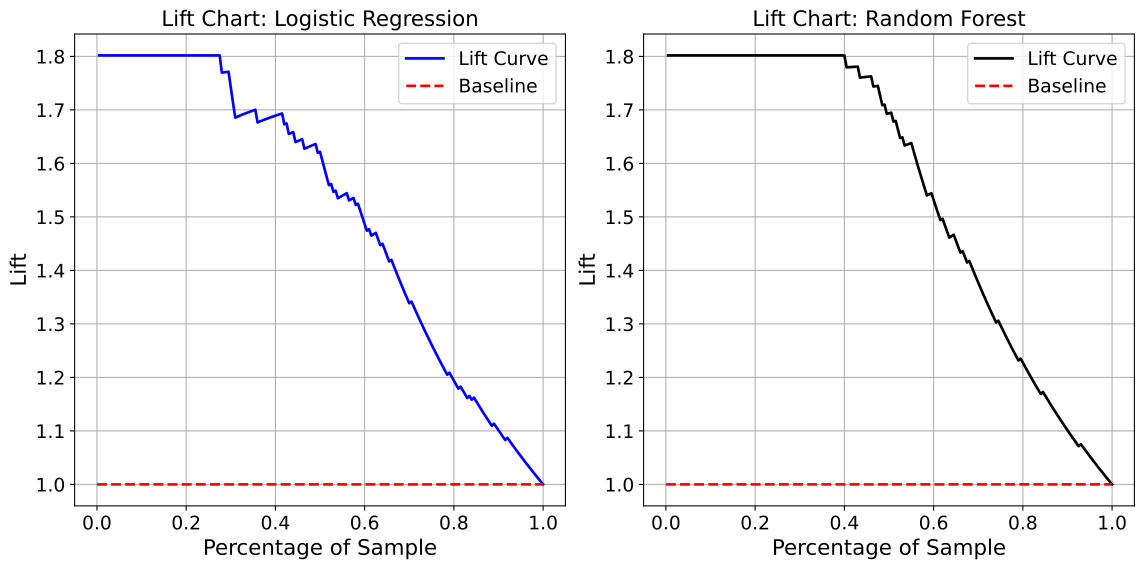
Lift Chart Example 1: Subplot Layout
In this first Lift Chart example, we evaluate and compare the ranking performance
of two classification models: Logistic Regression and Random Forest Classifier trained
on the synthetic dataset from the Binary Classification Models section. The chart displays Lift curves for both models in a
two-column subplot layout (n_cols=2, n_rows=1), enabling side-by-side comparison
of how effectively each model prioritizes positive cases.
Each plot shows the model’s Lift across increasing portions of the test set, with a grey dashed line at Lift = 1 indicating the baseline (random performance). Curves above this line reflect the model’s ability to identify more positives than would be expected by chance. The Random Forest produces a steeper initial lift, demonstrating greater concentration of positive cases near the top-ranked predictions.
The show_lift_chart function allows for rich customization, including plot dimensions, axis font sizes, and curve styling. In this example, we set the line widths for both models and saved the plots in both PNG and SVG formats for further reporting or documentation.
from model_metrics import show_lift_chart

show_lift_chart(
    model=[model1, model2],
    X=X_test,
    y=y_test,
    model_title=["Logistic Regression", "Random Forest"],
    linestyle_kwgs={"color": "red", "linestyle": "--"},
    curve_kwgs={
        "Logistic Regression": {"color": "blue", "linewidth": 2},
        "Random Forest": {"color": "black", "linewidth": 2},
    },
    subplots=True,
)
Output
Lift Chart Example 2: Overlay
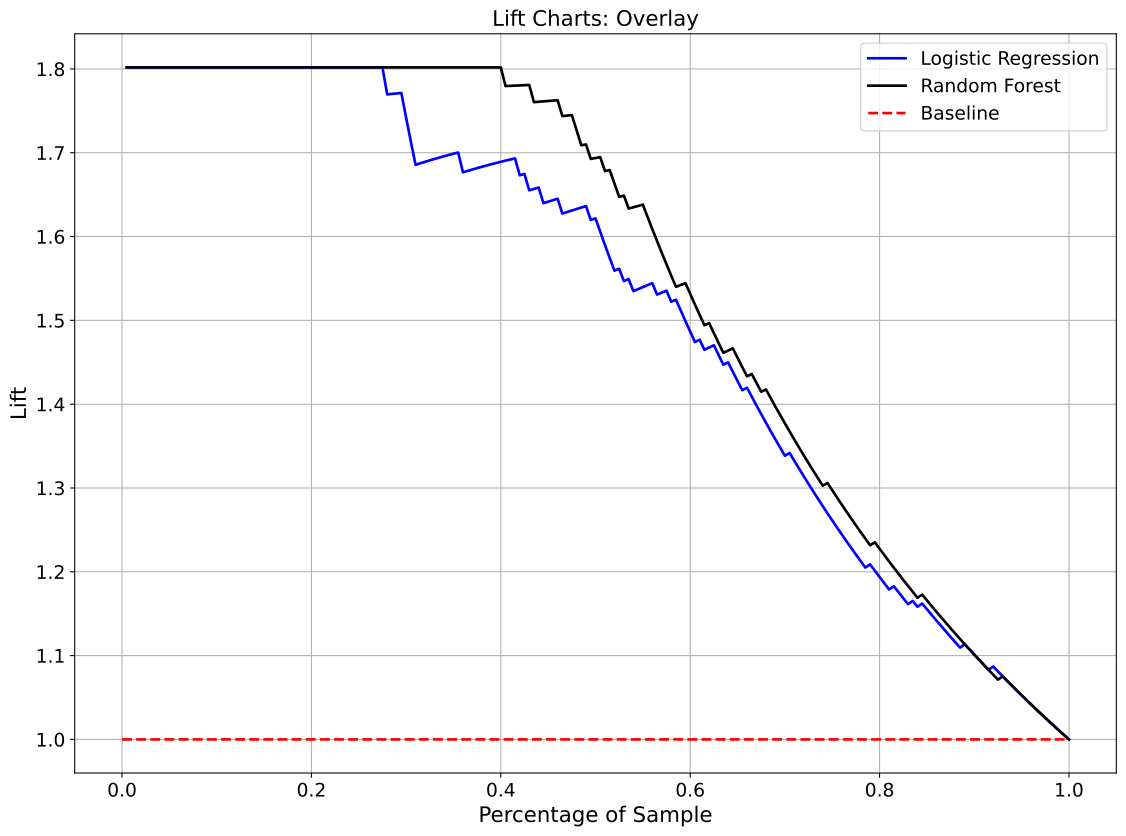
This example overlays Lift curves from two classification models: Logistic Regression and Random Forest Classifier on a single plot for direct visual comparison. Both models were trained on the same synthetic dataset from the Binary Classification Models section, and their lift performance is evaluated on the shared test set.
The Lift curve shows how many more positive outcomes are captured by the model at each quantile compared to a random baseline. A horizontal dashed black line at Lift = 1 represents random selection; curves above this line indicate effective ranking of positive cases. Overlaying curves makes it easier to assess which model better concentrates true positives near the top of the prediction list.
Using the overlay=True option, the show_lift_chart function generates a clean,
unified plot. Each curve is styled with linewidth=2 for clarity, and all axis
elements and tick marks are sized for presentation-quality output. This layout
is particularly helpful for slide decks, performance reports, or model selection
discussions.
from model_metrics import show_lift_chart

show_lift_chart(
    model=[model1, model2],
    X=X_test,
    y=y_test,
    overlay=True,
    model_title=["Logistic Regression", "Random Forest"],
    linestyle_kwgs={"color": "red", "linestyle": "--", "linewidth": 2},
    curve_kwgs={
        "Logistic Regression": {"color": "blue", "linewidth": 2},
        "Random Forest": {"color": "black", "linewidth": 2},
    },
)
Output
Gain Charts
This section explores how to evaluate the cumulative performance of classification models in identifying positive outcomes using gain charts. These charts are especially effective at showing the model’s ability to concentrate the correct (positive) predictions in the top-ranked portion of the dataset. Using the same Logistic Regression, Decision Tree, and Random Forest Classifier models trained on the synthetic dataset introduced in the Binary Classification Models section, we demonstrate how to plot and compare Gain Curves across models.
A gain chart shows the cumulative percentage of actual positive cases captured as we move through the population sorted by predicted probability. Unlike the Lift Chart, which displays the ratio of model performance over baseline, the Gain Chart directly shows the percentage of positives captured, providing a more intuitive sense of how effective a model is at identifying positives early in the ranked list. See the mathematical definition of Gain here.
The show_gain_chart function supports single or multiple models, with options to
overlay all gain curves in a single plot or display them in a flexible subplot layout.
Labels, title wrapping, curve styles, and saving output images are all customizable,
making this function well-suited for both development analysis and final reporting.
- show_gain_chart(model=None, X=None, y_prob=None, y=None, xlabel='Percentage of Sample', ylabel='Cumulative Gain', model_title=None, overlay=False, title=None, save_plot=False, image_path_png=None, image_path_svg=None, image_filename=None, text_wrap=None, curve_kwgs=None, linestyle_kwgs=None, subplots=False, n_cols=2, n_rows=None, figsize=None, label_fontsize=12, tick_fontsize=10, gridlines=True, legend_loc='best', show_gini=False, decimal_places=3, ax=None)
- Parameters:
model (object or list[object]) – A trained classifier or list of classifiers. Each model must support
predict_probaunlessy_probis supplied directly.X (pd.DataFrame or np.ndarray) – The feature matrix used for prediction. Required if
modelis provided.y_prob (list, array, or
None, optional) – Predicted probabilities for classification models. Can be provided instead ofmodelandX.y (pd.Series, np.ndarray, or list of array-like) – Ground truth binary labels. When
y_probis a list of arrays,ymay be a matching list of targets, one per model. See Per-Model Ground Truth.xlabel (str, optional) – Label for the x-axis. Defaults to
"Percentage of Sample".ylabel (str, optional) – Label for the y-axis. Defaults to
"Cumulative Gain".model_title (str or list[str], optional) – Custom display names for each model. If
None, defaults to sequential names.overlay (bool, optional) – If
True, overlay all models on a single axis. Mutually exclusive withsubplots.title (str, optional) – Plot or subplot title. Set to
""to suppress the title.save_plot (bool, optional) – Whether to save the chart(s) to disk.
image_path_png (str, optional) – Output path for saving PNG image(s).
image_path_svg (str, optional) – Output path for saving SVG image(s).
image_filename (str, optional) – Custom filename for the saved image. When provided, saving is triggered regardless of
save_plot. If it includes a file extension (e.g..png,.svg,.pdf,.jpg,.tiff), the figure is saved verbatim in that format; otherwise it is used as the base name for theimage_path_png/image_path_svgoutputs.text_wrap (int, optional) – Max characters before title wrapping. Set to
Noneto disable.curve_kwgs (dict[str, dict] or list[dict], optional) – Dict or list of kwargs per model to customize line style.
linestyle_kwgs (dict, optional) – Styling for the random baseline. Defaults to
{"color": "gray", "linestyle": "--", "linewidth": 2}.subplots (bool, optional) – Whether to render a subplot layout. Cannot be used with
overlay.n_cols (int, optional) – Columns in the subplot layout. Defaults to
2.n_rows (int, optional) – Rows in the subplot layout. If
None, inferred automatically.figsize (tuple[int, int], optional) – Figure size (width, height) in inches.
label_fontsize (int, optional) – Font size for axis labels and titles.
tick_fontsize (int, optional) – Font size for tick marks and legends.
gridlines (bool, optional) – Whether to show gridlines on the plots.
legend_loc (str, optional) – Location for the legend. Standard matplotlib locations like
'best','upper right','lower left', etc., or'bottom'to place legend below the plot. Defaults to'best'.show_gini (bool, optional) – Whether to display the Gini coefficient in the legend. Defaults to
False.decimal_places (int, optional) – Number of decimal places for displaying the Gini coefficient. Defaults to
3.ax (matplotlib.axes.Axes, optional) – Pre-created axes to draw onto. When supplied, the function draws onto the provided axes and suppresses
plt.show()andsave_plot_imagescalls. IfNone, a new figure and axes are created automatically. Defaults toNone.
- Returns:
None.Displays or saves Gain Charts for one or more models.- Return type:
None- Raises:
If
overlay=Trueandsubplots=Trueare both set.
Important
You can supply either
modelandXor passy_probdirectly.When using
y_prob, the function bypasses model predictions and plots cumulative gains directly from the provided probabilities.Supports single-model or multiple-model workflows, with either model objects or arrays of pre-computed probabilities.
When
axis supplied, saving is suppressed; usecombine_plotssave parameters instead.
Notes
- What is a Gain Chart?
Plots the cumulative percentage of positives captured vs. sample size.
The x-axis shows the fraction of the sample, ranked by predicted probability.
The y-axis shows what percentage of the total positives have been captured.
- Why use Gain Charts?
Gain Charts help answer: “If I contact the top X% of predictions, how many positives will I catch?”
Especially useful in marketing, lead scoring, risk management, and fraud detection.
- Reading Gain Curves:
Curves that rise steeply and plateau early indicate better model performance.
The dashed baseline (diagonal line) represents random selection.
- Layout Options:
Use
overlay=Trueto combine all gain curves into a single plot.Use
subplots=Truefor a subplot layout per model.If neither is set, plots will be rendered individually.
- Styling Options:
Customize individual model lines via
curve_kwgs.Modify the diagonal baseline line using
linestyle_kwgs.Adjust fonts and wrapping for presentation clarity.
- Saving Output:
If
save_plot=True, figures are saved as<model_title>_gain.png/svg,gain_overlay.png/svg, orgain_subplots.png/svg.If
image_filenameis provided, it overrides the auto-generated filename and triggers saving regardless ofsave_plot. A file extension inimage_filename(e.g..png,.pdf,.jpg,.tiff) selects the output format.When
axis supplied, saving is suppressed in the individual function; usecombine_plotssave parameters instead.
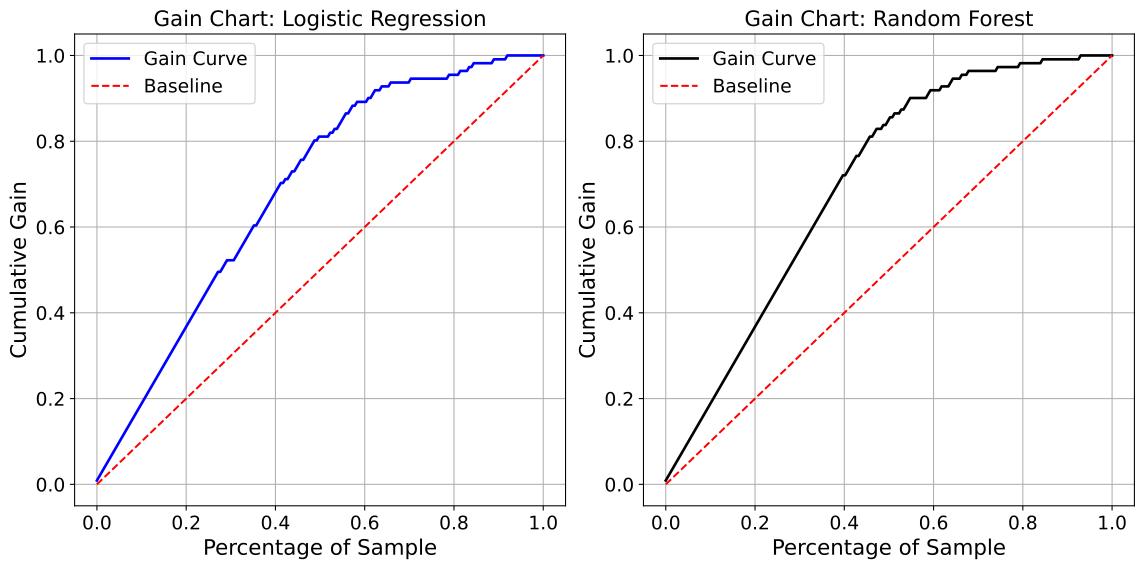
Gain Chart Example 1: Subplot Layout
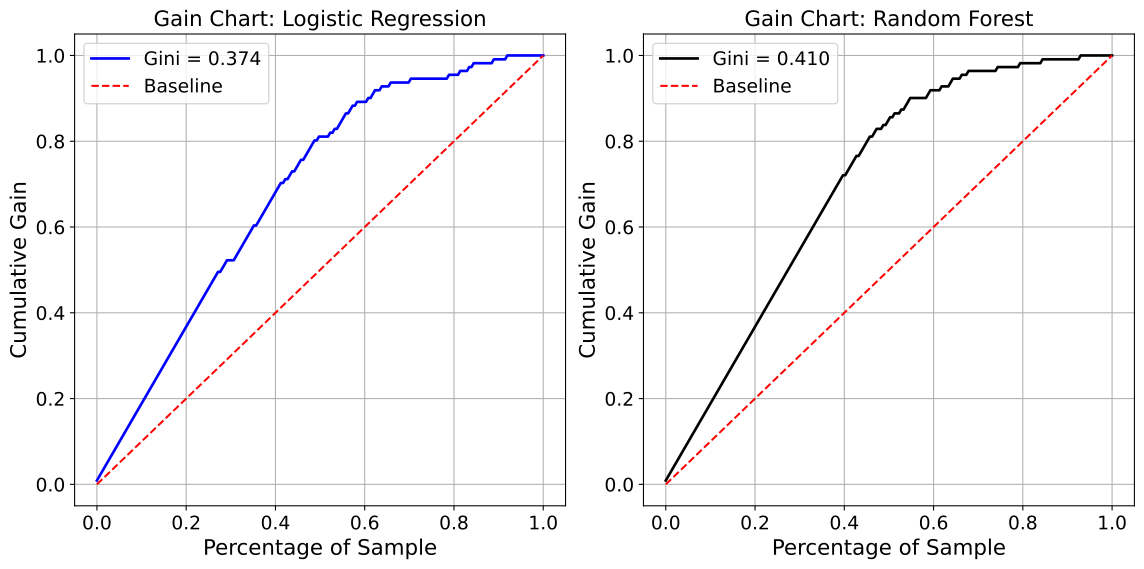
In this first Gain Chart example, we compare the cumulative gain performance of two classification models: Logistic Regression and Random Forest Classifier trained on the synthetic dataset from the Binary Classification Models section. This visualization showcases their ability to identify positive instances across different percentiles of the ranked test data.
Each subplot presents the cumulative gain achieved as a function of the percentage of the sample, sorted by descending predicted probability. The grey dashed line represents the baseline (random gain). A model that identifies a high proportion of positive cases in the early part of the ranking will have a steeper and higher curve. In this example, the Random Forest model outpaces Logistic Regression, indicating better early identification of positives.
The show_gain_chart function allows flexible styling and layout control. This example uses a subplot
configuration (n_cols=2, n_rows=1), customized line widths and colors, and includes saving the figure
for documentation or stakeholder presentations.
from model_metrics import show_gain_chart

show_gain_chart(
    model=[model1, model2],
    X=X_test,
    y=y_test,
    figsize=(12, 6),
    model_title=["Logistic Regression", "Random Forest"],
    linestyle_kwgs={"color": "grey", "linestyle": "--"},
    curve_kwgs={
        "Logistic Regression": {"color": "blue", "linewidth": 2},
        "Random Forest": {"color": "black", "linewidth": 2},
    },
    subplots=True,
)
Output
Gain Chart Example 2: Displaying Gini Coefficients
This example demonstrates how to include Gini coefficients directly in the gain chart legends using
the show_gini=True parameter. The Gini coefficient is a summary statistic derived from the area
under the gain curve (AUGC), calculated as 2 × AUGC - 1, and ranges from 0 to 1 where higher values
indicate better model discrimination.
Both models: Logistic Regression and Random Forest Classifier were trained on the
synthetic dataset from the Binary Classification Models section.
By enabling show_gini=True (and optionally setting decimal_places=3), each model’s legend
entry automatically displays its Gini coefficient, providing both visual and quantitative performance
comparison in a single view.
The Gini coefficient complements the visual gain curve by offering a single number that summarizes discriminative power. In this example, both the curve shape and the Gini value help identify which model better concentrates positive cases at the top of the predicted ranking. This is particularly useful in presentations, model selection discussions, and performance reporting where stakeholders need both graphical intuition and numeric metrics.
from model_metrics import show_gain_chart

show_gain_chart(
    model=[model1, model2],
    X=X_test,
    y=y_test,
    model_title=["Logistic Regression", "Random Forest"],
    linestyle_kwgs={"color": "red", "linestyle": "--"},
    curve_kwgs={
        "Logistic Regression": {"color": "blue", "linewidth": 2},
        "Random Forest": {"color": "black", "linewidth": 2},
    },
    subplots=True,
    show_gini=True,
    decimal_places=3,
)
Output
Gini coefficient for Logistic Regression: 0.374
Gini coefficient for Random Forest: 0.410
Gain Chart Example 3: Overlay
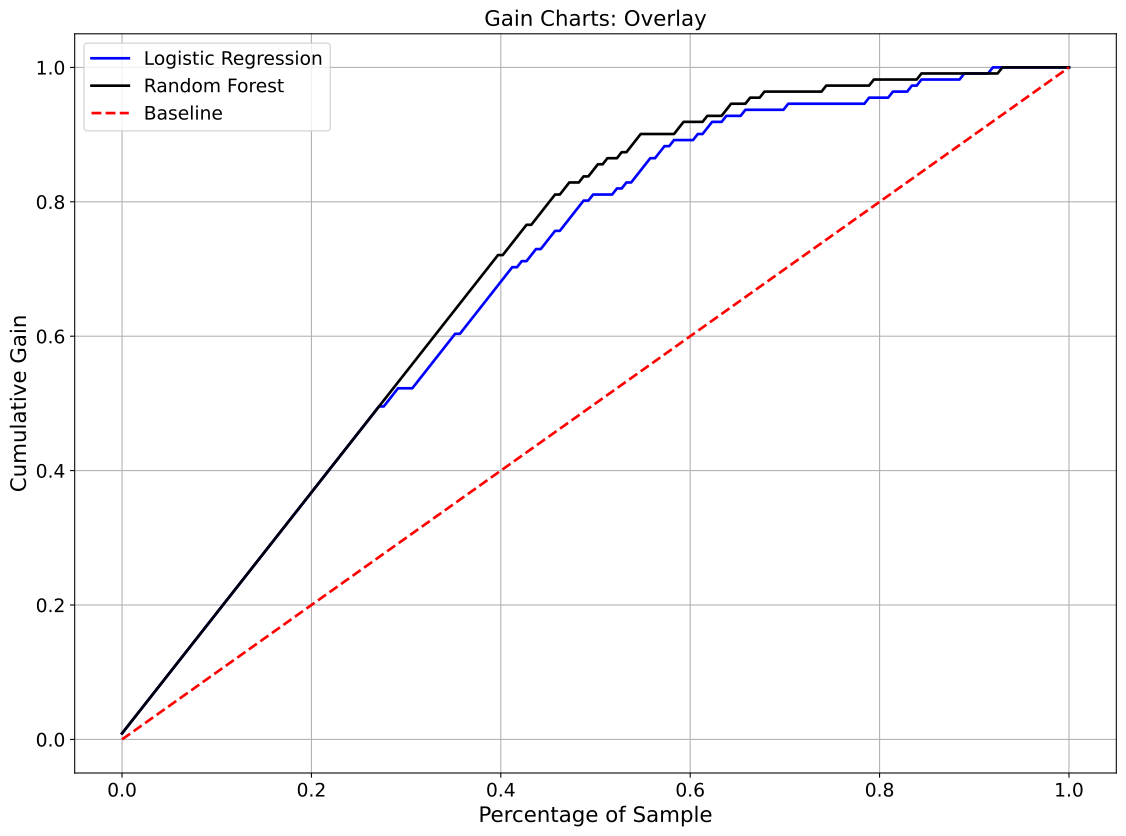
This example overlays Gain curves from two classification models: Logistic Regression and Random Forest Classifier on a single plot to enable direct visual comparison of their cumulative gain performance. Both models were trained on the same synthetic dataset from the Binary Classification Models section and evaluated on the same test set.
The Gain curve shows the cumulative proportion of true positives captured as you move through the population, ranked by predicted probability. A diagonal baseline line from (0, 0) to (1, 1) indicates the expected performance of a random model. Curves that rise above this line demonstrate superior model ability to concentrate positive cases near the top of the ranked list.
By setting overlay=True, the show_gain_chart function produces a single,
easy-to-read plot containing both models’ gain curves. Each curve is styled
with linewidth=2 for clear visibility. Overlay layouts are ideal for model
selection discussions, presentations, and performance dashboards.
from model_metrics import show_gain_chart

show_gain_chart(
    model=[model1, model2],
    X=X_test,
    y=y_test,
    overlay=True,
    model_title=["Logistic Regression", "Random Forest"],
    linestyle_kwgs={"color": "red", "linestyle": "--", "linewidth": 2},
    curve_kwgs={
        "Logistic Regression": {"color": "blue", "linewidth": 2},
        "Random Forest": {"color": "black", "linewidth": 2},
    },
)
Output
ROC AUC Curves
This section demonstrates how to evaluate the performance of binary classification models using ROC AUC curves, a key metric for assessing the trade-off between true positive and false positive rates. Using the Logistic Regression and Random Forest Classifier models trained on the synthetic dataset from the previous (Binary Classification Models) section, we generate ROC curves to visualize their discriminatory power.
ROC AUC (Receiver Operating Characteristic Area Under the Curve) provides a
single scalar value representing a model’s ability to distinguish between
positive and negative classes, with a value of 1 indicating perfect classification
and 0.5 representing random guessing. The curves are plotted by varying the
classification threshold and calculating the true positive rate (sensitivity)
against the false positive rate (1-specificity). This makes ROC AUC particularly
useful for comparing models like Logistic Regression, which relies on linear
decision boundaries, and Random Forest Classifier, which leverages ensemble
decision trees, especially when class imbalances or threshold sensitivity are
concerns. The show_roc_curve function simplifies this process, enabling
users to visualize and compare these curves effectively, setting the stage for
detailed performance analysis in subsequent examples.
The show_roc_curve function provides a flexible and powerful way to visualize
the performance of binary classification models using Receiver Operating Characteristic
(ROC) curves. Whether you’re comparing multiple models, evaluating subgroup fairness,
or preparing publication-ready plots, this function allows full control over layout,
styling, and annotations. It supports single and multiple model inputs, optional overlay
or subplot layouts, and group-wise comparisons via a categorical feature. Additional options
allow custom axis labels, AUC precision, curve styling, and export to PNG/SVG.
Designed to be both user-friendly and highly configurable, show_roc_curve
is a practical tool for model evaluation and stakeholder communication.
- show_roc_curve(model=None, X=None, y_prob=None, y=None, xlabel='False Positive Rate', ylabel='True Positive Rate', model_title=None, decimal_places=2, overlay=False, title=None, save_plot=False, image_path_png=None, image_path_svg=None, image_filename=None, text_wrap=None, curve_kwgs=None, linestyle_kwgs=None, subplots=False, n_rows=None, n_cols=2, figsize=None, label_fontsize=12, tick_fontsize=10, gridlines=True, group_category=None, delong=None, hanley_mcneil=None, show_operating_point=False, operating_point_method='youden', operating_point_kwgs=None, legend_loc='lower right', ax=None, class_labels=None, show_class_counts=True)
- Parameters:
model (estimator, list[estimator], or str) – A trained estimator, list of estimators, or placeholders (strings). If
y_probis provided directly,modelmay beNone.X (pd.DataFrame or np.ndarray) – Feature data for prediction. Required when
modelobjects are provided andy_probis not.y_prob (array-like or list[array-like], optional) – Predicted probabilities for the positive class. Can be a single array or a list of arrays corresponding to multiple models. For multiclass models, pass the full
(n_samples, n_classes)matrix, with columns in sorted class order.y (pd.Series, np.ndarray, or list of array-like) – True binary target labels for ROC evaluation. When
y_probis a list of arrays,ymay be a matching list of targets, one per model, allowing cohorts of different lengths to be overlaid. See Per-Model Ground Truth.xlabel (str, optional) – Label for the x-axis.
ylabel (str, optional) – Label for the y-axis.
model_title (str or list[str], optional) – Custom model title(s). Can be a string or list of strings. If
None, defaults to"Model 1","Model 2", etc.decimal_places (int, optional) – Number of decimal places for rounding AUC values.
overlay (bool, optional) – Whether to overlay multiple models in a single plot. Cannot be used with
subplotsorgroup_category.title (str, optional) – Title for the plot or subplots. If
"", disables titles entirely.save_plot (bool, optional) – Whether to save plots to disk.
image_path_png (str, optional) – Path to save PNG images.
image_path_svg (str, optional) – Path to save SVG images.
image_filename (str, optional) – Custom filename for the saved image. When provided, saving is triggered regardless of
save_plot. If it includes a file extension (e.g..png,.svg,.pdf,.jpg,.tiff), the figure is saved verbatim in that format; otherwise it is used as the base name for theimage_path_png/image_path_svgoutputs.text_wrap (int, optional) – Maximum width before wrapping long titles.
curve_kwgs (list[dict] or dict[str, dict], optional) – Style parameters for ROC curves. Accepts a list of dicts or a nested dict keyed by model titles.
linestyle_kwgs (dict, optional) – Style dictionary for the random guess (diagonal) line.
subplots (bool, optional) – Whether to arrange plots in a grid layout. Cannot be used with
overlay=Trueorgroup_category.n_rows (int, optional) – Number of rows for the subplot grid. Calculated automatically if
None.n_cols (int, optional) – Number of columns for the subplot grid.
figsize (tuple, optional) – Figure size (width, height) in inches.
label_fontsize (int, optional) – Font size for axis labels and titles.
tick_fontsize (int, optional) – Font size for tick labels and legend.
gridlines (bool, optional) – Whether to display gridlines.
group_category (array-like, optional) – Categorical variable to group ROC curves (e.g., by sex or race). Cannot be used with
overlayorsubplots.delong (tuple or list[array-like], optional) – Tuple or list of two predicted probability arrays for the exact DeLong test (
delong_roc_test()) comparing two correlated ROC AUCs. Accounts for the correlation between the two AUCs, since they are computed on the same samples. Cannot be used withgroup_category.hanley_mcneil (tuple or list[array-like], optional) – Tuple or list of two predicted probability arrays for the Hanley & McNeil parametric approximation (
hanley_mcneil_auc_test()). Same interface asdelongbut the cheaper, conservative approximation. Preferdelongfor reported results. Cannot be used withgroup_category.show_operating_point (bool, optional) – Whether to display an optimal operating point on the ROC curve.
operating_point_method (str, optional) – Method used to compute the operating point. Supported options are
"youden"and"closest_topleft".operating_point_kwgs (dict, optional) – Styling options for the operating point marker (passed to
matplotlib.scatter).legend_loc (str, optional) – Legend location. Standard matplotlib locations or
"bottom"to place the legend below the plot.ax (matplotlib.axes.Axes, optional) – Pre-created axes to draw onto. When supplied, the function draws onto the provided axes and suppresses
plt.show()andsave_plot_imagescalls. IfNone, a new figure and axes are created automatically. Defaults toNone.class_labels (list[str], optional) – For multiclass models, names for the model’s classes in
classes_order (position i names encoded class i).ymay hold these names or the encoded labels. Legends use the names.show_class_counts (bool, optional) – For multiclass models, append each class’s one-vs-rest support (count and prevalence in
y) to its legend entry. Defaults toTrue.
- Returns:
None. Displays or saves ROC curve plots.- Return type:
None- Raises:
If both
subplots=Trueandoverlay=True.If
group_categoryis used withoverlayorsubplots.If
overlay=Trueis used with only one model.If
delongorhanley_mcneilis used whengroup_categoryis provided.If neither (
modelandX) nory_probare supplied.If
operating_point_methodis not one of the supported options.If
group_category,delong,hanley_mcneil, orshow_operating_pointis used with a multiclass model.
Important
You can provide either
modelwithXor directly passy_prob.overlayandsubplotsare mutually exclusive.group_categorygroups ROC curves by unique category values.The
delongparameter runs the exact DeLong test;hanley_mcneilruns the parametric approximation. Both compare two correlated ROC curves on the same samples and cannot be combined withgroup_category.When
axis supplied, saving is suppressed; usecombine_plotssave parameters instead.
Notes
- Flexible Inputs
modelandmodel_titlecan be scalars or lists.Strings in
modelact as placeholders when using precomputed probabilities.Curve styling is controlled via
curve_kwgsandlinestyle_kwgs.
- Operating Point Visualization
When
show_operating_point=True, the optimal threshold is computed and displayed on the ROC curve.The operating point is labeled in the legend with its threshold value.
- Group-wise ROC
When
group_categoryis provided, ROC curves are computed per group.Legends display AUC, total count, positive count, and negative count.
- AUC Comparison
delongruns the exact, nonparametric DeLong test (delong_roc_test()), which accounts for the full covariance between the two correlated AUCs.hanley_mcneilruns the Hanley & McNeil parametric approximation (hanley_mcneil_auc_test()), which is cheaper and tends to be conservative.Both operate on the first model position and require two probability arrays; use
delongfor reported results.
- Plot Modes
overlay=True: All ROC curves on a single plot.subplots=True: Each model plotted in a grid layout.Default behavior produces one plot per model.
- Multiclass Models
Detected automatically: a 2D
y_probwith more than two columns, or a model with more than two classes.Single and subplot modes draw one one-vs-rest ROC curve per class, with that class’s AUC in the legend and, when
show_class_counts=True, its count and prevalence. A model-levelcolorincurve_kwgsis not applied, so the classes stay distinguishable.Overlay mode draws one macro-average curve per model, labeled with the macro AUC (the mean of the per-class AUCs), which matches
roc_auc_score(..., multi_class="ovr").Per-class and macro AUC values are printed for each model.
group_category,delong,hanley_mcneil, andshow_operating_pointapply to binary models only.
- Saving Plots
If
save_plot=True, figures are saved to the specified paths.Filenames are generated automatically based on model name and plot mode (e.g.,
<name>_roc_auc.png/svg,roc_auc_overlay_plot.png/svg,roc_auc_subplots.png/svg).If
image_filenameis provided, it overrides the auto-generated filename and triggers saving regardless ofsave_plot. A file extension inimage_filename(e.g..png,.pdf,.jpg,.tiff) selects the output format.When
axis supplied, saving is suppressed in the individual function; usecombine_plotssave parameters instead.
The show_roc_curve function provides flexible and highly customizable
plotting of ROC curves for binary classification models. It supports overlays,
subplot layouts, and subgroup visualizations, while also allowing export options
and styling hooks for publication-ready output.
ROC AUC Example 1: Subplot Layout
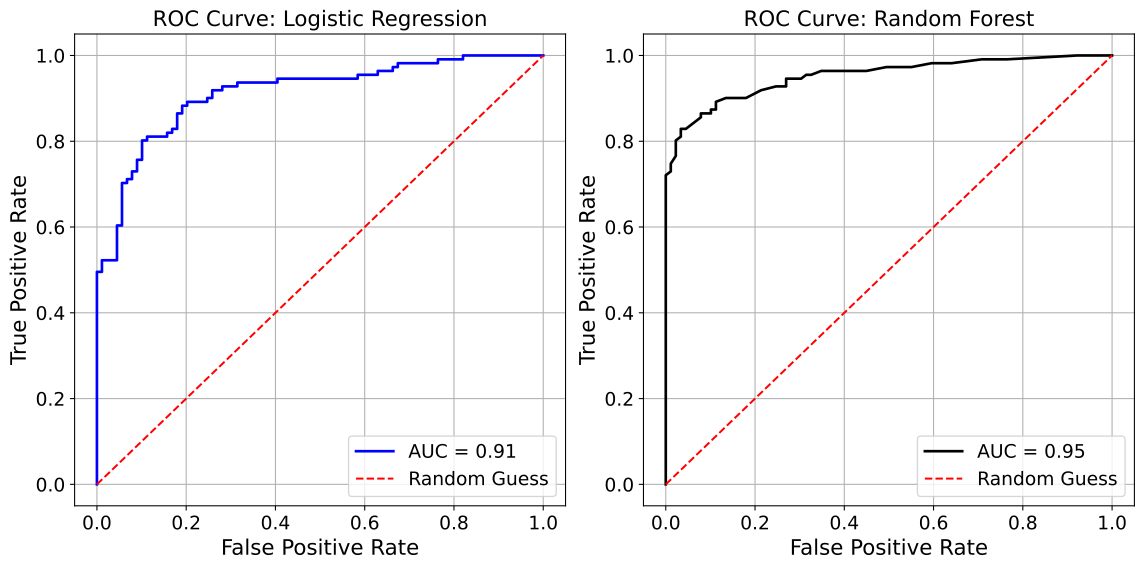
In this first ROC AUC evaluation example, we plot the ROC curves for two
models: Logistic Regression and Random Forest Classifier, trained on the
synthetic dataset from the Binary Classification Models section. The curves are displayed side by side
using a subplot layout (n_cols=2, n_rows=1), with the Logistic Regression curve
in blue and the Random Forest curve in green for clear differentiation.
A red dashed line represents the random guessing baseline. This example
demonstrates how the show_roc_curve function enables straightforward
visualization of model performance, with options to customize colors,
add a grid, and save the plot for reporting purposes.
from model_metrics import show_roc_curve

show_roc_curve(
    model=[model1, model2],
    X=X_test,
    y=y_test,
    model_title=model_titles,
    decimal_places=2,
    n_cols=2,
    n_rows=1,
    curve_kwgs={
        "Logistic Regression": {"color": "blue", "linewidth": 2},
        "Random Forest": {"color": "black", "linewidth": 2},
    },
    linestyle_kwgs={"color": "red", "linestyle": "--"},
    subplots=True,
)
Output
ROC AUC Example 2: Overlay
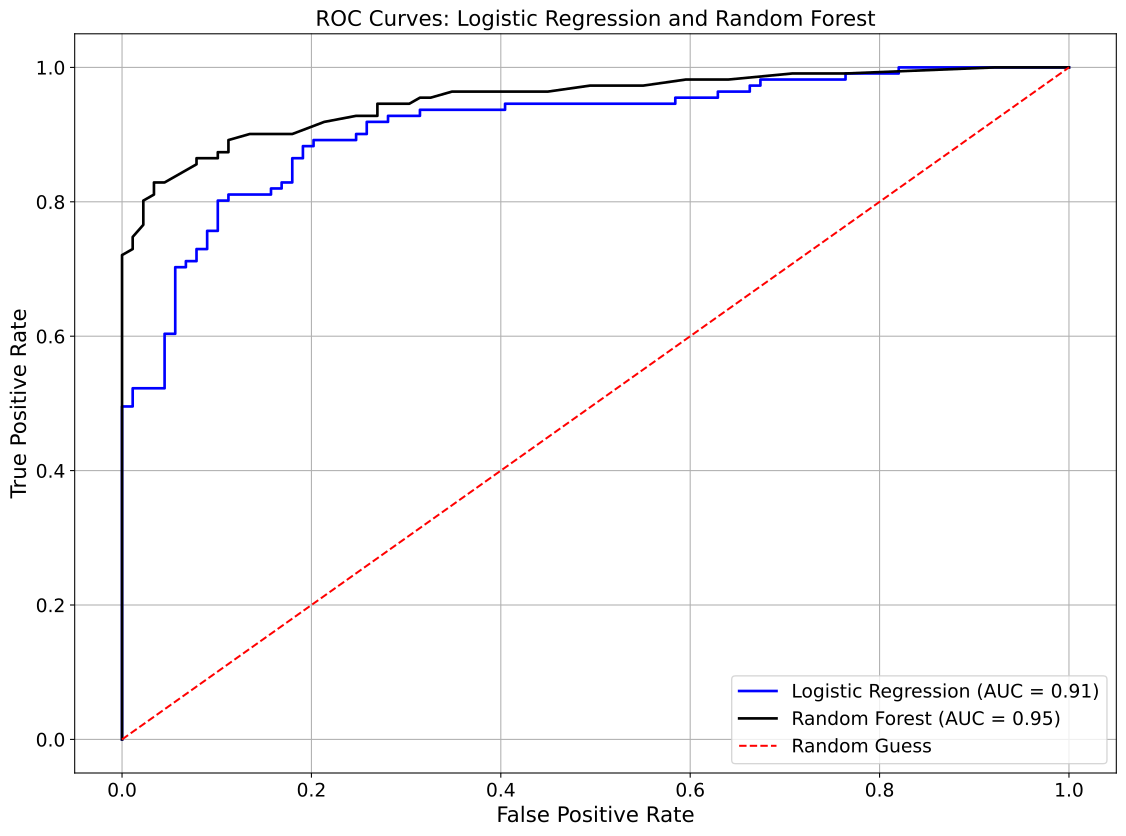
In this second ROC AUC evaluation example, we focus on overlaying the results of
two models: Logistic Regression and Random Forest Classifier, trained on the
synthetic dataset from the Binary Classification Models section onto a single plot. Using the show_roc_curve
function with the overlay=True parameter, the ROC curves for both models are
displayed together, with Logistic Regression in blue and Random Forest in black,
both with a linewidth=2. A red dashed line serves as the random guessing
baseline, and the plot includes a custom title for clarity.
from model_metrics import show_roc_curve

show_roc_curve(
    model=[model1, model2],
    X=X_test,
    y=y_test,
    model_title=model_titles,
    decimal_places=2,
    curve_kwgs={
        "Logistic Regression": {"color": "blue", "linewidth": 2},
        "Random Forest": {"color": "black", "linewidth": 2},
    },
    linestyle_kwgs={"color": "red", "linestyle": "--"},
    title="ROC Curves: Logistic Regression and Random Forest",
    overlay=True,
)
Output
ROC AUC Example 3: DeLong’s Test
In this third ROC AUC evaluation example, we statistically compare two
correlated models using the exact DeLong test. We use the Logistic Regression
and Random Forest Classifier models trained on the synthetic dataset from
the Binary Classification Models section. Passing their
predicted probabilities to the delong parameter of delong_roc_test runs
delong_roc_test(), which accounts for the correlation between the two AUCs
(they are computed on the same patients) via the full between-AUC covariance.
Performs the exact, nonparametric DeLong test for the difference between two correlated ROC AUCs, based on DeLong, DeLong & Clarke-Pearson (1988).
- delong_roc_test(y_true, y_scores_1, y_scores_2, model_names=None, verbose=True, return_values=False, decimal_places=4)
- Parameters:
y_true (array-like) – True binary class labels (0/1).
y_scores_1 (array-like) – Predicted probabilities or decision scores from the first model, aligned to
y_true.y_scores_2 (array-like) – Predicted probabilities or decision scores from the second model, aligned to
y_true.model_names (list or tuple of str, optional) – Optional model names for printed output. Defaults to
("Model 1", "Model 2")if not provided.verbose (bool, optional) – Whether to print the formatted AUC comparison and p-value summary. Defaults to
True.return_values (bool, optional) – Whether to return the numerical results
(auc1, auc2, p_value)for programmatic access instead of just printing them. Defaults toFalse.decimal_places (int, optional) – Number of decimal places for the printed AUCs, difference, and p-value. Defaults to
4.
- Returns:
Tuple of floats
(auc1, auc2, p_value)ifreturn_values=True. Otherwise, prints the results and returnsNone.- Return type:
tuple or None
- Raises:
If
y_trueis not binary (contains values other than 0 and 1).If
y_truedoes not contain both classes.
Important
This is the exact test for comparing two correlated ROC curves evaluated on the same set of samples.
Unlike
hanley_mcneil_auc_test(), it makes no distributional assumption: it uses empirical placement values and the full covariance between the two AUCs, as described in [5].The p-value tests the null hypothesis that the two AUCs are equal.
Notes
- Method Overview:
AUCs and their covariance are estimated from midrank (placement) values via the Sun & Xu (2014) fast algorithm, so the test scales to large samples.
The variance of the difference is
Var(auc1 - auc2) = Var(auc1) + Var(auc2) - 2 * Cov(auc1, auc2); the between-AUC covariance is what makes this a correct paired test.The z-statistic is
z = (auc1 - auc2) / sqrt(Var(auc1 - auc2)), and the two-sided p-value isp = 2 * norm.sf(|z|).
- Typical Use Case:
Use this function when comparing two models trained and tested on the same dataset to evaluate whether their ROC-AUCs differ significantly.
It is the recommended test for reported model comparisons;
hanley_mcneil_auc_test()provides a cheaper, conservative approximation.It is also invoked by
show_roc_curve()when thedelongargument is provided.
Example:
from model_metrics import delong_roc_test

# Compare two models' ROC-AUC scores
delong_roc_test(
    y_test,
    model1.predict_proba(X_test)[:, 1],
    model2.predict_proba(X_test)[:, 1],
    model_names=["Logistic Regression", "Random Forest"],
    verbose=True,
    decimal_places=6,
)
Output
DeLong Test for Two Correlated ROC AUCs:
  Model 1 AUC = 0.9126
  Model 2 AUC = 0.9520
  difference   = -0.0393
  p-value      = 0.0017
ROC AUC Example: DeLong Test via show_roc_curve
You can run the exact DeLong test directly from show_roc_curve by passing the
two models’ predicted probabilities to the delong parameter. This compares
two correlated models (evaluated on the same samples) and reports whether the
difference in AUC is statistically significant.
from model_metrics import show_roc_curve

show_roc_curve(
    model=[model1, model2],
    X=X_test,
    y=y_test,
    model_title=model_titles,
    decimal_places=2,
    delong=[model1.predict_proba(X_test)[:, 1], model2.predict_proba(X_test)[:, 1]],
)
Running this renders the ROC curve plot (shown here) and, in addition, prints the DeLong test result:
Output
DeLong Test for Two Correlated ROC AUCs:
  Model 1 AUC = 0.9126
  Model 2 AUC = 0.9520
  difference   = -0.0393
  p-value      = 0.0017
ROC AUC Example 4: Hanley Mcneil AUC Test
In this fourth ROC AUC evaluation example, we focus on the results of two models: Logistic Regression and Random Forest Classifier, trained on the synthetic dataset from the Binary Classification Models section.
Performs a large-sample z-test for the difference between two correlated AUCs, based on Hanley & McNeil (1982).
- hanley_mcneil_auc_test(y_true, y_scores_1, y_scores_2, model_names=None, verbose=True, return_values=False, decimal_places=4)
- Parameters:
y_true (array-like) – True binary class labels.
y_scores_1 (array-like) – Predicted probabilities or decision scores from the first model.
y_scores_2 (array-like) – Predicted probabilities or decision scores from the second model.
model_names (list or tuple of str, optional) – Optional model names for printed output. Defaults to
("Model 1", "Model 2")if not provided.verbose (bool, optional) – Whether to print the formatted AUC comparison and p-value summary. Defaults to
True.return_values (bool, optional) – Whether to return the numerical results
(auc1, auc2, p_value)for programmatic access instead of just printing them. Defaults toFalse.decimal_places (int, optional) – Number of decimal places for printed AUC and p-value. Defaults to
4.
- Returns:
Tuple of floats
(auc1, auc2, p_value)ifreturn_values=True. Otherwise, prints the results and returnsNone.- Return type:
tuple or None
Important
This test compares two correlated ROC curves evaluated on the same set of samples.
It is a parametric approximation of DeLong’s nonparametric test, as described in [4].
The p-value tests the null hypothesis that the two AUCs are equal.
Notes
- Formula Overview:
Standard error (SE) is computed using Hanley & McNeil’s approximation based on sample counts and the AUC of the first model.
The z-statistic is then computed as:
z = (auc1 - auc2) / SEThe two-sided p-value is derived as:
p = 2 * (1 - norm.cdf(|z|))
- Typical Use Case:
Use this function when comparing two models trained and tested on the same dataset to evaluate whether their ROC-AUCs differ significantly.
The function is particularly useful within pipelines or visualization utilities such as
show_roc_curve()when thedelongargument is provided.
- Integration Example:
This test can be used independently or embedded in a plotting function to provide AUC significance testing.
Example:
from model_metrics import hanley_mcneil_auc_test

# Compare two models' ROC-AUC scores
hanley_mcneil_auc_test(
    y_test,
    model1.predict_proba(X_test)[:, 1],
    model2.predict_proba(X_test)[:, 1],
    model_names=["Logistic Regression", "Random Forest"],
    verbose=True,
    decimal_places=6,
)
Output
Hanley & McNeil AUC Comparison (Approximation of DeLong's Test):
  Logistic Regression AUC = 0.912643
  Random Forest AUC = 0.951969
  p-value = 0.054494
ROC AUC Example: Hanley & McNeil Approximation via show_roc_curve
The same comparison can be run with the faster Hanley & McNeil approximation by
using the hanley_mcneil parameter instead of delong. The approximation is
conservative and typically reports a larger p-value than the exact test; prefer
delong for reported results.
from model_metrics import show_roc_curve

show_roc_curve(
    model=[model1, model2],
    X=X_test,
    y=y_test,
    model_title=model_titles,
    decimal_places=2,
    hanley_mcneil=[model1.predict_proba(X_test)[:, 1], model2.predict_proba(X_test)[:, 1]],
)
As before, this renders the ROC curve plot (shown here) and prints the comparison, here using the approximation:
Output
Hanley & McNeil AUC Comparison (Approximation of DeLong's Test):
  Logistic Regression AUC = 0.912643
  Random Forest AUC = 0.951969
  p-value = 0.054494
ROC AUC Example 5: Operating Point Using Youden’s J
In this fifth ROC AUC evaluation example, we focus on the results of two models: Logistic Regression and Random Forest Classifier, trained on the synthetic dataset from the Binary Classification Models section.
The objective of this example is to identify and visualize an optimal operating point on the ROC curve using Youden’s J statistic, defined as:
This criterion selects the threshold that maximizes the vertical distance between the ROC curve and the random-guess diagonal, providing a balanced tradeoff between sensitivity and specificity. More information on this method can be found here.
The show_roc_curve function supports this directly via the
show_operating_point and operating_point_method parameters.
In the example below, we compute the ROC curve for a decision tree classifier and annotate the optimal operating point determined by Youden’s J statistic.
from model_metrics import show_roc_curve

show_roc_curve(
    model=[model1, model2],
    X=X_test,
    y=y_test,
    model_title=model_titles,
    decimal_places=2,
    show_operating_point=True,
    operating_point_method="youden",
    curve_kwgs={
        "Logistic Regression": {"color": "blue", "linewidth": 2},
        "Random Forest": {"color": "black", "linewidth": 2},
    },
    linestyle_kwgs={"color": "red", "linestyle": "--"},
    operating_point_kwgs={
        "marker": "o",
        "color": "red",
        "s": 100,
    },
)
When enabled, the operating point is plotted directly on the ROC curve and annotated in the legend with its corresponding decision threshold.
Output
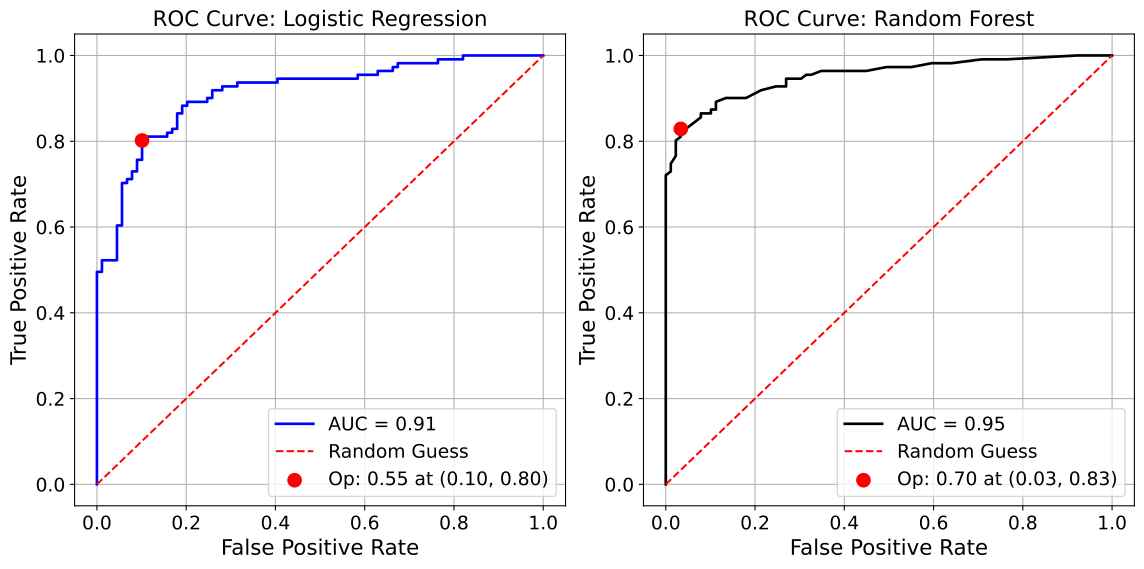
ROC AUC Example 6: Closest to Top Left
In this sixth example, we demonstrate an alternative method for identifying an optimal operating point on the ROC curve using the closest-to-top-left criterion. Like Youden’s J statistic, this approach seeks a balanced threshold, but instead of maximizing the vertical distance from the diagonal, it minimizes the Euclidean distance to the ideal point (0, 1) in ROC space.
The closest-to-top-left method finds the threshold that minimizes:
This geometric criterion is particularly useful when you want to prioritize proximity to perfect classification (top-left corner) rather than maximizing the difference between true positive and false positive rates.
In this ROC AUC evaluation example, we focus on the results of two models: Logistic Regression and Random Forest Classifier, trained on the synthetic dataset from the Binary Classification Models section.
The show_roc_curve function supports this method through the operating_point_method parameter
by setting it to "closest_topleft". In the example below, we compute the ROC curve for a
decision tree classifier and annotate the optimal operating point using the closest-to-top-left
criterion.
from model_metrics import show_roc_curve

show_roc_curve(
    model=[model1, model2],
    X=X_test,
    y=y_test,
    model_title=model_titles,
    decimal_places=2,
    show_operating_point=True,
    subplots=True,
    operating_point_method="closest_topleft",
    curve_kwgs={
        "Logistic Regression": {"color": "blue", "linewidth": 2},
        "Random Forest": {"color": "black", "linewidth": 2},
    },
    linestyle_kwgs={"color": "red", "linestyle": "--"},
    operating_point_kwgs={
        "marker": "o",
        "color": "red",
        "s": 100,
    },
)
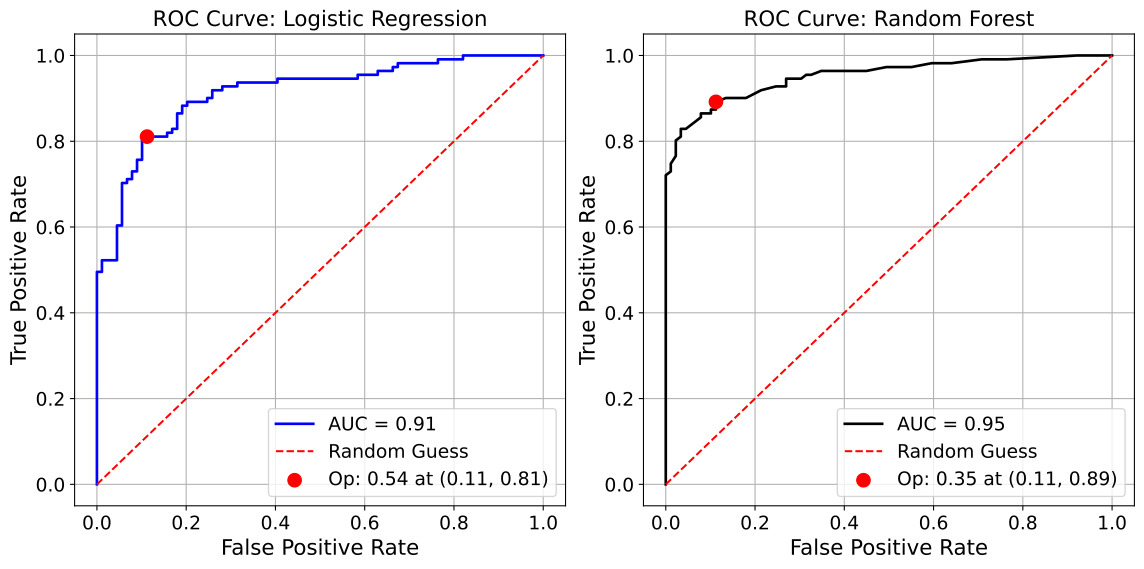
ROC AUC Example 7: by Category
In this seventh ROC AUC evaluation example, we utilize the well-known Adult Income dataset [2], a widely used benchmark for binary classification tasks. Its rich mix of categorical and numerical features makes it particularly suitable for analyzing model performance across different subgroups.
To build and evaluate our models, we use the model_tuner library [3].
Click here to view the corresponding codebase for this workflow.
The objective here is to assess ROC AUC scores not just overall, but across each category of a selected feature, such as occupation, education, marital-status, or race. This approach enables deeper insight into how performance varies by subgroup, which is particularly important for fairness, bias detection, and subgroup-level interpretability.
The show_roc_curve function supports this analysis through the
group_category parameter.
For example, by passing group_category=X_test_2["race"],
you can generate a separate ROC curve for each unique racial group in the dataset:
from model_metrics import show_roc_curve

show_roc_curve(
    model=model_rf["model"].estimator,
    X=X_test,
    y=y_test,
    model_title="Random Forest Classifier",
    decimal_places=2,
    group_category=X_test_2["race"],
)
Output
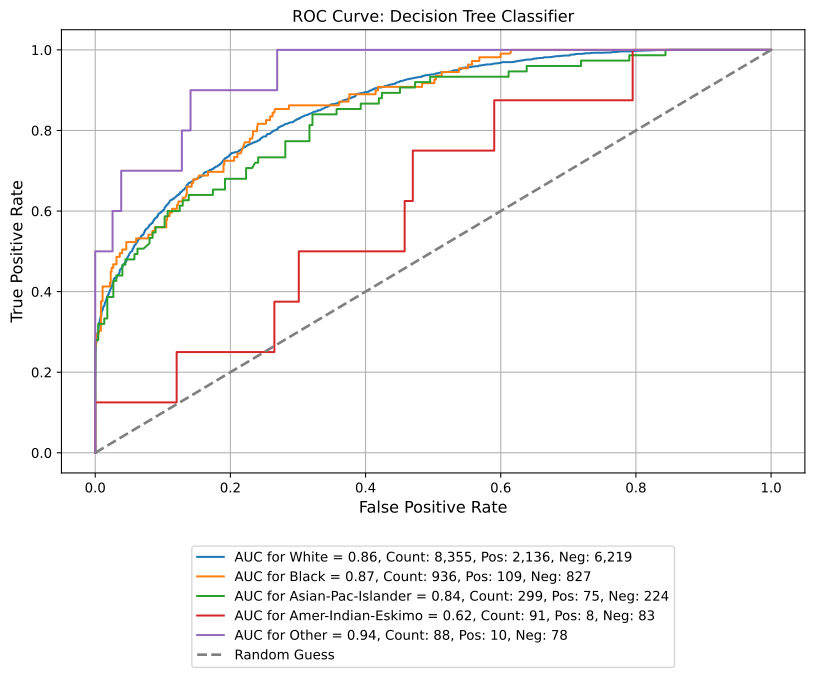
ROC AUC Example 8: Multiclass One-vs-Rest Curves
For the three models from the Multiclass Classification Models section, each panel draws one ROC curve per class, treating that class as positive and the other four as negative. The legend gives each class’s AUC, and the console prints the per-class and macro values.
from model_metrics import show_roc_curve

show_roc_curve(
    model=models,
    model_title=model_titles,
    X=X_test,
    y=y_test,
    class_labels=lab_names,
    subplots=True,
    n_cols=3,
    figsize=(20, 6),
    decimal_places=3,
)
Output
AUC for Alpha vs rest (Logistic Regression): 0.973
AUC for Bravo vs rest (Logistic Regression): 0.935
AUC for Charlie vs rest (Logistic Regression): 0.960
AUC for Delta vs rest (Logistic Regression): 0.961
AUC for Echo vs rest (Logistic Regression): 0.945
Macro AUC for Logistic Regression: 0.955
AUC for Alpha vs rest (Random Forest): 0.992
AUC for Bravo vs rest (Random Forest): 0.979
AUC for Charlie vs rest (Random Forest): 0.982
AUC for Delta vs rest (Random Forest): 0.987
AUC for Echo vs rest (Random Forest): 0.972
Macro AUC for Random Forest: 0.982
AUC for Alpha vs rest (XGBoost): 0.993
AUC for Bravo vs rest (XGBoost): 0.984
AUC for Charlie vs rest (XGBoost): 0.984
AUC for Delta vs rest (XGBoost): 0.989
AUC for Echo vs rest (XGBoost): 0.977
Macro AUC for XGBoost: 0.985
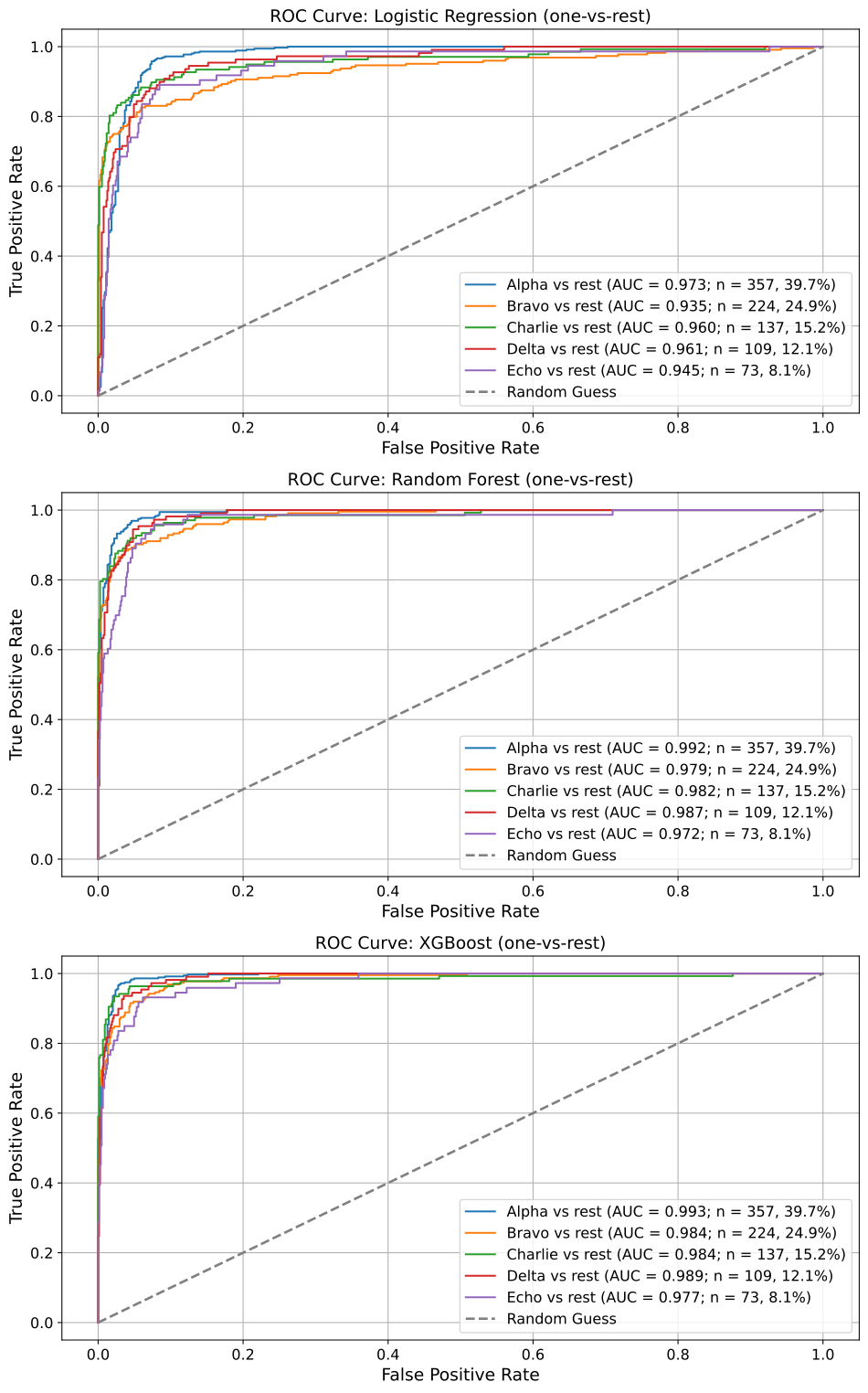
ROC AUC Example 9: Multiclass Macro-Average Overlay
To compare models on one plot, overlay=True reduces each model to a single
macro-average ROC curve: the per-class curves are interpolated onto a common
false positive rate grid and averaged. The legend reports the macro AUC.
from model_metrics import show_roc_curve

show_roc_curve(
    model=models,
    model_title=model_titles,
    X=X_test,
    y=y_test,
    class_labels=lab_names,
    overlay=True,
    decimal_places=3,
)
Output
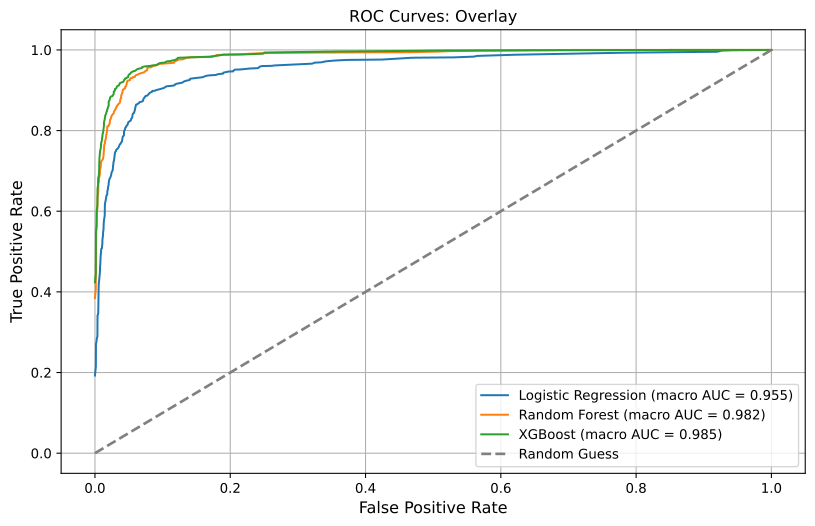
Precision-Recall Curves
This section demonstrates how to evaluate the performance of binary classification models using Precision-Recall (PR) curves, a critical visualization for understanding model behavior in the presence of class imbalance. Using the Logistic Regression and Random Forest Classifier models trained on the synthetic dataset from the previous (Binary Classification Models) section, we generate PR curves to examine how well each model identifies true positives while limiting false positives.
Precision-Recall curves focus on the trade-off between precision (positive predictive value) and recall (sensitivity) across different classification thresholds. This is particularly important when the positive class is rare, as is common in fraud detection, disease diagnosis, or adverse event prediction, because ROC AUC can overstate performance under imbalance. Unlike the ROC curve, the PR curve is sensitive to the proportion of positive examples and gives a clearer picture of how well a model performs where it matters most: in identifying the positive class.
The area under the Precision-Recall curve, also known as Average Precision (AP), summarizes model performance across thresholds. A model that maintains high precision as recall increases is generally more desirable, especially in settings where false positives have a high cost. This makes the PR curve a complementary and sometimes more informative tool than ROC AUC in skewed classification scenarios.
- show_pr_curve(model=None, X=None, y=None, y_prob=None, xlabel='Recall', ylabel='Precision', model_title=None, decimal_places=2, overlay=False, title=None, save_plot=False, image_path_png=None, image_path_svg=None, image_filename=None, text_wrap=None, curve_kwgs=None, subplots=False, n_cols=2, n_rows=None, figsize=None, label_fontsize=12, tick_fontsize=10, gridlines=True, group_category=None, legend_metric='ap', legend_loc='lower left', ax=None, class_labels=None, show_class_counts=True, show_prevalence_baseline=True)
- Parameters:
model (object or str or list[object or str]) – A trained model, a string placeholder, or a list containing models or strings to evaluate. If
y_probis supplied directly,modelmay beNone.X (pd.DataFrame or np.ndarray) – Feature matrix used for prediction. Required when
modelobjects are supplied andy_probis not.y (pd.Series, np.ndarray, or list of array-like) – True binary labels for evaluation. When
y_probis a list of arrays,ymay be a matching list of targets, one per model. See Per-Model Ground Truth.y_prob (array-like or list[array-like], optional) – Predicted probabilities for one or multiple models (positive class, shape
(n_samples,)or list of such arrays). When provided, the function bypasses model prediction and uses these probabilities directly. For multiclass models, pass the full(n_samples, n_classes)matrix, with columns in sorted class order.xlabel (str, optional) – Label for the x-axis. Defaults to
"Recall".ylabel (str, optional) – Label for the y-axis. Defaults to
"Precision".model_title (str or list[str], optional) – Custom title(s) for the model(s). Can be a string or list of strings. If
None, defaults to"Model 1","Model 2", etc.decimal_places (int, optional) – Number of decimal places for Average Precision (AP) or AUCPR values. Defaults to
2.overlay (bool, optional) – Whether to overlay multiple models on a single plot. Defaults to
False.title (str, optional) – Title for the plot (used in overlay mode or as global title). If
"", disables the title. Defaults toNone.save_plot (bool, optional) – Whether to save the plot(s) to file. Defaults to
False.image_path_png (str, optional) – File path to save the plot(s) as PNG.
image_path_svg (str, optional) – File path to save the plot(s) as SVG.
image_filename (str, optional) – Custom filename for the saved image. When provided, saving is triggered regardless of
save_plot. If it includes a file extension (e.g..png,.svg,.pdf,.jpg,.tiff), the figure is saved verbatim in that format; otherwise it is used as the base name for theimage_path_png/image_path_svgoutputs.text_wrap (int, optional) – Maximum character width before wrapping plot titles. If
None, no wrapping is applied.curve_kwgs (list[dict] or dict[str, dict], optional) – Plot styling for PR curves. Accepts a list of dictionaries or a nested dictionary keyed by model_title.
subplots (bool, optional) – Whether to organize the PR plots in a subplot layout. Cannot be used with
overlay=Trueorgroup_category.n_cols (int, optional) – Number of columns in the subplot layout. Defaults to
2.n_rows (int, optional) – Number of rows in the subplot layout. If
None, calculated automatically based on number of models and columns.figsize (tuple, optional) – Size of the plot or subplots, in inches. Defaults to
(8, 6).label_fontsize (int, optional) – Font size for axis labels and titles. Defaults to
12.tick_fontsize (int, optional) – Font size for ticks and legend text. Defaults to
10.gridlines (bool, optional) – Whether to display gridlines on plots. Defaults to
True.group_category (array-like, optional) – Categorical array to group PR curves. Cannot be used with
subplots=Trueoroverlay=True.legend_metric (str, optional) – Metric to display in the legend. Either
"ap"(Average Precision) or"aucpr"(area under the PR curve). Defaults to"ap".legend_loc (str, optional) – Location for the legend. Standard matplotlib locations like
'lower left','upper right', etc., or'bottom'to place legend below the plot. Defaults to'lower left'.ax (matplotlib.axes.Axes, optional) – Pre-created axes to draw onto. When supplied, the function draws onto the provided axes and suppresses
plt.show()andsave_plot_imagescalls. IfNone, a new figure and axes are created automatically. Defaults toNone.class_labels (list[str], optional) – For multiclass models, names for the model’s classes in
classes_order (position i names encoded class i).ymay hold these names or the encoded labels. Legends use the names.show_class_counts (bool, optional) – For multiclass models, append each class’s one-vs-rest support (count and prevalence in
y) to its legend entry. Defaults toTrue.show_prevalence_baseline (bool, optional) – For multiclass models, draw each class’s no-skill baseline (its prevalence in
y) as a dotted horizontal line in that class’s color. Defaults toTrue.
- Returns:
None.Displays or saves Precision-Recall curve plots for classification models.- Return type:
None- Raises:
If
subplots=Trueandoverlay=Trueare both set.If
group_categoryis used withsubplots=Trueoroverlay=True.If
overlay=Trueis used with only one model.If
legend_metricis not one of"ap"or"aucpr".If neither (
modelandX) nory_probis provided.If
group_categoryis used with a multiclass model.
If
model_titleis not a string, list of strings, orNone.
Important
You can supply either
modelandXor passy_probdirectly.When using
y_prob, the function bypasses model predictions and computes PR curves and metrics directly from the provided probabilities.Supports single-model or multi-model workflows with either model objects or arrays of pre-computed probabilities (provide a list for multiple curves).
When
axis supplied, saving is suppressed; usecombine_plotssave parameters instead.
Notes
- Flexible Inputs:
modelandmodel_titlecan be individual items or lists. Strings passed inmodelare treated as placeholder names.Titles can be automatically inferred or explicitly passed using
model_title.
- Group-Wise PR:
If
group_categoryis passed, separate PR curves are plotted for each unique group.The legend will include group-specific Average Precision and class distribution (e.g.,
AP = 0.78, Count: 500, Pos: 120, Neg: 380).
- Average Precision vs. AUCPR:
By default, the legend shows Average Precision (AP), which summarizes the PR curve with greater emphasis on the performance at higher precision levels.
If the user passes
legend_metric="aucpr", the legend will instead display AUCPR (Area Under the Precision-Recall Curve), which gives equal weight to all parts of the curve.
- Plot Modes:
overlay=Trueoverlays all models in one figure.subplots=Truearranges individual PR plots in a subplot layout.If neither is set, separate full-size plots are shown for each model.
- Multiclass Models:
Detected automatically: a 2D
y_probwith more than two columns, or a model with more than two classes.Single and subplot modes draw one one-vs-rest PR curve per class, with that class’s AP or AUCPR in the legend and, when
show_class_counts=True, its count and prevalence. A model-levelcolorincurve_kwgsis not applied, so the classes stay distinguishable.Overlay mode draws one macro-average curve per model (precision averaged over a common recall grid), labeled with the mean of the per-class AP or AUCPR.
Each class’s chance level is its own prevalence, so rare classes have lower PR baselines. With
show_prevalence_baseline=True, each baseline is drawn as a dotted line in the class’s color.group_categoryapplies to binary models only.
- Legend and Styling:
A random classifier baseline (constant precision) is plotted by default.
Customize PR curves with
curve_kwgs.Titles can be disabled with
title="".
- Saving Plots:
If
save_plot=True, plots are saved using the base filename format<model_name>_precision_recall.png/svg,pr_overlay_plot.png/svg, orpr_subplots.png/svg.If
image_filenameis provided, it overrides the auto-generated filename and triggers saving regardless ofsave_plot. A file extension inimage_filename(e.g..png,.pdf,.jpg,.tiff) selects the output format.When
axis supplied, saving is suppressed in the individual function; usecombine_plotssave parameters instead.
The show_pr_curve function provides flexible and highly customizable plotting
of Precision-Recall curves for binary classification models. It supports overlays,
subplot layouts, and subgroup visualizations, while also allowing export options and
styling hooks for publication-ready output.
Precision-Recall Example 1: Subplot Layout
In this first Precision-Recall evaluation example, we plot the PR curves for two
models: Logistic Regression and Random Forest Classifier, both trained on the
synthetic dataset from the Binary Classification Models section.
The curves are arranged side by side using a subplot layout (n_cols=2, n_rows=1),
with the Logistic Regression curve rendered in blue and the Random Forest curve
in green to distinguish between models. A gray dashed line indicates the baseline
precision, equal to the prevalence of the positive class in the dataset.
This example illustrates how the show_pr_curve function makes it easy to
visualize and compare model performance when dealing with class imbalance. It
also demonstrates layout flexibility and customization options, including gridlines,
label styling, and export functionality, making it suitable for both exploratory
analysis and final reporting.
from model_metrics import show_pr_curve

show_pr_curve(
    model=[model1, model2],
    X=X_test,
    y=y_test,
    model_title=model_titles,
    decimal_places=2,
    n_cols=2,
    n_rows=1,
    curve_kwgs={
        "Logistic Regression": {"color": "blue", "linewidth": 2},
        "Random Forest": {"color": "black", "linewidth": 2},
    },
    subplots=True,
)
Output
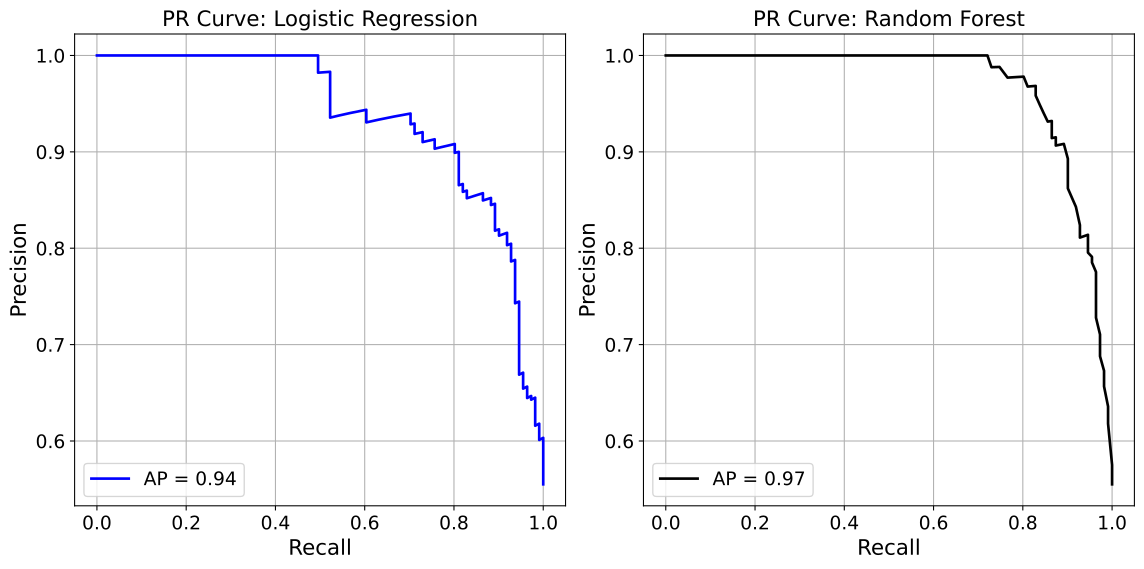
Precision-Recall Example 2: Overlay
In this second Precision-Recall evaluation example, we focus on overlaying the
results of two models: Logistic Regression and Random Forest Classifier, trained
on the synthetic dataset from the Binary Classification Models section onto a single plot. Using the show_pr_curve
function with the overlay=True parameter, the Precision-Recall curves for
both models are displayed together, with Logistic Regression in blue and Random
Forest in black, both with a linewidth=2. The plot includes a custom title
for clarity.
from model_metrics import show_pr_curve

show_pr_curve(
    model=[model1, model2],
    X=X_test,
    y=y_test,
    model_title=model_titles,
    decimal_places=2,
    n_cols=2,
    n_rows=1,
    curve_kwgs={
        "Logistic Regression": {"color": "blue", "linewidth": 2},
        "Random Forest": {"color": "black", "linewidth": 2},
    },
    title="ROC Curves: Logistic Regression and Random Forest",
    overlay=True,
)
Output
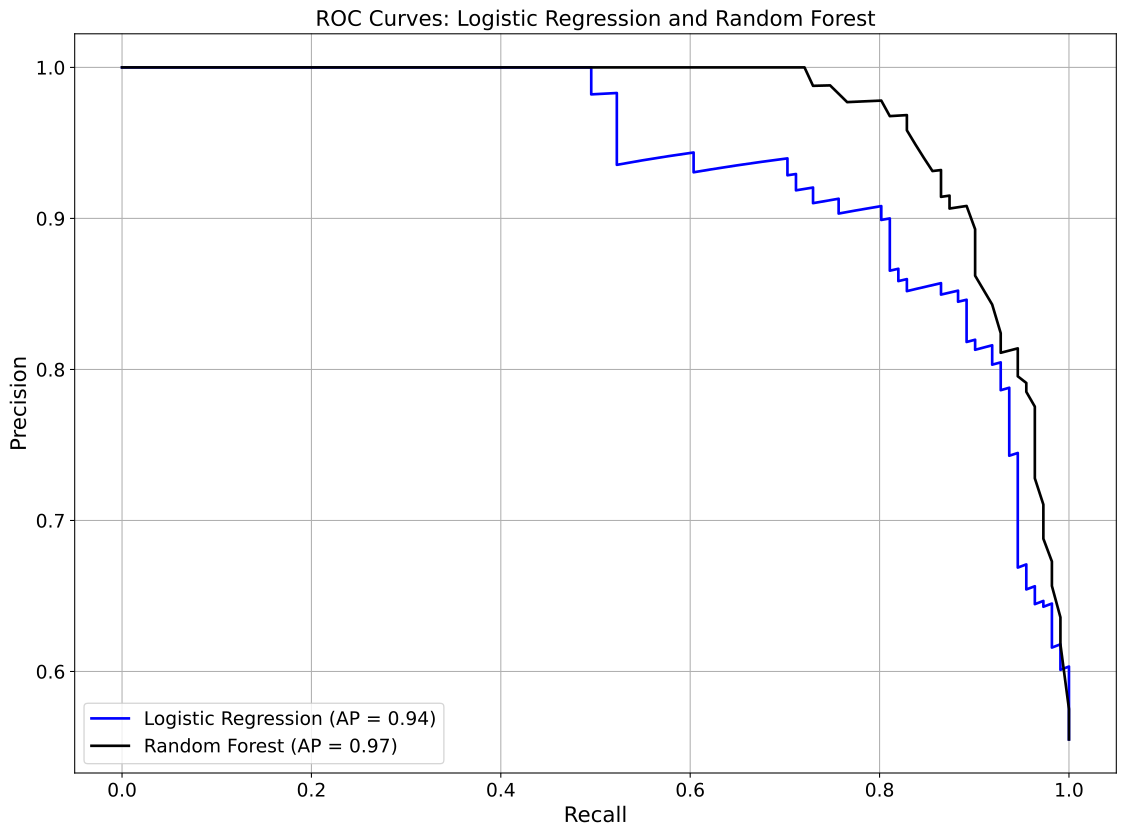
Precision-Recall Example 3: Categorical
In this third Precision-Recall evaluation example, we utilize the well-known Adult Income dataset [2], a widely used benchmark for binary classification tasks. Its rich mix of categorical and numerical features makes it particularly suitable for analyzing model performance across different subgroups.
To build and evaluate our models, we use the model_tuner library [3].
Click here to view the corresponding codebase for this workflow.
The objective here is to assess ROC AUC scores not just overall, but across each category of a selected feature, such as occupation, marital-status, or race. This enables deeper insight into how performance varies by subgroup, which is particularly important for fairness, bias detection, and subgroup-level interpretability.
The show_pr_curve function supports this analysis through the
group_category parameter.
For example, by passing group_category=X_test_2["race"],
you can generate a separate ROC curve for each unique racial group in the dataset:
from model_metrics import show_pr_curve

show_pr_curve(
    model=model_rf["model"].estimator,
    X=X_test,
    y=y_test,
    model_title="Random Forest Classifier",
    decimal_places=2,
    group_category=X_test_2["race"],
)
Output
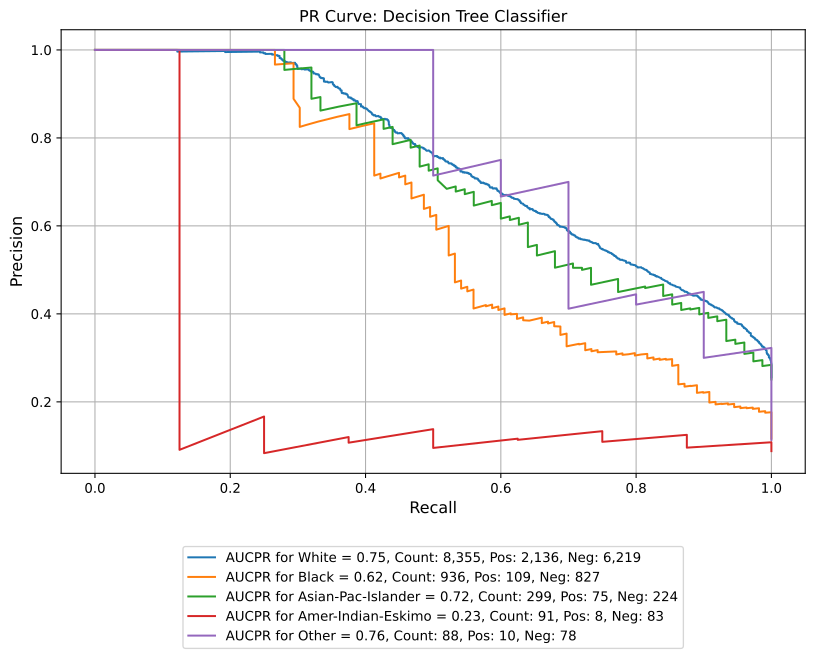
Precision-Recall Example 4: Multiclass One-vs-Rest Curves
For the three models from the Multiclass Classification Models section, each panel draws one PR curve per class. Precision is sensitive to prevalence, so the per-class curves separate more than the ROC curves do: Echo, the rarest class, has the lowest Average Precision for every model.
from model_metrics import show_pr_curve

show_pr_curve(
    model=models,
    model_title=model_titles,
    X=X_test,
    y=y_test,
    class_labels=lab_names,
    subplots=True,
    n_cols=3,
    figsize=(20, 6),
    legend_metric="ap",
    decimal_places=3,
)
Output
AP for Alpha vs rest (Logistic Regression): 0.934
AP for Bravo vs rest (Logistic Regression): 0.900
AP for Charlie vs rest (Logistic Regression): 0.904
AP for Delta vs rest (Logistic Regression): 0.811
AP for Echo vs rest (Logistic Regression): 0.618
Macro AP for Logistic Regression: 0.834
AP for Alpha vs rest (Random Forest): 0.985
AP for Bravo vs rest (Random Forest): 0.953
AP for Charlie vs rest (Random Forest): 0.946
AP for Delta vs rest (Random Forest): 0.919
AP for Echo vs rest (Random Forest): 0.818
Macro AP for Random Forest: 0.924
AP for Alpha vs rest (XGBoost): 0.989
AP for Bravo vs rest (XGBoost): 0.961
AP for Charlie vs rest (XGBoost): 0.960
AP for Delta vs rest (XGBoost): 0.930
AP for Echo vs rest (XGBoost): 0.859
Macro AP for XGBoost: 0.940
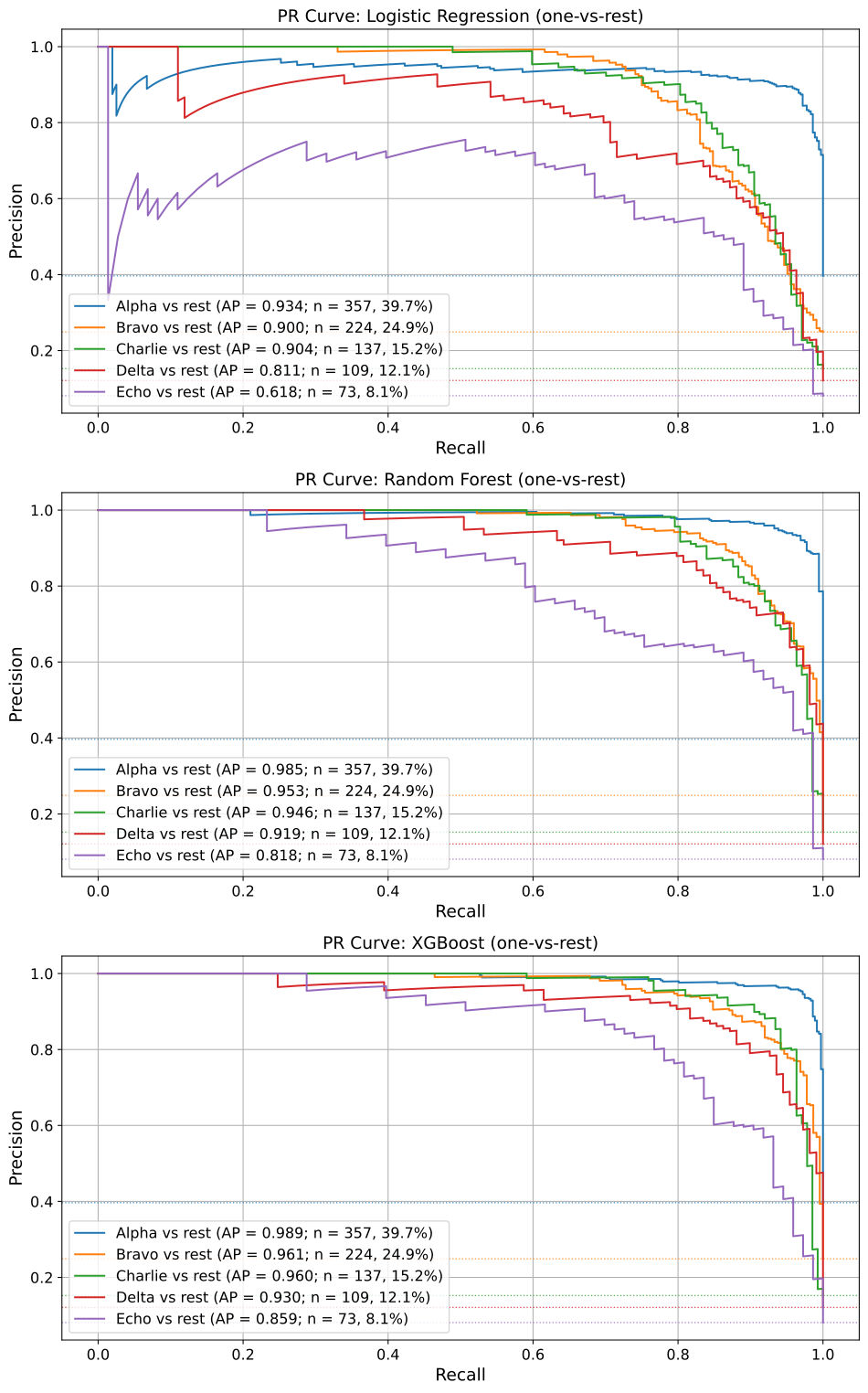
Precision-Recall Example 5: Multiclass Macro-Average Overlay
overlay=True reduces each model to one macro-average PR curve. Here
legend_metric="aucpr" reports the mean per-class area under the PR curve.
from model_metrics import show_pr_curve

show_pr_curve(
    model=models,
    model_title=model_titles,
    X=X_test,
    y=y_test,
    class_labels=lab_names,
    overlay=True,
    legend_metric="aucpr",
    decimal_places=3,
)
Output
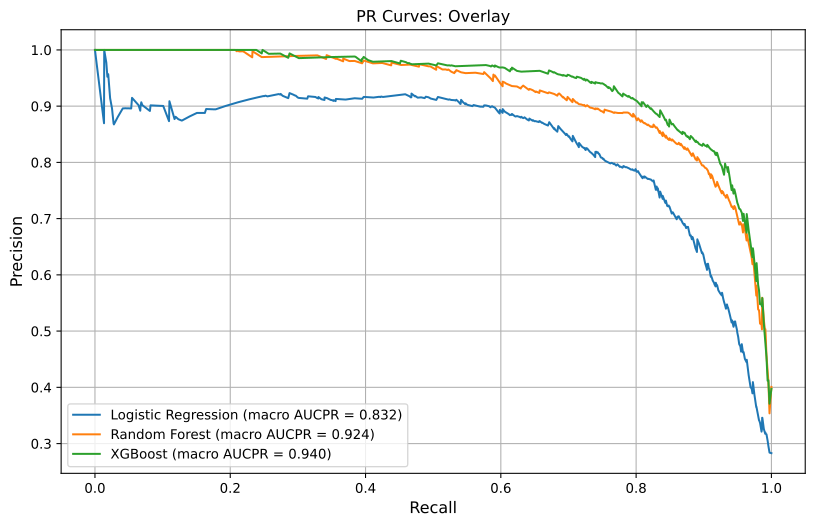
Confusion Matrix Evaluation
This section introduces the show_confusion_matrix function, which provides a
flexible, styled interface for generating and visualizing confusion matrices
across one or more classification models. It supports advanced features like
threshold overrides, subgroup labeling, classification report display, and fully
customizable plot aesthetics including subplot layouts.
The confusion matrix is a fundamental diagnostic tool for classification models, displaying the counts of true positives, true negatives, false positives, and false negatives. This function goes beyond standard implementations by allowing for custom thresholds (globally or per model), label annotation (e.g., TP, FP, etc.), plot exporting, colorbar toggling, and subplot visualization.
This is especially useful when comparing multiple models side-by-side or needing publication-ready confusion matrices for stakeholders.
- show_confusion_matrix(model=None, X=None, y=None, y_prob=None, model_title=None, title=None, model_threshold=None, custom_threshold=None, class_labels=None, cmap='Blues', save_plot=False, image_path_png=None, image_path_svg=None, image_filename=None, text_wrap=None, figsize=(5, 5), labels=True, label_fontsize=12, tick_fontsize=10, inner_fontsize=10, subplots=False, score=None, class_report=False, show_colorbar=False, ax=None, return_df=False, xtick_rotation=None, normalize=None, highlight_diagonal=False, diagonal_kwgs=None, cell_values=None, **kwargs)
- Parameters:
model (object or str or list[object or str], optional) – A single model (object or string), or a list of models or string placeholders. Can be
Noneify_probis provided directly.X (pd.DataFrame or np.ndarray, optional) – Feature matrix used for prediction when
modelis provided. Ignored ify_probis passed directly.y (pd.Series, np.ndarray, or list of array-like) – True target labels. When
y_probis a list of arrays,ymay be a matching list of targets, one per model. See Per-Model Ground Truth.y_prob (array-like, optional) – Predicted probabilities. For binary models, the positive-class probability, converted to class predictions with the threshold. For multiclass models, the full
(n_samples, n_classes)matrix, with columns in sorted class order.model_title (str or list[str], optional) – Custom title(s) for each model. Can be a string or list of strings. If
None, defaults to"Model 1","Model 2", etc.title (str, optional) – Title for each plot. If
"", no title is displayed. IfNone, a default title is shown.model_threshold (dict, optional) – Dictionary of thresholds keyed by model title. Used if
custom_thresholdis not set. Binary classification only.custom_threshold (float, optional) – Global override threshold to apply across all models. If set, takes precedence over
model_threshold. Binary classification only.class_labels (list[str], optional) – Custom labels for the classes in the matrix. For multiclass models, names the model’s classes in
classes_order (position i names encoded class i);ymay hold these names or the encoded labels.cmap (str, optional) – Colormap to use for the heatmap. Defaults to
"Blues".save_plot (bool, optional) – Whether to save the generated plot(s).
image_path_png (str, optional) – Path to save the PNG version of the image.
image_path_svg (str, optional) – Path to save the SVG version of the image.
image_filename (str, optional) – Custom filename for the saved image. When provided, saving is triggered regardless of
save_plot. If it includes a file extension (e.g..png,.svg,.pdf,.jpg,.tiff), the figure is saved verbatim in that format; otherwise it is used as the base name for theimage_path_png/image_path_svgoutputs.text_wrap (int, optional) – Maximum width of plot titles before wrapping.
figsize (tuple[int, int], optional) – Figure size in inches. Defaults to
(5, 5).labels (bool, optional) – Whether to annotate matrix cells with
TP,FP,FN,TN. Binary classification only.label_fontsize (int, optional) – Font size for axis labels and titles.
tick_fontsize (int, optional) – Font size for axis ticks.
inner_fontsize (int, optional) – Font size for numbers and labels inside cells.
subplots (bool, optional) – Whether to display multiple models in a subplot layout.
score (str, optional) – Scoring metric to use when optimizing threshold (if applicable).
class_report (bool, optional) – If
True, prints a classification report below each matrix.show_colorbar (bool, optional) – Whether to display the colorbar on the confusion matrix heatmap. Defaults to
False.ax (matplotlib.axes.Axes, optional) – Pre-created axes to draw onto. When supplied, the function draws onto the provided axes and suppresses
plt.show()andsave_plot_imagescalls. IfNone, a new figure and axes are created automatically. Defaults toNone.return_df (bool, optional) – If
True, also returns the confusion matrices as a dictionary of DataFrames keyed by model title (rowsActual <class>, columnsPredicted <class>). Plots are still drawn. Defaults toFalse.xtick_rotation (float, optional) – Rotation in degrees for the predicted-class (x-axis) labels, right-aligned to their ticks. If
None, 45 for multiclass models and 0 for binary.normalize (str, optional) – Show proportions in place of raw counts.
"true"divides each row by its total (diagonal = per-class recall),"pred"divides each column (diagonal = per-class precision), and"all"divides by the grand total. Colors use a fixed 0 to 1 scale, andreturn_dfreturns the normalized tables. Defaults toNone.highlight_diagonal (bool, optional) – Whether to draw a border around the diagonal (correct-prediction) cells. Defaults to
False.diagonal_kwgs (dict, optional) – Styling for the diagonal borders, passed to
matplotlib.patches.Rectangle. Defaults to a black border with linewidth 2.cell_values (str, optional) – What each cell shows when
normalizeis set:"both"(proportion with the count beneath it, the default),"proportion", or"count". Colors follow the normalized values in every case. Withoutnormalize, cells show counts.kwargs (dict, optional) – Additional keyword arguments for customization (e.g.,
n_cols).
- Returns:
If
return_df=True, a dictionary of confusion matrix DataFrames keyed by model title; otherwiseNone. Displays confusion matrix plots (and optionally saves them).- Return type:
dict[str, pandas.DataFrame] or
None- Raises:
If neither (
modelandX) nory_probis provided.If a threshold is passed for a multiclass model.
If
class_labelsdoes not have one entry per class.If
normalizeis notNone,"true","pred", or"all".If
cell_valuesis invalid, or"proportion"or"both"is requested withoutnormalize.
TypeError – If
model_titleis not a string, a list of strings, orNone.
Important
You can supply either
modelandXor passy_probdirectly.When using
y_prob, the function applies thresholds (custom_thresholdormodel_threshold) to compute predicted labels for the confusion matrix.Supports single-model or multiple-model workflows, with either model objects or arrays of pre-computed probabilities.
When
axis supplied, saving is suppressed; usecombine_plotssave parameters instead.
Notes
- Model Support:
Supports single or multiple classification models.
model_titlemay be inferred automatically or provided explicitly.
- Threshold Handling:
Use
model_thresholdto specify per-model thresholds.custom_thresholdoverrides all other thresholds.
- Plotting Modes:
subplots=Truearranges plots in a subplot grid. Column count is controlled vian_colsinkwargs.Otherwise, plots are displayed one at a time.
- Labeling:
Set
labels=Falseto disable annotating cells withTP,FP,FN,TN.Cells show raw counts by default; with
normalize,cell_valuesselects proportions, counts, or both.
- Multiclass Models:
Detected automatically: a 2D
y_probwith more than two columns, or a model with more than two classes.Predictions are the class with the highest probability, and the matrix is N x N. Rows are true classes and columns are predicted classes.
Axis labels come from
class_labelswhen given, otherwise from the model’sclasses_.The
TP/FP/FN/TNoverlay is binary only and is skipped.Row normalization (
normalize="true") puts per-class recall on the diagonal and makes shading comparable across classes of very different sizes.
- Colorbar and Styling:
Toggle colorbar via
show_colorbar.Colormap and font sizes are fully configurable.
- Saving Plots:
If
save_plot=True, plots are saved asconfusion_matrix_<model_name>.png/svgorconfusion_matrix_subplots.png/svg.If
image_filenameis provided, it overrides the auto-generated filename and triggers saving regardless ofsave_plot. A file extension inimage_filename(e.g..png,.pdf,.jpg,.tiff) selects the output format.When
axis supplied, saving is suppressed in the individual function; usecombine_plotssave parameters instead.
Confusion Matrix Example 1: Threshold=0.5
In this first confusion matrix evaluation example, we focus on showing the results of two models: Logistic Regression and Random Forest Classifier, trained on the synthetic dataset from the Binary Classification Models section onto a single plot.
from model_metrics import show_confusion_matrix

show_confusion_matrix(
    model=[model1, model2],
    X=X_test,
    y=y_test,
    model_title=model_titles,
    cmap="Blues",
    text_wrap=40,
    subplots=True,
    n_cols=2,
    n_rows=1,
    figsize=(6, 6),
)
Output
Confusion Matrix for Logistic Regression:

        Predicted 0  Predicted 1
Actual 0           75           14
Actual 1           20           91

Confusion Matrix for Random Forest:

        Predicted 0  Predicted 1
Actual 0           80            9
Actual 1           15           96
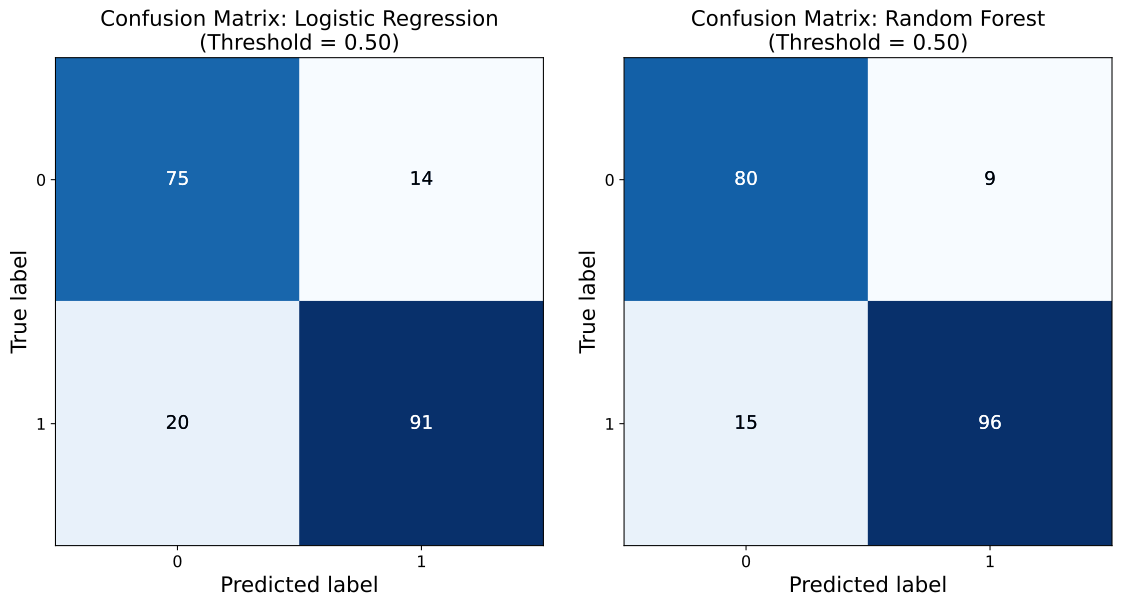
Confusion Matrix Example 2: Classification Report
This second confusion matrix evaluation example is nearly identical to the first,
but uses a different color map (cmap="viridis"), sets show_colorbar=True, and class_report=True
to print classification reports for each model in addition to the visual output.
from model_metrics import show_confusion_matrix

show_confusion_matrix(
    model=[model1, model2],
    X=X_test,
    y=y_test,
    model_title=model_titles,
    cmap="viridis",
    text_wrap=40,
    subplots=True,
    n_cols=2,
    n_rows=1,
    figsize=(6, 6),
    show_colorbar=True,
    class_report=True
)
Output
Confusion Matrix for Logistic Regression:

          Predicted 0  Predicted 1
Actual 0           76           18
Actual 1           13           93

Classification Report for Logistic Regression:

              precision    recall  f1-score   support

           0       0.85      0.81      0.83        94
           1       0.84      0.88      0.86       106

    accuracy                           0.84       200
   macro avg       0.85      0.84      0.84       200
weighted avg       0.85      0.84      0.84       200

Confusion Matrix for Random Forest:

           Predicted 0  Predicted 1
Actual 0            84           10
Actual 1             3          103

Classification Report for Random Forest:

              precision    recall  f1-score   support

           0       0.97      0.89      0.93        94
           1       0.91      0.97      0.94       106

    accuracy                           0.94       200
   macro avg       0.94      0.93      0.93       200
weighted avg       0.94      0.94      0.93       200
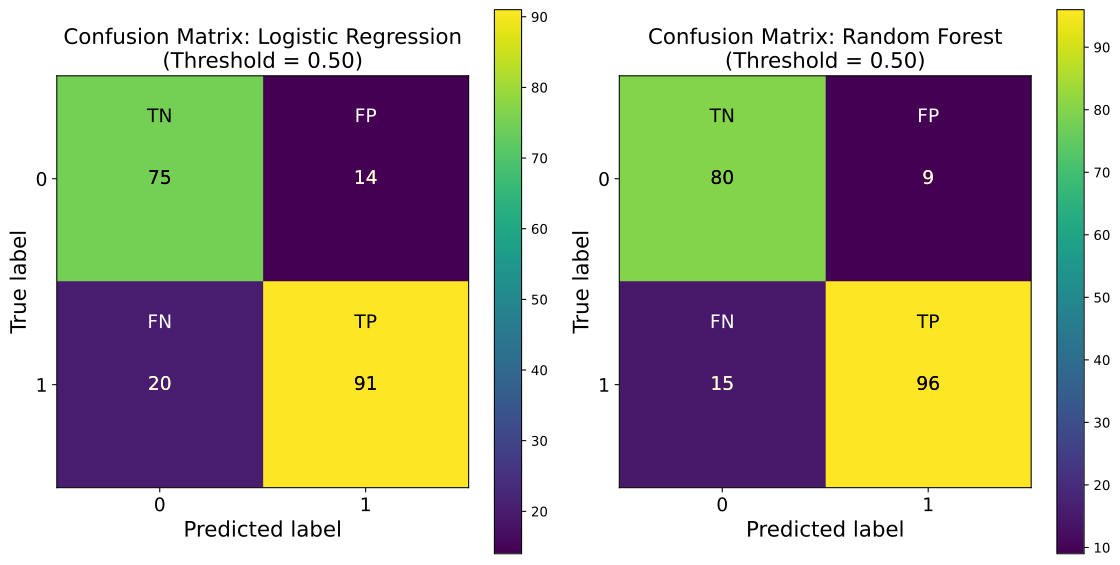
Confusion Matrix Example 3: Threshold = 0.37
In this third confusion matrix evaluation example using the synthetic dataset
from the Binary Classification Models section, we apply
a custom classification threshold of 0.37 using the custom_threshold parameter.
This overrides the default threshold of 0.5 and enables us to inspect how the
confusion matrices shift when a more lenient decision boundary is applied. Refer
to the section on threshold selection logic
for caveats on choosing the right threshold.
This is especially useful in imbalanced classification problems or cost-sensitive environments where the trade-off between precision and recall must be adjusted. By lowering the threshold, we increase the number of positive predictions, which can improve recall but may come at the cost of more false positives.
The output matrices for both models: Logistic Regression and Random Forest are shown side by side in a subplot layout for easy visual comparison.
from model_metrics import show_confusion_matrix

show_confusion_matrix(
    model=[model1, model2],
    X=X_test,
    y=y_test,
    model_title=model_titles,
    text_wrap=40,
    subplots=True,
    n_cols=2,
    n_rows=1,
    figsize=(6, 6),
    custom_threshold=0.37,
)
Output
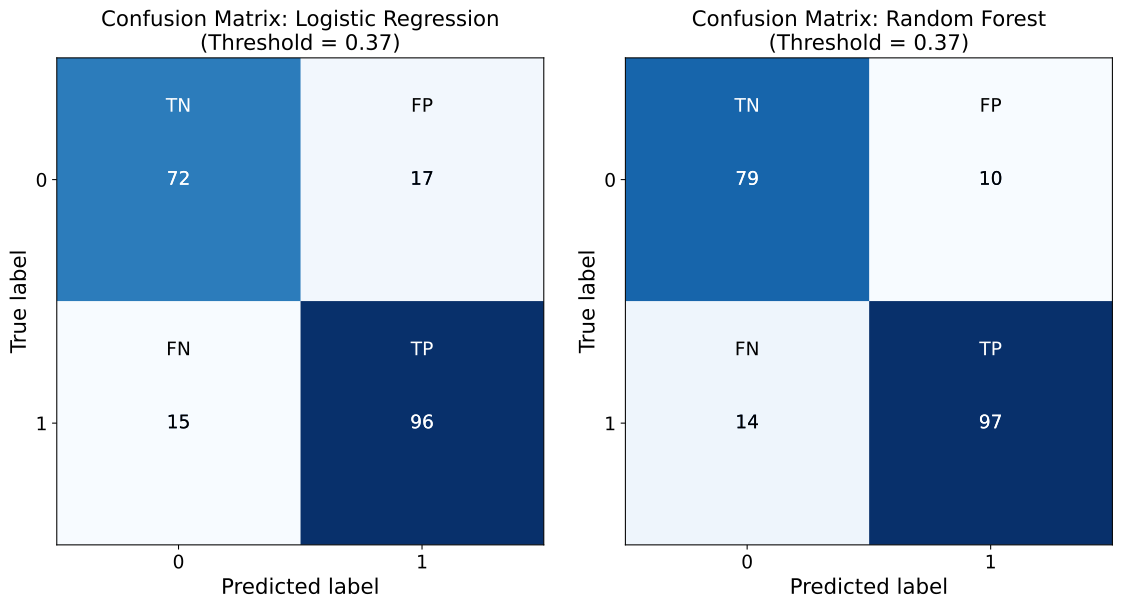
Confusion Matrix Example 4: Multiclass
This example uses the three models from the Multiclass Classification
Models section. Each matrix is 5 x 5: rows are the
true classes and columns are the predicted classes, so correct predictions sit
on the diagonal. class_labels names the classes for the XGBoost model, which
was trained on encoded targets.
from model_metrics import show_confusion_matrix

show_confusion_matrix(
    model=models,
    model_title=model_titles,
    X=X_test,
    y=y_test,
    class_labels=lab_names,
    subplots=True,
    n_cols=3,
    figsize=(6, 6),
)
Output
Confusion Matrix for Logistic Regression:

                Predicted Alpha  Predicted Bravo  Predicted Charlie  \
Actual Alpha                337                7                  4
Actual Bravo                 21              181                 11
Actual Charlie                3               10                111
Actual Delta                  5               11                  0
Actual Echo                  13               11                  1

                Predicted Delta  Predicted Echo
Actual Alpha                  5               4
Actual Bravo                  7               4
Actual Charlie               12               1
Actual Delta                 84               9
Actual Echo                   7              41

Confusion Matrix for Random Forest:

                Predicted Alpha  Predicted Bravo  Predicted Charlie  \
Actual Alpha                350                7                  0
Actual Bravo                 16              200                  2
Actual Charlie                5                6                113
Actual Delta                  3                6                  1
Actual Echo                  13                8                  3

                Predicted Delta  Predicted Echo
Actual Alpha                  0               0
Actual Bravo                  2               4
Actual Charlie               12               1
Actual Delta                 91               8
Actual Echo                   5              44

Confusion Matrix for XGBoost:

                Predicted Alpha  Predicted Bravo  Predicted Charlie  \
Actual Alpha                348                6                  0
Actual Bravo                 13              198                  5
Actual Charlie                3                6                119
Actual Delta                  2                7                  1
Actual Echo                   5                6                  3

                Predicted Delta  Predicted Echo
Actual Alpha                  2               1
Actual Bravo                  3               5
Actual Charlie                7               2
Actual Delta                 95               4
Actual Echo                   5              54
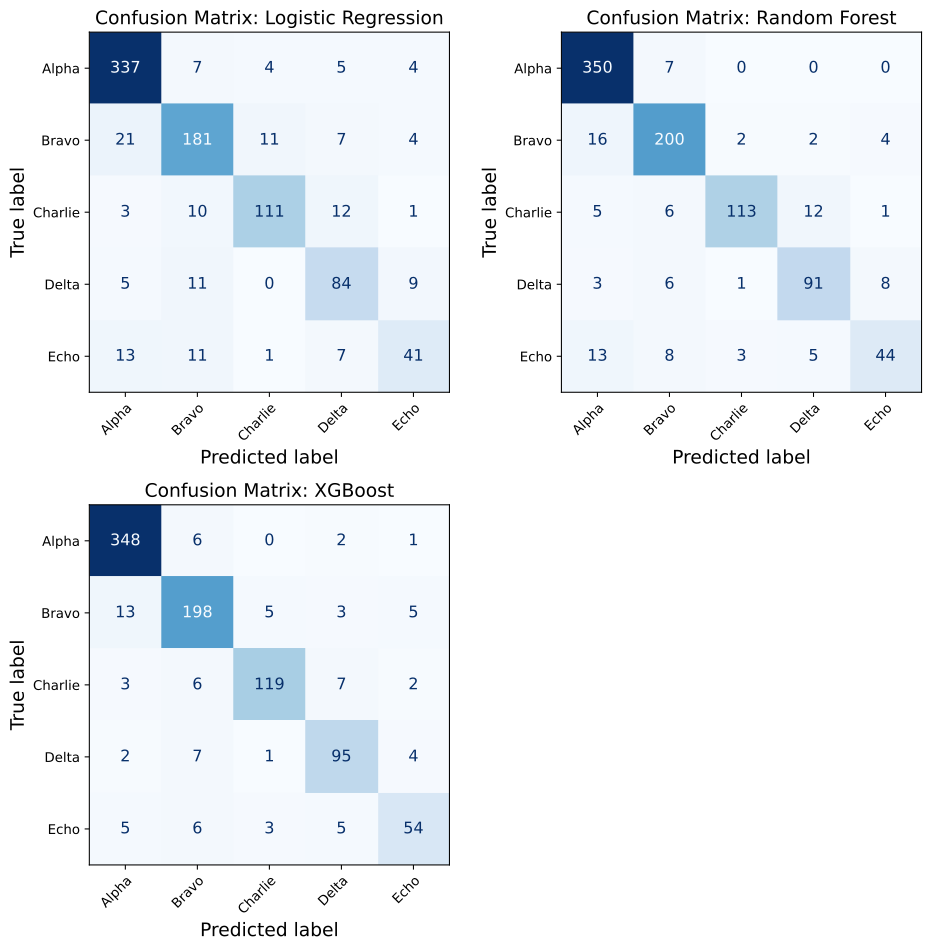
Confusion Matrix Example 5: Row-Normalized With Highlighted Diagonal
Raw counts make large classes look dark and small classes pale, even where the
small class is predicted well. normalize="true" divides each row by its
total, so each cell is the share of that class’s true cases and the diagonal is
per-class recall. Cells show the proportion with the count beneath it, colors
use a fixed 0 to 1 scale so the panels are directly comparable, and
highlight_diagonal=True borders the correct-prediction cells.
return_df=True returns the normalized matrices, keyed by model title.
from model_metrics import show_confusion_matrix

cm_dfs = show_confusion_matrix(
    model=models,
    model_title=model_titles,
    X=X_test,
    y=y_test,
    class_labels=lab_names,
    subplots=True,
    n_cols=3,
    figsize=(6, 6),
    normalize="true",
    highlight_diagonal=True,
    return_df=True,
)

cm_dfs["Random Forest"].round(3)
Output
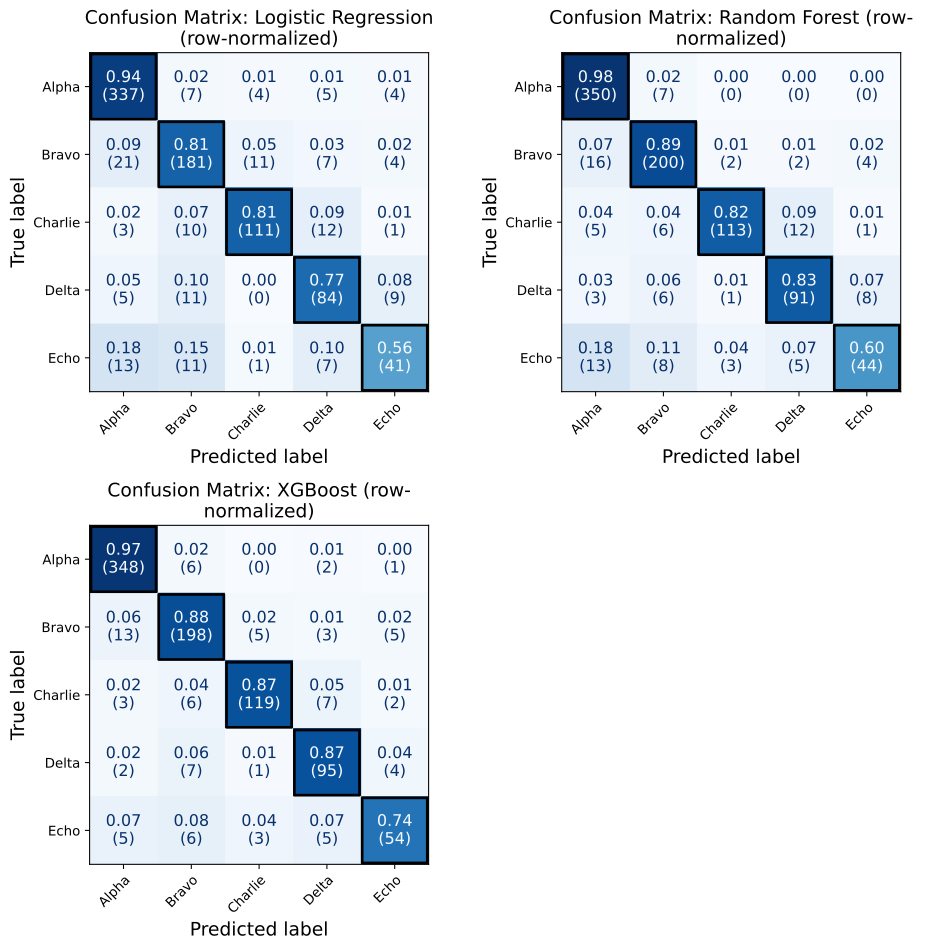
| Predicted Alpha | Predicted Bravo | Predicted Charlie | Predicted Delta | Predicted Echo | |
|---|---|---|---|---|---|
| Actual Alpha | 0.980 | 0.020 | 0.000 | 0.000 | 0.000 |
| Actual Bravo | 0.071 | 0.893 | 0.009 | 0.009 | 0.018 |
| Actual Charlie | 0.036 | 0.044 | 0.825 | 0.088 | 0.007 |
| Actual Delta | 0.028 | 0.055 | 0.009 | 0.835 | 0.073 |
| Actual Echo | 0.178 | 0.110 | 0.041 | 0.068 | 0.603 |
Reading the Random Forest rows, Alpha is recalled 98% of the time while Echo is recalled 60.3% of the time, with 17.8% of Echo cases predicted as Alpha. That pull toward the largest class is easy to miss in raw counts.
Confusion Matrix Example 6: Counts and Column Proportions Side by Side
normalize="pred" divides each column by its total, so the diagonal is
per-class precision: of the cases predicted as a class, the share that truly
belong to it. This example uses combine_plots to place two views of the
XGBoost matrix side by side. Both panels share the same column normalization,
so their shading is identical, and cell_values sets what each one prints:
raw counts on the left, proportions on the right. diagonal_kwgs restyles
the diagonal borders, and label_fontsize is passed to both panels by
combine_plots.
from model_metrics import show_confusion_matrix, combine_plots

shared = dict(
    model=xgb,
    X=X_test,
    y=y_test,
    class_labels=lab_names,
    inner_fontsize=12,
    normalize="pred",
    highlight_diagonal=True,
    diagonal_kwgs={"edgecolor": "red", "linewidth": 1.5},
)

combine_plots(
    [
        (
            show_confusion_matrix,
            {**shared, "cell_values": "count", "title": "XGBoost: Counts"},
        ),
        (
            show_confusion_matrix,
            {
                **shared,
                "cell_values": "proportion",
                "title": "XGBoost: Column Proportions (Precision)",
            },
        ),
    ],
    n_cols=2,
    figsize=(14, 7),
    label_fontsize=14,
)
Output
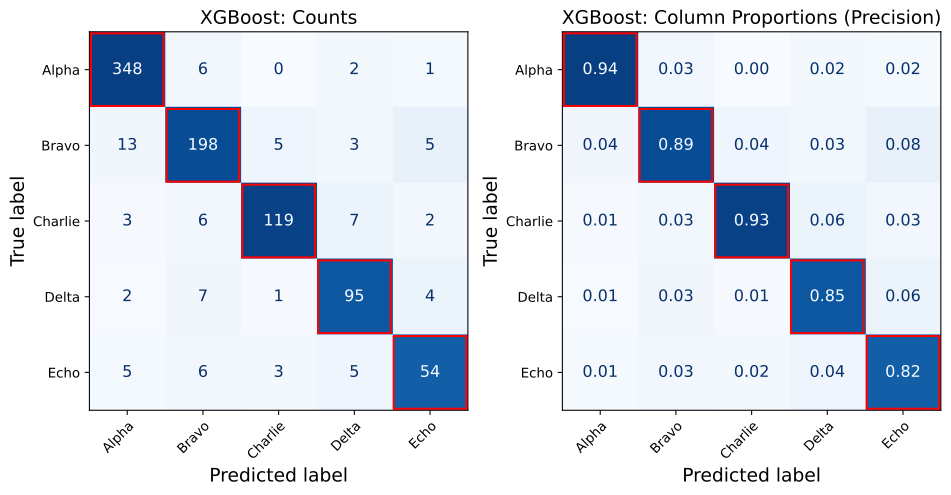
Reading down the Echo column, 54 of the 66 cases predicted as Echo are truly Echo, a precision of 0.82. Echo’s recall in the per-class table is lower (0.740), so the model is more reliable when it predicts Echo than it is at finding every Echo case.
Overlap Venn Diagrams
This section introduces the plot_overlap_venns function, which renders
equal-area Venn diagrams comparing two binary classifiers across any subset
of {“TP”, “FP”, “FN”, “TN”} confusion-matrix categories. It supports advanced
features like flexible prediction-input modes (binary predictions,
probabilities, or fitted models), per-side threshold overrides, custom
titles and colors, fine-grained label visibility toggles, and integration
with combine_plots.
Where a standard confusion matrix shows one model’s classification counts, an overlap Venn shows which observations the two models agree and disagree on within a chosen subpopulation. Each panel renders one category as two intersecting circles: the intersection is the count of observations both models placed in that category, the crescents are the per-side exclusives, and the outside-circle text reports the observations in the subpopulation that neither model placed in the category.
This is especially useful for error analysis when comparing two candidate
models on the same task. The False Negative panel shows how the models
disagree on which actual positives are missed; the True Positive panel
shows which positives each model uniquely catches. Pair with
overlap_table and overlap_summary (covered later in this section)
to drill into the specific observations behind the counts.
- plot_overlap_venns(y_true, y_pred_a=None, y_pred_b=None, *, y_prob_a=None, y_prob_b=None, model_a=None, model_b=None, X_a=None, X_b=None, threshold_a=None, threshold_b=None, score_a=None, score_b=None, categories=('FN', 'TN'), label_a='Model A', label_b='Model B', titles=None, title_pad=None, label_kwgs=None, inner_fontsize=12, outer_fontsize=12, title_fontsize=11, figsize=None, ncols=None, pad=1.08, h_pad=None, w_pad=None, colors=None, alpha=0.4, save_plot=False, image_path_png=None, image_path_svg=None, image_filename=None, ax=None)
- Parameters:
y_true (pd.Series or np.ndarray) – True binary class labels (0 / 1). Coerced to int via
np.asarray(...).ravel().astype(int).y_pred_a (array-like, optional) – Binary predictions from Model A. Mutually exclusive with
y_prob_aandmodel_aon the same side. When supplied directly,threshold_aandscore_aare ignored on that side.y_pred_b (array-like, optional) – Binary predictions from Model B. Same exclusivity rules as
y_pred_a.y_prob_a (array-like, optional) – Positive-class probabilities from Model A. Thresholded internally via
threshold_a(defaults to 0.5 if not set). Mutually exclusive withy_pred_aandmodel_a.y_prob_b (array-like, optional) – Positive-class probabilities from Model B. Same exclusivity and threshold rules as
y_prob_a.model_a (estimator, optional) – Trained model object exposing
.predict()(and.predict_proba()if a threshold is applied). Mutually exclusive withy_pred_aandy_prob_a. Routed through the library’sget_predictionshelper, so any tuned.thresholdattribute on the model is honored automatically.model_b (estimator, optional) – Trained model object for Model B, with the same exclusivity rules and threshold-aware routing as
model_a.X_a (pd.DataFrame or np.ndarray, optional) – Feature matrix for
model_a. Required whenmodel_ais supplied.X_b (pd.DataFrame or np.ndarray, optional) – Feature matrix for
model_b. If both models share the same features, leaveX_b=Noneand it will default toX_a.threshold_a (float, optional) – Per-side explicit threshold override for Model A. When set, used directly as the decision threshold on the
y_prob_aandmodel_apaths. WhenNone, they_prob_apath uses 0.5 and themodel_apath falls back to the model’s stored.thresholdattribute (or 0.5 if absent). Ignored wheny_pred_ais supplied directly.threshold_b (float, optional) – Per-side explicit threshold override for Model B. Same rules as
threshold_a.score_a (str, optional) – Score key used to look up the threshold from the
model_a.thresholddict on themodel_apath. IfNone,get_predictionsfalls back to the first entry in the model’s.scoringlist. Ignored whenthreshold_ais set or wheny_pred_a/y_prob_ais supplied directly.score_b (str, optional) – Score key for
model_b. Same rules asscore_a.categories (str or sequence of str, optional) – Confusion-matrix categories to plot, any subset of {“TP”, “FP”, “FN”, “TN”}. A bare string (e.g.
categories="FN") is accepted as shorthand for a single-category call. Defaults to("FN", "TN").label_a (str, optional) – Display name for Model A, rendered beneath the left circle and inside the A-only region. Defaults to
"Model A".label_b (str, optional) – Display name for Model B, rendered beneath the right circle and inside the B-only region. Defaults to
"Model B".titles (dict, optional) – Per-category title override, e.g.
{"FN": "Missed ED admissions"}. Keys must be a subset of {“TP”, “FP”, “FN”, “TN”}. Any category not in the dict uses the default heading. The auto-generated subpopulation/outside-count line beneath the heading is always preserved.title_pad (float, optional) – Padding in points between the title and the top of the axes, forwarded to
ax.set_title(pad=...).Noneuses matplotlib’s defaultrcParams["axes.titlepad"](normally 6.0).label_kwgs (dict, optional) – Fine-grained visibility toggles for the text decorations on each Venn panel. Recognized keys (all bool, all default True):
show_title,show_subtitle,show_set_labels,show_set_totals,show_inner_count,show_inner_role. Pass only the keys you want to override.inner_fontsize (int, optional) – Font size for the count and role labels inside each Venn region. Defaults to 12.
outer_fontsize (int, optional) – Font size for the set labels rendered beneath each circle. Defaults to 12.
title_fontsize (int, optional) – Font size for the panel title above each Venn diagram. Defaults to 11.
figsize (tuple[float, float], optional) – Figure size in inches. When
Noneand the function creates its own figure, defaults to dynamic sizing computed from title-text length (width floors at 5.5 inches, height fixed at 5.0 inches). Ignored whenaxis supplied.ncols (int, optional) – Number of columns in the panel grid. When
None, defaults to 1 if there is a single category and 2 otherwise.nrowsis derived fromncolsand the category count.pad (float, optional) – Outer figure padding passed to
plt.tight_layout(pad=...). Defaults to 1.08. Only applied when the function creates its own figure.h_pad (float, optional) – Vertical spacing between subplot rows, forwarded to
plt.tight_layout(h_pad=...).w_pad (float, optional) – Horizontal spacing between subplot columns, forwarded to
plt.tight_layout(w_pad=...).colors (tuple, optional) – 2-tuple
(color_a, color_b)sets the A-only and B-only patch colors; the intersection is the RGB midpoint. 3-tuple(color_a, color_b, color_both)specifies the intersection color explicitly. Any matplotlib color spec (named, hex, RGB tuple) works.alpha (float, optional) – Patch transparency applied when
colorsis provided. Defaults to 0.4 (matchesmatplotlib_venn’s stock look).save_plot (bool, optional) – Whether to write the figure to disk via
save_plot_images. Only applied when the function creates its own figure.image_path_png (str, optional) – Directory to save the PNG output.
image_path_svg (str, optional) – Directory to save the SVG output.
image_filename (str, optional) – Custom filename for the saved image. When provided, saving is triggered regardless of
save_plot. If it includes a file extension (e.g..png,.svg,.pdf,.jpg,.tiff), the figure is saved verbatim in that format; otherwise it is used as the base name for theimage_path_png/image_path_svgoutputs.ax (matplotlib.axes.Axes, optional) – Pre-existing axes to nest the Venn grid inside. When supplied, the host ax is removed and its grid slot is subdivided into an
nrows x ncolssub-gridspec to hold all category panels. Used when routing throughcombine_plots; the outer caller ownstight_layout, save, and show in that case.
- Returns:
None. Displays the Venn diagram grid (and optionally saves it).- Return type:
None- Raises:
ValueError – If any value in
categoriesis not one of {“TP”, “FP”, “FN”, “TN”}, if any key intitlesis outside that set, if more than one ofy_pred_*,y_prob_*,model_*is provided on the same side, if a model is provided without a corresponding feature matrix, or ifcolorsis not a 2-tuple or 3-tuple.TypeError – If
model_aormodel_bis supplied but does not implement a.predict()method.
Important
For each side (a, b), supply exactly one of:
y_pred_*(binary predictions),y_prob_*(probabilities, thresholded internally), ormodel_*plusX_*(model called viaget_predictions). Supplying more than one on the same side raisesValueError.When the
model_*path is used, each model’s stored.thresholdattribute is looked up automatically. To compare two tuned models at their respective operating points, pass the fitted model objects and leavethreshold_*unset. To force a common threshold, setthreshold_a=threshold_b=<value>.When comparing a Venn diagram side by side with the corresponding summary table from
overlap_summary, pass the same threshold inputs to both functions or the partition counts will not match.
Notes
- Input Modes:
y_pred_*is the simplest path when predictions have already been computed upstream. The threshold parameters are ignored on this path.y_prob_*is the natural fit when probabilities are in hand and you want explicit control over the decision threshold.model_*plusX_*is the right choice when comparing two tuned models at their stored thresholds.
- Categories:
Plot any subset of {“TP”, “FP”, “FN”, “TN”}. Single category is fine; the function arranges from one to four panels.
The bare-string form
categories="FN"is accepted as shorthand.
- Label Visibility:
All text decorations on each Venn panel are controlled through the
label_kwgsdict.Pass only the keys you want to change; unspecified keys keep their
Truedefaults.For paper figures with explanatory captions, common combinations strip the subtitle and the inner role text, leaving just the title, the model names, and the region counts.
- Colors:
When
colorsis a 2-tuple, the intersection color is computed as the RGB midpoint of the two set colors, withalphaapplied uniformly.For full manual control, pass a 3-tuple
(color_a, color_b, color_both).
- Saving Plots:
If
save_plot=True, the figure is saved asoverlap_venns.png/svg.If
image_filenameis provided, it overrides the auto-generated filename and triggers saving regardless ofsave_plot. A file extension inimage_filename(e.g..png,.pdf,.jpg,.tiff) selects the output format.When
axis supplied (e.g. viacombine_plots), saving is suppressed in this function; usecombine_plotssave parameters instead.
Overlap Venn Example 1: Default FN and TN Panels
In this first example, we plot the default categories ("FN" and "TN")
for two models, Logistic Regression and Random Forest, trained on the
synthetic dataset from the Binary Classification Models section. The False Negative panel shows the overlap of missed
positives between the two models; the True Negative panel shows the overlap of
correctly cleared negatives.
from model_metrics import plot_overlap_venns

plot_overlap_venns(
    y_true=y_test,
    model_a=model_lr["model"],
    model_b=model_rf["model"],
    X_a=X_test,
    label_a="LR",
    label_b="RF",
)
Output
Overlap Venn Example 2: All Four Categories With Custom Titles and Native Thresholds
The second example plots all four confusion-matrix categories in a 2 by 2
grid, with custom per-category titles supplied through the titles
parameter. Custom titles replace only the heading line; the
auto-generated subpopulation summary line beneath each heading is
preserved.
Both models are passed as fitted estimator objects via model_a and
model_b, so each model’s tuned .threshold attribute is picked up
automatically through the library’s get_predictions helper. This means
the Venn shows each classifier at its real operating point rather than the
default 0.5, which is the typical pattern when comparing two
threshold-tuned models in a clinical or imbalanced-classification setting.
Note
To force a specific decision threshold across both models (e.g. for a
Youden or break-even comparison), pass threshold_a and
threshold_b explicitly. To force 0.5 on a tuned model, set
threshold_a=threshold_b=0.5. For models without a stored
.threshold attribute, the function silently falls back to 0.5.
from model_metrics import plot_overlap_venns

plot_overlap_venns(
    y_true=y_test,
    model_a=model_lr["model"],
    model_b=model_rf["model"],
    X_a=X_test,
    categories=("TP", "FP", "FN", "TN"),
    label_a="LR",
    label_b="RF",
    h_pad=10,
    titles={
        "TP": "Correctly Caught",
        "FP": "False Alarms",
        "FN": "Missed Positives",
        "TN": "Correctly Cleared",
    },
    ncols=2,
)
Output
Note
Notice the h_pad=10 parameter to add extra vertical spacing between
the rows of the grid, preventing the titles and subtitles from
overlapping across panels.
Overlap Venn Example 3: Slide-Deck Mode With label_kwgs
The third example uses label_kwgs to strip non-essential chrome from the
panel, producing a cleaner look suited for slides and paper figures where
the surrounding caption already provides context. Here we keep the title and
the model names but drop the auto-generated subtitle, the per-side totals
beneath each circle, and the inner role text inside each region.
Note
The label_kwgs dict accepts six independent boolean toggles, all
default True. Pass only the keys you want to override; unspecified
keys keep their defaults.
show_title: heading line above the Venn diagram.show_subtitle: auto stats line beneath the heading (e.g. “Out of 2,338 actual positives, both catch (TP): 1,421”).show_set_labels: model names beneath each circle.show_set_totals: per-side totals beneath the model names (e.g. “FN total: 864”).show_inner_count: the numeric count inside each region.show_inner_role: the role text inside each region (e.g. “both miss”, “LR”, “DT”).
from model_metrics import plot_overlap_venns

plot_overlap_venns(
    y_true=y_test,
    model_a=model_lr["model"],
    model_b=model_rf["model"],
    X_a=X_test,
    categories=("FN",),
    label_a="LR",
    label_b="RF",
    titles={"FN": "Missed Positives"},
    label_kwgs={
        "show_subtitle":   False,
        "show_set_totals": False,
        "show_inner_role": False,
    },
    colors=("steelblue", "crimson"),
    alpha=0.5,
)
Output
Overlap Venn Example 4: Probability Input With Per-Side Thresholds
The fourth example uses the y_prob_* input path, applying explicit
per-side thresholds. This is the natural pattern when probabilities have
been computed once upstream and the same binarization should be applied
to the Venn, to overlap_summary, and to any other downstream
evaluation. Each model can carry its own tuned threshold, allowing a
direct comparison of two classifiers at their respective operating points
without re-running the models.
from model_metrics import plot_overlap_venns

y_prob_lr = model_lr["model"].predict_proba(X_test)[:, 1]
y_prob_rf = model_rf["model"].predict_proba(X_test)[:, 1]

plot_overlap_venns(
    y_true=y_test,
    y_prob_a=y_prob_lr,
    y_prob_b=y_prob_rf,
    threshold_a=0.37,
    threshold_b=0.42,
    categories=("FN", "TP"),
    label_a="LR",
    label_b="RF",
)
Output
Note
threshold_a and threshold_b are available to apply a custom decision threshold on the model_* or y_prob_* paths, even when the subtitle and the per-side totals are hidden via label_kwgs. This allows you to maintain a clean
visual style while still communicating the operating points of the models being compared. These thresholds can be custom values (e.g. 0.37 and 0.42 in the example), they can be extracted from the model object (if the model was threshold tuned), or they can be set to the same value to force a common decision boundary across both models (e.g. threshold_a=threshold_b=0.5).
Overlap Table
This section introduces the overlap_table function, which returns a
per-observation DataFrame classifying each row as TP/FP/FN/TN for two
classifiers and flagging where they agree. It is the row-level companion to
plot_overlap_venns, exposing the same overlap structure as tabular data
rather than as a figure.
Where a Venn diagram aggregates observations into region counts, the overlap table preserves the per-row detail. This makes it the right tool when you need to drill into specific disagreements (e.g. “which observations did Logistic Regression flag as positive that Random Forest cleared?”) or when you want to merge the overlap structure with other observation-level data for downstream analysis.
A typical workflow pairs plot_overlap_venns for the figure with
overlap_table to inspect the underlying observations and
overlap_summary for the aggregated counts that match the Venn regions.
- overlap_table(y_true, y_pred_a=None, y_pred_b=None, *, y_prob_a=None, y_prob_b=None, model_a=None, model_b=None, X_a=None, X_b=None, threshold_a=None, threshold_b=None, score_a=None, score_b=None, label_a='Model A', label_b='Model B', index=None)
- Parameters:
y_true (pd.Series or np.ndarray) – True binary class labels (0 / 1). Coerced to int via
np.asarray(...).ravel().astype(int).y_pred_a (array-like, optional) – Binary predictions from Model A. Mutually exclusive with
y_prob_aandmodel_aon the same side. When supplied directly,threshold_aandscore_aare ignored on that side.y_pred_b (array-like, optional) – Binary predictions from Model B. Same exclusivity rules as
y_pred_a.y_prob_a (array-like, optional) – Positive-class probabilities from Model A. Thresholded internally via
threshold_a(defaults to 0.5 if not set). Mutually exclusive withy_pred_aandmodel_a.y_prob_b (array-like, optional) – Positive-class probabilities from Model B. Same exclusivity and threshold rules as
y_prob_a.model_a (estimator, optional) – Trained model object exposing
.predict(). Mutually exclusive withy_pred_aandy_prob_a. Routed through the library’sget_predictionshelper, so any tuned.thresholdattribute on the model is honored automatically.model_b (estimator, optional) – Trained model object for Model B, with the same exclusivity rules and threshold-aware routing as
model_a.X_a (pd.DataFrame or np.ndarray, optional) – Feature matrix for
model_a. Required whenmodel_ais supplied.X_b (pd.DataFrame or np.ndarray, optional) – Feature matrix for
model_b. If both models share the same features, leaveX_b=Noneand it will default toX_a.threshold_a (float, optional) – Per-side explicit threshold override for Model A. When set, used directly as the decision threshold on the
y_prob_aandmodel_apaths. WhenNone, they_prob_apath uses 0.5 and themodel_apath falls back to the model’s stored.thresholdattribute (or 0.5 if absent). Ignored wheny_pred_ais supplied directly.threshold_b (float, optional) – Per-side explicit threshold override for Model B. Same rules as
threshold_a.score_a (str, optional) – Score key used to look up the threshold from the
model_a.thresholddict on themodel_apath. IfNone,get_predictionsfalls back to the first entry in the model’s.scoringlist. Ignored whenthreshold_ais set or wheny_pred_a/y_prob_ais supplied directly.score_b (str, optional) – Score key for
model_b. Same rules asscore_a.label_a (str, optional) – Display name for Model A. Used as a column-name stem in the returned DataFrame (
{label_a}_pred,{label_a}_category). Defaults to"Model A".label_b (str, optional) – Display name for Model B. Defaults to
"Model B".index (array-like or pd.Index, optional) – Custom index for the returned DataFrame (e.g. a patient ID series). Defaults to
RangeIndex.
- Returns:
DataFrame with columns
y_true,{label_a}_pred,{label_b}_pred,{label_a}_category,{label_b}_category,agree. One row per observation. The_categorycolumns hold string values from {"TP","FP","FN","TN"}; theagreecolumn is boolean.- Return type:
pd.DataFrame
- Raises:
ValueError – If more than one of
y_pred_*,y_prob_*,model_*is provided on the same side, or if a model is provided without a corresponding feature matrix.TypeError – If
model_aormodel_bis supplied but does not implement a.predict()method.
Important
For each side (a, b), supply exactly one of:
y_pred_*(binary predictions),y_prob_*(probabilities, thresholded internally), ormodel_*plusX_*(model called viaget_predictions). Supplying more than one on the same side raisesValueError.To keep the returned table consistent with the corresponding
plot_overlap_vennsfigure andoverlap_summarytable, pass the same threshold inputs to all three calls. The simplest pattern is to binarize once upstream and pass the resultingy_pred_*arrays to all three functions.The
indexparameter is what makes the table useful for downstream analysis. Passing a patient ID series (or any other observation key) lets you slice into the table by identifier or join with other observation-level data.
Notes
- Category Values:
{label_a}_categoryand{label_b}_categoryhold one of"TP","FP","FN","TN"for every row, computed per-side fromy_trueand the model’s prediction.
- The ``agree`` Flag:
agreeisTruewhen both models placed the observation in the same confusion-matrix category,Falseotherwise.Note that
agree=Truedoes not mean both models were correct. Two models that are both wrong in the same way (both FN or both FP) still agree. Filter ony_trueand the category columns when distinguishing the “both right” cases from the “both wrong” cases.
- Common Use Cases:
Slice
df[~df["agree"]]to inspect every observation the two models disagree on.Filter
df.query("LR_category == 'FN' and RF_category == 'TP'")to find positives that one model caught while the other missed.Merge with patient demographics or clinical data on the supplied
indexfor subgroup analysis of model disagreements.
Overlap Table Example 1: Drilling Into Model Disagreements
This example builds an overlap table for Logistic Regression and Random
Forest trained on the synthetic dataset from the Binary Classification
Models section, indexes by patient ID for
downstream joining, and filters to the rows where the two models disagree.
This is the standard error-analysis entry point: get the table, slice on
~agree, then inspect or join.
from model_metrics import overlap_table

df = overlap_table(
    y_true=y_test,
    model_a=model_lr["model"],
    model_b=model_rf["model"],
    X_a=X_test,
    label_a="LR",
    label_b="RF",
)

print(f"Total observations:    {len(df):,}")
print(f"Disagreement count:    {(~df['agree']).sum():,}")
print(f"Disagreement rate:     {(~df['agree']).mean():.1%}")

disagreements = df[~df["agree"]]
print(disagreements.head())
Output
Total observations:    9,769
Disagreement count:    1,922
Disagreement rate:     19.7%
    y_true  LR_pred  RF_pred LR_category RF_category  agree
1        1        0        1          FN          TP  False
5        1        0        1          FN          TP  False
8        0        0        1          TN          FP  False
10       0        0        1          TN          FP  False
14       0        0        1          TN          FP  False
Overlap Summary
This section introduces the overlap_summary function, which returns a
four-row DataFrame indexed by {TP, FP, FN, TN} with per-category counts
of every Venn region. It is the aggregated companion to
plot_overlap_venns: the numbers it returns are exactly the numbers
rendered on the corresponding Venn panels, making it the natural drop-in
for paper appendices, slide notes, or any context where the table form is
more useful than the figure.
For each confusion-matrix category, the table records the per-model totals
(n_{label_a}, n_{label_b}), the intersection (both), the per-side
exclusive crescents ({label_a}_only, {label_b}_only), the residual
inside the subpopulation but outside both circles (outside), and the
subpopulation denominator (subpop). Two identities hold every row:
Partition:   both + {label_a}_only + {label_b}_only + outside == subpop
Per-model:   n_{label_a} == both + {label_a}_only
             n_{label_b} == both + {label_b}_only
The partition identity is the row-level sanity check. The per-model
decomposition is the bridge to the corresponding Venn: n_{label} is the
full circle for that side, {label}_only is just the crescent.
- overlap_summary(y_true, y_pred_a=None, y_pred_b=None, *, y_prob_a=None, y_prob_b=None, model_a=None, model_b=None, X_a=None, X_b=None, threshold_a=None, threshold_b=None, score_a=None, score_b=None, label_a='Model A', label_b='Model B', verbose=False)
- Parameters:
y_true (pd.Series or np.ndarray) – True binary class labels (0 / 1). Coerced to int via
np.asarray(...).ravel().astype(int).y_pred_a (array-like, optional) – Binary predictions from Model A. Mutually exclusive with
y_prob_aandmodel_aon the same side. When supplied directly,threshold_aandscore_aare ignored on that side.y_pred_b (array-like, optional) – Binary predictions from Model B. Same exclusivity rules as
y_pred_a.y_prob_a (array-like, optional) – Positive-class probabilities from Model A. Thresholded internally via
threshold_a(defaults to 0.5 if not set). Mutually exclusive withy_pred_aandmodel_a.y_prob_b (array-like, optional) – Positive-class probabilities from Model B. Same exclusivity and threshold rules as
y_prob_a.model_a (estimator, optional) – Trained model object exposing
.predict(). Mutually exclusive withy_pred_aandy_prob_a. Routed through the library’sget_predictionshelper, so any tuned.thresholdattribute on the model is honored automatically.model_b (estimator, optional) – Trained model object for Model B, with the same exclusivity rules and threshold-aware routing as
model_a.X_a (pd.DataFrame or np.ndarray, optional) – Feature matrix for
model_a. Required whenmodel_ais supplied.X_b (pd.DataFrame or np.ndarray, optional) – Feature matrix for
model_b. Defaults toX_awhen both models share the same features.threshold_a (float, optional) – Per-side explicit threshold override for Model A. When set, used directly as the decision threshold on the
y_prob_aandmodel_apaths. WhenNone, they_prob_apath uses 0.5 and themodel_apath falls back to the model’s stored.thresholdattribute (or 0.5 if absent). Ignored wheny_pred_ais supplied directly.threshold_b (float, optional) – Per-side explicit threshold override for Model B. Same rules as
threshold_a.score_a (str, optional) – Score key used to look up the threshold from the
model_a.thresholddict on themodel_apath. IfNone,get_predictionsfalls back to the first entry in the model’s.scoringlist. Ignored whenthreshold_ais set or wheny_pred_a/y_prob_ais supplied directly.score_b (str, optional) – Score key for
model_b. Same rules asscore_a.label_a (str, optional) – Display name for Model A. Used as a column-name stem in the returned DataFrame (
n_{label_a},{label_a}_only). Defaults to"Model A".label_b (str, optional) – Display name for Model B. Defaults to
"Model B".verbose (bool, optional) – If
True, print a human-readable column-meaning legend before the DataFrame is returned. Defaults toFalse.
- Returns:
Four-row DataFrame indexed by
{"TP", "FP", "FN", "TN"}with seven columns:n_{label_a},n_{label_b},both,{label_a}_only,{label_b}_only,outside,subpop. The four partition columns sum tosubpopon every row. The per-model totals decompose asn_{label_a} = both + {label_a}_onlyandn_{label_b} = both + {label_b}_only.- Return type:
pd.DataFrame
- Raises:
ValueError – If more than one of
y_pred_*,y_prob_*,model_*is provided on the same side, or if a model is provided without a corresponding feature matrix.TypeError – If
model_aormodel_bis supplied but does not implement a.predict()method.
Important
For each side (a, b), supply exactly one of:
y_pred_*(binary predictions),y_prob_*(probabilities, thresholded internally), ormodel_*plusX_*(model called viaget_predictions). Supplying more than one on the same side raisesValueError.The numbers returned by
overlap_summaryexactly match the regions in aplot_overlap_vennsfigure built from the same inputs. When comparing the two side by side in a report, pass the same threshold inputs to both calls or the partition counts will not line up.The two views in the table (
n_{label}vs{label}_only) represent different relationships to the Venn.n_{label}is the full circle (everything the model placed in this category, including the intersection).{label}_onlyis the exclusive crescent (only what that model alone placed in this category). The legend printed withverbose=Truedocuments both relationships explicitly.
Notes
- Two Identities Per Row:
Partition identity:
both + {label_a}_only + {label_b}_only +
outside == subpop
. Useful as a row-level sanity check when building the table from custom inputs.Per-model decomposition:
n_{label_a} == both + {label_a}_onlyand similarly for B. This is the bridge between the table columns and the Venn circles.
- Subpopulation Denominator:
subpopis the actual-positive count for the TP and FN rows, and the actual-negative count for the FP and TN rows.
- Verbose Output:
With
verbose=True, the legend is printed via Python’sprint()before the DataFrame is returned. In Jupyter, the legend therefore renders above the table.Users who want the legend underneath the table should leave
verbose=Falseand call_print_overlap_summary_legend(...)manually in a separate cell after displaying the DataFrame.
Overlap Summary Example 1: Cross-Referencing With the Venn
This example builds a summary table for Logistic Regression and Random
Forest trained on the synthetic dataset from the Binary Classification
Models section, with verbose=True to print the
column legend above the table. Because both models are passed as fitted
estimator objects, the function looks up each model’s stored .threshold
attribute and applies it automatically. The resulting partition counts
match the Venn panels rendered by plot_overlap_venns on the same inputs
exactly.
from model_metrics import overlap_summary

summary = overlap_summary(
    y_true=y_test,
    model_a=model_lr["model"],
    model_b=model_rf["model"],
    X_a=X_test,
    label_a="LR",
    label_b="RF",
    verbose=True,
)

print(summary)
Output
overlap_summary columns
-----------------------
Rows: confusion-matrix category (TP, FP, FN, TN).

  n_LR             LR's full count for this category (= both + LR_only).
  n_RF             RF's full count for this category (= both + RF_only).
  both             observations both models placed in this category
                   (the venn intersection).
  LR_only          LR placed it here, RF didn't (the LR-exclusive
                   crescent in the venn).
  RF_only          RF placed it here, LR didn't (the RF-exclusive
                   crescent in the venn).
  outside          in the subpop but neither model placed it here.
  subpop           denominator: actual positives for TP/FN,
                   actual negatives for FP/TN.

Two relationships hold every row:
  Partition:  both + LR_only + RF_only + outside == subpop
  Per-model:  n_LR == both + LR_only
              n_RF == both + RF_only

    n_LR  n_RF  both  LR_only  RF_only  outside  subpop
TP  1474  1820  1421       53      399      465    2338
FP  1155  1977   908      247     1069     5207    7431
FN   864   518   465      399       53     1421    2338
TN  6276  5454  5207     1069      247      908    7431
Overlap Crosstabs
The crosstab pair extends the overlap family to a fourth view of the same comparison. Where overlap_summary gives per-category marginal counts and plot_overlap_venns shows per-category region overlap, the crosstab pair shows the full joint distribution of (model_a category, model_b category) in one 4x4 frame. The diagonal is agreement; the off-diagonal valid cells are the TP-swap and FP-swap pairs; eight cells are structurally impossible because y_true is fixed per observation.
Both functions share the same prediction-input block as the rest of the overlap family. Swapping between plot_overlap_venns, overlap_summary, overlap_table, overlap_crosstab, and plot_overlap_crosstab for the same comparison is a one-character edit.
- overlap_crosstab(y_true, y_pred_a=None, y_pred_b=None, *, y_prob_a=None, y_prob_b=None, model_a=None, model_b=None, X_a=None, X_b=None, threshold_a=None, threshold_b=None, score_a=None, score_b=None, label_a='Model A', label_b='Model B', normalize=False, mask_impossible=False, decimal_places=None, verbose=False)
Return the 4x4 joint distribution of confusion-matrix categories for two classifiers as a pandas DataFrame indexed by {TP, FP, FN, TN} on both axes. Each observation is categorized as TP/FP/FN/TN for both models; the returned DataFrame counts every (model_a category, model_b category) pair.
- Parameters:
y_true (array-like) – True binary labels.
y_pred_a (array-like) – Binary predictions for side A. Mutually exclusive with
y_prob_aandmodel_a.y_pred_b (array-like) – Binary predictions for side B. Mutually exclusive with
y_prob_bandmodel_b.y_prob_a (array-like) – Positive-class probabilities for side A, thresholded internally via
threshold_a(default 0.5).y_prob_b (array-like) – Positive-class probabilities for side B, thresholded internally via
threshold_b(default 0.5).model_a (estimator) – Trained classifier exposing
.predict()for side A. Routed throughget_predictions, so any stored.thresholdattribute is picked up automatically.model_b (estimator) – Trained classifier exposing
.predict()for side B. Same routing asmodel_a.X_a (array-like) – Feature matrix for
model_a.X_b (array-like) – Feature matrix for
model_b. Defaults toX_awhen both models share features.threshold_a (float) – Explicit threshold override for side A.
threshold_b (float) – Explicit threshold override for side B.
score_a (str) – Score key for the
model_apath’s.thresholdlookup.score_b (str) – Score key for the
model_bpath’s.thresholdlookup.label_a (str) – Index name of the returned DataFrame. Default
"Model A".label_b (str) – Columns name of the returned DataFrame. Default
"Model B".normalize (bool) – If
True, divide every cell by the total observation count so the matrix sums to 1.0.mask_impossible (bool) – If
True, set the eight structurally impossible cells toNaNinstead of leaving them at 0.decimal_places (int) – If set, round every numeric cell to this many decimal places before returning.
NaNcells produced bymask_impossible=Trueare left untouched. Most useful together withnormalize=Trueto control proportion display. DefaultNoneapplies no rounding.verbose (bool) – If
True, print the cell-meaning legend and the derived swap summary before returning.
- Returns:
4x4 DataFrame indexed by {TP, FP, FN, TN} with the same four columns.
- Return type:
pandas.DataFrame
- Raises:
ValueError – If more than one of
y_pred_*,y_prob_*,model_*is provided on the same side, or if a model is provided without a feature matrix.TypeError – If
model_aormodel_bis supplied but does not implement.predict().
Important
Of the 16 cells in the 4x4 grid, only 8 are reachable. Since y_true is fixed per observation, any cell mixing a positive-subpop category (TP, FN) on one axis with a negative-subpop category (FP, TN) on the other is structurally impossible. A single observation cannot be TP for one model and FP for the other, since y_true is either 1 or 0, not both. The structurally impossible cells are always 0 in the returned DataFrame, or NaN when mask_impossible=True.
Note
The three input modes (y_pred_*, y_prob_*, model_* + X_*) are mutually exclusive per side. The y_prob_* path defaults to threshold 0.5 when threshold_* is not set, because there is no model object to source a stored threshold from. To get consistent counts across the entire overlap family (plot_overlap_venns, overlap_summary, overlap_table, overlap_crosstab), binarize once upstream and pass y_pred_* everywhere. Mixing model objects on one path with raw probabilities on another means one side picks up the stored .threshold while the other defaults to 0.5, and the counts diverge.
Example 1: Two trained models with verbose summary
from model_metrics import overlap_crosstab

ct = overlap_crosstab(
    y_true=y_test,
    model_a=model_lr["model"],
    model_b=model_rf["model"],
    X_a=X_test,
    label_a="LR",
    label_b="RF",
    verbose=True,
)
print(ct)
Output
overlap_crosstab cells
----------------------
Rows: LR's confusion-matrix category.
Cols: RF's confusion-matrix category.

diagonal            agreement: both models put the observation in the
                    same category. (TP,TP), (FP,FP), (FN,FN), (TN,TN).
(TP,FN) / (FN,TP)   TP swap: one model catches an actual positive the
                    other misses.
(FP,TN) / (TN,FP)   FP swap: one model false-alarms on an actual
                    negative the other clears.
impossible cells    the 8 cells mixing a positive-subpop category
                    (TP, FN) with a negative-subpop one (FP, TN). A
                    single observation cannot be, say, TP for one model
                    and FP for the other, because y_true is fixed.
                    Always 0, or NaN when mask_impossible=True.

Swap summary
------------
Agreement:     7,847 / 9,769  (80.3%)
Disagreement:  1,922

Shared TP:     1,460
Shared FN:     375
Shared TN:     5,027
Shared FP:     985

TP swap:       RF catches 489, misses 14 (net +475 TP)
FP swap:       RF adds 1,249, avoids 170 (net +1,079 FP)

RF    TP    FP   FN    TN
LR
TP  1460     0   14     0
FP     0   985    0   170
FN   489     0  375     0
TN     0  1249    0  5027
Example 2: Probabilities with tuned thresholds
ct = overlap_crosstab(
    y_true=y_test,
    y_prob_a=y_prob_lr,
    y_prob_b=y_prob_rf,
    threshold_a=model_thresholds["Logistic Regression"],
    threshold_b=model_thresholds["Random Forest Classifier"],
    label_a="LR",
    label_b="RF",
)
Output
RF    TP    FP   FN    TN
LR
TP  1460     0   14     0
FP     0   985    0   170
FN   489     0  375     0
TN     0  1249    0  5027
Example 3: Normalized proportions
ct_prop = overlap_crosstab(
    y_true=y_test,
    y_pred_a=y_pred_lr,
    y_pred_b=y_pred_rf,
    label_a="LR",
    label_b="RF",
    normalize=True,
    decimal_places=3,
)
# Cells now sum to 1.0; the agreement diagonal reads as the agreement rate.
Output
RF     TP     FP     FN     TN
LR
TP  0.090  0.000  0.007  0.000
FP  0.000  0.018  0.000  0.020
FN  0.029  0.000  0.112  0.000
TN  0.000  0.023  0.000  0.701
- plot_overlap_crosstab(y_true, y_pred_a=None, y_pred_b=None, *, y_prob_a=None, y_prob_b=None, model_a=None, model_b=None, X_a=None, X_b=None, threshold_a=None, threshold_b=None, score_a=None, score_b=None, label_a='Model A', label_b='Model B', title=None, table_only=False, show_summary=True, show_legend=True, colors=None, cell_fontsize=14, label_fontsize=12, title_fontsize=14, summary_fontsize=11, font=None, figsize=None, save_plot=False, image_path_png=None, image_path_svg=None, image_filename=None, ax=None)
Render the 4x4 crosstab as a styled matplotlib figure with three cell colorings (diagonal agreement, off-diagonal swap, structurally impossible), an optional right-hand swap-summary panel, and an optional legend strip beneath the matrix. Calls
overlap_crosstabinternally to compute the joint distribution, then dispatches to three private drawing helpers for the three regions of the figure.Parameter semantics for the prediction-input block (
y_pred_*,y_prob_*,model_*,X_*,threshold_*,score_*,label_*) matchoverlap_crosstabexactly.- Parameters:
title (str) – Figure title.
Nonedefaults to"{label_a} vs {label_b}: Prediction Overlap". Pass""to suppress.table_only (bool) – One-flag shortcut for a bare matrix. Suppresses title, side summary panel, and bottom legend strip. Equivalent to passing
title="",show_summary=False,show_legend=Falsetogether.show_summary (bool) – Render the right-hand swap-summary text block (shared TP / FN / TN / FP counts, TP-swap and FP-swap breakdowns with net deltas).
show_legend (bool) – Render the color-legend strip beneath the matrix.
colors (dict) – Override cell colors. Keys
"agree","disagree","impossible". Unspecified keys keep their defaults (soft green#d4edda, soft pink#f8d7da, soft blue-gray#e2e6ed).cell_fontsize (int) – Font size for the cell counts. Default 14.
label_fontsize (int) – Font size for the row and column headers. Default 12.
title_fontsize (int) – Font size for the title block. Default 14.
summary_fontsize (int) – Font size for the side panel. Default 11.
font (str or list of str) – Font family applied to every text element in the figure. Accepts any matplotlib font family string (e.g.
"Arial","Helvetica","DejaVu Sans","Times New Roman") or a list of fallbacks. Applied viamatplotlib.rc_context, so the override scopes to this call only and does not modify the globalrcParams.figsize (tuple) – Figure size in inches.
Nonetriggers a three-way default:(5, 5)whentable_only=True,(11, 6.5)whenshow_summary=True,(7, 6.5)otherwise.save_plot (bool) – If
True, write the figure to disk usingsave_plot_images.image_path_png (str) – Directory for PNG output when
save_plot=True.image_path_svg (str) – Directory for SVG output when
save_plot=True.image_filename (str) – Filename stem (without extension). Defaults to
"overlap_crosstab".ax (matplotlib.axes.Axes) – Pre-existing axes to nest the figure inside. When supplied, the host
axis released and the slot is carved into a sub-gridspec. This is how the function integrates withcombine_plots. Save controls are suppressed in this mode.
- Returns:
None- Raises:
ValueError – If more than one of
y_pred_*,y_prob_*,model_*is provided on the same side, or iffontis a string that is neither aliased nor installed on the system.TypeError – If
fontis neither a string, a list of strings, norNone.
Important
Cell colors encode three kinds of cells. Green is agreement (diagonal). Pink is valid swap cells (off-diagonal TP-swap and FP-swap pairs). Blue-gray is structurally impossible cells. The matrix uses set_aspect("equal") so cells always render square regardless of figure dimensions; an asymmetric figsize produces a figure of that exact size with whitespace on the wider dimension, since cells will not stretch to fill.
Note
The font parameter expands common cross-platform font names (Arial, Helvetica, Times New Roman, Calibri, Cambria, Tahoma, Georgia, Verdana, Garamond, Consolas, Source Code Pro, Fira Code, JetBrains Mono, Menlo, Monaco, Cascadia Code) through internal alias chains that always terminate in a DejaVu font, which ships with matplotlib. Aliased fonts always succeed even when the named font is not installed, falling back gracefully through the chain. Unaliased fonts that are not installed raise ValueError rather than silently swapping to DejaVu, so typos and missing fonts surface explicitly.
Note
The swap summary panel is framed relative to label_b. Lines read as “what does Model B gain or lose relative to Model A”. When comparing a baseline against a candidate model, put the candidate in the _b slot so the narrative arrow points from baseline (_a) to candidate (_b).
Example 1: Default render
from model_metrics import plot_overlap_crosstab

plot_overlap_crosstab(
    y_true=y_test,
    model_a=model_lr["model"],
    model_b=model_rf["model"],
    X_a=X_test,
    label_a="LR",
    label_b="RF",
)
Output
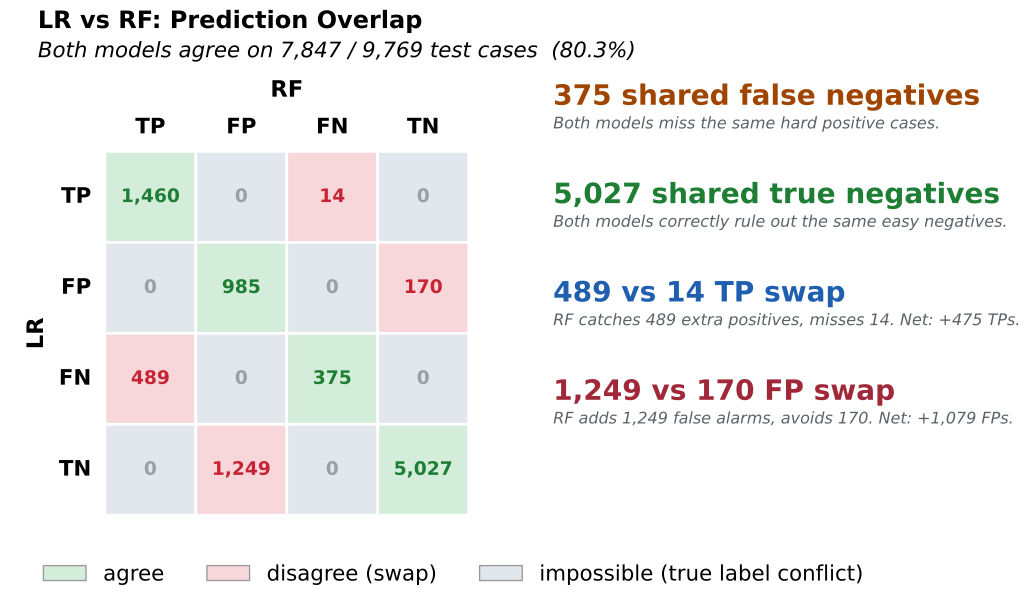
Example 2: Bare matrix for slides (table_only)
plot_overlap_crosstab(
    y_true=y_test,
    y_prob_a=y_prob_lr,
    y_prob_b=y_prob_rf,
    threshold_a=model_thresholds["Logistic Regression"],
    threshold_b=model_thresholds["Random Forest Classifier"],
    label_a="LR",
    label_b="RF",
    table_only=True,
)
Output
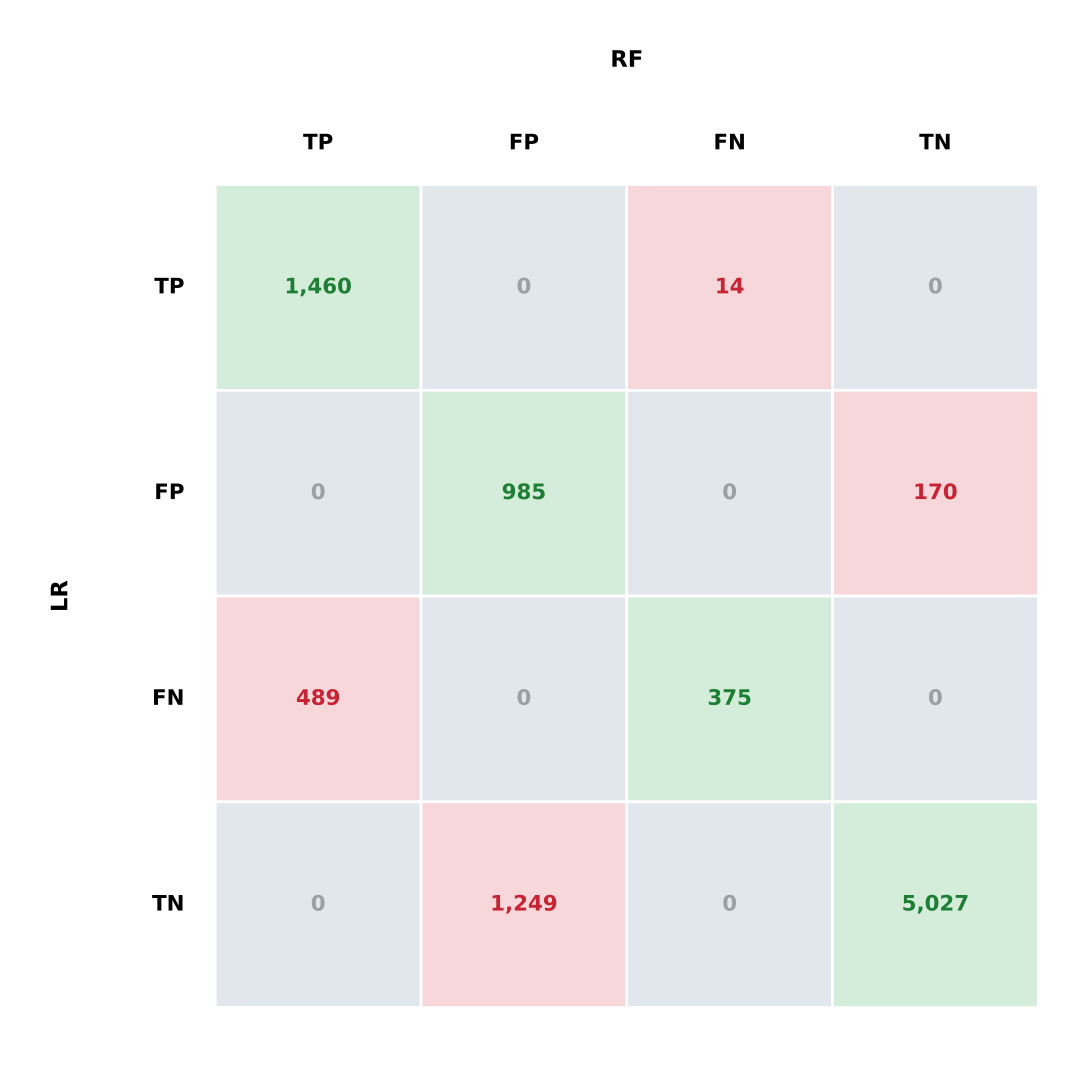
Calibration Curves
This section focuses on calibration curves, a diagnostic tool that compares predicted probabilities to actual outcomes, helping evaluate how well a model’s predicted confidence aligns with observed frequencies. Using models like Logistic Regression or Random Forest on the synthetic dataset from the previous (Binary Classification Models) section, we generate calibration curves to assess the reliability of model probabilities.
Calibration is especially important in domains where probability outputs inform downstream decisions, such as healthcare, finance, and risk management. A well-calibrated model not only predicts the correct class but also outputs meaningful probabilities, for example, when a model predicts a 0.7 probability, we expect roughly 70% of such predictions to be correct.
The show_calibration_curve function simplifies this process by allowing users to
visualize calibration performance across models or subgroups. The plots show the
mean predicted probabilities against the actual observed fractions of positive
cases, with an optional reference line representing perfect calibration.
Additional features include support for overlay or subplot layouts, subgroup
analysis by categorical features, and optional Brier score display, a scalar
measure of calibration quality.
The function offers full control over styling, figure layout, axis labels, and output format, making it easy to generate both exploratory and publication-ready plots.
- show_calibration_curve(model=None, X=None, y_prob=None, y=None, xlabel='Mean Predicted Probability', ylabel='Fraction of Positives', model_title=None, overlay=False, title=None, save_plot=False, image_path_png=None, image_path_svg=None, image_filename=None, text_wrap=None, curve_kwgs=None, subplots=False, n_cols=2, n_rows=None, figsize=None, label_fontsize=12, tick_fontsize=10, bins=10, marker='o', show_brier_score=True, brier_decimals=3, gridlines=True, linestyle_kwgs=None, group_category=None, legend_loc='best', ax=None, class_labels=None, show_class_counts=True, **kwargs)
- Parameters:
model (estimator or list, optional) – A trained classifier or a list of classifiers to evaluate. Can be
Noneify_probis provided directly.X (pd.DataFrame or np.ndarray, optional) – Feature matrix used for predictions when
modelis supplied. Ignored ify_probis passed directly.y_prob (array-like or list of array-like, optional) – Predicted probabilities for the positive class. Can be provided directly instead of
modelandX. For multiclass models, pass the full(n_samples, n_classes)matrix, with columns in sorted class order.y (pd.Series, np.ndarray, or list of array-like) – True binary target values. When
y_probis a list of arrays,ymay be a matching list of targets, one per model. See Per-Model Ground Truth.xlabel (str, optional) – X-axis label. Defaults to
"Mean Predicted Probability".ylabel (str, optional) – Y-axis label. Defaults to
"Fraction of Positives".model_title (str or list[str], optional) – Custom title(s) for the models.
overlay (bool, optional) – If
True, overlays multiple models on one plot.title (str, optional) – Title for the plot. Use
""to suppress.save_plot (bool, optional) – Whether to save the plot(s).
image_path_png (str, optional) – Directory path for PNG export.
image_path_svg (str, optional) – Directory path for SVG export.
image_filename (str, optional) – Custom filename for the saved image. When provided, saving is triggered regardless of
save_plot. If it includes a file extension (e.g..png,.svg,.pdf,.jpg,.tiff), the figure is saved verbatim in that format; otherwise it is used as the base name for theimage_path_png/image_path_svgoutputs.text_wrap (int, optional) – Max characters before title text wraps.
curve_kwgs (list[dict] or dict[str, dict], optional) – Styling options for the calibration curves.
subplots (bool, optional) – Whether to arrange models in a subplot layout.
n_cols (int, optional) – Number of columns in the subplot layout. Defaults to
2.n_rows (int, optional) – Number of rows in the subplot layout. Auto-calculated if
None.figsize (tuple, optional) – Figure size in inches (width, height).
label_fontsize (int, optional) – Font size for axis labels and titles.
tick_fontsize (int, optional) – Font size for ticks and legend entries.
bins (int, optional) – Number of bins used to compute calibration.
marker (str, optional) – Marker style for calibration points.
show_brier_score (bool, optional) – Whether to display Brier score in the legend.
brier_decimals (int, optional) – Number of decimal places to display for the Brier score in legend labels. Defaults to
3.gridlines (bool, optional) – Whether to show gridlines on plots.
linestyle_kwgs (dict, optional) – Styling for the “perfectly calibrated” reference line.
group_category (array-like, optional) – Categorical variable used to create subgroup calibration plots.
legend_loc (str, optional) – Location for the legend. Standard matplotlib locations like
'best','upper right','lower left', etc., or'bottom'to place legend below the plot. Defaults to'best'.ax (matplotlib.axes.Axes, optional) – Pre-created axes to draw onto. When supplied, the function draws onto the provided axes and suppresses
plt.show()andsave_plot_imagescalls. IfNone, a new figure and axes are created automatically. Defaults toNone.class_labels (list[str], optional) – For multiclass models, names for the model’s classes in
classes_order (position i names encoded class i).ymay hold these names or the encoded labels. Legends use the names.show_class_counts (bool, optional) – For multiclass models, append each class’s one-vs-rest support (count and prevalence in
y) to its legend entry. Defaults toTrue.kwargs (dict, optional) – Additional keyword arguments passed to the plot function.
- Returns:
None.Displays or saves calibration plots for classification models.- Return type:
None- Raises:
If
overlay=Trueandsubplots=Trueare both set.If
group_categoryis used withoverlayorsubplots.If
curve_kwgslist does not match number of models.If
overlayorgroup_categoryis used with a multiclass model.
If
model_titleis not a string, list of strings, Series, orNone.
Important
You can supply either
modelandXor passy_probdirectly.When using
y_prob, the function bypasses model predictions and evaluates calibration curves directly from the provided probabilities.brier_decimalscontrols the numeric precision of the Brier score shown in legend entries whenshow_brier_score=True.Supports single-model or multiple-model workflows, including arrays of pre-computed probabilities.
When
axis supplied, saving is suppressed; usecombine_plotssave parameters instead.
Notes
- Calibration vs Discrimination:
Calibration evaluates how well predicted probabilities reflect observed outcomes, while ROC AUC measures a model’s ability to rank predictions.
- Flexible Plotting Modes:
overlay=Trueplots multiple models on one figure.subplots=Truearranges plots in a subplot layout.If neither is set, individual full-size plots are created.
- Group-Wise Analysis:
Passing
group_categoryplots separate calibration curves by subgroup (e.g., age, race).Each subgroup’s Brier score is shown when
show_brier_score=True.
- Customization:
Use
curve_kwgsandlinestyle_kwgsto control styling.Add markers, gridlines, and custom titles to suit report or presentation needs.
- Multiclass Models:
Detected automatically: a 2D
y_probwith more than two columns, or a model with more than two classes.Draws one one-vs-rest reliability curve per class, with that class’s one-vs-rest Brier score (0 to 1) and, when
show_class_counts=True, its count and prevalence in the legend. A model-levelcolorincurve_kwgsis not applied, so the classes stay distinguishable.Use
subplots=Trueto compare models;overlayandgroup_categoryapply to binary models only.
- Saving Outputs:
If
save_plot=True, figures are saved as<name>_Calibration.png/svg,calibration_overlay.png/svg,calibration_subplots.png/svg, or<name>_by_<group>_calibration.png/svg.If
image_filenameis provided, it overrides the auto-generated filename and triggers saving regardless ofsave_plot. A file extension inimage_filename(e.g..png,.pdf,.jpg,.tiff) selects the output format.When
axis supplied, saving is suppressed in the individual function; usecombine_plotssave parameters instead.
Important
Calibration curves are a valuable diagnostic tool for assessing the alignment between predicted probabilities and actual outcomes. By plotting the fraction of positives against predicted probabilities, we can evaluate how well a model’s confidence scores correspond to observed reality. While these plots offer important insights, it’s equally important to understand the assumptions and limitations behind the calibration methods used.
Calibration Curve Example 1: Subplots
This example presents calibration curves for two classification models trained on the well-known Adult Income dataset [2], a widely used benchmark for binary classification tasks. Its rich mix of categorical and numerical features makes it particularly suitable for analyzing model performance across different subgroups.
To build and evaluate our models, we use the model_tuner library [3].
Click here to view the corresponding codebase for this workflow.
The classification models are displayed side by side in a subplot layout. Each
subplot shows how well the predicted probabilities from a model align with the
actual observed outcomes. A diagonal dashed line representing perfect calibration
is included in both plots, and Brier scores are shown in the legend to quantify
each model’s calibration accuracy.
By setting subplots=True, the function automatically arranges the individual plots
based on the number of models and specified columns. This layout is ideal for
visually comparing calibration behavior across models without overlapping lines.
pipelines_or_models = [
model_lr["model"].estimator,
model_rf["model"].estimator,
model_dt["model"].estimator,
]

# Model titles
model_titles = [
    "Logistic Regression",
    "Random Forest Classifier",
    "Decision Tree Classifier",
]

from model_metrics import show_calibration_curve

show_calibration_curve(
    model=pipelines_or_models[:2],
    X=X_test,
    y=y_test,
    model_title=model_titles[:2],
    text_wrap=50,
    bins=10,
    show_brier_score=True,
    subplots=True,
    linestyle_kwgs={"color": "black"},
)
Output
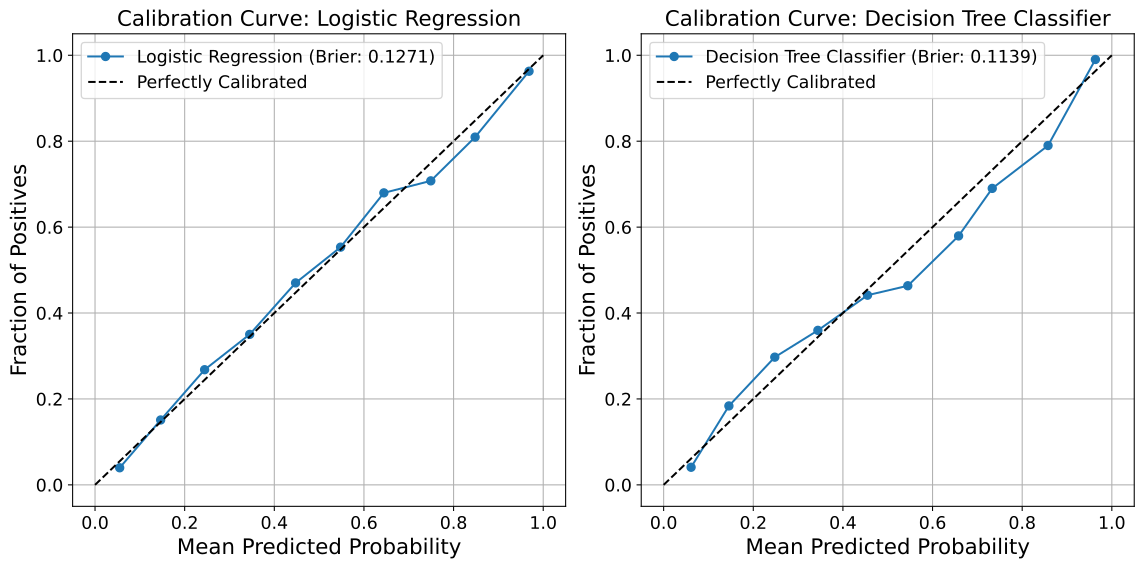
Calibration Curve Example 2: Overlay
This example also uses the well-known Adult Income dataset [2], a widely used benchmark for binary classification tasks. Its rich mix of categorical and numerical features makes it particularly suitable for analyzing model performance across different subgroups.
To build and evaluate our models, we use the model_tuner library [3].
Click here to view the corresponding codebase for this workflow.
This example demonstrates how to overlay calibration curves from multiple classification
models in a single plot. Overlaying allows for direct visual comparison of how predicted
probabilities from each model align with actual outcomes on the same axes.
The diagonal dashed line represents perfect calibration, and Brier scores are included in the legend for each model, providing a quantitative measure of calibration accuracy.
By setting overlay=True, the function combines all model curves into one figure,
making it easier to evaluate relative performance without splitting across subplots.
pipelines_or_models = [
model_lr["model"].estimator,
model_rf["model"].estimator,
model_dt["model"].estimator,
]

# Model titles
model_titles = [
    "Logistic Regression",
    "Random Forest Classifier",
    "Decision Tree Classifier",
]


from model_metrics import show_calibration_curve

show_calibration_curve(
    model=pipelines_or_models,
    X=X_test,
    y=y_test,
    model_title=model_titles,
    bins=10,
    show_brier_score=True,
    overlay=True,
    linestyle_kwgs={"color": "black"},
)
Output
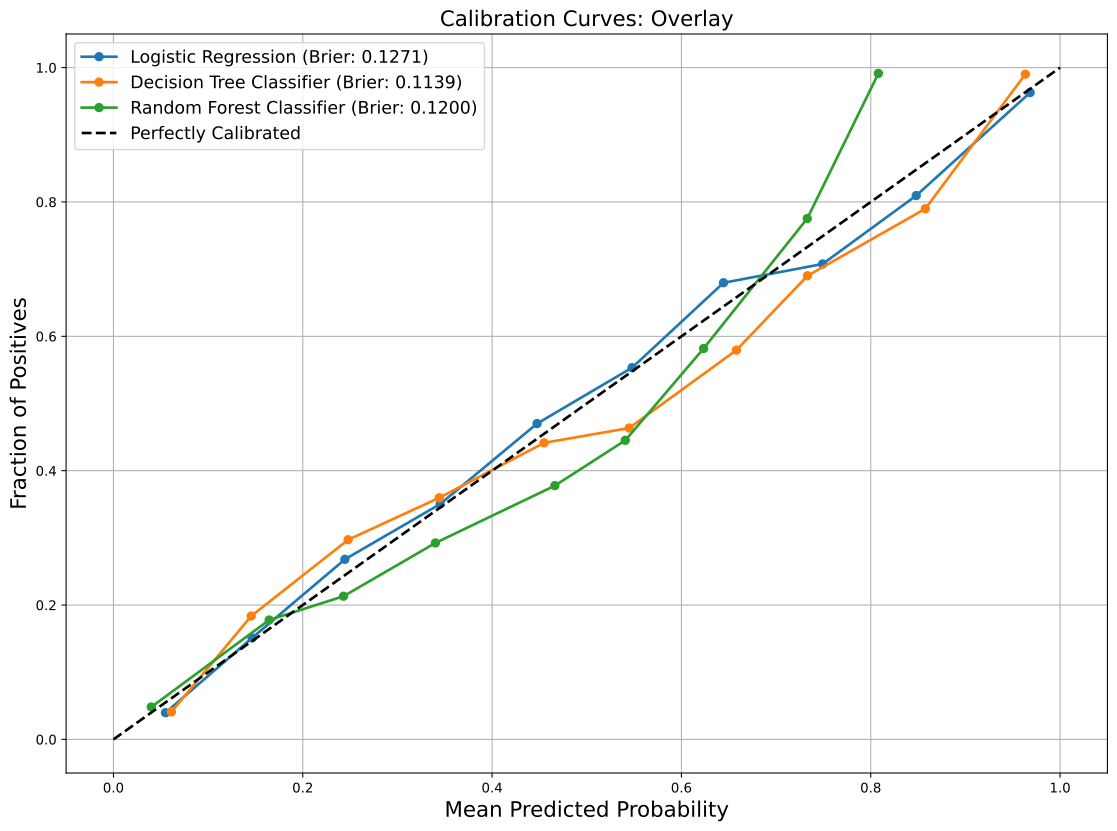
Calibration Curve Example 3: by Category
This example, too, uses the well-known Adult Income dataset [2], a widely used benchmark for binary classification tasks. Its rich mix of categorical and numerical features makes it particularly suitable for analyzing model performance across different subgroups.
To build and evaluate our models, we use the model_tuner library [3].
Click here to view the corresponding codebase for this workflow.
This example shows how to visualize calibration curves separately for each
category within a given feature, in this case, the race column of the joined
test set using a single Random Forest classifier. Each plot represents the
calibration behavior of the model for a specific subgroup, allowing for detailed
insight into how predicted probabilities align with actual outcomes across
demographic categories.
This type of disaggregated visualization is especially useful for fairness
analysis and subgroup performance auditing. By setting group_category="race",
the function automatically detects unique values in the specified column and
generates a separate calibration curve for each.
The dashed diagonal reference line represents perfect calibration. Brier scores are included in each plot to provide a quantitative measure of calibration performance within the group.
Note
When using group_category, both overlay and subplots must be set to
False. This ensures each group receives its own standalone figure, avoiding
conflicting layout behavior.
from model_metrics import show_calibration_curve

show_calibration_curve(
    model=model_rf["model"].estimator,
    X=X_test,
    y=y_test,
    model_title="Random Forest Classifier",
    bins=10,
    show_brier_score=True,
    linestyle_kwgs={"color": "black"},
    curve_kwgs={title: {"linewidth": 2} for title in model_titles},
    group_category=X_test_2["race"],
)
Output
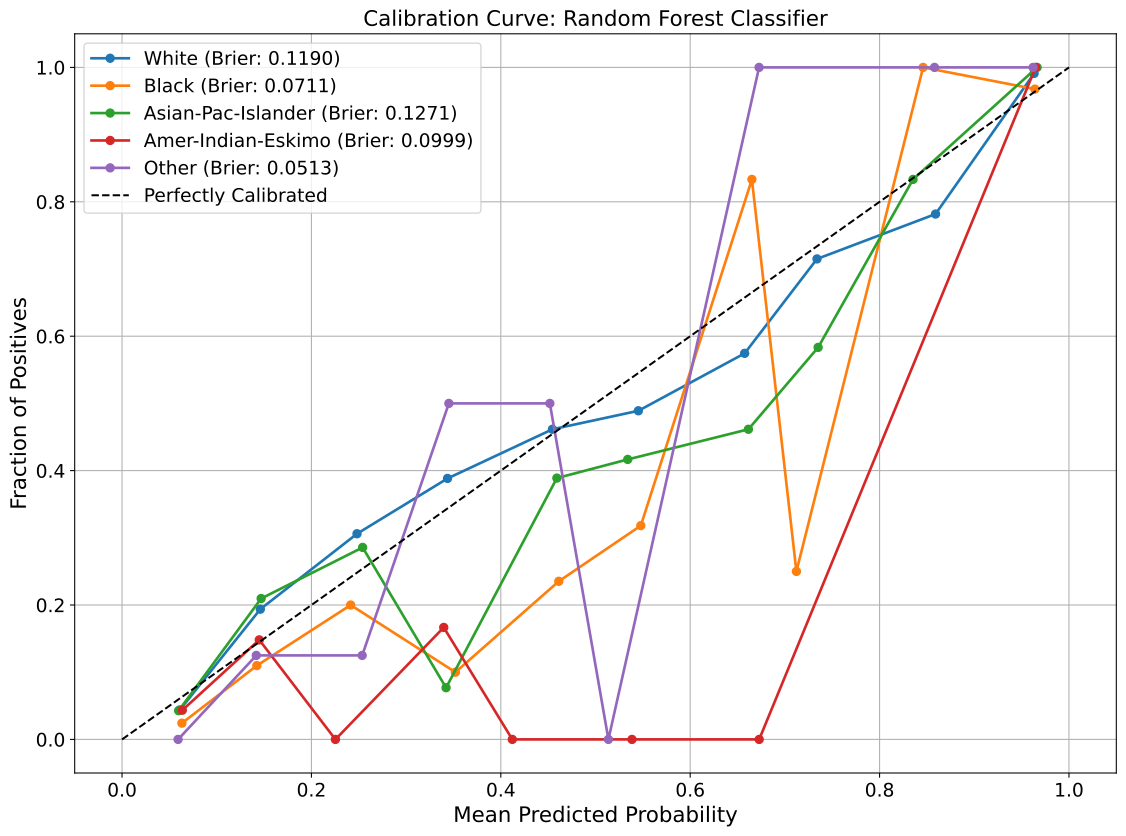
Calibration Curve Example 4: Multiclass One-vs-Rest Curves
For the three models from the Multiclass Classification Models section, each panel draws one reliability curve per class,
comparing that class’s predicted probability with the observed fraction of cases
belonging to it. Rare classes have few samples at high predicted probabilities,
so fewer bins (bins=8 here) keep their curves stable.
from model_metrics import show_calibration_curve

show_calibration_curve(
    model=models,
    model_title=model_titles,
    X=X_test,
    y=y_test,
    class_labels=lab_names,
    subplots=True,
    n_cols=3,
    figsize=(20, 6),
    bins=8,
)
Output
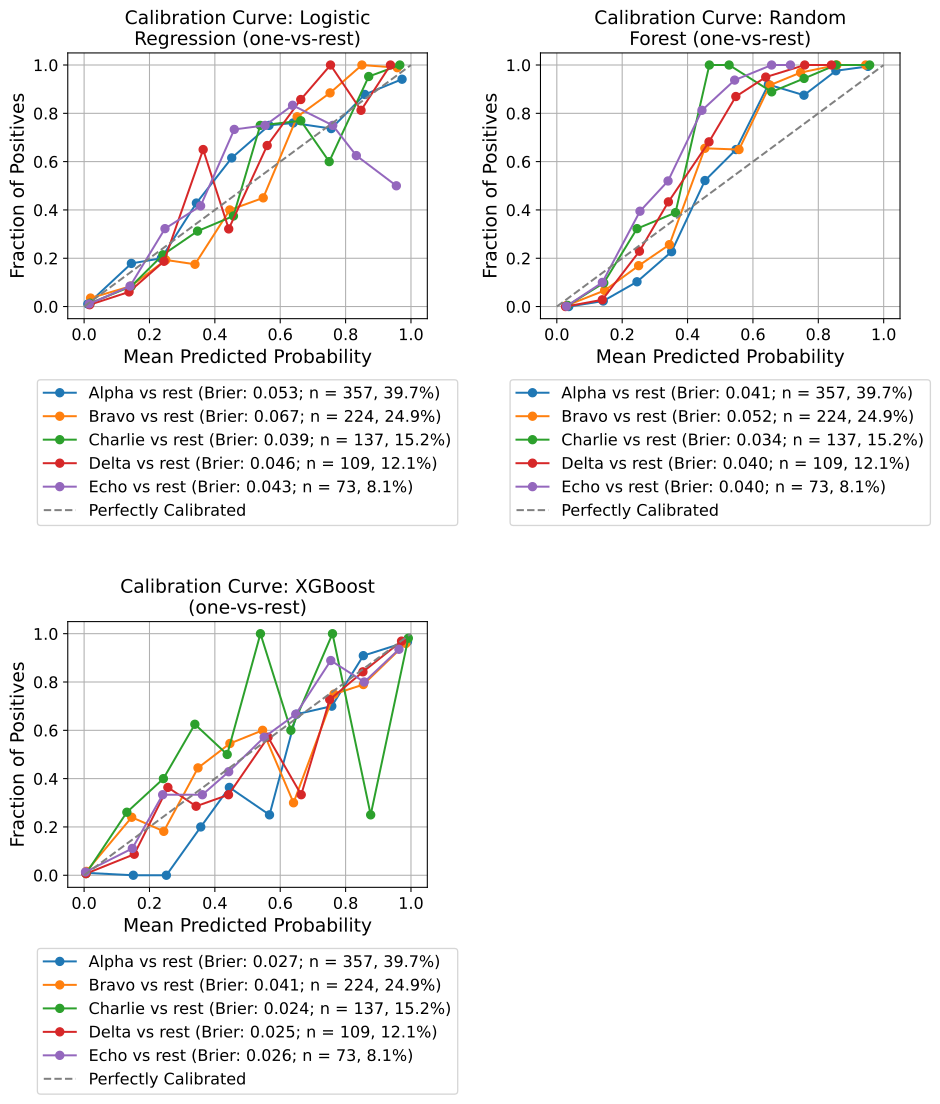
Threshold Metric Curves
This section introduces a powerful utility for exploring how classification thresholds affect key performance metrics, including Precision, Recall, F1 Score, and Specificity. Rather than fixing a threshold (commonly at 0.5), this function allows users to visualize trade-offs across the full range of possible thresholds, making it especially useful when optimizing for use-case-specific goals such as maximizing recall or achieving a minimum precision.
Using the Random Forest Classifier models trained on the adult income dataset [2], this tool helps users answer practical questions like:
What threshold achieves at least 85% precision?
Where does F1 score peak for this model?
How does specificity behave as the threshold increases?
The plot_threshold_metrics function supports optional threshold lookups via
lookup_metric and lookup_value, which prints the closest threshold that
meets your constraint. Plots can be customized with colors, gridlines, line styles,
wrapped titles, and export options.
- plot_threshold_metrics(model=None, X_test=None, y_test=None, y_prob=None, model_title=None, title=None, text_wrap=None, figsize=None, label_fontsize=12, tick_fontsize=10, gridlines=True, baseline_thresh=True, curve_kwgs=None, model_colors=None, metric_colors=None, metric_linestyles=None, baseline_kwgs=None, threshold_kwgs=None, lookup_kwgs=None, legend_loc='bottom', legend_ncol=3, legend_bbox_to_anchor=None, save_plot=False, image_path_png=None, image_path_svg=None, image_filename=None, lookup_metric=None, lookup_value=None, decimal_places=4, model_threshold=None, overlay=False, subplots=False, n_cols=2, n_rows=None, suptitle=None, suptitle_y=0.98, ax=None)
Plot Precision, Recall, F1 Score, and Specificity as functions of the decision threshold for one or multiple models.
Supports single-model, overlay, and subplot grid layouts. When multiple models are provided, each model’s threshold curves are plotted together in a shared or individual axes depending on the display mode selected.
Color encoding adapts to the layout. With a single curve set (a single plot, subplots, or a one-model overlay) each metric gets its own color, matching the familiar red / green / blue / purple scheme. In a multi-model overlay, color instead encodes the model and each metric is given a distinct linestyle, so two cohorts drawn on one axes stay separable. Both mappings are overridable via
model_colors,metric_colors, andmetric_linestyles.- Parameters:
model (estimator or list of estimators, optional) – A trained classification estimator or list of estimators. Must support
predict_proba. Required ify_probis not provided.X_test (pd.DataFrame or np.ndarray, optional) – Feature matrix for evaluation. Required when
modelis supplied.y_test (pd.Series, np.ndarray, or list of array-like) – True binary labels. Required. When a list matching the number of models is supplied alongside
y_prob, each entry is treated as that model’s own ground truth, so models scored on different cohorts (with different row counts) can be overlaid. See Per-Model Ground Truth.y_prob (array-like or list of array-like, optional) – Pre-computed predicted probabilities for the positive class. If multiple models are being evaluated, pass a list of arrays. When provided,
modelandX_testare not required.model_title (str or list of str, optional) – Custom name(s) for the model(s). Defaults to the model class name when model objects are provided, or
"Model 1","Model 2", etc. when onlyy_probarrays are passed.title (str, optional) – Per-plot or per-subplot title. If
None, a default title is shown. If"", no per-plot title is displayed.text_wrap (int, optional) – Maximum width of the title before wrapping onto multiple lines.
figsize (tuple, optional) – Size of the matplotlib figure. Defaults to
(8, 6)for single or overlay plots and(n_cols * 8, n_rows * 6)for subplots.label_fontsize (int, optional) – Font size for axis labels and title. Defaults to
12.tick_fontsize (int, optional) – Font size for tick labels. Defaults to
10.gridlines (bool, optional) – Whether to show gridlines. Defaults to
True.baseline_thresh (bool, optional) – If
True, draws a vertical reference line at threshold = 0.5. In overlay mode the line is drawn once for the axes rather than once per model. Defaults toTrue.curve_kwgs (dict or list of dict, optional) – Styling applied to the metric curves. A flat dict (e.g.
{"linewidth": 2}) is applied to every curve of every model. A dict keyed by model title, or a list aligned with the models, applies per-model styling. Values set here override the automatic color and linestyle assignment.model_colors (sequence of color specs, optional) – Colors used per model in a multi-model overlay, cycled if shorter than the model count. Ignored when color encodes the metric.
metric_colors (dict, optional) – Metric-to-color mapping used when color encodes the metric. Keys are
"F1 Score","Recall","Precision","Specificity". Unspecified keys keep their defaults.metric_linestyles (dict, optional) – Metric-to-linestyle mapping used when color encodes the model. Same keys as
metric_colors. Unspecified keys keep their defaults.baseline_kwgs (dict, optional) – Styling options for the baseline (0.5) threshold line. Defaults to a black dotted line.
threshold_kwgs (dict, optional) – Styling options for the model threshold line when
model_thresholdis provided. Defaults to a black dotted line.lookup_kwgs (dict, optional) – Styling options for the lookup threshold line when
lookup_metricandlookup_valueare provided. Defaults to a gray dashed line.legend_loc (str, optional) – Legend location. Standard matplotlib locations, or
"bottom"to place the legend beneath the axes. Defaults to"bottom".legend_ncol (int, optional) – Number of legend columns. A multi-model overlay produces four entries per model plus the reference lines, so raising this keeps the legend from running past the axes width. Matplotlib fills columns top to bottom, so with two cohorts and
legend_ncol=2each column reads as one cohort. Defaults to3.legend_bbox_to_anchor (tuple, optional) – Explicit anchor for the legend when
legend_loc="bottom". When omitted, the anchor scales with the number of legend rows so multi-model overlays clear the x-axis label automatically. Set it explicitly when the automatic value drops the legend too far, which can happen insidecombine_plots.save_plot (bool, optional) – If
True, saves the plot to disk. Defaults toFalse.image_path_png (str, optional) – Path to save the plot as a PNG image.
image_path_svg (str, optional) – Path to save the plot as an SVG image.
image_filename (str, optional) – Custom filename for the saved image. When provided, saving is triggered regardless of
save_plot. If it includes a file extension (e.g..png,.svg,.pdf,.jpg,.tiff), the figure is saved verbatim in that format; otherwise it is used as the base name for theimage_path_png/image_path_svgoutputs.lookup_metric (str, optional) – Metric used to locate the threshold closest to
lookup_value. One of"precision","recall","f1", or"specificity".lookup_value (float, optional) – Target value for
lookup_metric. Must be provided together withlookup_metric.decimal_places (int, optional) – Number of decimal places for reported thresholds. Defaults to
4.model_threshold (float, sequence of float, or dict, optional) – A model-specific threshold to highlight with a vertical line. A scalar is broadcast to all models. A sequence must be aligned with the models and match their count. A dict must be keyed by model title, with an entry for every model. In overlay mode, distinct thresholds are each drawn and labeled with their model name; a threshold shared by every model is drawn once.
overlay (bool, optional) – If
True, plots all models on a single shared axes. Cannot be used withsubplots=True. Defaults toFalse.subplots (bool, optional) – If
True, plots each model in its own subplot. Cannot be used withoverlay=True. Defaults toFalse.n_cols (int, optional) – Number of columns in the subplot grid. Only used when
subplots=True. Defaults to2.n_rows (int, optional) – Number of rows in the subplot grid. If not specified, calculated automatically from the number of models and
n_cols.suptitle (str, optional) – Overall figure title shown above all subplots when
subplots=True. IfNone, defaults to"Threshold Metrics". If"", no suptitle is displayed. Has no effect whensubplots=False.suptitle_y (float, optional) – Vertical position of the suptitle in the 0-1 range. Increase slightly (e.g.
1.01) if the title overlaps the top row of subplots. Defaults to0.98.ax (matplotlib.axes.Axes, optional) – Pre-created axes to draw onto. When supplied, the function draws onto the provided axes and suppresses
plt.show()andsave_plot_imagescalls. IfNone, a new figure and axes are created automatically. Defaults toNone.
- Returns:
None.Displays (and optionally saves) the threshold metrics plot.- Return type:
None- Raises:
If
y_testis not provided.If neither (
modelandX_test) nory_probis provided.If only one of
lookup_metricorlookup_valueis provided.If both
overlay=Trueandsubplots=Trueare set.If
model_thresholdis a sequence whose length does not match the number of models.
KeyError – If
model_thresholdis a dict lacking an entry for any model title.TypeError – If
model_thresholdis not a number, sequence, or dict.
Important
You can supply either
modelandX_testor passy_probdirectly.When using
y_prob, the function bypasses model inference and uses the provided probabilities.overlayandsubplotsare mutually exclusive.suptitleandtitleare independent:suptitlecontrols the overall figure heading for subplots,titlecontrols per-subplot headings.When
axis supplied, saving is suppressed; usecombine_plotssave parameters instead.
Notes
- Metric Curves:
Plots include
Precision,Recall,F1 Score, andSpecificityover threshold values.Useful for analyzing how changing the threshold alters model behavior.
- Multi-Model Support:
Pass a list of models or
y_probarrays to compare multiple models.Use
overlay=Truefor a single shared plot orsubplots=Truefor a grid layout.Model titles default to the class name when model objects are provided.
Pass a list of
y_testarrays alongside a list ofy_probarrays to overlay models scored on different cohorts.
- Color Encoding:
Single curve set (single plot, subplots, one-model overlay): color encodes the metric.
Multi-model overlay: color encodes the model, linestyle encodes the metric.
Two colors with four dash patterns stays readable at panel size, where eight distinct colors does not.
Override with
model_colors,metric_colors, ormetric_linestyles; an explicitcurve_kwgscolor takes precedence over both.
- Legend Layout:
Curve labels are prefixed with the model name at draw time in overlay mode, so every model is labeled consistently.
Reference lines belong to the axes, not to any one model, and are emitted once rather than stacking duplicates.
legend_ncolreflows the legend; the bottom anchor scales with the resulting row count unlesslegend_bbox_to_anchoris set.
- Threshold Lookup:
Set
lookup_metricandlookup_valueto find the closest threshold that meets your constraint.Prints the result to the console and highlights the corresponding vertical line.
- Three optional vertical guides are supported:
Baseline at 0.5 (
baseline_thresh=True).model_threshold(e.g., a tuned decision threshold, one per model when passing a list).A threshold found by targeting
lookup_metricatlookup_value.
- Styling Options:
Customize plot curves with
curve_kwgs.Adjust baseline, model threshold, and lookup line styles via
baseline_kwgs,threshold_kwgs, andlookup_kwgs.
- Saving Plots:
If
save_plot=True, figures are saved asthreshold_metrics_<name>.png/svg,threshold_metrics_<name>_<lookup_metric>.png/svg,threshold_metrics_overlay.png/svg, orthreshold_metrics_subplots.png/svg.If
image_filenameis provided, it overrides the auto-generated filename and triggers saving regardless ofsave_plot. A file extension inimage_filename(e.g..png,.pdf,.jpg,.tiff) selects the output format.When
axis supplied, saving is suppressed in the individual function; usecombine_plotssave parameters instead.
- Interactivity:
Ideal for presentations or dashboards where visualizing threshold sensitivity is crucial.
Particularly helpful for domains like healthcare, fraud detection, or content moderation where the cost of false positives vs. false negatives must be carefully managed.
Threshold Curves Example 1: Threshold=0.5
This example demonstrates how to plot threshold-dependent classification metrics using a Random Forest Classifier trained on the adult income dataset [2].
The plot_threshold_metrics function visualizes how Precision, Recall, F1 Score,
and Specificity change as the decision threshold varies. In this configuration,
the baseline threshold line at 0.5 is enabled (baseline_thresh=True),
and the line styling is customized via curve_kwgs. Font sizes and wrapping options
are adjusted for improved clarity in presentation-ready plots.
from model_metrics import plot_threshold_metrics

plot_threshold_metrics(
    model=model_rf["model"].estimator,
    X_test=X_test,
    y_test=y_test,
    baseline_thresh=True,
    baseline_kwgs={
        "color": "purple",
        "linestyle": "--",
        "linewidth": 2,
    },
    curve_kwgs={
        "linestyle": "-",
        "linewidth": 2,
    },
    text_wrap=40,
)
Output
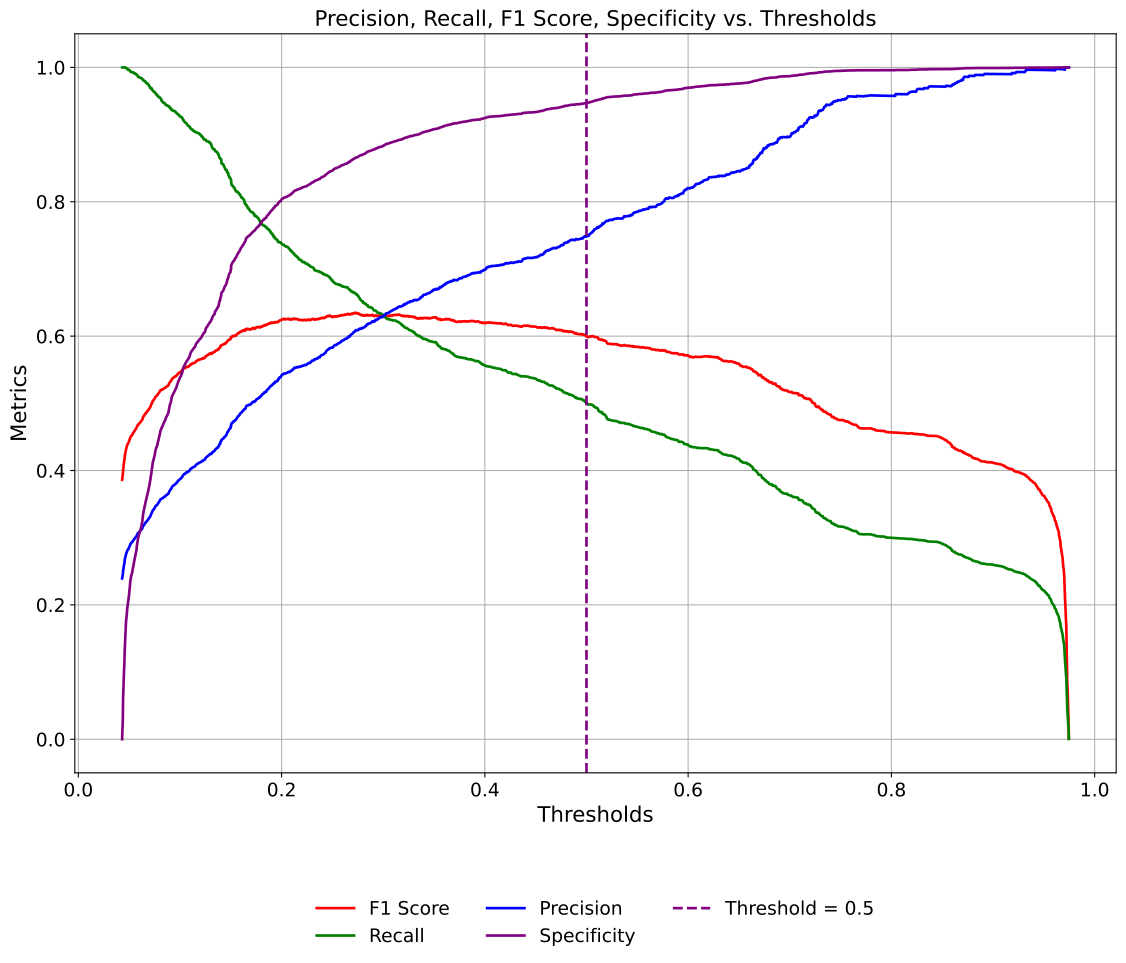
Threshold Curves Example 2: Targeted Metric Lookup
This example expands on threshold-based classification metric visualization using
a targeted lookup scenario. Suppose a clinical stakeholder or domain expert has
determined (based on prior research, cost-benefit considerations, or operational
constraints) that a precision of approximately 0.879 is ideal for downstream
decision-making (e.g., minimizing false positives in a healthcare setting).
The plot_threshold_metrics function accepts the optional arguments lookup_metric
and lookup_value to help identify the threshold that best aligns with this target.
When these are set, the function automatically locates and highlights the threshold
that most closely achieves the desired metric value, offering transparency and
guidance for threshold tuning.
from model_metrics import plot_threshold_metrics

plot_threshold_metrics(
    model=model_rf["model"].estimator,
    X_test=X_test,
    y_test=y_test,
    lookup_metric="precision",
    lookup_value=0.879,
    baseline_thresh=False,
    lookup_kwgs={
        "color": "red",
        "linestyle": "--",
        "linewidth": 2,
    },
    curve_kwgs={
        "linestyle": "-",
        "linewidth": 2,
    },
    text_wrap=40,
)
Output
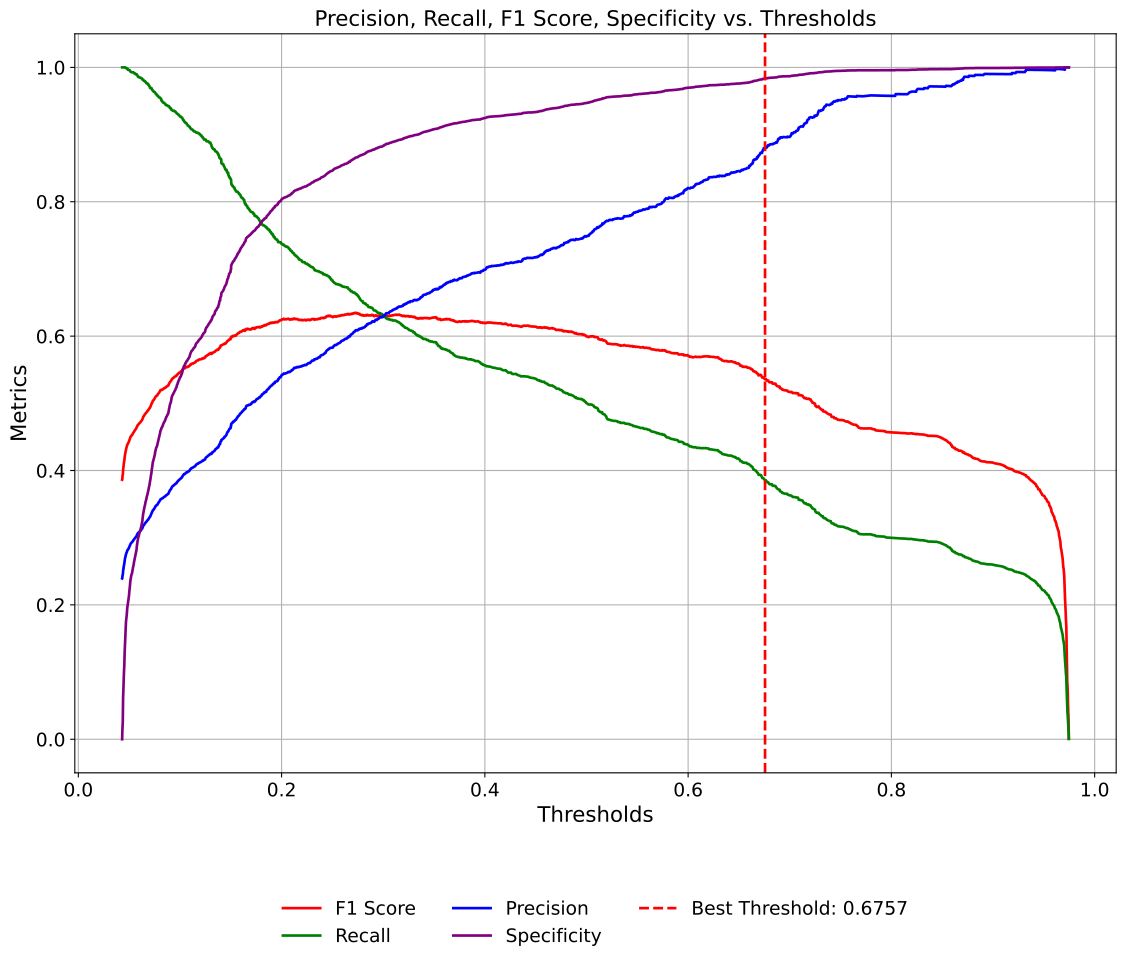
In this example:
lookup_metric="precision"specifies that we are targeting the precision curve.lookup_value=0.879provides the desired value for that metric.The function will search for the closest possible precision value along the threshold range and display a vertical line at that corresponding threshold.
The threshold value is printed to the console and included in the legend (e.g., Best Threshold: 0.6757).
Threshold Curves Example 3: Model-Specific Threshold
In many production settings, a classifier is deployed with a tuned decision threshold different from the default 0.5 (e.g., to balance costs of false positives vs. false negatives).
This example shows how to explicitly pass a model’s chosen threshold to be drawn as a vertical guide on the plot using model_threshold=....
You can do this whether you’re providing a model/X pair or pre-computed probabilities via y_prob. Below we show the latter.
# Get predicted probabilities for Random Forest model
y_prob_rf = model_rf["model"].estimator.predict_proba(X_test)[:, 1]

# Retrieve model thresholds
model_thresholds = {
    "Logistic Regression": next(iter(model_lr["model"].threshold.values())),
    "Decision Tree Classifier": next(iter(model_dt["model"].threshold.values())),
    "Random Forest Classifier": next(iter(model_rf["model"].threshold.values())),
}

from model_metrics import plot_threshold_metrics

# Example: Use precomputed probabilities but still highlight the model's tuned threshold.
plot_threshold_metrics(
    y_prob=y_prob[2],      # precomputed probabilities for the positive class
    y_test=y_test,         # ground-truth labels
    baseline_thresh=False, # hide the default 0.5 guide
    model_threshold=model_thresholds["Random Forest Classifier"],
    threshold_kwgs={       # styling for the model-threshold vertical line
        "color": "blue",
        "linestyle": "--",
        "linewidth": 1,
    },
    curve_kwgs={           # styling for metric curves
        "linestyle": "-",
        "linewidth": 1.25,
    },
    text_wrap=40,
)
Output
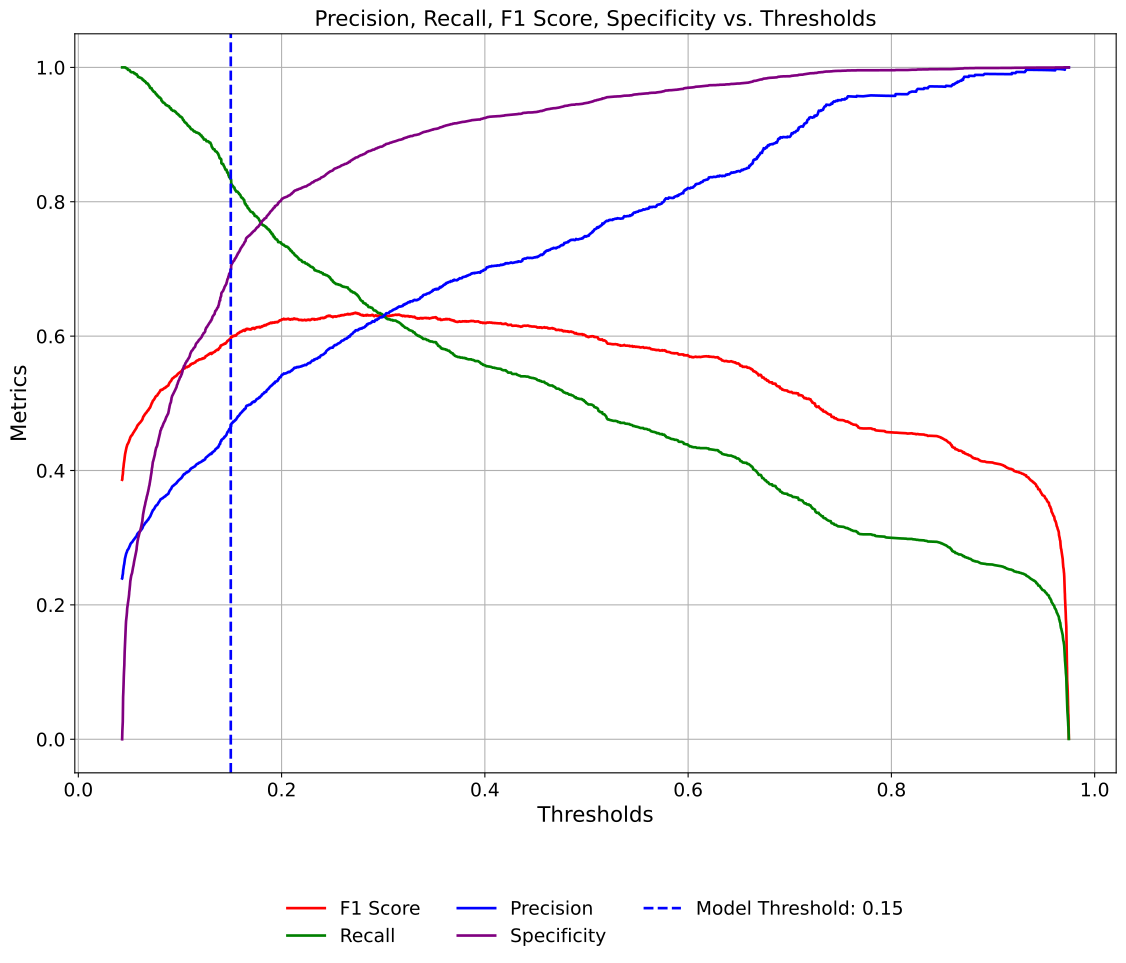
Note
model_thresholddraws a labeled vertical line (e.g., Model Threshold: 0.6757), making it clear where the production decision point lies.This is independent of
baseline_thresh; you can enable both if you want to compare the tuned threshold vs. the default 0.5.If you prefer to compute probabilities on-the-fly, pass the model and test features instead of
y_prob:
Threshold Curves Example 4: Subplots for Multiple Models
When evaluating several models side by side, subplots=True renders each
model’s threshold curves in its own panel within a shared figure. This avoids
the visual clutter of overlay mode while keeping all models in a single output.
Pass a list of y_prob arrays and a matching list of model_threshold
values to annotate each subplot with its own tuned threshold line. Use
suptitle to set an overall figure heading and title to control
per-subplot headings independently.
from model_metrics import plot_threshold_metrics

# Precomputed probabilities for each model
y_prob_dt = model_dt["model"].estimator.predict_proba(X_test)[:, 1]
y_prob_rf = model_rf["model"].estimator.predict_proba(X_test)[:, 1]

# list of models
models_list = [
"Decision Tree Classifier",
"Random Forest Classifier",
]

# Use precomputed probabilities but still highlight the model's tuned threshold.
plot_threshold_metrics(
    model_title=models_list[1:3],
    y_prob=[
        y_prob_dt,
        y_prob_rf,
    ],  # precomputed probabilities for the positive class
    y_test=y_test,  # ground-truth labels
    baseline_thresh=False,  # hide the default 0.5 guide
    model_threshold=[model_thresholds[name] for name in models_list[1:3]],
    # figsize=(14, 10),
    tick_fontsize=14,
    label_fontsize=16,
    image_path_png=image_path_png,
    image_path_svg=image_path_svg,
    save_plot=True,
    threshold_kwgs={  # styling for the model-threshold vertical line
        "color": "blue",
        "linestyle": "--",
        "linewidth": 2,
    },
    curve_kwgs={  # styling for metric curves
        "linestyle": "-",
        "linewidth": 2,
    },
    n_rows=1,
    suptitle_y=1.05,
    subplots=True,
)
Output
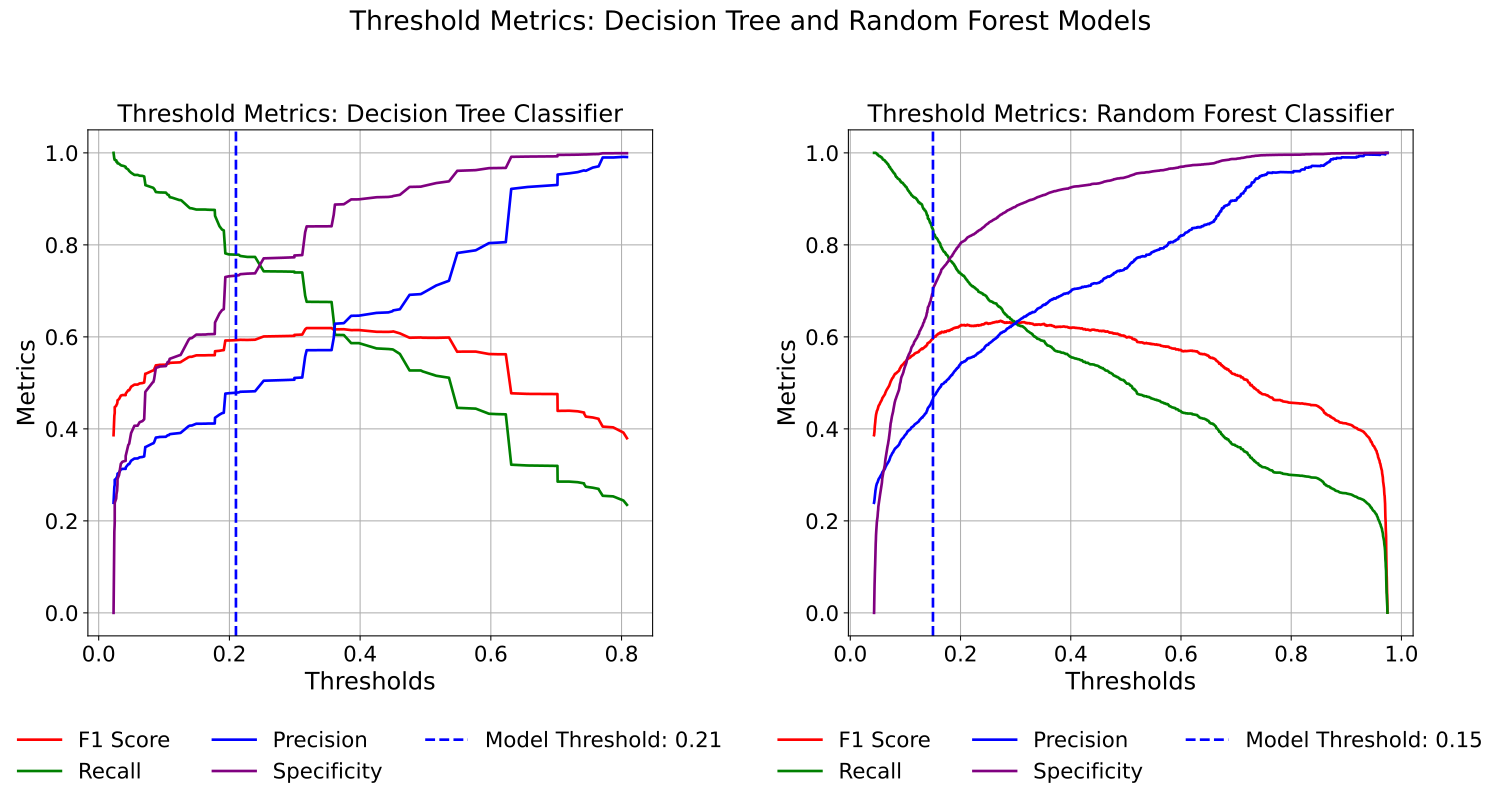
Residual Diagnostics
Residual diagnostics are essential tools for evaluating regression model performance beyond standard metrics like R² or RMSE. By examining the patterns in residuals: the differences between observed and predicted values, we can identify violations of modeling assumptions, detect systematic errors, and uncover opportunities for model improvement.
The show_residual_diagnostics function provides comprehensive visualization of residual
patterns across multiple dimensions:
Residuals vs Fitted Values: Assess homoscedasticity (constant variance) and identify non-linear patterns
Residuals vs Predictors: Examine whether specific features are associated with systematic prediction errors
Q-Q Plots: Evaluate whether residuals follow a normal distribution
Histogram of Residuals: Visualize the distribution shape and identify outliers
Scale-Location Plots: Detect heteroscedasticity (non-constant variance)
Dataset for Regression Residuals Examples:
The examples in this section use the diabetes dataset from scikit-learn, which was introduced in the Regression Models section. This dataset contains baseline medical measurements and a quantitative measure of disease progression, making it ideal for demonstrating residual analysis techniques across different regression approaches.
What Good Residuals Look Like:
Randomly scattered around zero with no systematic patterns
Constant spread across the range of fitted values (homoscedasticity)
Approximately normally distributed (for inference and prediction intervals)
No strong correlations with individual predictor variables
What Bad Residuals Reveal:
Funnel shapes (heteroscedasticity): Variance increases/decreases with predicted values, suggesting transformations may be needed
Curved patterns: Non-linear relationships that the model hasn’t captured
Clusters or groups: Systematic differences across subpopulations that may require interaction terms or stratified models
Heavy tails or skewness: Outliers or violations of normality assumptions
Patterns vs predictors: Missing interaction effects or non-linear relationships with specific features
More information on residual diagnostics and interpretation can be found in the residual diagnostics section.
- show_residual_diagnostics(model=None, X=None, y=None, y_pred=None, model_title=None, plot_type='all', figsize=None, label_fontsize=12, tick_fontsize=10, gridlines=True, save_plot=False, image_path_png=None, image_path_svg=None, image_filename=None, show_outliers=False, n_outliers=3, suptitle=None, suptitle_y=0.995, text_wrap=None, xlim=None, ylim=None, point_kwgs=None, group_kwgs=None, line_kwgs=None, show_lowess=False, lowess_kwgs=None, group_category=None, show_centroids=False, centroid_type='clusters', n_clusters=None, centroid_kwgs=None, legend_loc='best', legend_kwgs=None, n_cols=None, n_rows=None, heteroskedasticity_test=None, decimal_places=4, show_plots=True, show_diagnostics_table=False, return_diagnostics=False, histogram_type='frequency', kmeans_rstate=42)
- Parameters:
model (estimator or list of estimators, optional) – Trained regression model(s). If
None,y_predmust be provided.X (array-like, optional) – Feature matrix. Required if
modelis provided.y (array-like or list of array-like) – True target values. When
y_predis a list of arrays,ymay be a matching list of targets, one per model. See Per-Model Ground Truth.y_pred (array-like or list, optional) – Predicted values. Can be provided instead of
modelandX.model_title (str or list[str], optional) – Custom name(s) for model(s). Defaults to
"Model 1","Model 2", etc.plot_type (str or list, optional) – Which diagnostic plot(s) to display. Options:
"all","fitted","qq","scale_location","leverage","influence","histogram","predictors". Can pass a list for specific plots.figsize (tuple, optional) – Figure size (width, height). Defaults vary by
plot_type.label_fontsize (int, optional) – Font size for axis labels and titles. Defaults to
12.tick_fontsize (int, optional) – Font size for tick labels. Defaults to
10.gridlines (bool, optional) – Whether to display grid lines. Defaults to
True.save_plot (bool, optional) – Whether to save the plot(s) to disk. Defaults to
False.image_path_png (str, optional) – Path to save PNG image.
image_path_svg (str, optional) – Path to save SVG image.
image_filename (str, optional) – Custom filename for the saved image. When provided, saving is triggered regardless of
save_plot. If it includes a file extension (e.g..png,.svg,.pdf,.jpg,.tiff), the figure is saved verbatim in that format; otherwise it is used as the base name for theimage_path_png/image_path_svgoutputs.show_outliers (bool, optional) – Whether to label outlier points on plots. Defaults to
False.n_outliers (int, optional) – Number of most extreme outliers to label. Defaults to
3.suptitle (str, optional) – Custom title for the overall figure. If
None, uses default; if"", no suptitle is displayed.suptitle_y (float, optional) – Vertical position of the figure suptitle (0-1 range). Defaults to
0.995.text_wrap (int, optional) – Maximum width for wrapping titles.
xlim (tuple, optional) – X-axis limits as
(min, max). Applied to all plots for consistent scaling across multiple models.ylim (tuple, optional) – Y-axis limits as
(min, max). Applied to all plots for consistent scaling across multiple models.point_kwgs (dict, optional) – Styling for scatter points (e.g.,
{'alpha': 0.6, 'color': 'blue'}).group_kwgs (dict, optional) – Styling for group scatter points when
group_categoryis provided. Can specify colors as a list for each group.line_kwgs (dict, optional) – Styling for reference lines (e.g.,
{'color': 'red', 'linestyle': '--'}).show_lowess (bool, optional) – Whether to show the LOWESS smoothing trend line on residual plots. Defaults to
False.lowess_kwgs (dict, optional) – Styling for LOWESS smoothing line (e.g.,
{'color': 'blue', 'linewidth': 2}).group_category (str or array-like, optional) – Categorical variable for grouping observations. Can be a column name in
Xor an array matchingyin length.show_centroids (bool, optional) – Whether to plot centroids for groups or clusters. Defaults to
False.centroid_type (str, optional) – Type of centroids to display. Options:
"clusters"(k-means clustering) or"groups"(category centroids). Defaults to"clusters".n_clusters (int, optional) – Number of clusters for k-means clustering when
centroid_type="clusters". Defaults to3if not specified.centroid_kwgs (dict, optional) – Styling for centroid markers (e.g.,
{'marker': 'X', 's': 50, 'c': ['red', 'blue']}).legend_loc (str, optional) – Location for the legend. Standard matplotlib locations like
'best','upper right', etc. Defaults to'best'.legend_kwgs (dict, optional) – Control legend display for groups, centroids, clusters, and heteroskedasticity tests. Use keys
'groups','centroids','clusters','het_tests'with boolean values.n_cols (int, optional) – Number of columns for predictor plots layout. If
None, uses automatic layout.n_rows (int, optional) – Number of rows for predictor plots layout. If
None, automatically calculated.heteroskedasticity_test (str, optional) – Test for heteroskedasticity. Options:
"breusch_pagan","white","goldfeld_quandt","spearman","all", orNone. Defaults toNone.decimal_places (int, optional) – Number of decimal places for all numeric values in diagnostics. Defaults to
4.show_plots (bool, optional) – Whether to display diagnostic plots. Defaults to
True.show_diagnostics_table (bool, optional) – Whether to print a formatted table of diagnostic statistics. Defaults to
False.return_diagnostics (bool, optional) – If
True, return a dictionary containing diagnostic statistics. Defaults toFalse.histogram_type (str, optional) – Type of histogram to display. Options:
"frequency"(raw counts) or"density"(probability density with normal overlay). Defaults to"frequency".kmeans_rstate (int, optional) – Random state for reproducibility in k-means clustering. Defaults to
42.
- Returns:
None(displays plots) or dictionary of diagnostics ifreturn_diagnostics=True.- Return type:
Noneor dict- Raises:
If neither (
modelandX) nory_predis provided.If
plot_typeis not recognized.If both
group_categoryandn_clustersare specified.If
heteroskedasticity_testis not a valid test type.If
histogram_typeis not'frequency'or'density'.If
centroid_typeis not'clusters'or'groups'.If
centroid_type='groups'withoutgroup_categoryspecified.If
show_centroids=Trueandcentroid_type='clusters'butXcontains non-numeric columns (k-means clustering requires all numeric features).
Important
You can supply either
modelandXor passy_preddirectly.When using
y_pred, the function bypasses model predictions and uses the provided values for residual calculation.Supports single-model or multiple-model workflows.
Cannot specify both
group_category(user-defined groups) andn_clusters(automatic clustering) simultaneously.When
centroid_type='groups',group_categorymust be provided.
Notes
- Diagnostic Plot Types:
"all": Creates a comprehensive 2x3 grid with fitted, Q-Q, scale-location, leverage, influence, and histogram plots."fitted": Residuals vs fitted values (detects heteroscedasticity and non-linearity)."qq": Normal Q-Q plot (assesses normality assumption)."scale_location": Standardized residuals vs fitted (evaluates homoscedasticity)."leverage": Residuals vs leverage with Cook’s distance contours (identifies influential points)."influence": Influence plot with bubble sizes proportional to Cook’s distance."histogram": Distribution of residuals with optional normal overlay."predictors": Separate plots for residuals vs each predictor variable.
- Heteroskedasticity Testing:
Optional parameter
heteroskedasticity_testperforms formal statistical tests for non-constant variance."breusch_pagan": Tests whether residual variance depends on predicted values."white": More general test that doesn’t assume specific functional form."goldfeld_quandt": Compares variance between two subsamples."spearman": Spearman correlation between absolute residuals and fitted values."all": Runs all available tests.Test results are displayed in plot legends and printed when
show_diagnostics_table=True.If
None(default), no tests are performed, only visual diagnostics are displayed.
- Grouped Analysis:
Use
group_categoryto stratify residuals by categorical variables (e.g., sex, age group, treatment arm).Use
n_clustersfor automatic k-means clustering to identify data-driven residual patterns.Set
show_centroids=Trueto overlay group/cluster centroids on plots.centroid_typecontrols centroid display:"clusters"(default) for k-means or"groups"for category centroids.kmeans_rstateensures reproducible clustering (default:42).Use
legend_kwgsto control which legend entries appear (groups, centroids, clusters, heteroskedasticity tests).
- Axis Scaling:
Use
xlimandylimto enforce consistent axis ranges across all plots when comparing multiple models.
- Customization:
Control histogram display with
histogram_type:"frequency"for raw counts or"density"for normalized distribution with normal overlay.Enable LOWESS smoothing with
show_lowess=Trueto visualize trends in residual plots.Customize point, line, LOWESS, group, and centroid styling via respective
*_kwgsparameters.Adjust subplot layout for predictor plots using
n_colsandn_rows.Set
suptitleto customize or suppress the overall figure title, and usesuptitle_yto adjust vertical position.
- Output Options:
Set
show_plots=Falseandshow_diagnostics_table=Trueto print only the diagnostic statistics table.Use
return_diagnostics=Trueto programmatically access diagnostic quantities for custom analyses.Combine
show_plots=Trueandshow_diagnostics_table=Truefor comprehensive visual and quantitative assessment.When
group_categoryis a column inX, it is automatically excluded from predictor plots to avoid redundancy.
- Saving Plots:
If
save_plot=True, figures are saved asresiduals_<plot_type>.png/svgor<model_name>_residuals_by_predictor.png/svgfor predictor plots.If
image_filenameis provided, it overrides the auto-generated filename and triggers saving regardless ofsave_plot. A file extension inimage_filename(e.g..png,.pdf,.jpg,.tiff) selects the output format.
- resid_diagnostics_to_dataframe(diagnostics)
Convert the dictionary returned by
show_residual_diagnostics(...,
return_diagnostics=True)
into a two-columnpandas.DataFrameofStatisticandValue, flattening nested structures so the result is ready for export or reporting.- Parameters:
diagnostics (dict) – The diagnostics dictionary returned by
show_residual_diagnosticswithreturn_diagnostics=True.- Returns:
Two-column DataFrame with one row per diagnostic statistic.
- Return type:
pandas.DataFrame
Notes
- Flattening:
Heteroskedasticity results are expanded into one row per component, e.g.
hetero_breusch_pagan_stat,hetero_breusch_pagan_pval, andhetero_breusch_pagan_heteroskedastic.With
heteroskedasticity_test="all", all four tests (Breusch-Pagan, White, Goldfeld-Quandt, Spearman) appear, each with its statistic, p-value, and boolean indicator.Jarque-Bera is split into statistic, p-value, and a boolean normality indicator.
- Why Use It:
The console table prints only p-values and interpretations. The DataFrame carries the test statistics too, which is what a paper or technical appendix needs.
Export with
df.to_csv("diagnostics.csv", index=False), or pull a single value withdf.loc[df["Statistic"] == "r2", "Value"].iloc[0].
Residual Diagnostics Example 1: All Residual Diagnostics Plots
Using the diabetes dataset, this first example demonstrates a complete residual diagnostic analysis for a single
regression model using plot_type="all". This setting generates all available diagnostic
visualizations in a single comprehensive display:
Residuals vs Fitted Values: Detects non-linearity, heteroscedasticity, and outliers
Q-Q Plot: Assesses normality of residuals
Scale-Location Plot: Evaluates homoscedasticity (constant variance)
Residuals vs Leverage: Identifies influential observations
Histogram of Residuals: Shows the distribution shape
We evaluate a Random Forest model trained on the diabetes dataset. The n_clusters=3
parameter performs k-means clustering on the residuals to identify groups of observations
with similar prediction error patterns. Setting show_centroids=True overlays cluster
centers on the residual plots, styled with custom colors and markers via centroid_kwgs.
The kmeans_rstate=222 parameter controls the random seed for k-means clustering, ensuring
reproducible cluster assignments across repeated runs. By default, kmeans_rstate is set
to 42, making clustering deterministic unless explicitly changed. This is important because
k-means uses random initialization; different seeds can produce slightly different cluster
assignments, especially when clusters overlap or are of similar size. Setting a fixed seed
ensures that diagnostic plots remain consistent for documentation, presentations, and
collaborative analysis.
To formally test for heteroscedasticity, we enable heteroskedasticity_test="breusch_pagan".
This optional parameter runs the Breusch-Pagan test, which evaluates whether residual
variance is systematically related to predicted values. Test results, including the test
statistic, p-value, and interpretation, are printed to the console. A significant result
(p < 0.05) indicates heteroscedasticity, suggesting that predictions may be more reliable
for certain ranges of the response variable than others.
Additional customization options include:
n_cols=2: Arranges diagnostic plots in a 2-column grid layout; this is useful for wide-format displays, but it is recommended to not use this setting when displaying all plots together to maintain clarity.histogram_type="density": Displays residuals as a density plot rather than raw countsdecimal_places=2: Controls precision of printed test statisticstick_fontsizeandlabel_fontsize: Adjust text sizing for readabilitysave_plot=Truewith image paths: Exports plots as PNG and SVG for reports
The function also returns a diagnostics dictionary containing residuals, fitted values,
standardized residuals, and leverage statistics. This allows for programmatic access to
diagnostic quantities for custom analyses or integration with resid_diagnostics_to_dataframe
to convert results into a pandas DataFrame for further exploration.
rf_pred = rf_model.predict(X_test)

from model_metrics import show_residual_diagnostics

show_residual_diagnostics(
    y_pred=rf_pred,
    model_title=["Random Forest"],
    X=X_test,
    y=y_test,
    n_clusters=3,
    n_cols=2,
    plot_type="all",
    show_centroids=True,
    centroid_kwgs={"c": ["red", "blue", "green"], "marker": "X", "s": 50},
    heteroskedasticity_test="breusch_pagan",
    decimal_places=2,
    histogram_type="density",
    kmeans_rstate=222,
)
Output
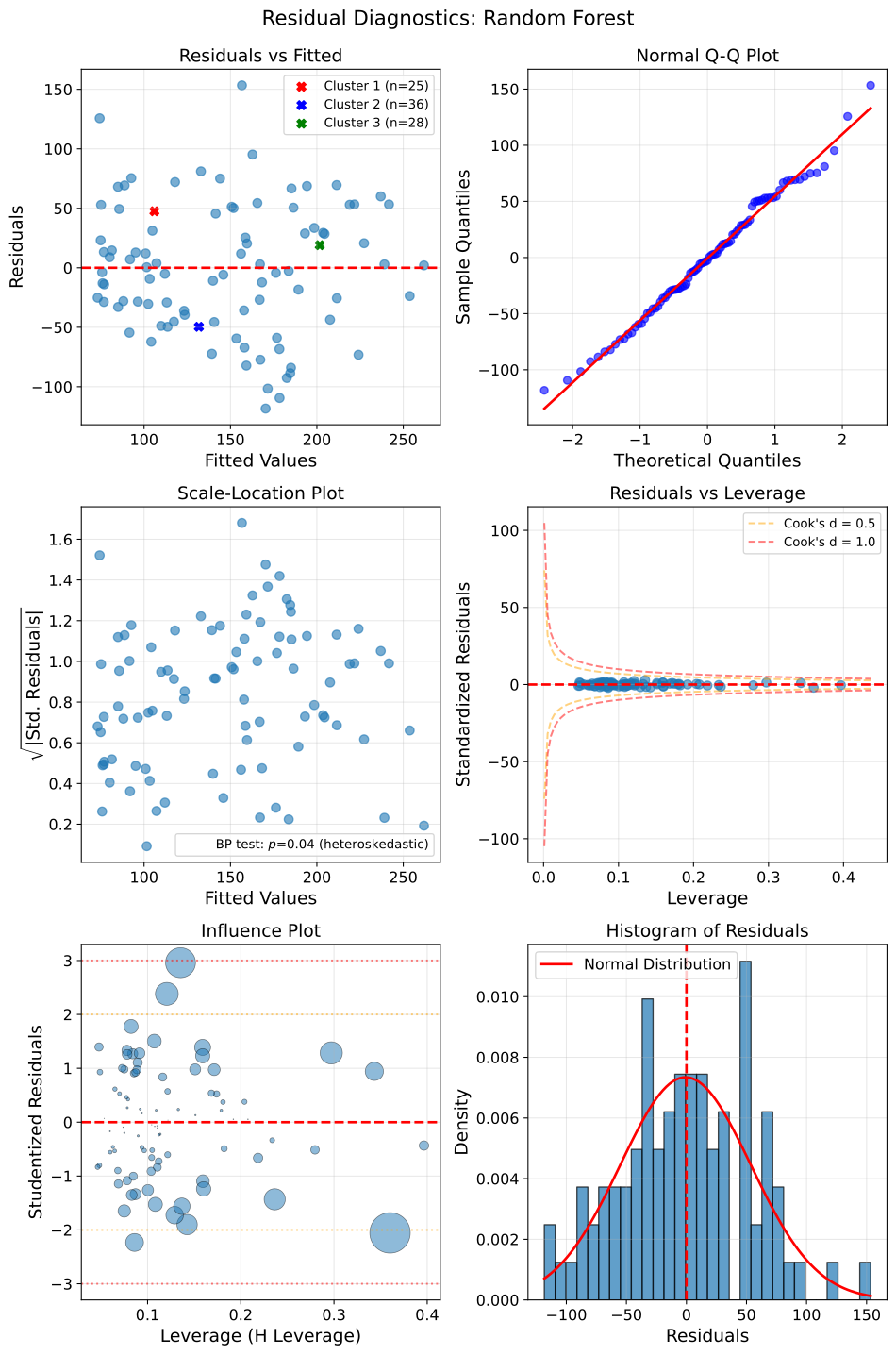
Residual Diagnostics Example 2: Single Plot with LOWESS Smoothing
Using the diabetes dataset, this example demonstrates two key capabilities for focused residual analysis:
Selective plot generation: The
plot_typeparameter allows you to generate specific diagnostic plots rather than the full suite. Pass a single plot name as a string (e.g.,"fitted") or a list of plot names for multiple specific plots (e.g.,["fitted", "qq", "histogram"]). This is useful when you need to examine particular model assumptions or create targeted visualizations for reports.LOWESS trend detection: Setting
show_lowess=Trueadds a locally weighted scatterplot smoothing (LOWESS) curve to residual plots. This non-parametric smoothing line reveals systematic patterns or trends in the residuals that might not be obvious from the scatter alone. If model assumptions hold, the LOWESS line should be roughly horizontal at y=0. Pronounced curves or trends indicate potential violations of linearity or suggest that the model is systematically over- or under-predicting in certain regions.
We focus on the Scale-Location plot (plot_type="scale_location"), which is particularly useful for detecting heteroscedasticity: the violation of the constant variance assumption. This plot displays the square root of standardized residuals against fitted values, making it easier to spot changes in residual spread across the prediction range. The LOWESS smoothing line, styled in orange via lowess_kwgs, helps identify whether variance increases, decreases, or remains stable as predictions change.
The heteroskedasticity_test="breusch_pagan" parameter formally tests for
heteroscedasticity. The Breusch-Pagan test evaluates whether residual variance
is systematically related to the predictors or fitted values. Test results appear
in the plot legend (if space permits) or can be displayed in a diagnostic table
using show_diagnostics_table=True. A significant result (p < 0.05) provides
statistical evidence of heteroscedasticity, which may require remedial measures
such as variance-stabilizing transformations, weighted least squares, or robust
standard errors.
from model_metrics import show_residual_diagnostics

show_residual_diagnostics(
    y_pred=rf_pred,
    model_title="Random Forest",
    X=X_test,
    y=y_test,
    plot_type="scale_location",
    point_kwgs={"alpha": 0.9, "color": "blue", "edgecolor": "black", "s": 50},
    show_lowess=True,
    lowess_kwgs={"color": "red", "linewidth": 2},
    heteroskedasticity_test="breusch_pagan",
    figsize=(8, 6),
    tick_fontsize=12,
    label_fontsize=14,
)
Output
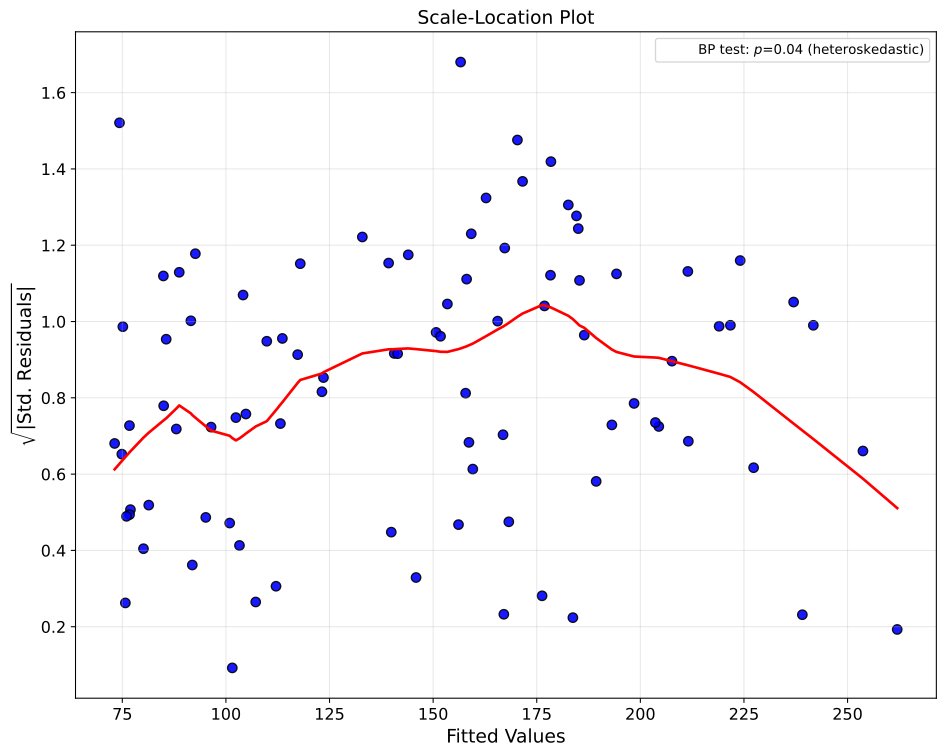
Residual Diagnostics Example 3: Diagnostics Table Only
Using the diabetes dataset, this example
demonstrates how to generate a comprehensive residual diagnostics summary table
without displaying plots. By setting show_plots=False and
show_diagnostics_table=True, the function outputs only a tabular summary of key
diagnostic statistics and heteroscedasticity test results.
The diagnostics table includes:
Residual statistics: Mean, standard deviation, min, max, and quartiles
Standardized residual metrics: Useful for identifying outliers (\(|z| > 3\))
Heteroscedasticity test results: When
heteroskedasticity_testis specified
In this example, we set heteroskedasticity_test="all" to run all available tests:
Breusch-Pagan: Tests whether residual variance depends on predicted values
White: A more general test that doesn’t assume a specific functional form
Goldfeld-Quandt: Compares variance between two subsamples
Spearman: Compares correlation between absolute residuals and fitted values
Each test returns a test statistic, p-value, and interpretation. The decimal_places=5
parameter ensures high precision in the printed output, which is useful for reporting
results in research papers or technical documentation.
The return_diagnostics=True parameter returns a dictionary containing all diagnostic
quantities (residuals, fitted values, standardized residuals, leverage, etc.) for
programmatic access or conversion to a DataFrame using resid_diagnostics_to_dataframe.
Note: You can also display both the table and plots simultaneously by setting
show_plots=True and show_diagnostics_table=True together. This provides a
comprehensive view combining visual diagnostics with quantitative summaries, ideal for
thorough model evaluation reports.
Additional parameters used:
plot_type="histogram": Specifies which plot type to generate (only relevant ifshow_plots=True)n_clusters=3andshow_centroids=True: Configures k-means clustering (applied to returned diagnostics)save_plot=True: Would save plots ifshow_plots=True
from model_metrics import show_residual_diagnostics

diagnostics = show_residual_diagnostics(
    y_pred=rf_pred,
    model_title=["Random Forest"],
    X=X_test_diabetes,
    y=y_test_diabetes,
    n_clusters=3,
    n_cols=2,
    save_plot=True,
    image_path_png=image_path_png,
    image_path_svg=image_path_svg,
    tick_fontsize=12,
    label_fontsize=14,
    plot_type="histogram",
    show_centroids=True,
    centroid_kwgs={"c": ["red", "blue", "green"], "marker": "X", "s": 50},
    heteroskedasticity_test="all",
    legend_loc="upper right",
    show_diagnostics_table=True,
    return_diagnostics=True,
    show_plots=False,
    decimal_places=5,
)
Output
============================================================
Residual Diagnostics: Random Forest
============================================================
Statistic                                     Value
------------------------------------------------------------
N Observations                                   89
N Predictors                                     10
------------------------------------------------------------
R-squared                                   0.44282
Adjusted R-squared                          0.37139
------------------------------------------------------------
RMSE                                       54.33241
MAE                                        44.05303
------------------------------------------------------------
Mean Residual                              -0.73056
Std Residual                               54.32750
Min Residual                             -118.34000
Max Residual                              153.37000
Jarque-Bera Test               p=0.76159 (Normal)
Durbin-Watson                               2.20903
------------------------------------------------------------
Mean Leverage                               0.12360
Max Leverage                                0.39654
Leverage Threshold (2p/n)                   0.22472
High Leverage Points                              7
------------------------------------------------------------
Heteroskedasticity Tests:
Breusch-Pagan                 p=0.03750 (Heteroskedastic)
White                         p=0.10104 (Homoskedastic)
Goldfeld-Quandt               p=0.05058 (Homoskedastic)
Spearman Correlation          p=0.09465 (Homoskedastic)
============================================================
Residual Diagnostics Example 4: Diagnostics to DataFrame
Building on the Residual Diagnostics Example 2,
the diagnostics dictionary returned by show_residual_diagnostics() can be converted into
a pandas DataFrame for programmatic analysis, reporting, or integration into automated pipelines.
The resid_diagnostics_to_dataframe() helper function handles this conversion seamlessly,
properly flattening nested structures like heteroskedasticity test results. Unlike the
console table which only displays p-values and interpretations, the DataFrame provides
complete test results including both the test statistics and p-values: useful for creating
custom reports, academic papers, or detailed model documentation that requires full
statistical disclosure.
from model_metrics import show_residual_diagnostics, resid_diagnostics_to_dataframe

# Generate diagnostics (reusing Example 2 configuration)
diagnostics = show_residual_diagnostics(
    y_pred=rf_prob,
    model_title=["Random Forest"],
    X=X_test_diabetes,
    y=y_test_diabetes,
    n_clusters=3,
    heteroskedasticity_test="breusch_pagan",
    show_diagnostics_table=False,  # Suppress console table
    show_plots=False,  # Suppress plots to focus on data extraction
    decimal_places=2,
    kmeans_rstate=222,
)

# Convert to DataFrame
df = resid_diagnostics_to_dataframe(diagnostics)
print(df)
This produces a clean DataFrame with all diagnostic statistics:
Output
| Statistic | Value |
|---|---|
| model_name | Random Forest |
| n_observations | 89 |
| n_predictors | 10 |
| mean_residual | -0.730562 |
| std_residual | 54.327496 |
| min_residual | -118.34 |
| max_residual | 153.37 |
| mae | 44.053034 |
| rmse | 54.332408 |
| r2 | 0.44 |
| adj_r2 | 0.37 |
| jarque_bera_stat | 0.5447 |
| jarque_bera_pval | 0.761588 |
| durbin_watson | 2.209026 |
| max_leverage | 0.396543 |
| mean_leverage | 0.123596 |
| max_cooks_d | 0.207521 |
| leverage_threshold | 0.224719 |
| high_leverage_count | 7 |
| influential_points_05 | 0 |
| influential_points_10 | 0 |
| hetero_breusch_pagan_stat | 19.22 |
| hetero_breusch_pagan_pval | 0.04 |
| hetero_breusch_pagan_heteroskedastic | TRUE |
| hetero_white_stat | 78.78 |
| hetero_white_pval | 0.1 |
| hetero_white_heteroskedastic | FALSE |
| hetero_goldfeld_quandt_stat | 1.77 |
| hetero_goldfeld_quandt_pval | 0.05 |
| hetero_goldfeld_quandt_heteroskedastic | FALSE |
| hetero_spearman_stat | 0.18 |
| hetero_spearman_pval | 0.09 |
| hetero_spearman_heteroskedastic | FALSE |
Key Features:
Automatic flattening: Heteroskedasticity test results are expanded into separate rows (e.g.,
hetero_breusch_pagan_stat,hetero_breusch_pagan_pval)Normality interpretation: Jarque-Bera results are split into statistic, p-value, and boolean normality indicator
Ready for export: DataFrame can be saved to CSV, Excel, or integrated into reporting workflows with
df.to_csv('diagnostics.csv', index=False)Programmatic access: Extract specific statistics with
df.loc[df['Statistic'] == 'R-squared', 'Value'].iloc[0]
When multiple heteroskedasticity tests are requested using heteroskedasticity_test="all",
the DataFrame will include rows for all four tests (Breusch-Pagan, White, Goldfeld-Quandt,
and Spearman Correlation), each with their respective statistics, p-values, and
heteroskedasticity indicators.
Residual Diagnostics Example 5: Grouped Analysis with Customization
Using the diabetes dataset, this example demonstrates the full power of grouped residual analysis, showcasing how stratification by categorical variables can reveal differential model performance across subpopulations. We use the Random Forest model trained on the diabetes dataset, focusing on three key predictors (age, BMI, and sex) to examine whether prediction errors vary systematically between male and female patients.
Understanding the residual diagnostic example 4 parameters
Core Data Parameters:
y_pred=rf_pred: Provides pre-computed predictions from the Random Forest model, bypassing the need to pass the model object itselfX=X_test_diab_copy[["age", "bmi"]]: Focuses analysis on two specific predictors rather than all featuresy=y_test_diabetes: True target values for residual calculationmodel_title="Random Forest": Custom display name for the model
Grouping and Visualization Parameters:
plot_type="predictors": Creates separate residual plots for each predictor variable (age, BMI, sex_category), allowing examination of predictor-specific error patternsgroup_category="sex_category": Stratifies all visualizations by sex, color-coding points by Male/Female to reveal group-specific patternscentroid_type="groups": Instructs the function to compute centroids for each category ingroup_category(Male and Female) rather than using k-means clusteringshow_centroids=True: Overlays the mean residual position for each sex on every plot, making systematic bias immediately visible
Styling and Aesthetics:
group_kwgs: Controls the appearance of scatter points for each group:"color": ["#1f77b4", "#ff7f0e"]: Custom hex colors for Male (blue) and Female (orange)"alpha": 0.8: Semi-transparency to reveal overlapping points"s": 60: Point size for readability"edgecolors": "black": Black borders around points for definition
centroid_kwgs: Customizes the centroid markers to stand out:"c": ["red", "blue"]: Distinct colors for Male and Female centroids"marker": "X": X-shaped markers easily distinguishable from data points"s": 50: Marker size balancing visibility with clarity
Statistical Testing:
heteroskedasticity_test="all": Runs all four heteroskedasticity tests (Breusch-Pagan, White, Goldfeld-Quandt, Spearman) on each predictor, with results displayed in plot legends. This comprehensive testing approach provides convergent evidence about whether variance differs systematically across groups or predicted values.
Layout and Display:
figsize=(12, 8): Larger figure accommodates predictor subplots with clear legendstick_fontsize=14,label_fontsize=16: Enhanced readability for presentation or publicationlegend_loc="bottom": Places legends below plots to avoid obscuring data points, especially useful with heteroskedasticity test resultssuptitle="": Suppresses the overall figure title for a cleaner, more professional appearance
Additional Parameters:
decimal_places=2: Rounds all statistical test results to two decimal places for concise displaykmeans_rstate=222: Sets random seed for reproducibility (relevant only ifcentroid_type="clusters"were used)save_plot=True,image_path_png,image_path_svg: Exports high-quality figures for reports or publications
# Generate predictions from multiple models
linear_pred = linear_model.predict(X_test_diabetes)
rf_pred = rf_model.predict(X_test_diabetes)
ridge_pred = ridge_model.predict(X_test_diabetes)

# The 'sex' column is already categorical-like (coded as positive/negative values)
# Let's make it more interpretable
X_test_copy = X_test.copy()
X_test_copy["sex_category"] = X_test_copy["sex"].apply(
    lambda x: "Male" if x > 0 else "Female"
)

from model_metrics import show_residual_diagnostics

# Generate residual diagnostics stratified by sex
show_residual_diagnostics(
    y_pred=rf_pred,
    model_title="Random Forest",
    X=X_test_diab_copy,
    y=y_test_diabetes,
    plot_type="predictors",
    show_centroids=True,
    group_category="sex_category",
    centroid_kwgs={"c": ["red", "blue"], "marker": "X", "s": 50},
    suptitle="",
    legend_loc="bottom",
)
Output
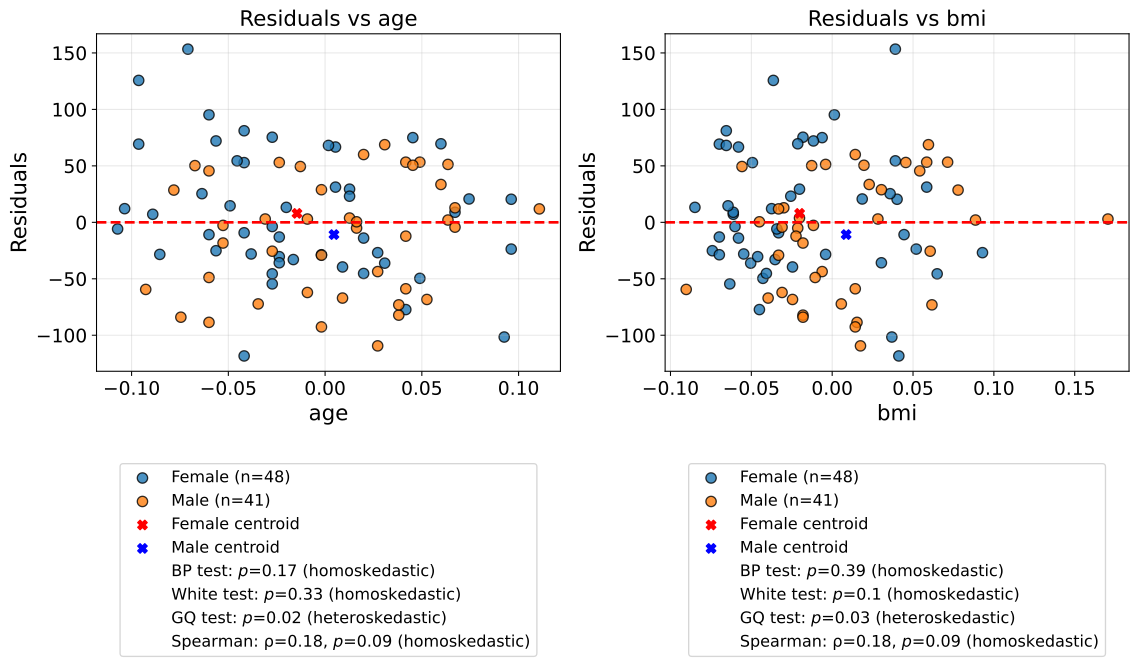
What the residual diagnostics example 4 analysis reveals
By examining residuals stratified by sex across age, BMI, and the sex category itself, we can identify:
Systematic Bias: Do centroids deviate from zero differently for males vs females? If the female centroid is consistently above zero while the male centroid is below, the model systematically under-predicts for females and over-predicts for males.
Differential Variance: Do residuals spread more widely for one group? The heteroskedasticity tests quantify whether prediction uncertainty differs between sexes.
Predictor-Specific Patterns: Does the relationship between residuals and a predictor (e.g., BMI) differ by sex? Diverging patterns suggest interaction effects that the model hasn’t captured.
Fairness Assessment: In healthcare applications, differential error patterns by sex could indicate the need for sex-specific calibration or additional interaction terms in the model.
Interpreting Centroids
The centroids represent the average (x, y) position of residuals for each group on each predictor plot:
X-coordinate: Mean value of the predictor for that group
Y-coordinate: Mean residual for that group
A centroid with y ≠ 0 indicates systematic over-prediction (y < 0) or under-prediction (y > 0) for that group. Centroids at different vertical positions reveal bias, while different horizontal positions reflect predictor distribution differences between groups.
Heteroskedasticity Test Interpretation
Each test evaluates whether residual variance is constant:
Breusch-Pagan: Tests if variance depends on fitted values or predictors
White: General test not assuming specific functional form
Goldfeld-Quandt: Compares variance between high and low predictor values
Spearman: Correlation between absolute residuals and fitted values
Statistical significance (typically p < 0.05) indicates heteroscedasticity, suggesting transformations or weighted regression may be needed.
Residual Diagnostics Example 6: Multiple Models with Shared Axes
Using the diabetes dataset, this example demonstrates how to compare residual diagnostics across multiple models with standardized axis limits for direct visual comparison. By passing a list of predictions and model names, you can evaluate multiple models side-by-side using any diagnostic plot type.
Key features demonstrated:
- Model Comparison Across Any Plot Type
While this example uses histograms (
plot_type="histogram"), the same approach works for all diagnostic plot types:Residuals vs Fitted (
plot_type="fitted"): Compare linearity assumptionsQ-Q Plots (
plot_type="qq"): Compare normality of residualsScale-Location (
plot_type="scale_location"): Compare homoscedasticityLeverage Plots (
plot_type="leverage"): Compare influential observationsAll plots (
plot_type="all"): Generate all 6 diagnostic plots for each model
Simply change the
plot_typeparameter while keeping the same multi-model structure (y_pred=[model1, model2]) to create comprehensive cross-model comparisons for any diagnostic.- Shared Axis Limits
xlim=(-175, 175): Standardizes the x-axis (residual values) across both modelsylim=(0, 10): Standardizes the y-axis (frequency counts) across both models
This ensures that visual differences in residual distributions reflect actual model performance rather than different axis scales.
- Group-Based Analysis
The
group_category="sex_category"parameter colors points by sex, with custom styling viagroup_kwgs. When combined withshow_centroids=Trueandcentroid_type="groups", group-specific centroids are displayed to reveal whether residual patterns differ across demographic groups.- Legend Positioning
Setting
legend_loc="bottom"places legends below the x-axis with proper spacing. The function automatically adds vertical space to accommodate bottom legends when using default figure sizes.- Comprehensive Heteroscedasticity Testing
heteroskedasticity_test="all"runs all four available tests (Breusch-Pagan, White, Goldfeld-Quandt, Spearman) and displays results in the legend. This helps identify whether residual variance is constant across fitted values.- Title and Layout Customization
suptitle="": Suppresses the overall figure title for a cleaner looktext_wrap=35: Wraps subplot titles at 35 charactersn_cols=2: Arranges subplots in 2 columns for side-by-side comparison
- When to Use Multi-Model Comparison
Multi-model comparison is particularly valuable when:
Comparing different algorithms (e.g., linear vs tree-based models)
Evaluating hyperparameter tuning results (e.g., different regularization strengths)
Assessing feature engineering impact (e.g., with vs without transformations)
Creating model selection documentation for reports or publications
- When to Use Shared Axes
Shared axis limits (
xlim/ylim) are recommended when models have similar scales. If models produce residuals on very different scales, omit these parameters to let each subplot use optimal ranges.
from model_metrics import show_residual_diagnostics

show_residual_diagnostics(
    y_pred=[ridge_pred, rf_pred],
    model_title=["Ridge Regression", "Random Forest"],
    X=X_test[["age", "bmi", "sex_category"]],
    y=y_test,
    plot_type="histogram",  # Try "all", "fitted", "qq", etc.
    show_centroids=True,
    centroid_type="groups",
    group_category="sex_category",
    centroid_kwgs={"c": ["red", "blue"], "marker": "X", "s": 50},
    group_kwgs={
        "color": ["#1f77b4", "#ff7f0e"],  # Custom hex colors
        "alpha": 0.8,
        "s": 60,
        "edgecolors": "black",
    },
    heteroskedasticity_test="all",
    suptitle="",
    n_cols=2,
    text_wrap=35,
    legend_loc="bottom",
    xlim=(-175, 175),
    ylim=(0, 10),
)
Output
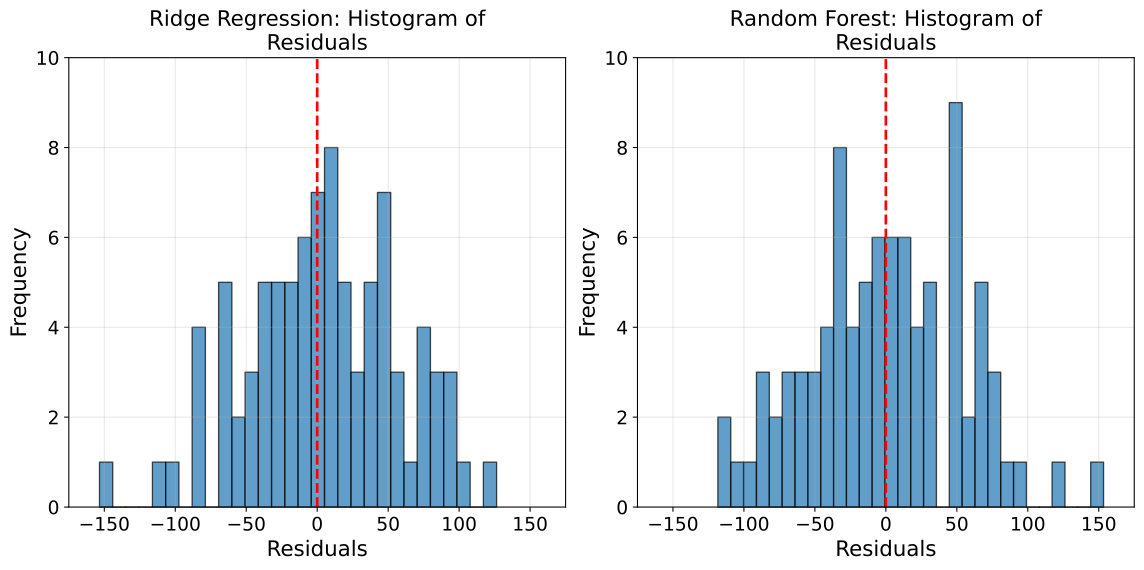
Feature Selection and Importance
The feature-selection suite answers three practical questions about a fitted model: which features carry the importance, how few features you actually need, and how performance degrades as you trim. All three functions share the same ranking logic, work with model_tuner wrappers, plain estimators, and pipelines, and can hand back tidy DataFrames or feature lists for downstream use.
Cumulative Feature Importance
The show_cumulative_feature_importance function ranks a model’s features by
importance and shows how few of them account for the bulk of it. Each bar is
annotated with its running cumulative share, so the “these N features explain
80% of the signal” story reads straight off the plot. It resolves importances
from CatBoost, tree, and linear models alike, and can return the ranked table or
the selected feature list for programmatic use.
- show_cumulative_feature_importance(model=None, threshold=0.80, xlabel='Individual Importance %', title=None, text_wrap=None, figsize=None, label_fontsize=12, tick_fontsize=10, bar_color='steelblue', bar_kwgs=None, annotation_color='darkred', show_annotation=True, feature_names=None, clean_names=None, feature_groups=None, column_transformer=None, feature_selection_step='feature_selection_RFE', preprocessor_step='preprocess_column_transformer_ColumnTransformer', save_plot=False, image_path_png=None, image_path_svg=None, image_filename=None, return_df=False, return_features=False, ax=None)
- Parameters:
model (estimator or wrapper) – A fitted estimator, model_tuner wrapper, or pipeline whose feature importances (or linear coefficients) will be ranked. Required.
threshold (float, optional) – Cumulative-importance cutoff that defines the “selected” top-k features (e.g.
0.80for 80%).xlabel (str, optional) – Label for the importance axis.
title (str, optional) – Plot title. If
None, a default is used;""disables the title.text_wrap (int, optional) – Maximum title width before wrapping.
figsize (tuple, optional) – Figure size
(width, height)in inches.label_fontsize (int, optional) – Font size for axis labels and title.
tick_fontsize (int, optional) – Font size for tick labels and annotations.
bar_color (str, optional) – Color for the importance bars.
bar_kwgs (dict, optional) – Extra keyword arguments merged into the bar call (e.g.
{"edgecolor": "black", "linewidth": 2}); overrides the defaults.annotation_color (str, optional) – Color for the cumulative-percentage annotations.
show_annotation (bool, optional) – Whether to annotate each bar with its running cumulative percentage.
feature_names (sequence, optional) – Explicit feature names, used when the model does not carry them.
clean_names (dict or callable, optional) – Display-only relabeling for the feature axis, as a dict
{original: label}or a callable. Does not affect the ranking or returned names.feature_groups (dict, callable, or str, optional) – Roll expanded columns (e.g. one-hot levels) up into a parent variable so the split importance is summed back together. Accepts a dict
{column: parent}, a callablename -> parent, or"auto"to infer the mapping fromcolumn_transformer. Unmapped columns keep their own name. Has no effect on a model whose features are already one column per variable.column_transformer (ColumnTransformer, optional) – Fitted
ColumnTransformerused byfeature_groups="auto"to map output columns back to their source columns.feature_selection_step (str, optional) – Name of the feature-selection step to unwrap in a pipeline.
preprocessor_step (str, optional) – Name of the preprocessing step to unwrap in a pipeline.
save_plot (bool, optional) – Whether to save the figure to disk.
image_path_png (str, optional) – Directory for a PNG output.
image_path_svg (str, optional) – Directory for an SVG output.
image_filename (str, optional) – Custom filename for the saved image. When provided, saving is triggered regardless of
save_plot. If it includes a file extension (e.g..png,.svg,.pdf,.jpg,.tiff), the figure is saved verbatim in that format; otherwise it is used as the base name for theimage_path_png/image_path_svgoutputs.return_df (bool, optional) – If
True, return the ranked importance DataFrame.return_features (bool, optional) – If
True, return the list of selected top-k features (those withinthreshold). With bothreturn_dfandreturn_features, a dict{"features": [...], "df": DataFrame}is returned.ax (matplotlib.axes.Axes, optional) – Pre-created axes to draw onto (e.g. from
combine_plots); suppresses save and show.
- Returns:
None, aDataFrame, a list, or a dict, depending onreturn_df/return_features.- Return type:
- Raises:
ValueError – If
modelisNone.
Important
Feature names are resolved from
feature_names, the model’sget_feature_names(), a pipeline preprocessor,feature_names_in_, or a generic fallback, in that order.clean_namesaffects only the displayed axis labels; the returned features keep their original names so they remain usable for indexingX.The console prints a short summary of how many features reach
threshold.
Cumulative Feature Importance Example 1: The 80% View
In this first cumulative feature importance example, we examine which features drive the Random Forest Regressor trained on the diabetes dataset from the Regression Models section. The default plot ranks every feature and annotates the running cumulative share, making it obvious how much of the model’s signal lives in a handful of features.
from model_metrics import show_cumulative_feature_importance

show_cumulative_feature_importance(rf_model, threshold=0.80)
Console output
5 features account for 80% of total importance:

feature importance_pct cumulative_pct
    bmi         35.55%         35.55%
    s5          23.10%         58.64%
    bp           8.84%         67.48%
    s6           7.13%         74.62%
    age          5.86%         80.48%
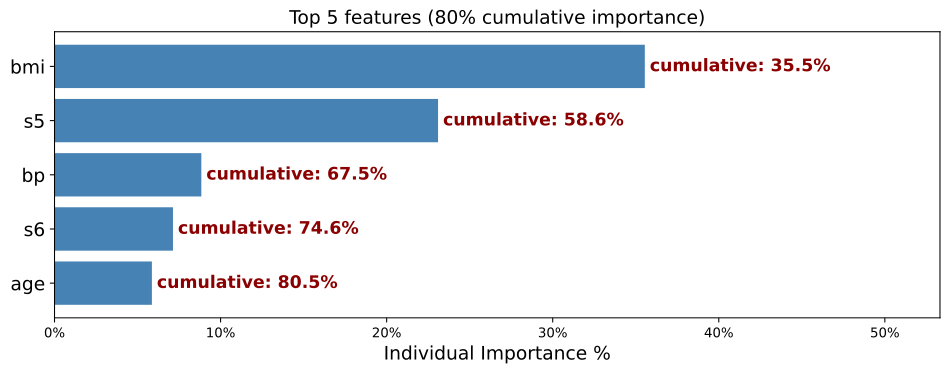
Cumulative Feature Importance Example 2: The Ranked Table
In this second example, using the same Random Forest Regressor from the
diabetes dataset from the Regression Models section, we pass return_df=True to get the full ranking as a DataFrame, with each
feature’s individual and cumulative share. Useful for logging, reports, or
feeding a selection step.
importance_df = show_cumulative_feature_importance(rf_model, return_df=True)
print(importance_df)
DataFrame output
  feature  importance  importance_pct  cumulative_pct
0     bmi    0.355469        0.355469        0.355469
1      s5    0.230957        0.230957        0.586426
2      bp    0.088408        0.088408        0.674834
3      s6    0.071329        0.071329        0.746163
4     age    0.058642        0.058642        0.804805
5      s2    0.057227        0.057227        0.862032
6      s1    0.052784        0.052784        0.914816
7      s3    0.051339        0.051339        0.966154
8      s4    0.024213        0.024213        0.990367
9     sex    0.009633        0.009633        1.000000
Cumulative Feature Importance Example 3: Selected Features and Clean Labels
In this third example, again with the Random Forest Regressor from the diabetes dataset from the Regression Models section,
we use return_features=True to get just the top-k features that reach
threshold (a ready-made shortlist), and clean_names to render
publication-friendly axis labels without altering the returned names.
top = show_cumulative_feature_importance(
    rf_model,
    threshold=0.90,
    clean_names={"bp": "Blood Pressure", "bmi": "Body Mass Index", "s6": "Serum 6"},
    return_features=True,
)
print(top)

# feed the shortlist straight into a reduced model
X_reduced = X_test[top]
Output
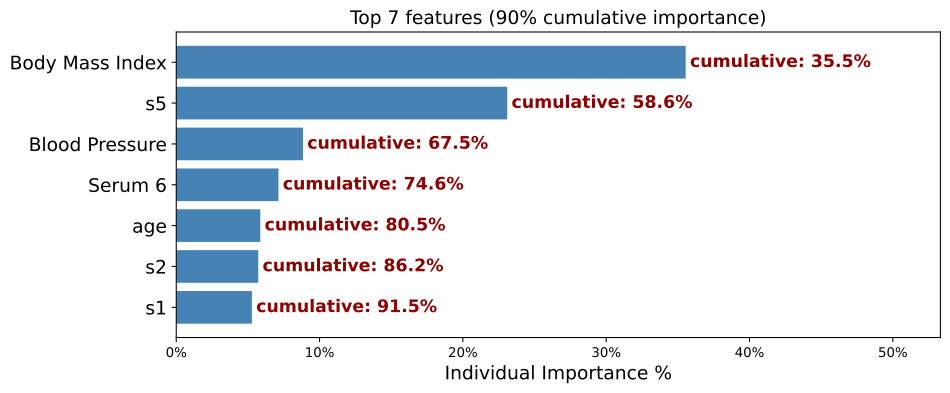
['bmi', 's5', 'bp', 's6', 'age', 's2', 's1']
Cumulative Feature Importance Example 4: Grouping One-Hot Columns
One-hot encoding splits a categorical variable across many indicator columns, and
the model’s importance is divided among them. A genuinely predictive variable can
therefore look weaker than a single numeric feature purely because its signal is
fragmented across levels rather than concentrated in one column. Summing the
indicators back together is what feature_groups does.
The diabetes and Adult Income models used in the previous examples are fitted on
numeric columns only, so there is nothing to group. To demonstrate the behaviour we
fit a small pipeline on the raw Adult Income frame, where the categorical predictors
(workclass, marital-status, occupation, and so on) are still present and
get one-hot encoded by a ColumnTransformer.
from sklearn.compose import ColumnTransformer
from sklearn.preprocessing import OneHotEncoder
from sklearn.pipeline import Pipeline
from sklearn.ensemble import RandomForestClassifier
from sklearn.model_selection import train_test_split

numeric = ["age", "education-num", "capital-gain", "capital-loss", "hours-per-week"]
categorical = ["workclass", "marital-status", "occupation", "relationship", "race", "sex"]

X_raw = X_ai[numeric + categorical].dropna()
y_raw = (y_ai.loc[X_raw.index].squeeze().astype(str).str.contains(">50K")).astype(int)

X_tr, X_te, y_tr, y_te = train_test_split(
    X_raw, y_raw, test_size=0.2, random_state=42, stratify=y_raw
)

ct = ColumnTransformer(
    transformers=[
        ("num", "passthrough", numeric),
        ("cat", OneHotEncoder(handle_unknown="ignore", sparse_output=False), categorical),
    ]
)

pipe = Pipeline([("pre", ct), ("rf", RandomForestClassifier(n_estimators=200, random_state=42))])
pipe.fit(X_tr, y_tr)
The fitted pipeline expands six categorical variables into dozens of indicator columns. Ranked without grouping, each indicator competes on its own:
ungrouped = show_cumulative_feature_importance(pipe, return_df=True)
print(len(ungrouped), "ranked columns")
Passing feature_groups="auto" together with the fitted transformer rolls those
indicators back up to their source variable and sums their importance:
grouped = show_cumulative_feature_importance(
    pipe,
    feature_groups="auto",
    column_transformer=pipe.named_steps["pre"],
    return_df=True,
)
print(len(grouped), "ranked variables")
print(grouped)
The row count drops from the number of encoder columns to the number of source variables, and any categorical whose signal was previously spread across many low-ranked indicators moves up the ranking on the sum of its parts.
Where no ColumnTransformer is available, feature_groups also accepts an explicit
dict or a callable. The callable form is convenient when the naming convention is
regular, since OneHotEncoder emits parent_level:
# explicit mapping, when only a few columns need regrouping
show_cumulative_feature_importance(
    pipe,
    feature_groups={
        "cat__marital-status_Never-married": "marital-status",
        "cat__marital-status_Married-civ-spouse": "marital-status",
    },
)

# or a callable, applied to every feature name
show_cumulative_feature_importance(
    pipe,
    feature_groups=lambda name: name.split("__")[-1].split("_")[0],
)
Important
Grouping sums importance within a parent, so the total across all groups equals the total across all columns.
feature_groups="auto"requirescolumn_transformer. Without it, use the dict or callable form.The inference reads the transformer’s own
transformers_attribute and matches each output name against that branch’s input columns by longest prefix, so variable names containing spaces, hyphens, or underscores resolve correctly without any string parsing on your part.The returned feature names are the parent names. That is usually what you want for a data-collection decision, but they are no longer valid column labels for indexing the encoded matrix.
Grouping is a no-op on a model whose features are already one column per variable, which is worth checking with
len(ungrouped) == len(grouped)before reading anything into the result.
Feature Importance Pareto
The show_feature_pareto function renders the classic Pareto chart, descending
importance bars with a smooth cumulative curve and an 80% crossover marker, and a
concentration-curve variant that plots cumulative percentage of features against
cumulative percentage of importance. The concentration form makes the “a small
fraction of features carries most of the importance” story unmistakable and fits
neatly on a slide even for wide models.
- show_feature_pareto(model=None, threshold=0.80, display='bars', top_n=None, feature_names=None, clean_names=None, feature_groups=None, column_transformer=None, feature_selection_step='feature_selection_RFE', preprocessor_step='preprocess_column_transformer_ColumnTransformer', title=None, text_wrap=None, xlabel='Feature', bar_ylabel='Individual importance %', line_ylabel='Cumulative %', figsize=None, label_fontsize=12, tick_fontsize=10, bar_color='steelblue', line_color='darkred', bar_kwgs=None, curve_kwgs=None, threshold_kwgs=None, smooth=True, xtick_rotation=45, mark_threshold=True, legend_loc='center right', save_plot=False, image_path_png=None, image_path_svg=None, image_filename=None, return_df=False, return_features=False, ax=None)
- Parameters:
model (estimator or wrapper) – A fitted estimator, model_tuner wrapper, or pipeline. Required.
threshold (float, optional) – Cumulative reference level, drawn as a horizontal line with the crossover marked.
display (str, optional) –
"bars"for the classic Pareto (bars plus cumulative curve on a twin axis), or"curve"for the concentration form (cumulative % of features vs cumulative % of importance, no bars, with a uniform-importance diagonal).top_n (int, optional) – Show only the top-N features. Cumulative percentages remain relative to all features.
feature_names (sequence, optional) – Explicit feature names when the model does not carry them.
clean_names (dict or callable, optional) – Display-only relabeling as a dict or callable.
feature_groups (dict, callable, or str, optional) – Roll expanded columns (e.g. one-hot levels) up into a parent variable, summing their importance. A dict
{column: parent}, a callable, or"auto"(requirescolumn_transformer). Applied before ranking, so the bars and the cumulative curve both reflect whole variables.column_transformer (ColumnTransformer, optional) – Fitted
ColumnTransformerused byfeature_groups="auto".feature_selection_step (str, optional) – Feature-selection step name to unwrap in a pipeline.
preprocessor_step (str, optional) – Preprocessing step name to unwrap in a pipeline.
title (str, optional) – Plot title. If
None, a default is used.text_wrap (int, optional) – Maximum title width before wrapping.
xlabel (str, optional) – Label for the feature axis (bars mode).
bar_ylabel (str, optional) – Label for the left (bars) axis.
line_ylabel (str, optional) – Label for the right (cumulative) axis.
figsize (tuple, optional) – Figure size
(width, height)in inches.label_fontsize (int, optional) – Font size for axis labels and title.
tick_fontsize (int, optional) – Font size for tick labels.
bar_color (str, optional) – Color for the importance bars.
line_color (str, optional) – Color for the cumulative curve.
bar_kwgs (dict, optional) – Extra keyword arguments merged into the bar call (bars mode); overrides the defaults.
curve_kwgs (dict, optional) – Extra keyword arguments merged into the cumulative curve, e.g.
{"linewidth": 3}to thicken it; overrides the defaults.threshold_kwgs (dict, optional) – Extra keyword arguments merged into the threshold and crossover guide lines, e.g.
{"linewidth": 2}; overrides the defaults.smooth (bool, optional) – Smooth the cumulative curve with a monotone PCHIP interpolation. Falls back to straight segments with too few points or without SciPy.
xtick_rotation (int, optional) – Rotation (degrees) for the feature tick labels (bars mode).
mark_threshold (bool, optional) – Whether to draw the threshold reference and crossover guide lines and print a one-line console summary of how many features reach threshold. The count is printed rather than annotated on the plot to avoid crowding the crossover.
legend_loc (str, optional) – Legend location.
save_plot (bool, optional) – Whether to save the figure to disk.
image_path_png (str, optional) – Directory for a PNG output.
image_path_svg (str, optional) – Directory for an SVG output.
image_filename (str, optional) – Custom filename for the saved image. When provided, saving is triggered regardless of
save_plot. If it includes a file extension (e.g..png,.svg,.pdf,.jpg,.tiff), the figure is saved verbatim in that format; otherwise it is used as the base name for theimage_path_png/image_path_svgoutputs.return_df (bool, optional) – If
True, return the ranked importance DataFrame.return_features (bool, optional) – If
True, return the list of features up to the threshold crossover. With both flags, a dict{"features": [...], "df": DataFrame}is returned.ax (matplotlib.axes.Axes, optional) – Pre-created axes to draw onto; a twin axis is created on it and save/show are suppressed.
- Returns:
None, aDataFrame, a list, or a dict, depending onreturn_df/return_features.- Return type:
- Raises:
ValueError – If
modelisNone, or ifdisplayis not"bars"or"curve".
Feature Importance Pareto Example 1: Classic Pareto
In this first feature importance Pareto example, we visualize the Random Forest
Regressor trained on the diabetes dataset from the Regression Models section as a classic Pareto chart. The default
display="bars" draws importance bars in descending order with a
smooth cumulative curve on a secondary axis. The dashed line marks the 80% threshold
and a vertical guide line marks the crossover; the count of features that reach
the threshold is printed to the console.
from model_metrics import show_feature_pareto

show_feature_pareto(rf_model, threshold=0.80)
Output
5 features reach 80% of cumulative importance.
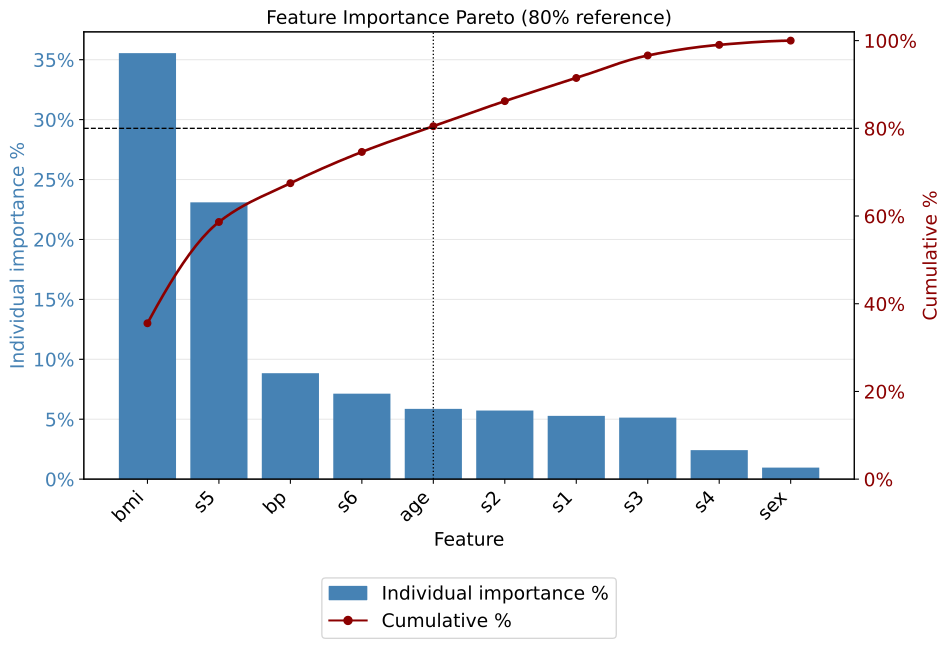
Feature Importance Pareto Example 2: Concentration Curve
In this second example, using the same Random Forest Regressor from the diabetes dataset from the Regression Models section,
we switch to display="curve", the same ranking is expressed as a concentration curve:
cumulative percentage of features on the x-axis against cumulative percentage of
importance on the y-axis. The diagonal shows what perfectly uniform importance
would look like, so how far the curve bows toward the top-left is exactly how
concentrated your model is.
show_feature_pareto(rf_model, display="curve", threshold=0.80)
Output
5 features reach 80% of cumulative importance.
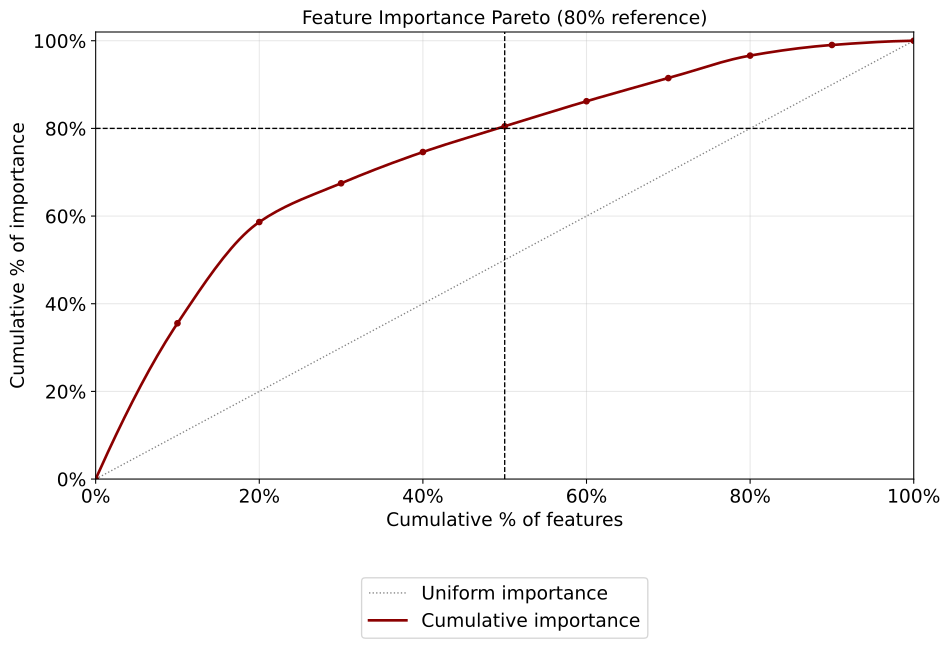
Feature Importance Pareto Example 3: Wide Models and Shortlists
In this third example, we work with a wider variant of the Random Forest
Regressor from the diabetes dataset from the Regression Models section. For models with many predictors, top_n keeps the bars readable while the
cumulative percentages stay honest (relative to all features), clean_names
renders publication-friendly axis labels without changing the returned feature
names, and return_features hands back the shortlist that reaches the
threshold.
top = show_feature_pareto(
    rf_model,
    top_n=15,
    threshold=0.90,
    clean_names={"bp": "Blood Pressure"},
    return_features=True,
)
print(top)
Output
7 features reach 90% of cumulative importance.
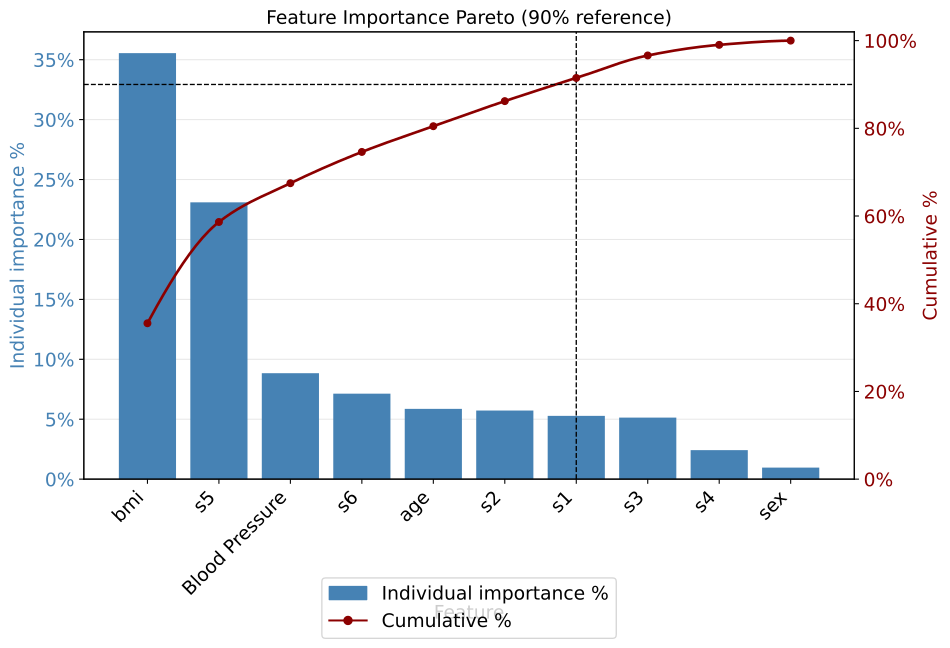
['bmi', 's5', 'bp', 's6', 'age', 's2', 's1']
Feature Importance Pareto Example 4: Grouped Pareto
feature_groups applies to the Pareto chart exactly as it does to the importance
plot, and it is arguably more valuable here. A Pareto chart of one-hot indicators
overstates how many “features” you need, because a single categorical variable can
occupy several bars and several steps of the cumulative curve. Grouping collapses those
into one bar and one step, so the crossover count reflects variables rather than
encoder columns.
Continuing with the encoded pipeline built in Cumulative Feature Importance Example 4:
show_feature_pareto(
    pipe,
    threshold=0.80,
    feature_groups="auto",
    column_transformer=pipe.named_steps["pre"],
    clean_names={
        "marital-status": "Marital Status",
        "capital-gain": "Capital Gain",
        "education-num": "Education (years)",
        "hours-per-week": "Hours / Week",
    },
)
Run the same call with and without feature_groups to see the difference in the
printed crossover count. The ungrouped number answers “how many encoder columns do I
need”, the grouped number answers “how many variables would I have to collect”, and the
second is usually the one a stakeholder is asking about.
Cumulative Feature Performance
The show_cumulative_feature_performance function traces how a model’s
performance holds up as it is restricted to its top-k most important features,
without retraining. Excluded features are set to a missing value and the fixed
model is re-scored, so the curve tells you exactly how few features you can keep
before performance falls off. It supports multiple metrics, an absolute or
cumulative-gains view, a retention summary table, and a one-call parsimony
shortlist.
- show_cumulative_feature_performance(model=None, X=None, y=None, y_probs=None, metrics=None, task='auto', display='absolute', x_as_percent=False, smooth=False, threshold=0.5, proba_func=None, step=1, progress=True, order=None, feature_groups=None, column_transformer=None, feature_selection_step='feature_selection_RFE', preprocessor_step='preprocess_column_transformer_ColumnTransformer', missing_value=np.nan, title=None, text_wrap=None, xlabel='Number of top features retained', ylabel='Score', figsize=None, label_fontsize=12, tick_fontsize=10, legend_loc='best', curve_kwgs=None, marker_kwgs=None, retain_kwgs=None, retain=None, retain_threshold=None, retain_metric=None, retention_levels=(0.90, 0.95, 0.99), return_retention=False, include_retained_pct=False, save_plot=False, image_path_png=None, image_path_svg=None, image_filename=None, return_df=False, return_features=False, ax=None)
- Parameters:
model (estimator or wrapper, optional) – A fitted, NaN-native model (e.g. CatBoost, XGBoost, HistGradientBoosting) or wrapper. Provide with
X, or usey_probsinstead.X (pandas.DataFrame, optional) – Feature matrix as a DataFrame (features are blanked by name during the sweep). Required in model mode.
y (array-like) – True labels or targets. Required.
y_probs (dict, optional) – Alternative to
model+X: a dict mapping feature count to a precomputed prediction array, e.g.{1: pred_1, 2: pred_2, ...}. Every vector must be the same length asy.metrics (list[str], optional) – Metric keys to evaluate. Defaults to a sensible set for the task (classification or regression).
task (str, optional) –
"auto","classification", or"regression". Auto-detected from the model and metrics.display (str, optional) –
"absolute"plots raw metric values;"cumulative_gains"plots each metric as a fraction of its full-model value, rising toward a 100% ceiling. In"absolute"mode, when R² is plotted alongside error metrics (MAE, RMSE), R² is placed on a separate right-hand axis so its[0, 1]range stays legible next to the target-unit metrics.x_as_percent (bool, optional) – Plot the x-axis as the cumulative fraction of all features instead of a raw count.
smooth (bool, optional) – Smooth each metric curve with a monotone PCHIP interpolation (markers stay on the real points).
threshold (float, optional) – Probability cutoff for label-based metrics (precision, recall, f1, accuracy).
proba_func (callable, optional) – Optional custom function to extract predictions from the model.
step (int, optional) – Step size for the feature sweep (evaluate every
stepfeatures).progress (bool, optional) – Show a tqdm progress bar over the ablation sweep. Requires tqdm; without it a
UserWarningis issued and the sweep runs unbarred. No effect in they_probspath, which performs no sweep.order (sequence, optional) – Explicit feature ordering, highest importance first; defaults to importance order. May be a subset of
X’s columns: any feature not listed is treated as below the cut and is blanked at everyk, son_featuresalways means “exactly these k features are retained, everything else is held out”. A one-time note reports how many features are being held out.feature_groups (dict, callable, or str, optional) – Roll expanded columns (e.g. one-hot levels) up into a parent variable. Each sweep step then adds a whole variable instead of a single category level, and blanking a group blanks all of its member columns together, so
n_featurescounts variables you would actually have to collect. A dict{column: parent}, a callable, or"auto"(requirescolumn_transformer).column_transformer (ColumnTransformer, optional) – Fitted
ColumnTransformerused byfeature_groups="auto".feature_selection_step (str, optional) – Feature-selection step name to unwrap in a pipeline.
preprocessor_step (str, optional) – Preprocessing step name to unwrap in a pipeline.
missing_value (scalar, optional) – Value used to blank excluded features during the ablation. Defaults to
np.nan. Non-numeric sentinels (strings,None) are accepted; the sweep then falls back to a per-step copy ofX, and each blanked column keeps its original dtype.title (str, optional) – Plot title.
text_wrap (int, optional) – Maximum title width before wrapping.
xlabel (str, optional) – Label for the x-axis.
ylabel (str, optional) – Label for the y-axis.
figsize (tuple, optional) – Figure size
(width, height)in inches.label_fontsize (int, optional) – Font size for axis labels and title.
tick_fontsize (int, optional) – Font size for tick labels.
legend_loc (str, optional) – Legend location.
curve_kwgs (dict, optional) – Line styling. Either a flat dict applied to every curve (e.g.
{"linewidth": 3}) or a per-metric mapping keyed by input metric name (e.g.{"roc_auc": {"color": "navy"}, "average_precision": {"color": "orange"}}). Per-metric form is detected when all values are dicts. An explicit per-metriccoloroverrides the automatic assignment used by the R² split.marker_kwgs (dict, optional) – Marker styling for the plotted points, in the same flat-or-per-metric form as
curve_kwgs(e.g.{"marker": "^", "markersize": 9}, or{"roc_auc": {"marker": "^"}, "average_precision": {"marker": "s"}}). Defaults to a size-5 circle inheriting each line’s color.retain_kwgs (dict, optional) – Extra keyword arguments merged into the retain-threshold marker lines, e.g.
{"linewidth": 2}; overrides the defaults.retain (dict, optional) – Convenience that couples the metric and its threshold into one mapping, e.g.
{"average_precision": 0.98}for “98% of full-model average precision”. Passing it alongsideretain_metricorretain_thresholdraises rather than silently letting one override the other. Currently one entry (a single marker); the value is a fraction of full-model performance.retain_threshold (float, optional) – If set (e.g.
0.98), draws a marker at the fewest features that retain this fraction of the primary metric. Raises ifretainis also given.retain_metric (str, optional) – Metric used for the retain marker. Defaults to the first higher-is-better metric. Raises if
retainis also given.retention_levels (sequence of float, optional) – Levels used to build the retention summary table.
return_retention (bool, optional) – If
True, compute and return the retention summary (fewest features to retain each level, per metric).include_retained_pct (bool, optional) – If
True, add a"<metric> (% of full)"column per metric to the scores table, giving each score as a percentage of its full-model value. Lower-is-better metrics are inverted so 100% always means “matches the full-feature model”.save_plot (bool, optional) – Whether to save the figure to disk.
image_path_png (str, optional) – Directory for a PNG output.
image_path_svg (str, optional) – Directory for an SVG output.
image_filename (str, optional) – Custom filename for the saved image. When provided, saving is triggered regardless of
save_plot. If it includes a file extension (e.g..png,.svg,.pdf,.jpg,.tiff), the figure is saved verbatim in that format; otherwise it is used as the base name for theimage_path_png/image_path_svgoutputs.return_df (bool, optional) – If
True, return the per-k scores DataFrame. In model mode the table also includes afeaturescolumn (always last) giving the ordered top-k feature names for each row, so the exact set behind any score can be read off directly.return_features (bool, optional) – If
True, return the selected feature list: the top-k that reachretain_thresholdon the primary metric, or the full importance-ranked list whenretain_thresholdisNone. Model mode only.ax (matplotlib.axes.Axes, optional) – Pre-created axes to draw onto; suppresses save and show.
- Returns:
None, or a single object (scores DataFrame, retention DataFrame, or feature list) when one return flag is set, or a dict keyed by"scores","retention", and/or"features"when several are set.- Return type:
- Raises:
If
yis not provided.If both
modelandy_probs, or neither, are provided.If a
y_probsvector’s length does not matchlen(y).If
displayis not"absolute"or"cumulative_gains".If a metric does not match the resolved task family.
If
return_featuresis requested in they_probspath.If the retain metric (via
retainorretain_metric) is not among the metrics being evaluated.If
retainis passed together withretain_thresholdorretain_metric.
If
y_probsis provided but is not a dict.
Important
The model is scored on progressively fewer features by blanking the rest to
missing_value; no retraining occurs, so a NaN-native model is required in the default (np.nan) mode.Blanked columns keep their original dtype, so a categorical column stays categorical with all-missing values rather than collapsing to float. Models fitted with declared categorical features are scored on the dtypes they expect.
Lower-is-better metrics (Brier, MAE, RMSE, MSE) are handled correctly in the gains view and retention math (they rise toward 100% retained rather than diving).
x_as_percent,smooth, anddisplayare independent and can be combined.When
orderis a subset ofX’s columns, unlisted features are held out at every step, so the reportedn_featuresis always the true retained count.
Cumulative Feature Performance Example 1: How Few Features Can You Keep?
In this first cumulative feature performance example, we trace how a gradient-boosted regressor (which natively handles missing values) trained on the diabetes dataset from the Regression Models section holds
its accuracy as it is restricted to its most important features. The default
view plots each metric against the number of top features retained, with R² on
its own right-hand axis (so it stays readable next to MAE and RMSE, which are in target units),
and with retain_threshold marking the fewest features that hold onto 98% of the
primary metric (R²). This is the “we can ship a smaller model” argument in
one plot.
from model_metrics import show_cumulative_feature_performance

show_cumulative_feature_performance(
    model,
    X_test,
    y_test,
    metrics=["r2", "mae", "rmse"],
    retain_threshold=0.98,
)
Output
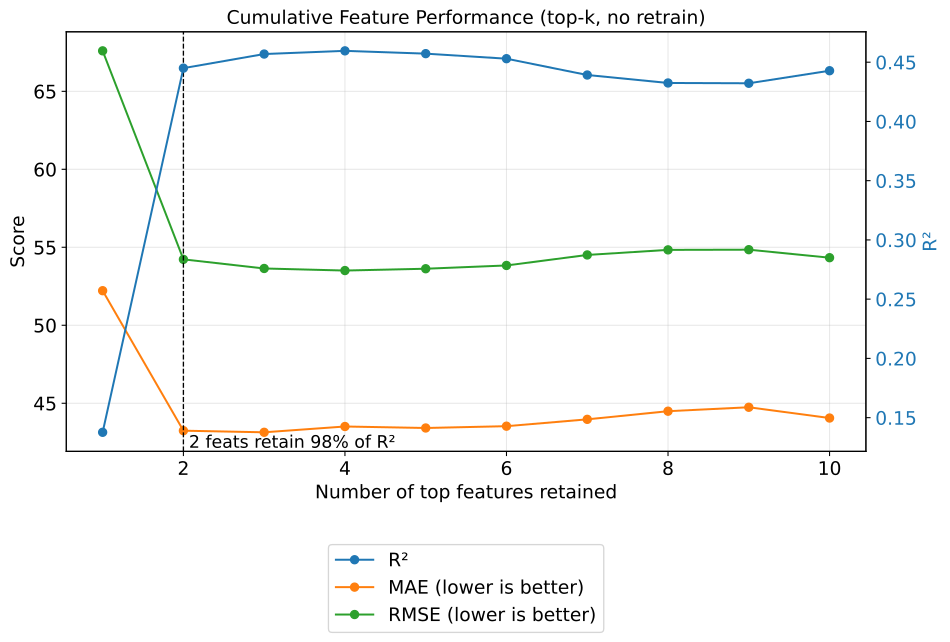
Cumulative Feature Performance Example 1b: Classification Metrics
This example illustrates how to assess how well a classification model preserves
its ranking performance as it is restricted to its most important features.
Leveraging a gradient-boosted classifier (which natively handles missing values)
trained on the synthetic dataset introduced in the Binary Classification
Models section, we trace ROC AUC, average precision, and
Brier score against the number of top features retained, with retain_threshold
marking the fewest features that hold onto 98% of the primary metric (ROC AUC).
from model_metrics import show_cumulative_feature_performance

show_cumulative_feature_performance(
    model,
    X_test,
    y_test,
    metrics=["roc_auc", "average_precision", "brier"],
    retain_threshold=0.98,
)
Because every classification metric here is bounded to [0, 1], all three share
a single y-axis; the secondary-axis split used for R² in the regression case does
not apply.
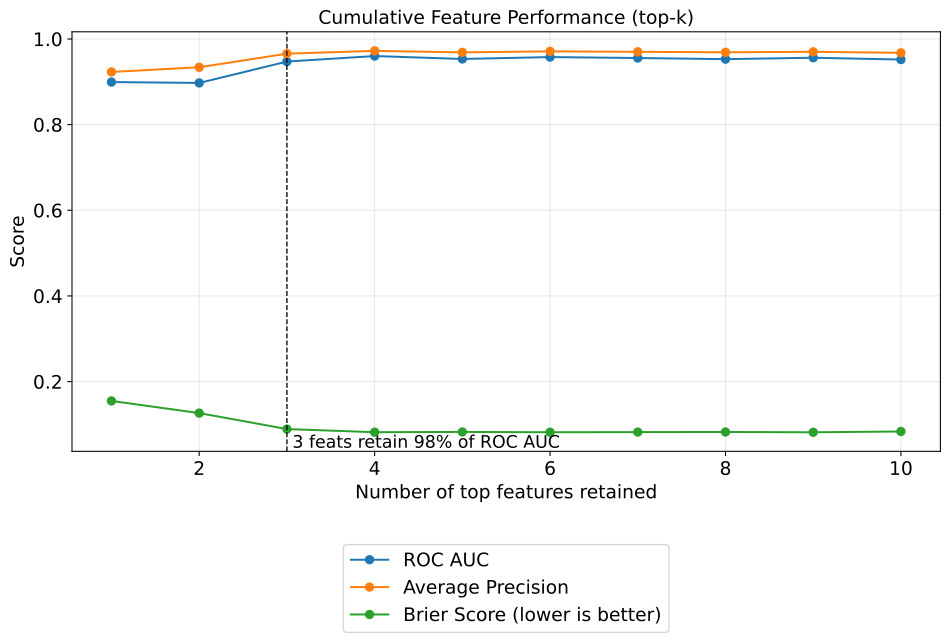
Cumulative Feature Performance Example 2: The Cumulative-Gains View
In this second example, using the same regressor from the diabetes dataset from the Regression Models section, we build a
polished, presentation-ready version: every metric is expressed as a fraction of
its full-model value with display="cumulative_gains", the x-axis is in
percent of features, and the curves are smoothed. Every line climbs toward a
shared 100% ceiling.
show_cumulative_feature_performance(
    rf_model,
    X_test,
    y_test,
    metrics=["r2", "mae", "rmse"],
    display="cumulative_gains",
    x_as_percent=True,
    smooth=True,
    retain_threshold=0.98,
)
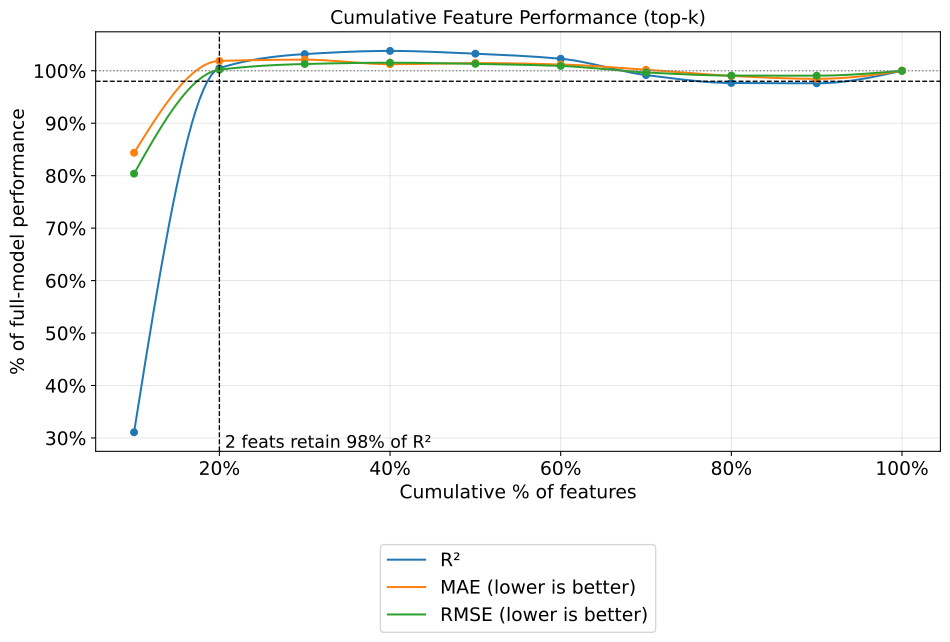
Cumulative Feature Performance Example 3: The Retention Table
In this third example, with the same regressor from the diabetes dataset from the Regression Models section, we pass
return_retention=True to get a compact table of how many features are needed
to retain each performance level, per metric. The result is also printed.
retention = show_cumulative_feature_performance(
    rf_model,
    X_test,
    y_test,
    metrics=["r2", "mae", "rmse"],
    retention_levels=(0.90, 0.95, 0.99),
    return_retention=True,
)

print(retention)
Console / DataFrame output
Features needed to retain each performance level:

              R²  MAE (lower is better)  RMSE (lower is better)
retain_level
90%            2                      2                       2
95%            2                      2                       2
99%            2                      2                       2
Cumulative Feature Performance Example 4: The Parsimony Shortlist
In this fourth example, still using the regressor from the diabetes dataset from the Regression Models section, we combine
retain_threshold with return_features=True so the function hands back the
smallest set of features that still reaches the threshold on the primary metric,
ready to slice X and refit a leaner model.
keep = show_cumulative_feature_performance(
    rf_model,
    X_test,
    y_test,
    retain_threshold=0.98,
    return_features=True,
)
print(keep)

X_lean = X_test[keep]
print(X_lean)
Output
['bmi', 's5']
          bmi        s5
287 -0.006206  0.032432
211  0.036907 -0.022517
72  -0.004050  0.084492
321  0.051996  0.098648
73  -0.020218 -0.005142
..        ...       ...
255 -0.065486 -0.003301
90  -0.025607 -0.072133
57  -0.063330 -0.056153
391 -0.069797 -0.089133
24   0.035829 -0.025953

[89 rows x 2 columns]
Cumulative Feature Performance Example 5: Reading the Sweep as a Table
The plot answers “how does performance decay as I trim?” The returned DataFrame answers the two follow-up questions that always come next: which features, and how much performance is retained at each step.
In this fifth example, still on the diabetes dataset,
return_df=True includes a features column (always the last column) giving the
ordered top-k names for every row, so the exact set behind any score can be read off
directly. Adding include_retained_pct=True expresses each metric as a percentage of
its full-model value, with lower-is-better metrics inverted so that 100% always means
“matches the full-feature model”.
scores = show_cumulative_feature_performance(
    rf_model,
    X_test,
    y_test,
    metrics=["r2", "mae"],
    return_df=True,
    include_retained_pct=True,
)
print(scores)
Because the result is a plain DataFrame, “how few features hold 95% of R², and which ones are they?” becomes a filter rather than a separate analysis:
hit = scores[scores["R² (% of full)"] >= 95].iloc[0]

print(f"{hit['n_features']} features retain "
      f"{hit['R² (% of full)']:.1f}% of full R² ({hit['R²']:.4f})")
print(hit["features"])
Important
The percentage floor differs by metric. An ROC AUC of 0.5 is chance, not zero, so a row reading “55% of full” there indicates essentially no discriminative skill rather than half the performance. R², average precision, and the error metrics have a true zero floor and read more naturally.
Cumulative Feature Performance Example 6: Choosing the Retention Target
By default the retain marker keys off the first higher-is-better metric, which is
usually ROC AUC or R². To target a different metric, retain couples the metric and
its threshold into a single argument, which reads more clearly at the call site than
the separate retain_metric / retain_threshold pair (both of which remain fully
supported).
This sixth example also demonstrates per-metric styling: curve_kwgs and
marker_kwgs each accept either a flat dict, applied to every curve, or a mapping
keyed by input metric name so each curve can be styled independently.
show_cumulative_feature_performance(
    model,
    X_test,
    y_test,
    metrics=["roc_auc", "average_precision"],
    retain={"average_precision": 0.95},          # 95% of full-model AP
    curve_kwgs={
        "roc_auc": {"color": "navy", "linewidth": 2.5},
        "average_precision": {"color": "darkorange", "linewidth": 2.5},
    },
    marker_kwgs={
        "roc_auc": {"marker": "o", "markersize": 5},
        "average_precision": {"marker": "^", "markersize": 7},
    },
    retain_kwgs={"linewidth": 2, "color": "black"},
    legend_loc="lower right",
)
Important
retainsupersedesretain_metric/retain_threshold. Passing both forms raises, rather than silently letting one override the other.Naming a metric that is not in
metricsraises immediately, and the error lists the valid keys as you passed them (roc_auc,brier) rather than internal display labels.A flat dict such as
marker_kwgs={"marker": "^"}applies to every curve; the per-metric form is detected when all values are themselves dicts.
Cumulative Feature Performance Example 7: Sweeping Whole Variables
When a model is fitted on one-hot encoded data, “keep the top 20 features” means 20
encoder columns, some of which are individual category levels. Dropping
marital-status_Never-married while keeping marital-status_Married-civ-spouse is
not an intervention anyone would make in practice, and it makes the x-axis hard to act
on.
In this seventh example, using the encoded pipeline built in Cumulative Feature
Importance Example 4, feature_groups changes what a step means: each k adds a
whole variable, and blanking a group blanks all of its member columns together. The
features column then holds parent names, so the count corresponds to data you would
actually have to collect.
Because the sweep blanks columns by name, it operates on the transformed matrix, so
transform X first and pass the final estimator rather than the whole pipeline:
import pandas as pd

ct = pipe.named_steps["pre"]
rf = pipe.named_steps["rf"]

X_te_t = pd.DataFrame(
    ct.transform(X_te),
    columns=ct.get_feature_names_out(),
    index=X_te.index,
)

scores = show_cumulative_feature_performance(
    rf,
    X_te_t,
    y_te,
    metrics=["roc_auc", "average_precision"],
    feature_groups="auto",
    column_transformer=ct,
    missing_value=0,          # RandomForest cannot consume NaN
    return_df=True,
    include_retained_pct=True,
)
print(scores[["n_features", "ROC AUC", "ROC AUC (% of full)", "features"]])
n_features now tops out at the number of source variables rather than the number of
encoded columns, and each row’s features entry lists parent names.
Important
The default
missing_value=np.nanrequires a NaN-native model (CatBoost, XGBoost, HistGradientBoosting). For a plainRandomForestClassifier, pass an explicit neutral value such as0, which for a one-hot column means “this level is not set”.Because a categorical expands into several columns, a grouped sweep reaching
kvariables covers more thankencoder columns. That is the point:kanswers the collection question, not the encoding question.
Cumulative Feature Performance Example 8: Testing a Candidate Feature Set
order accepts an explicit ranking, and it may be a subset of X’s columns.
That makes it the tool for answering “what would this specific shortlist give me?”, for
instance after removing features that are derivable from one another.
Any feature not named in order is treated as below the cut and blanked at every
k, so n_features always means “exactly these k features are retained, everything
else is held out”. A one-time note reports how many features are being excluded.
candidate = ["bmi", "s5", "bp", "age"]   # a hand-picked, de-duplicated shortlist

scores = show_cumulative_feature_performance(
    rf_model,
    X_test,
    y_test,
    metrics=["r2"],
    order=candidate,
    return_df=True,
    include_retained_pct=True,
)
print(scores)
Console output
Note: 6 feature(s) of X are not in the ranking and are held out (blanked) at every step.
Important
Because unlisted features are held out, the final row of a subset sweep is not the full model: it is the model restricted to exactly the features you named. This is what makes the comparison meaningful, since a sweep that silently left the remaining features in place would report the full-model score under a top-k label.
Retention Zoom
On a wide model the cumulative feature performance curve spans hundreds of
feature counts, so the region around each retention cutoff is compressed into a
few pixels. The show_retention_zoom function takes the scores table already
returned by show_cumulative_feature_performance(return_df=True) and draws
one panel per retention level, zoomed to a window of features on either side of
that level’s cutoff. No model is needed and nothing is re-scored, so the sweep,
often the slow step, never has to be rerun.
For each level, the cutoff is the smallest feature count that retains that
fraction of the full-model value on retain_metric. Each panel shows every
metric in metrics over [cutoff - window, cutoff + window], with a dashed
vertical line at the cutoff and a dotted horizontal line at the target value.
- show_retention_zoom(scores_df, metrics=None, retain_metric=None, retention_levels=(0.80, 0.90, 0.95, 0.99), window=50, crossing='first', n_cols=2, title=None, text_wrap=None, suptitle_wrap=None, suptitle_y=0.98, xlabel='Number of top features retained', ylabel='Score', figsize=None, label_fontsize=12, tick_fontsize=10, legend_loc='bottom', curve_kwgs=None, marker_kwgs=None, retain_kwgs=None, level_kwgs=None, save_plot=False, image_path_png=None, image_path_svg=None, image_filename=None, return_df=False)
- Parameters:
scores_df (pandas.DataFrame) – Per-k scores table with an
n_featurescolumn and one column per metric label (e.g."ROC AUC","Average Precision"), as returned byshow_cumulative_feature_performance(return_df=True). Afeaturescolumn and any"(% of full)"columns are ignored. The row with the largestn_featuresis treated as the full model.metrics (sequence of str, optional) – Metrics to plot, as registry keys (e.g.
"roc_auc") or column labels (e.g."ROC AUC"). Defaults to every registry metric present inscores_df.retain_metric (str, optional) – Metric that defines the cutoffs, as a registry key or column label. Defaults to the first higher-is-better metric in
metrics. If it is not inmetrics, it is added to the plotted metrics.retention_levels (float or sequence of float, optional) – Fractions of full-model performance, each in
(0, 1]. One panel per level; a single float gives a single panel. Defaults to(0.80, 0.90, 0.95, 0.99).window (int, optional) – Number of features shown on each side of the cutoff. Defaults to
50.crossing (str, optional) – How the cutoff is chosen.
"first"takes the first feature count reaching the level, matching thereturn_retentiontable ofshow_cumulative_feature_performance."sustained"takes the first feature count after which the metric never falls back below the level. Defaults to"first".n_cols (int, optional) – Panels per row, capped at the number of levels reached. Rows are sized from the number of levels.
title (str, optional) – Figure title.
Noneuses the default;""disables it.text_wrap (int, optional) – Character width at which each panel title is wrapped.
suptitle_wrap (int, optional) – Character width at which the figure title is wrapped.
suptitle_y (float, optional) – Vertical position of the figure title (0-1 range). Increase it (e.g.
1.02) to add space between the title and the top row of panels. Defaults to0.98.xlabel (str, optional) – X-axis label for every panel.
ylabel (str, optional) – Y-axis label for every panel.
figsize (tuple, optional) – Figure size
(width, height)in inches. Defaults to(10 * n_cols, 4.5 * n_rows).label_fontsize (int, optional) – Font size for panel titles and axis labels; the figure title uses
label_fontsize + 2.tick_fontsize (int, optional) – Font size for tick labels and the legend.
legend_loc (str, optional) –
"bottom"draws one shared legend centered below the grid, in a single row. Any other matplotlib location (e.g."best","upper left") draws the legend inside the first panel at that location. Defaults to"bottom".curve_kwgs (dict, optional) – Line styling, either a flat dict applied to every curve or a per-metric mapping keyed by the names passed in
metrics, as inshow_cumulative_feature_performance.marker_kwgs (dict, optional) – Marker styling in the same flat-or-per-metric form as
curve_kwgs. Defaults to size-3 circles, since each panel holds about2 * windowpoints.retain_kwgs (dict, optional) – Overrides for the vertical cutoff line (default black, dashed, width 1).
level_kwgs (dict, optional) – Overrides for the horizontal level line (default gray, dotted, width 1).
save_plot (bool, optional) – Whether to save the figure to disk.
image_path_png (str, optional) – Directory for a PNG output.
image_path_svg (str, optional) – Directory for an SVG output.
image_filename (str, optional) – Custom filename for the saved image; defaults to
"retention_zoom". When provided, saving is triggered regardless ofsave_plot. If it includes a file extension (e.g..png,.svg,.pdf,.jpg,.tiff), the figure is saved verbatim in that format; otherwise it is used as the base name for theimage_path_png/image_path_svgoutputs.return_df (bool, optional) – If
True, return the cutoff table: one row per level, indexed byretain_level, with the cutoffn_featuresand each metric’s value there.
- Returns:
The cutoff table if
return_df=True, otherwiseNone. The cutoff table is also printed.- Return type:
pandas.DataFrame or
None- Raises:
If
scores_dfis not a DataFrame with ann_featurescolumn.If a metric in
metricsorretain_metricis not found inscores_df.If
scores_dfhas no recognized metric columns.If any retention level is outside
(0, 1].If
windowis not a positive integer.If per-metric
curve_kwgsormarker_kwgshas keys that are not inmetrics.If no retention level is reached on
retain_metric.
Important
show_retention_zoomreads the scores table only. Runshow_cumulative_feature_performanceonce withreturn_df=Trueand zoom as often as needed.The full model is the row with the largest
n_features. For a subset sweep (ordernaming only some features), that row is the model restricted to the named features, so the levels are fractions of that restricted model.Lower-is-better metrics are handled in the retention math: the level line for such a metric sits at the full-model value divided by the level, so retaining 95% means an error no more than about 5% above the full model’s.
A level that is never reached is reported as missing in the cutoff table and gets no panel.
Notes
- First vs. Sustained Crossing:
On a non-monotonic curve,
crossing="first"can land on an early spike that the metric drops back below as more features are added.crossing="sustained"chooses the point after which the curve stays at or above the level, which is the more defensible cutoff for a feature shortlist.
- Reading a Panel:
The panel title gives the level, the cutoff feature count, and each metric’s value at the cutoff.
The dashed vertical line marks the cutoff, and the dotted horizontal line marks the target value of
retain_metric.
Retention Zoom Example 1: Zooming Into a Wide Sweep
This example uses the encoded pipeline from Cumulative Feature Performance
Example 7, but sweeps the encoded columns one at a time (no feature_groups),
so the scores table holds one row per encoder column. The sweep runs once with
return_df=True, and show_retention_zoom then draws one panel per
retention level of ROC AUC, ten features either side of each cutoff.
The forest was fitted inside the pipeline on the transformer’s array output, so
it knows its features only as feature_0, feature_1, and so on. Its
importances are therefore ranked under the encoded column names and passed to
the sweep as order.
import pandas as pd

from model_metrics import (
    show_cumulative_feature_performance,
    show_retention_zoom,
)

order = (
    pd.Series(rf.feature_importances_, index=X_te_t.columns)
    .sort_values(ascending=False)
    .index.tolist()
)

scores = show_cumulative_feature_performance(
    rf,
    X_te_t,
    y_te,
    metrics=["roc_auc", "average_precision"],
    order=order,
    missing_value=0,          # RandomForest cannot consume NaN
    return_df=True,
)

show_retention_zoom(
    scores,
    metrics=["roc_auc", "average_precision"],
    retain_metric="roc_auc",
    retention_levels=[0.80, 0.90, 0.95, 0.99],
    window=10,
)
Output
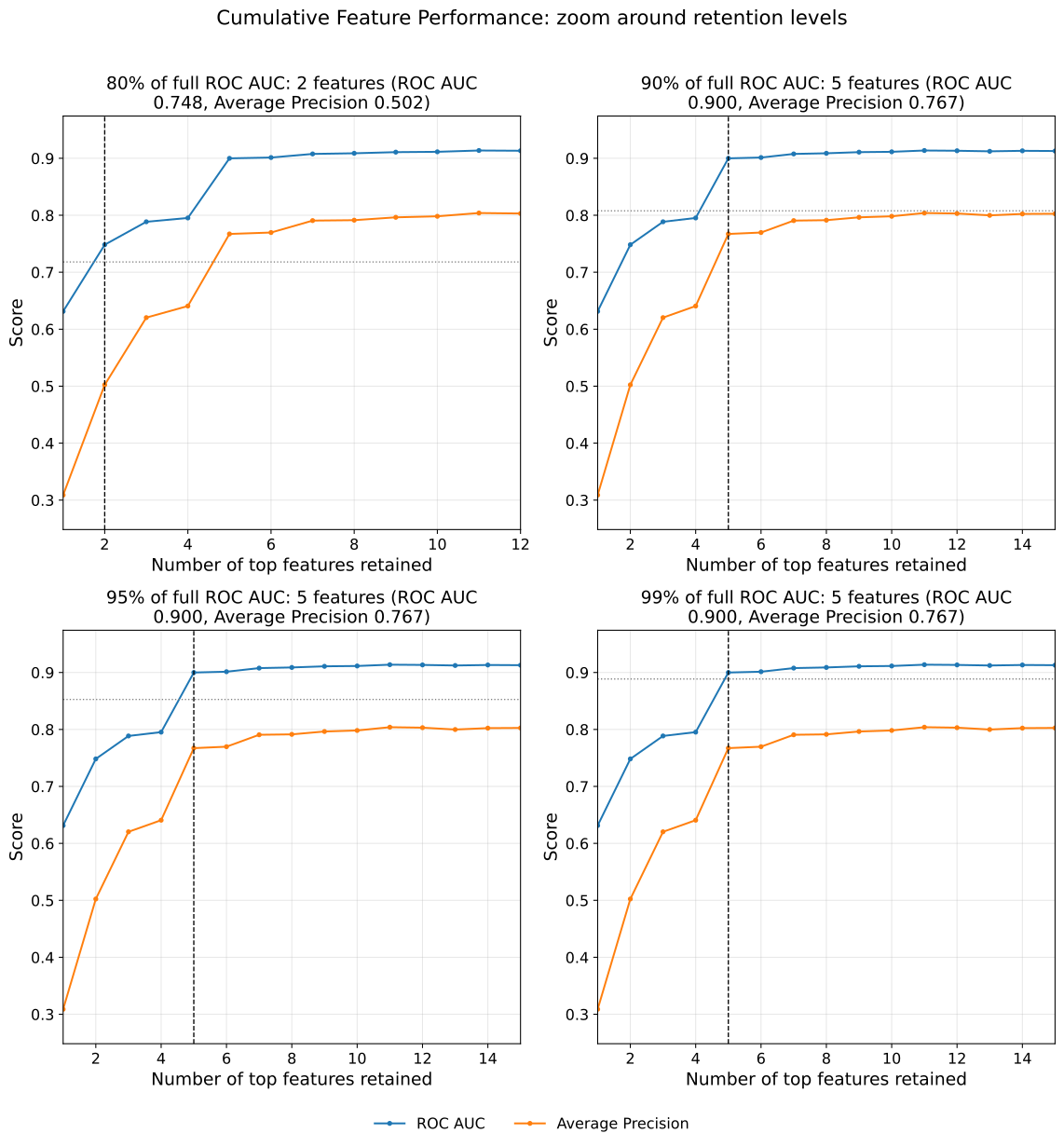
Retention Zoom Example 2: Sustained Crossing and the Cutoff Table
Reusing scores from the previous example, this call keys the cutoffs off
average precision with crossing="sustained", so each cutoff is the point
after which average precision stays at or above the level. return_df=True
returns the cutoff table for reporting, and legend_loc="lower right" places
the legend inside the first panel.
from model_metrics import show_retention_zoom

cutoffs = show_retention_zoom(
    scores,
    metrics=["roc_auc", "average_precision"],
    retain_metric="average_precision",
    retention_levels=[0.90, 0.95],
    window=10,
    crossing="sustained",
    legend_loc="lower right",
    return_df=True,
)

cutoffs
Output
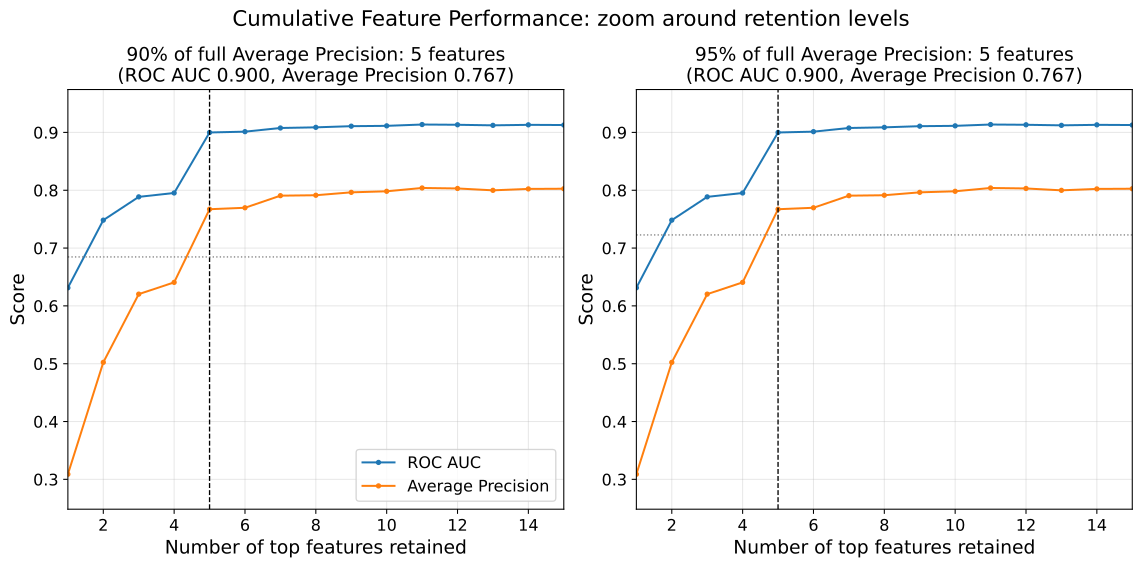
Risk-Adjusted Funnel Plots
This section introduces the funnel_plot function, which compares each group’s
observed event count against the count expected from its case mix, plotted against
the group’s volume with exact Poisson control limits. Where a calibration curve asks
whether predicted risk matches observed risk across the probability range, a funnel
plot asks whether it matches across the groups that generated the cases.
The unit of analysis is deliberately generic. Anything with one row per case, a grouping column, a 0/1 outcome, and a predicted probability works: hospitals, surgeons, regions, schools, branches, or vendors. The observed-over-expected (O/E) ratio is plotted on the y-axis against case volume on the x-axis, and the control limits widen for low-volume groups because a handful of cases cannot distinguish genuine departure from chance. Points outside the chosen limit are risk-adjusted outliers. See the mathematical definition of the funnel plot here.
The examples in this section use the well-known Adult Income dataset [2], a widely used benchmark for binary classification tasks. Its mix of categorical and numerical features makes it well suited to group-level evaluation, since several of its categorical columns produce natural grouping units with widely varying volume.
To build and evaluate our models, we use the model_tuner library [3].
Click here to view the corresponding codebase for this workflow.
- funnel_plot(df, group_col, y_col='y_true', p_col='y_pred_proba', unit_label='center', outcome_label='outcome', min_volume=1, flag_alpha=0.002, limit_alphas=(0.05, 0.002), overdispersion=False, annotate_outliers=False, n_grid=300, title=None, xlabel=None, ylabel='Observed / Expected', xlim=None, ylim=None, figsize=(9, 6), label_fontsize=12, tick_fontsize=10, title_fontsize=14, text_wrap=None, gridlines=False, grid_kwgs=None, curve_kwgs=None, point_kwgs=None, show_legend=True, legend_loc='upper right', legend_fontsize=8, save_plot=False, image_path_png=None, image_path_svg=None, image_filename=None, dpi=None, show_plot=True, ax=None)
- Parameters:
df (pandas.DataFrame) – Case-level frame with one row per case, containing
group_col,y_col, andp_col. Predictions are normally attached upstream, e.g.df["y_pred_proba"] = model.predict_proba(X)[:, 1].group_col (str) – Column identifying the grouping unit (center, surgeon, region, school, branch). Required; there is no default, so the unit of analysis is always explicit at the call site.
y_col (str, optional) – Column holding the observed binary outcome (0/1). Defaults to
"y_true".p_col (str, optional) – Column holding the model’s predicted probability for each case, summed within a group to form its expected count. Defaults to
"y_pred_proba".unit_label (str, optional) – Display name for the grouping unit, used in the default x-axis label, the default title, and the auto-generated save filename. Defaults to
"center".outcome_label (str, optional) – Display name for the outcome, used in the default title and the auto-generated save filename. Defaults to
"outcome".min_volume (int, optional) – Groups with fewer cases than this are dropped before anything is computed, keeping a handful of cases from dominating the O/E axis. Defaults to
1.flag_alpha (float, optional) – Two-sided alpha used to flag outliers. Each group is tested against its own expected count rather than against the smoothed band, so a group is neither flagged nor cleared by where the interpolated curve happens to fall at its volume. Defaults to
0.002(the 99.8%, or three-sigma, limit).limit_alphas (sequence of float, optional) – Alphas for the control bands that are drawn. Independent of
flag_alpha. Defaults to(0.05, 0.002), giving the 95% and 99.8% bands.overdispersion (bool, optional) – If
True, inflate the control limits bysqrt(phi)usingestimate_phi, widening them when there is genuine between-group variation beyond chance. The estimated phi is appended to the default title. Defaults toFalse.annotate_outliers (bool, optional) – Whether to label flagged points with their group id. Off by default, since the returned frame is usually easier to read than a crowded plot.
n_grid (int, optional) – Number of volume points used to draw the smooth control bands. Defaults to
300.title (str, optional) – Plot title. If
None, a default is used;""suppresses the title entirely.xlabel (str, optional) – Label for the volume axis. If
None, defaults to"<Unit> volume (number of cases)".ylabel (str, optional) – Label for the O/E axis. Defaults to
"Observed / Expected".xlim (tuple, optional) – X-axis limits as
(min, max).ylim (tuple, optional) – Y-axis limits as
(min, max). Useful when a single very low-expected group throws the O/E axis out to a large value and compresses everything else. Note that clipped groups disappear from the plot but remain in the returned frame.figsize (tuple, optional) – Figure size
(width, height)in inches. Defaults to(9, 6).label_fontsize (int, optional) – Font size for axis labels. Defaults to
12.tick_fontsize (int, optional) – Font size for tick labels, and the basis for outlier annotation size. Defaults to
10.title_fontsize (int, optional) – Font size for the title. Defaults to
14.text_wrap (int, optional) – Maximum title width before wrapping. If
None, no wrapping is applied.gridlines (bool, optional) – Whether to display gridlines. Defaults to
False.grid_kwgs (dict, optional) – Keyword arguments forwarded to
ax.gridwhengridlines=True. Defaults to{"visible": True, "alpha": 0.3}.curve_kwgs (dict, optional) – Line styling, merged over the defaults. Key
"target"styles the O/E = 1 reference line; key"limits"styles the control bands, taking either one dict applied to every band or a list paired positionally withlimit_alphas. Values pass straight through toax.plot, socolor,ls,lw,alpha, andlabelall work. Unrecognized top-level keys raise rather than being silently ignored.point_kwgs (dict, optional) – Marker styling, merged over the defaults. Keys
"inlier"and"outlier", with values passed toax.scatter, socolor,s,marker,alpha, andedgecolorall work. Unrecognized top-level keys raise.show_legend (bool, optional) – Whether to display the legend. Defaults to
True.legend_loc (str, optional) – Legend location. Standard matplotlib locations, or
"bottom"to place the legend below the axes. Defaults to"upper right".legend_fontsize (int, optional) – Font size for legend text. Defaults to
8.save_plot (bool, optional) – Whether to save the figure to disk. Defaults to
False.image_path_png (str, optional) – Directory for a PNG output.
image_path_svg (str, optional) – Directory for an SVG output.
image_filename (str, optional) – Custom filename for the saved image. When provided, saving is triggered regardless of
save_plot. If it includes a file extension (e.g..png,.svg,.pdf,.jpg,.tiff), the figure is saved verbatim in that format; otherwise it is used as the base name for theimage_path_png/image_path_svgoutputs.dpi (int, optional) – DPI for raster output. Ignored by vector formats.
show_plot (bool, optional) – Whether to call
plt.show(). Defaults toTrue.ax (matplotlib.axes.Axes, optional) – Pre-created axes to draw onto. When supplied, the function draws onto the provided axes and suppresses
tight_layout,plt.show(), andsave_plot_imagescalls. IfNone, a new figure and axes are created automatically. Defaults toNone.
- Returns:
Per-group DataFrame indexed by
group_colwith columnsobserved,expected,n(volume),oe, and the booleanoutlierflag. Flagged groups areg[g["outlier"]].- Return type:
pandas.DataFrame
- Raises:
If
curve_kwgsorpoint_kwgscontains an unrecognized top-level key.If
curve_kwgs["limits"]is a list shorter thanlimit_alphas.If no groups remain after
min_volumefiltering.
Important
The frame passed as
dfmust carry the outcome and the predictions alongside the grouping column. A feature matrix alone will not work, sincey_colandp_colare column names resolved againstdf, not arrays.limit_alphasandflag_alphaare independent. Drawing the 95% band does not mean flagging at 95%.The funnel assumes exchangeable groups. An ordered grouping variable (education level, age band, income decile) will produce a monotonic O/E pattern rather than a scattered one, and the resulting flags read as model miscalibration across that variable rather than as group-level outliers. A calibration curve is the better tool in that case.
When
axis supplied, saving is suppressed; usecombine_plotssave parameters instead.
Notes
- Reading the Plot:
An O/E above 1 means more events were observed than the model expected for that group’s case mix. Whether that reads as worse or better depends on the outcome.
Low-volume groups move a long way on one or two events. The widening limits already account for that, so a low-volume point far from 1.0 is often unremarkable.
Outlier status is a screening signal rather than a verdict. Unmeasured case mix, coding differences, and referral patterns all land in the residual.
- Overdispersion:
estimate_phiis public, so phi can be inspected before deciding whether to widen the limits. A value near 1.0 means the plain funnel is appropriate.Phi is estimated from the same residuals being tested, so it absorbs whatever systematic signal is present. That is the intent when the signal is benign between-group variation, and a caveat when the signal is model miscalibration.
With large expected counts the plain Poisson bands are extremely narrow, and a well-populated grouping can flag most of its groups. A high flag rate is a signal to check calibration rather than to read every flag as a genuine outlier.
- Styling:
curve_kwgsandpoint_kwgsmerge over the defaults, so a partial dict changes one property and leaves the rest alone.curve_kwgs["limits"]as a single dict styles every band identically; as a list it pairs positionally withlimit_alphas, which is how bands are differentiated.Both dicts validate their top-level keys, so a typo surfaces immediately rather than rendering with defaults.
- Companion Views:
The funnel answers “which groups are outliers”. The distribution of
g["oe"]answers “how much spread remains after adjustment”, and is covered byplot_distributionsineda_toolkit.group_oeis public, so the per-group frame can be built without plotting.
- Saving Plots:
If
save_plot=True, the figure is saved asfunnel_<outcome_label>_<unit_label>.png/svg.If
image_filenameis provided, it overrides the auto-generated filename and triggers saving regardless ofsave_plot. A file extension inimage_filenameselects the output format.When
axis supplied, saving is suppressed in the individual function; usecombine_plotssave parameters instead.
Funnel Plot Example 1: The Default View
In this first funnel plot example, we evaluate a Logistic Regression model trained on
the Adult Income dataset [2], grouped by
education-num. Each point is one education level, positioned by its case volume and by the
ratio of high earners observed to the number the model expected given each person’s
features.
The function takes a case-level frame carrying the grouping column alongside the
outcome and the predicted probabilities, so those are assembled first. Using
np.asarray sidesteps index alignment, which matters when the test features and the
test target do not share an index.
import numpy as np
import pandas as pd
from model_metrics import funnel_plot

# attach outcome and predictions to the grouping column
df_pred = X_test[["education-num"]].copy()
df_pred["y_true"] = np.asarray(y_test)
df_pred["y_pred_proba"] = np.asarray(y_prob_lr)

g = funnel_plot(
    df_pred,
    group_col="education-num",
    y_col="y_true",
    title="Income over 50: Risk Adjusted Funnel Plot by Education",
    p_col="y_pred_proba",
    unit_label="education-num",
    outcome_label="income_over_50k",
    min_volume=10,
)
Output
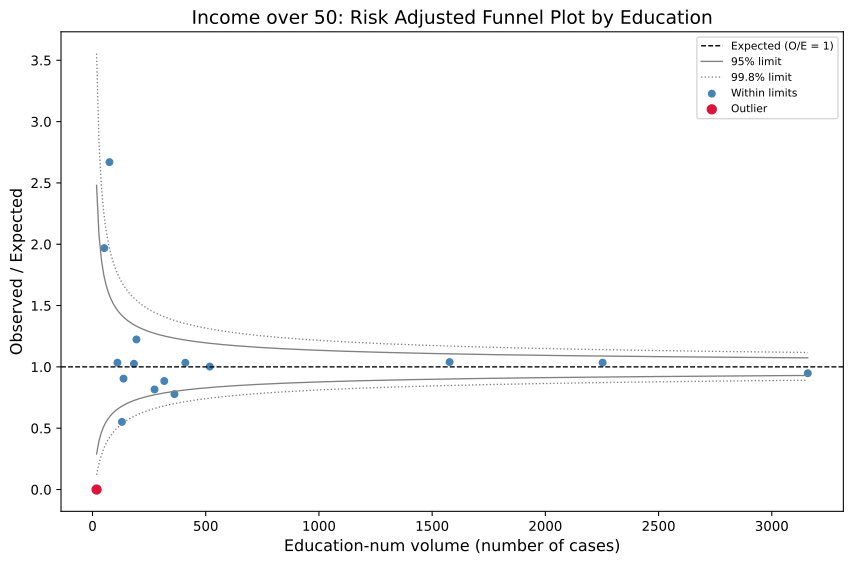
The returned frame carries the per-group counts and the outlier flag, indexed by the grouping column. Flagged groups are one filter away:
outliers = g[g["outlier"]].sort_values("oe")
outliers["direction"] = np.where(
    outliers["oe"] < 1, "below expected", "above expected"
)
print(outliers)
Output
               observed  expected   n   oe  outlier       direction
education-num
1                     0  0.210345  18  0.0     True  below expected
Funnel Plot Example 2: Overdispersion and the Flagging Threshold
The plain Poisson funnel assumes the only reason a group departs from O/E = 1 is
chance. Real cohorts almost always carry genuine between-group variation on top of
that, and with large expected counts the plain bands tighten to the point where most
groups clear them. overdispersion=True inflates the limits by sqrt(phi),
following Spiegelhalter [6].
Check phi before deciding. estimate_phi and group_oe are both public, so the
aggregation and the dispersion estimate can be inspected without drawing anything:
from model_metrics import group_oe, estimate_phi

g_raw = group_oe(
    df_pred,
    group_col="education-num",
    y_col="y_true",
    p_col="y_pred_proba",
    min_volume=10,
)
print("phi =", round(estimate_phi(g_raw), 3))
Output
phi = 1.07
This example also separates the two thresholds. limit_alphas controls which bands
are drawn, and flag_alpha controls which points are flagged. Here we draw
both bands but flag only at the 99.8% level, and annotate the flagged points directly
on the plot.
g_od = funnel_plot(
    df_pred,
    group_col="education-num",
    y_col="y_true",
    p_col="y_pred_proba",
    unit_label="education-num",
    outcome_label="income_over_50k",
    min_volume=10,
    overdispersion=True,
    limit_alphas=(0.05, 0.002),
    flag_alpha=0.002,
    annotate_outliers=True,
)

print("flagged, plain:        ", int(g["outlier"].sum()))
print("flagged, overdispersed:", int(g_od["outlier"].sum()))
Output
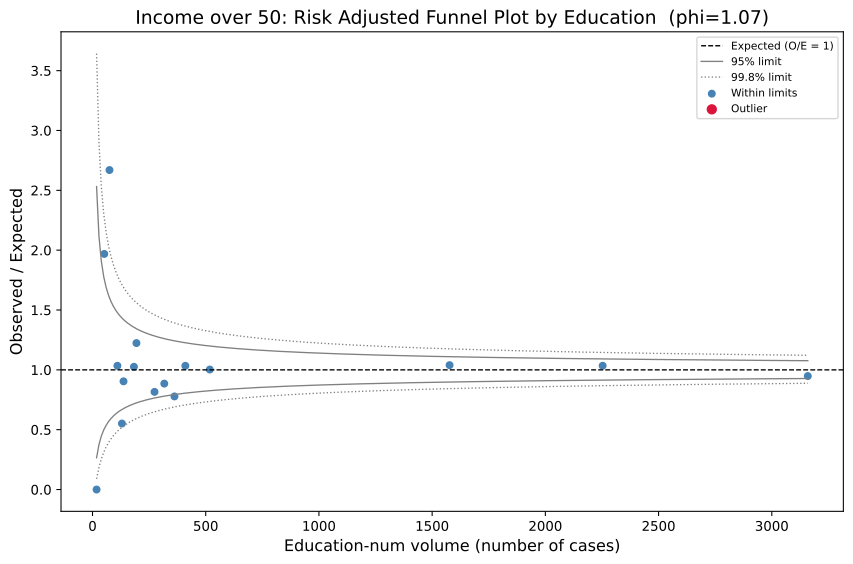
flagged, plain:         1
flagged, overdispersed: 0
Note
Phi is estimated from the same residuals the limits are testing, so it absorbs whatever systematic signal is present. When the underlying issue is genuine between-group variation, that is exactly the intent. When it is model miscalibration across the grouping variable, the widened limits will clear flags that the plain funnel correctly raised. Reporting both counts, as above, keeps that visible.
Funnel Plot Example 3: Styling and Composition
This third example exercises the styling surface and the composition path together.
Line styling goes through curve_kwgs and marker styling through point_kwgs.
Both merge over the defaults, so a partial dict changes one property and leaves the
rest alone, and values pass straight through to ax.plot and ax.scatter.
Passing curve_kwgs["limits"] as a list pairs each dict positionally with
limit_alphas, which is what differentiates the inner and outer bands. A single
dict there would style both identically and they would visually merge.
g = funnel_plot(
    df_pred,
    group_col="education-num",
    y_col="y_true",
    p_col="y_pred_proba",
    unit_label="education-num",
    outcome_label="income_over_50k",
    min_volume=30,
    overdispersion=True,
    title="High earners by education, risk-adjusted for individual features",
    ylabel="Observed / Expected high earners",
    ylim=(0.4, 1.7),
    figsize=(10, 6),
    curve_kwgs={
        "target": {"color": "black", "ls": "--"},
        "limits": [
            {"color": "#999999", "ls": "-"},
            {"color": "firebrick", "ls": ":", "lw": 1.5},
        ],
    },
    point_kwgs={
        "inlier": {"color": "#4C72B0", "s": 40, "alpha": 0.8},
        "outlier": {"color": "#C44E52", "s": 90, "marker": "D"},
    },
    gridlines=True,
    legend_loc="bottom",
)
Output
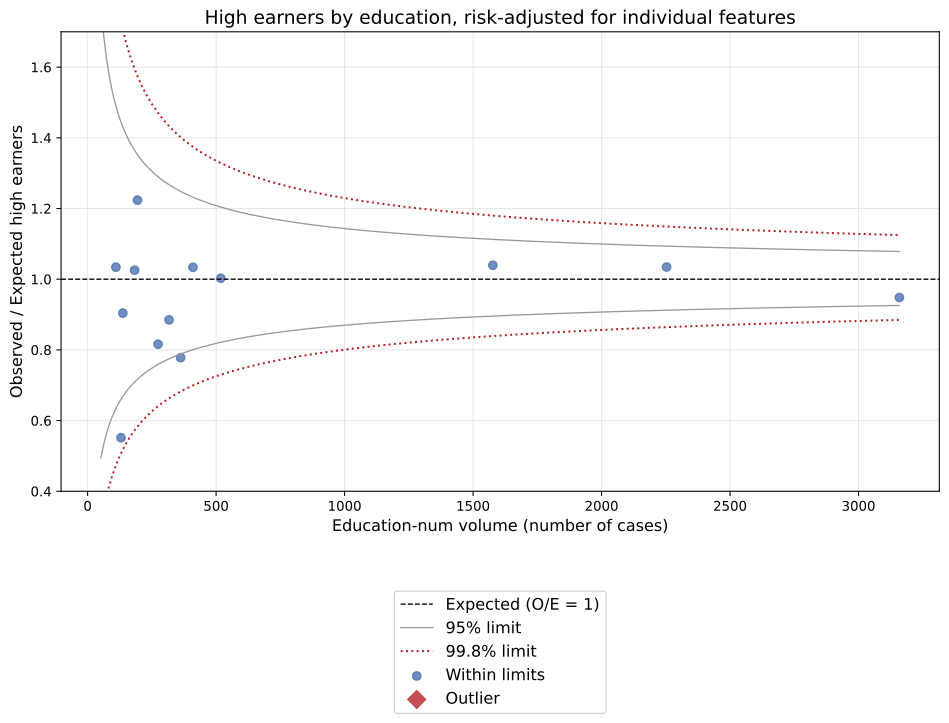
Combined Plot Grids
The combine_plots function assembles multiple single-plot calls into a single
shared subplot figure. It is the recommended way to create multi-panel evaluation
dashboards without writing any matplotlib figure or axes management code.
- combine_plots(plot_calls, n_cols=2, n_rows=None, figsize=None, suptitle=None, suptitle_y=0.98, label_fontsize=12, tick_fontsize=10, tight_layout=True, hspace=None, wspace=None, height_ratios=None, save_plot=False, image_path_png=None, image_path_svg=None, image_filename=None)
- Parameters:
plot_calls (list[tuple[callable, dict]]) –
List of
(func, kwargs)tuples. Each tuple maps one panel to a model_metrics single-plot function and its full keyword argument dictionary. Example:[ (show_roc_curve, {"y_prob": y_prob, "y": y_test}), (show_pr_curve, {"y_prob": y_prob, "y": y_test}), ]
n_cols (int, optional) – Number of columns in the subplot grid. Defaults to
2.n_rows (int, optional) – Number of rows. Auto-derived from
n_colsif not provided.figsize (tuple, optional) – Figure size
(width, height)in inches. Defaults to(n_cols * 6, n_rows * 5).suptitle (str, optional) – Overall figure title. If
None, no suptitle is shown.suptitle_y (float, optional) – Vertical position of the suptitle (0-1 range). Defaults to
0.98.label_fontsize (int, optional) – Font size for axis labels and titles inside each panel, and for the suptitle (rendered at
label_fontsize + 2). Injected into each panel function automatically unless overridden per-panel inplot_calls. Defaults to12.tick_fontsize (int, optional) – Font size for tick labels and legend text inside each panel. Injected into each panel function automatically unless overridden per-panel in
plot_calls. Defaults to10.tight_layout (bool, optional) – Whether to call
plt.tight_layout()before displaying. Ignored whenhspaceorwspaceis provided, since the figure switches toconstrained_layoutin that case. Defaults toTrue.hspace (float, optional) – Vertical spacing between subplot rows. When provided, switches the figure to
constrained_layoutand applies the value viafig.get_layout_engine().set(), which handles per-row legend overflow automatically. Useful whenlegend_loc="bottom"causes uneven row gaps. IfNone, matplotlib’s default spacing is used.wspace (float, optional) – Horizontal spacing between subplot columns. Same behavior as
hspace. IfNone, matplotlib’s default spacing is used.height_ratios (list of float, optional) – Relative heights of each row in the subplot grid. Length must equal the number of rows. Use to shrink rows holding smaller plots (e.g. confusion matrices) and reduce the gap between rows. For example,
[1, 0.7, 1, 1]shrinks the second row to 70% height.save_plot (bool, optional) – Whether to save the combined figure to disk. Defaults to
False.image_path_png (str, optional) – Path to save PNG output.
image_path_svg (str, optional) – Path to save SVG output.
image_filename (str, optional) – Custom filename for the saved image. When provided, saving is triggered regardless of
save_plot. If it includes a file extension (e.g..png,.svg,.pdf,.jpg,.tiff), the figure is saved verbatim in that format; otherwise it is used as the base name for theimage_path_png/image_path_svgoutputs.
- Returns:
None. Displays and optionally saves the combined figure.- Return type:
None- Raises:
ValueError – If
plot_callsis empty.TypeError – If any entry in
plot_callsis not a(callable, dict)tuple.
Important
Every function passed in
plot_callsmust accept anaxkeyword argument. All seven single-plot functions in this library (show_roc_curve,show_pr_curve,show_confusion_matrix,show_calibration_curve,show_lift_chart,show_gain_chart, andplot_threshold_metrics) support this.label_fontsizeandtick_fontsizeare injected automatically into each panel function if the function accepts those parameters and they are not already set in the panel’skwargs. Per-panel overrides always take precedence.save_plotandimage_filenamecontrol saving for the combined figure only. The individual functions suppress their own save andplt.show()calls when drawn onto an external axes.Panels that raise an exception during rendering display an inline error message rather than aborting the entire figure.
Notes
- Grid Layout:
n_colscontrols the number of columns; rows are inferred automatically.Pass explicit
n_rowsto override the auto-calculation.Trailing unused panels are hidden automatically.
- Spacing:
Use
hspaceto control vertical gap between rows. This is especially useful when panels uselegend_loc="bottom", which can cause uneven spacing between rows.Use
wspaceto control horizontal gap between columns.Both default to matplotlib’s automatic spacing when not provided, and both switch the figure to
constrained_layout, which supersedestight_layout.Use
height_ratioswhen rows hold plots of different natural heights, so a row of confusion matrices does not claim the same vertical space as a row of curves.
- Bottom Legends:
A panel using
legend_loc="bottom"resizes the figure the first time it is drawn. Insidecombine_plotsthat grows the whole shared grid rather than the single panel, so other panels can end up stretched.Pass an explicit
legend_bbox_to_anchoron that panel to place the legend without relying on the automatic anchor.
- Font Injection:
label_fontsizeandtick_fontsizepropagate to all panels that accept them, giving uniform typography across the grid without per-panel repetition.
- Axes Distribution:
combine_plotscreates a shared figure, pre-allocates one axes per panel usingplt.subplots, and passes each axes to the corresponding function via theaxkeyword. Individualplt.show()and save calls inside each function are suppressed when an external axes is supplied.
- Error Resilience:
If a panel raises an exception, an inline red error message is rendered in that panel and the remaining panels are unaffected.
- Saving Output:
If
save_plot=Trueorimage_filenameis provided, the combined figure is saved ascombined_plots.png/svgor using the custom filename. A file extension inimage_filenameselects the output format.
In this example, we utilize the well-known Adult Income dataset [2], a widely used benchmark for binary classification tasks. Its rich combination of categorical and numerical features makes it particularly suitable for evaluating subgroup fairness and model performance across demographic segments.
Example 1: 2 x 3 Classification Comparison Subplot Grid
The most common use case: ROC, PR, confusion matrix, calibration curve, lift chart, and gain chart for a single model displayed side by side.
from model_metrics import (
    combine_plots,
    show_roc_curve,
    show_pr_curve,
    show_confusion_matrix,
    show_calibration_curve,
    show_lift_chart,
    show_gain_chart,
)

combine_plots(
    plot_calls=[
        (
            show_roc_curve,
            {
                "y_prob": y_prob_lr,
                "y": y_test_ai,
                "model_title": "Logistic Regression",
            },
        ),
        (
            show_pr_curve,
            {
                "y_prob": y_prob_lr,
                "y": y_test_ai,
                "model_title": "Logistic Regression",
            },
        ),
        (
            show_confusion_matrix,
            {
                "y_prob": y_prob_lr,
                "y": y_test_ai,
                "model_title": "Logistic Regression",
                "inner_fontsize": 12,
                "model_threshold": model_thresholds["Logistic Regression"],
                "text_wrap": 40,
            },
        ),
        (
            show_calibration_curve,
            {
                "y_prob": y_prob_lr,
                "y": y_test_ai,
                "model_title": "Logistic Regression",
                "show_brier_score": True,
                "brier_decimals": 2,
            },
        ),
        (
            show_lift_chart,
            {
                "y_prob": y_prob_lr,
                "y": y_test_ai,
                "model_title": "Logistic Regression",
            },
        ),
        (
            show_gain_chart,
            {
                "y_prob": y_prob_lr,
                "y": y_test_ai,
                "model_title": "Logistic Regression",
                "show_gini": True,
                "decimal_places": 2,
            },
        ),
    ],
    n_cols=2,
    suptitle="Logistic Regression -- Full Evaluation Suite",
    suptitle_y=1.02,
    hspace=0.05,
)
Output
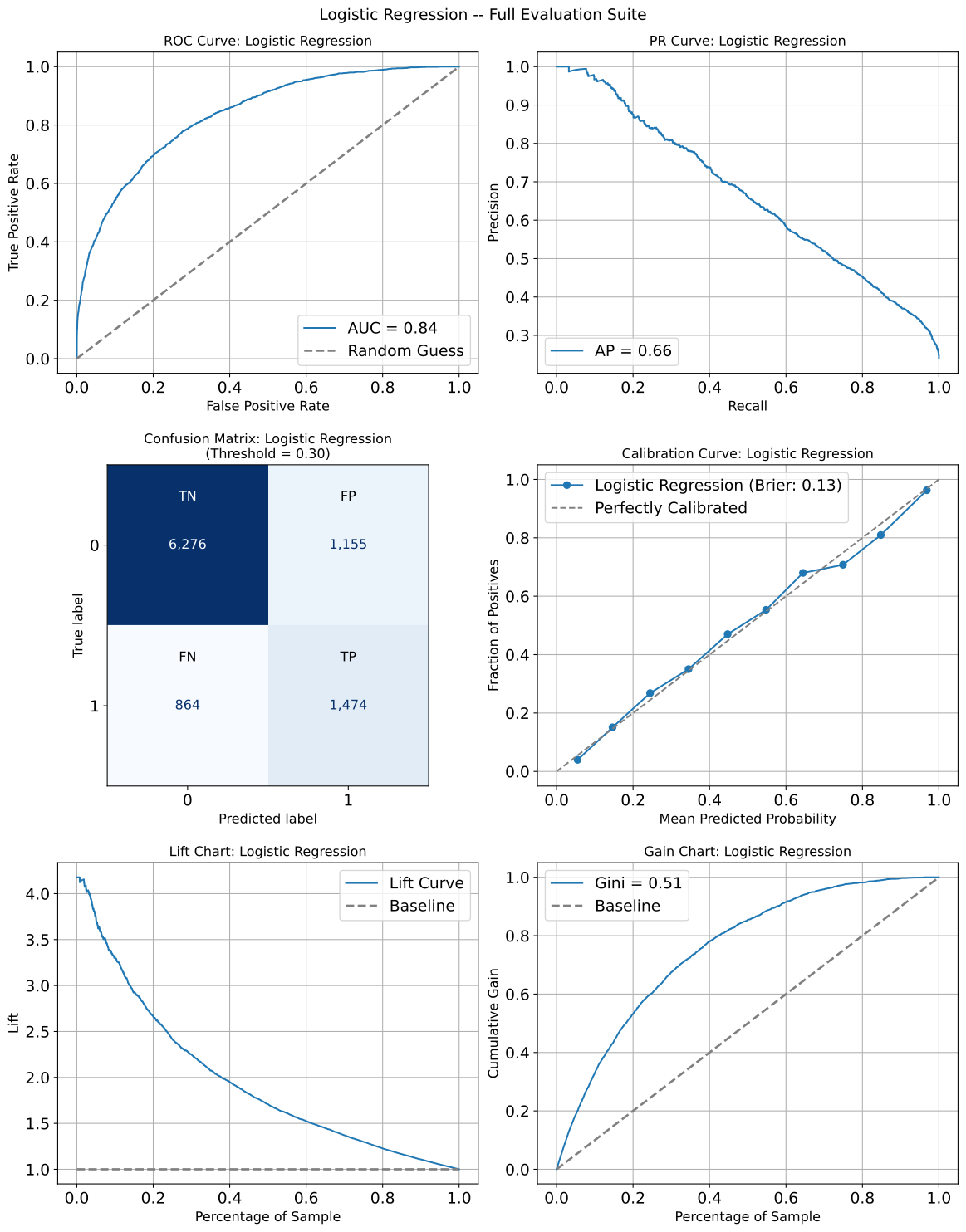
Example 2: 2 x 4 Classification Comparison Subplot Grid
A complete evaluation suite comparing two models across all plot types: ROC, PR, confusion matrices (one per model at model-specific thresholds), calibration, lift, gain, and threshold optimization for the best model.
from model_metrics import (
    combine_plots,
    show_roc_curve,
    show_pr_curve,
    show_confusion_matrix,
    show_calibration_curve,
    show_lift_chart,
    show_gain_chart,
)

combine_plots(
    plot_calls=[
        (
            show_roc_curve,
            {
                "y_prob": [y_prob_lr, y_prob_dt],
                "y": y_test_ai,
                "model_title": [
                    "Logistic Regression",
                    "Decision Tree Classifier",
                ],
                "overlay": True,
                "legend_loc": "bottom",
                "decimal_places": 2,
            },
        ),
        (
            show_pr_curve,
            {
                "y_prob": [y_prob_lr, y_prob_dt],
                "y": y_test_ai,
                "model_title": [
                    "Logistic Regression",
                    "Decision Tree Classifier",
                ],
                "overlay": True,
                "legend_loc": "bottom",
                "decimal_places": 2,
            },
        ),
        (
            show_confusion_matrix,
            {
                "y_prob": y_prob_lr,
                "y": y_test_ai,
                "model_title": "Logistic Regression",
                "inner_fontsize": 14,
                "text_wrap": 40,
                "model_threshold": "threshold_lr",
                "model_threshold": model_thresholds["Logistic Regression"],
                "decimal_places": 2,
            },
        ),
        (
            show_confusion_matrix,
            {
                "y_prob": y_prob_dt,
                "y": y_test_ai,
                "model_title": "Decision Tree Classifier",
                "inner_fontsize": 14,
                "text_wrap": 40,
                "model_threshold": model_thresholds["Decision Tree Classifier"],
                "decimal_places": 2,
            },
        ),
        (
            show_calibration_curve,
            {
                "y_prob": [y_prob_lr, y_prob_dt],
                "y": y_test_ai,
                "model_title": [
                    "Logistic Regression",
                    "Decision Tree Classifier",
                ],
                "show_brier_score": True,
                "overlay": True,
                "legend_loc": "bottom",
                "brier_decimals": 2,
            },
        ),
        (
            show_lift_chart,
            {
                "y_prob": [y_prob_lr, y_prob_dt],
                "y": y_test_ai,
                "model_title": [
                    "Logistic Regression",
                    "Decision Tree Classifier",
                ],
                "overlay": True,
                "legend_loc": "bottom",
            },
        ),
        (
            show_gain_chart,
            {
                "y_prob": [y_prob_lr, y_prob_dt],
                "y": y_test_ai,
                "model_title": [
                    "Logistic Regression",
                    "Decision Tree Classifier",
                ],
                "show_gini": True,
                "overlay": True,
                "legend_loc": "bottom",
                "decimal_places": 2,
            },
        ),
        (
            plot_threshold_metrics,
            {
                "y_prob": y_prob_dt,
                "y_test": y_test_ai,
                "title": "Decision Tree Classifier - Threshold Metrics",
                "baseline_thresh": False,
                "model_threshold": model_thresholds["Decision Tree Classifier"],
                "lookup_metric": "precision",
                "lookup_value": 0.6,
                "lookup_kwgs": {
                    "color": "black",
                    "linestyle": "--",
                    "linewidth": 2,
                },
                "threshold_kwgs": {
                    "color": "purple",
                    "linestyle": "--",
                    "linewidth": 2,
                },
                "curve_kwgs": {"linestyle": "-", "linewidth": 2},
                "decimal_places": 2,
            },
        ),
    ],
    n_cols=2,
    suptitle="LR vs DT -- Full Evaluation Suite",
    suptitle_y=1.02,
    height_ratios=[1, 0.7, 1, 1],
    hspace=0.05,
)
Output